
Scalable Actor Behavior Design for Randomized Traffic in RoadRunner
The previous post introduced a MATLAB-based traffic swarm framework capable of generating randomized ambient traffic with configurable safety and behavioral parameters. Realistic traffic scenarios require each vehicle to have a robust behavior model that can follow designated routes while autonomously avoiding collisions, especially at complex intersections.
To fully leverage the Model-Based Design (MBD) workflow and enhance simulation performance, the MATLAB-based behavior model has been transitioned to a Simulink-based one. In this article, we will explore the architecture of the Simulink actor behavior model shown below in detail.
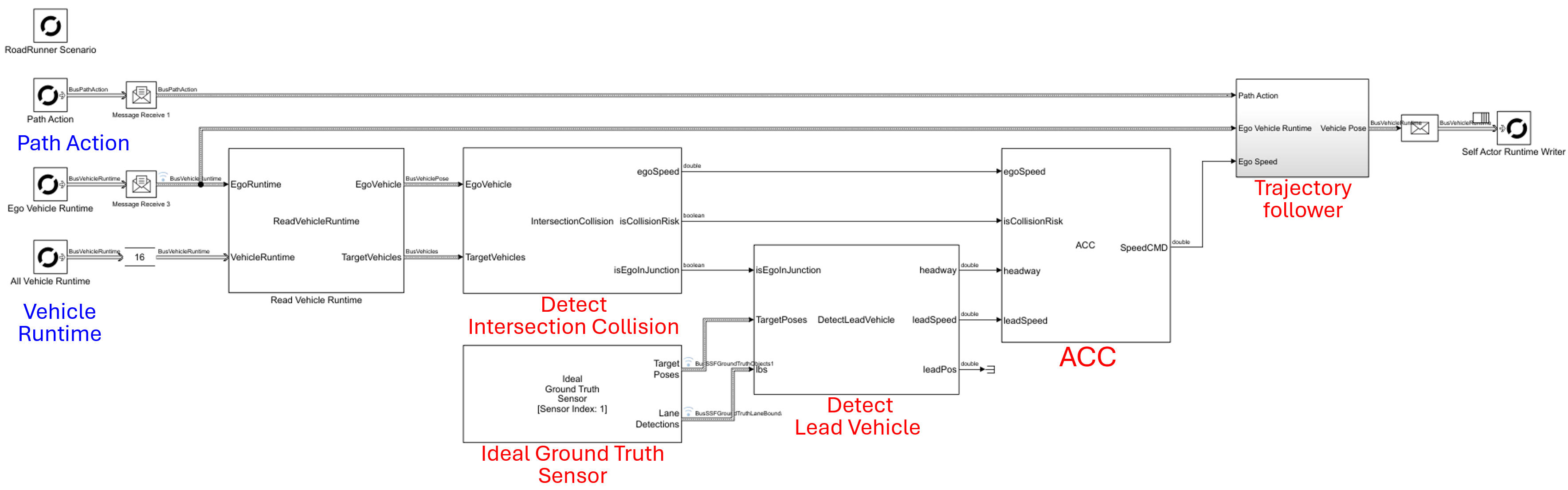
Lead Vehicle Detection via Ideal Ground Truth Sensors
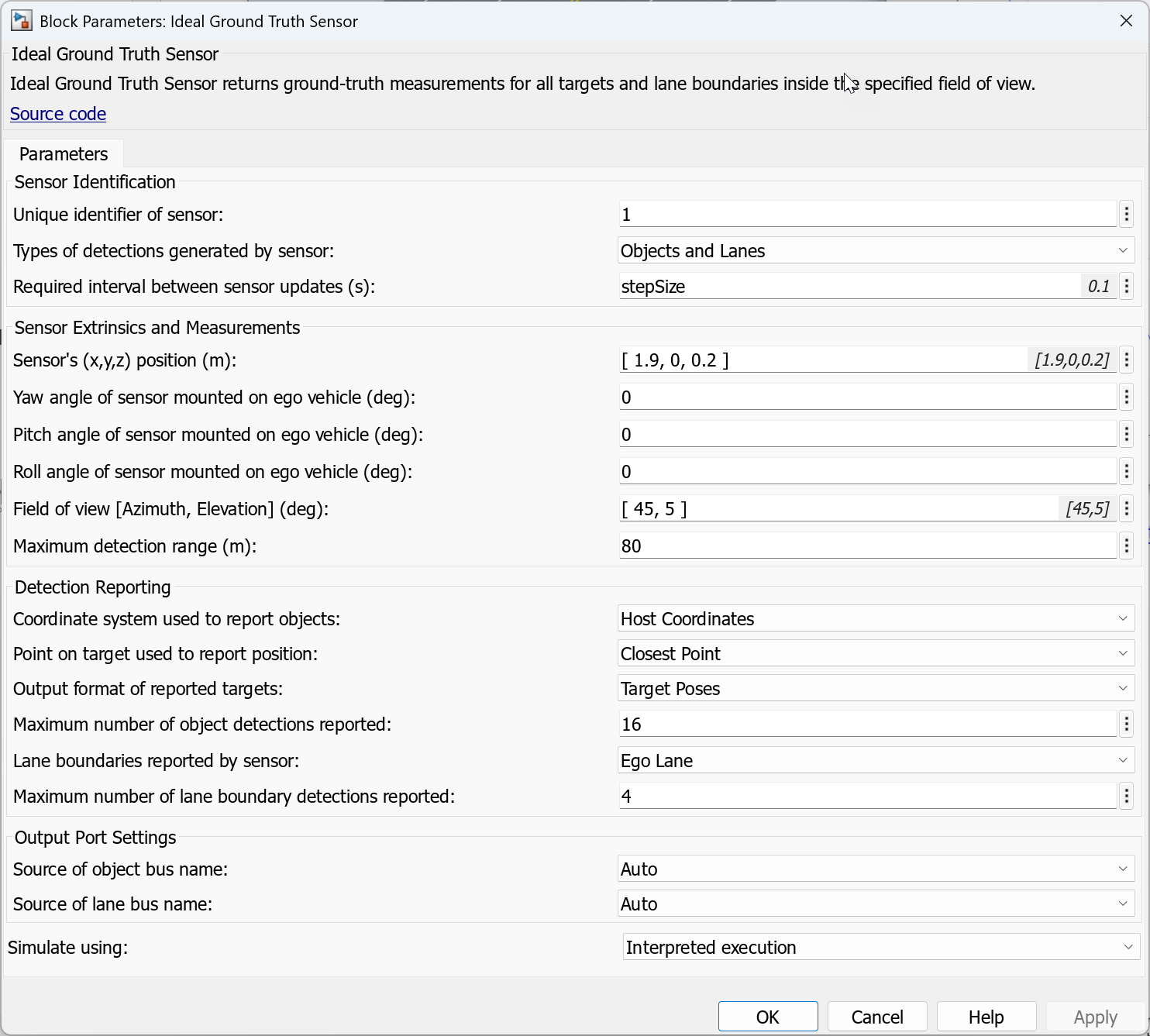
Implementing Adaptive Cruise Control (ACC) requires accurate detection of the lead vehicle. This can be efficiently implemented by utilizing an ideal ground truth sensor while co-simulating RoadRunner Scenario and Simulink. The process begins by specifying the sensor’s mounting parameters, such as position and orientation, as well as its detection parameters, including field of view and detection range.
The ideal sensor outputs the poses of detected targets within its field of view, reported in the ego vehicle’s coordinate frame. The sensor also generates the ego lane boundaries when the detection type is configured to “Objects and Lanes.” Please refer to the following screenshot of the sensor settings for more information.
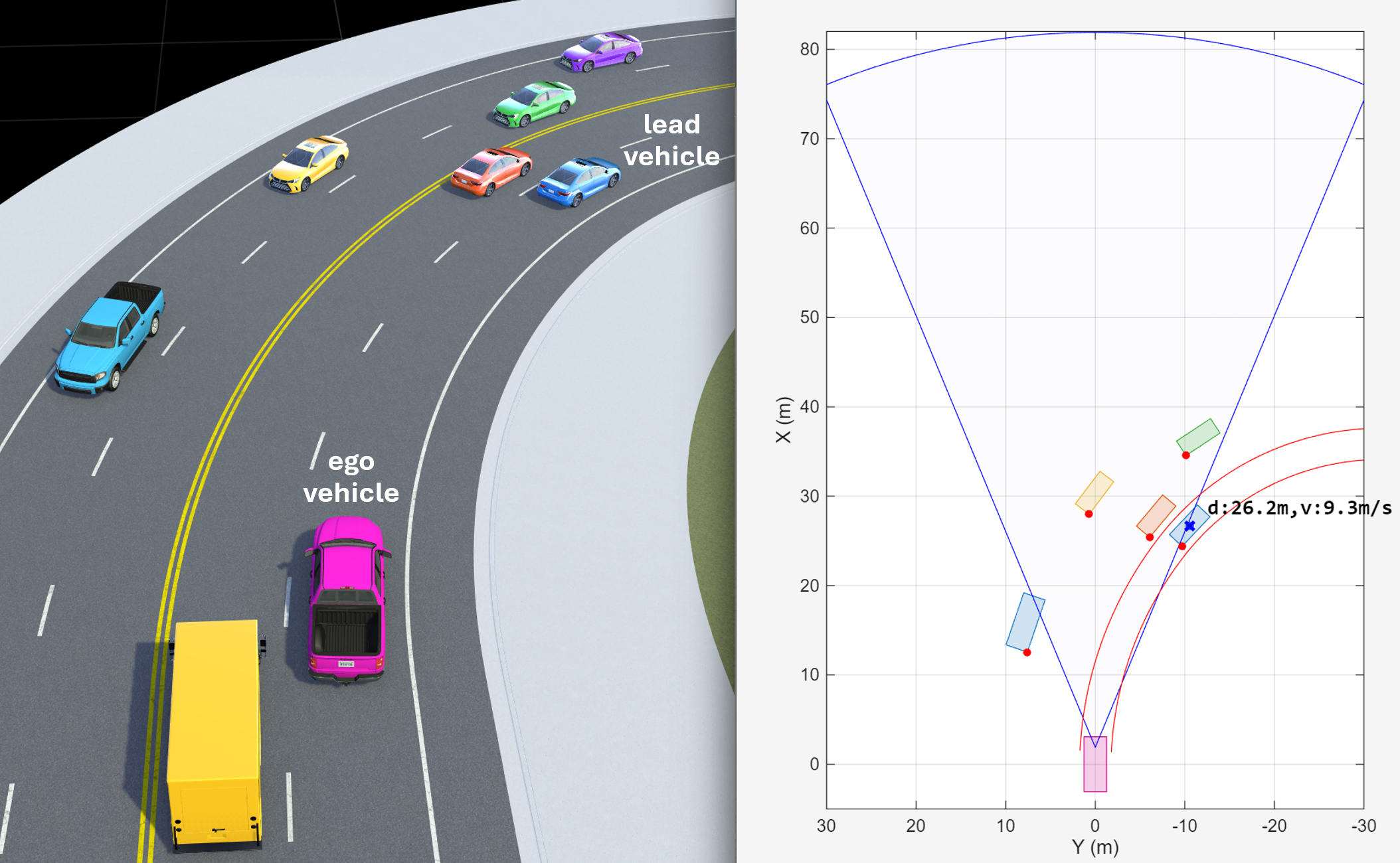
Detected targets are filtered to identify candidates for the lead vehicle within the ego lane boundaries. Among these, the vehicle with the minimum headway is selected as the lead vehicle—for example, the blue cross-marked vehicle shown in the following figure. The rectangles depict the ground-truth vehicle poses within the field of view, while the red dot markers represent targets reported by the sensor. Note that, based on the sensor configuration, only the closest point on each vehicle is reported.
Adaptive Cruise Control (ACC)
We implement a simple Adaptive Cruise Control (ACC) system based on Gipps’ car-following model, which balances free-flow driving objectives with safety constraints.
A braking (safety) term first computes the maximum speed that allows the ego vehicle to stop safely if the lead vehicle brakes abruptly:
% Inputs:
%   s_leader    - position of the lead vehicle [m]
%   s_follower  - position of the follower vehicle [m]
%   v_leader    - current speed of the lead vehicle [m/s]
% Parameters:
%   s0          - minimum desired gap [m]
%   b_max       - comfortable deceleration of the follower [m/s^2]
%   tau         - reaction time (typically ~1.0s) [s]

% Calculate gap between vehicles
g = s_leader - s_follower - s0;
g = max(g, double(0.1));

% Calculate Gipps braking term
v_brake = b_max * tau + sqrt(b_max^2 * tau^2 - b_max * (2*g - v_leader * tau - (v_leader^2 / b_max)));
An acceleration (comfort) term models smooth acceleration toward the desired free-flow speed. In this ACC implementation, the safety-limited speed is used as an upper bound to avoid aggressive acceleration when following:
% Input:
%   v_follower  - current speed of the following vehicle [m/s]
% Parameter:
%   a_max       - maximum acceleration of the follower [m/s^2]

% Calculate Gipps acceleration term
v_accel = v_follower + 2.5 * a_max * tau * (1 - v_follower / v_brake) * sqrt(0.025 + v_follower / v_brake);
The commanded speed is chosen conservatively as:
v_safe = min(v_accel, v_brake);
This formulation yields smooth acceleration in free flow and safe gap regulation during car following.
Intersection Collision Avoidance System
Finally, intersection collision avoidance is essential for the actor behavior model. When traffic signal information is available at the intersection, collisions can often be prevented by implementing a traffic signal follower (see this reference example for more details). However, a dedicated collision avoidance system is still necessary, as some vehicles may disregard the traffic signal.
The intersection collision avoidance system consists of a series of computational blocks that assess collision risk at intersections.

It begins by reading vehicle dynamics information — including speed and yaw rate — to calculate the predicted radius of curvature for each vehicle. By analyzing the magnitude and sign of this radius, the system estimates the vehicle’s maneuver type, such as going straight, turning right, or turning left.
Next, the system calculates intersection points (IPs) between the predicted paths of the ego vehicle and oncoming target vehicles, as illustrated in the figure below.
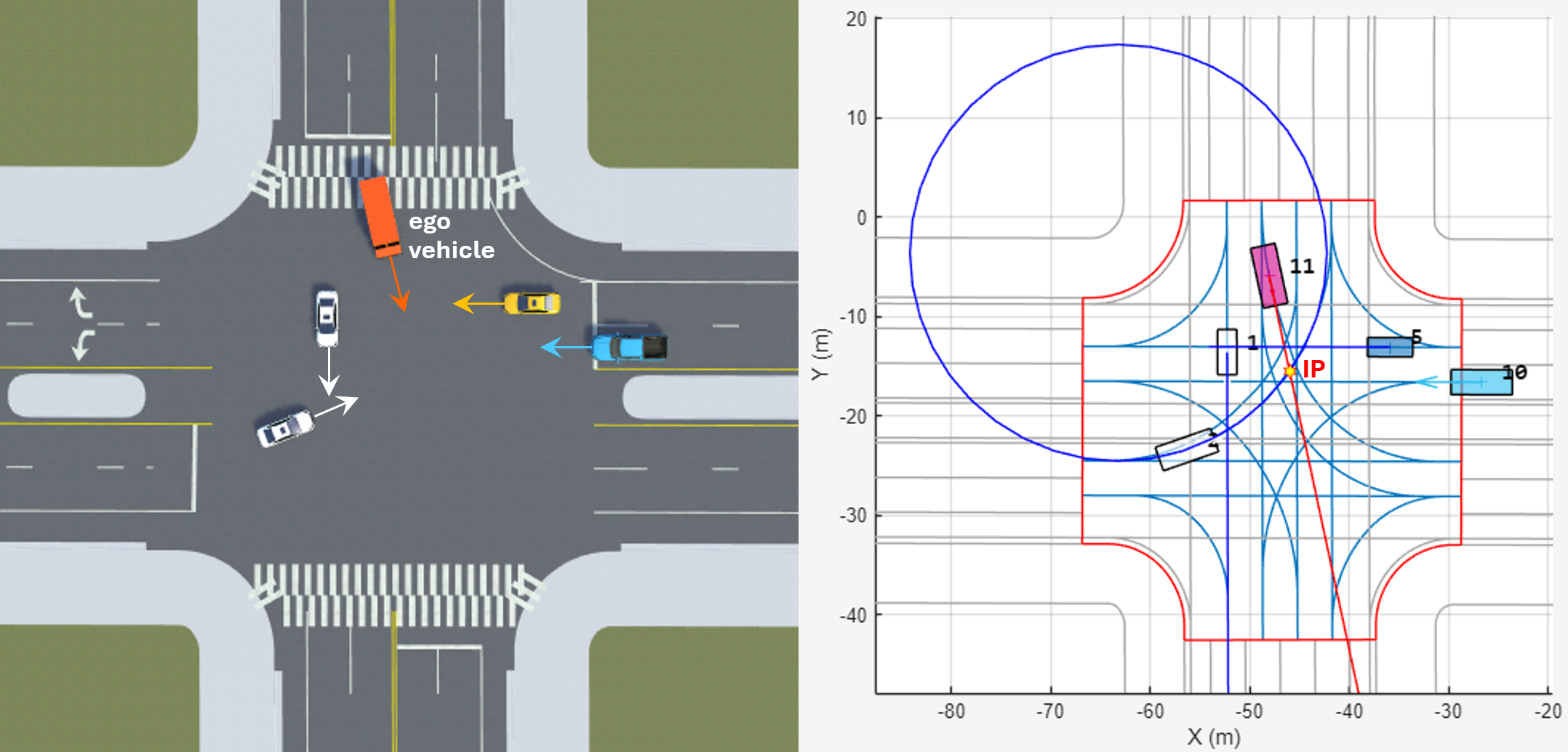
It then determines the travel distances (Dist2IP) and estimated arrival times (Time2IP) of both the ego and target vehicles at each intersection point. Based on these measurements, the system assesses collision risk using logic described in the following code snippet:
% Assess Warning Level based on time to IP and time gap between ego and target
function ICWLevel = assessWarningLevel(time_ego,time_target,timeGap,params)

% Determine warning level
if timeGap < params.MinTimeGap % time gap between ego and target is within MinTimeGap
   if time_ego < params.WarnTTC && time_target < params.WarnTTC
                                    % both ego and target times are less than WarnTTC
      if time_target < params.MinTTC ... % target time is less than MinTTC
             && time_ego < params.MinTTC % and ego time is less than MinTTC
         ICWLevel = 3; % high level warning
      elseif time_target < params.MinTTC % only target time is less than MinTTC
         ICWLevel = 2; % mid level warning
      else
         ICWLevel = 1; % low level warning
      end
   else % eith ego or target times are greater than WarnTTC
      ICWLevel = 0; % no warning
   end
else % time gap between ego and target is too big
   ICWLevel = 0; % no warning
end
end
When the system assesses collision risk, it activates autonomous emergency braking (AEB) as needed to prevent collisions. The video below illustrates how the intersection collision avoidance system works.
For more information about the algorithm, please see the following references:
[1]. Reference example: Intersection Collision Warning Using V2X Communication
[2]. Park Seo-Wook, Raynier Suresh, and Anusha Ailuri, “Collision Avoidance System at Urban Intersections Using V2X Communication,” SAE Technical Paper 2025-01-8030, 2025.
Trajectory Follower
When randomized ambient traffic is generated, each vehicle’s initial position and route are defined randomly. The actor behavior model is then responsible for controlling the vehicle to follow its predefined route. At the start of the simulation, the Path Following Action from the RoadRunner Scenario Reader generates a sequence of waypoints that define the desired path.
The HelperPolylineEvaluator is a MATLAB System Object that facilitates vehicle movement along this polyline path by interpolating between sequential waypoints.
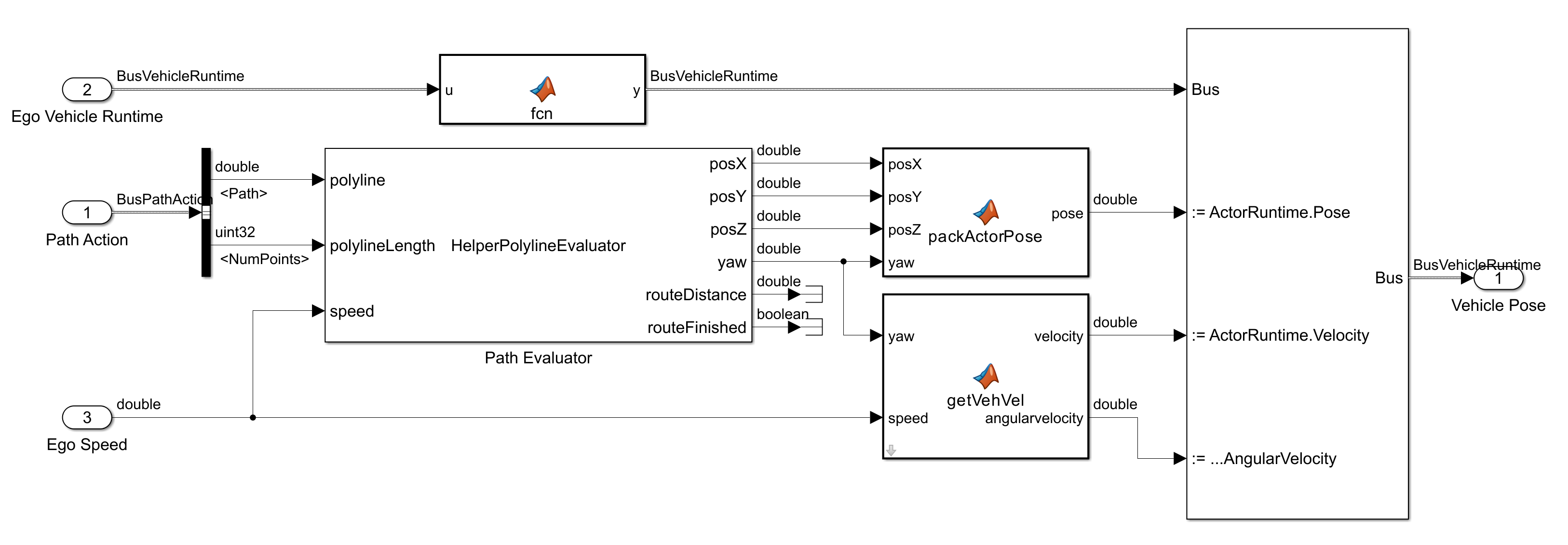
At each time step, it calculates a target distance based on the vehicle’s current speed and the simulation’s sampling interval, then identifies the corresponding segment on the polyline. The vehicle’s 3D position (X, Y, Z) and orientation (yaw) are determined through linear interpolation and tangent blending between waypoints, ensuring smooth and continuous transitions along the path. Additionally, the object tracks the cumulative distance traveled and provides a flag to indicate when the vehicle has reached the end of its route.
You can find this trajectory follower block in the reference example.
Publishing Ready-to-Run Actor Behaviors
To assign the same Simulink actor behavior to multiple actors in RoadRunner, you can publish a ready-to-run package from your Simulink behavior model. This approach enables RoadRunner to execute the compiled behavior directly, without rebuilding the Simulink model at runtime, and allows the same package to be reused by many actors.
Use the following command to generate the package:
Simulink.publish.publishActor('TrafficFollowerSL',PackageType='ReadyToRun')
Note: Generating ready-to-run native code requires Simulink Coder, and often Embedded Coder or a supported code generation target. Ensure that your MATLAB/Simulink installation and license include the necessary products for C/C++ code generation. Also, the generated binaries must be compatible with the RoadRunner runtime platform (e.g., OS and architecture).
The above command generates a ZIP file containing precompiled native binaries (such as MEX, DLL, or SO files) and metadata required by RoadRunner. You can create a new behavior asset by assigning the generated ZIP file, and then apply this behavior to all ambient traffic actors.
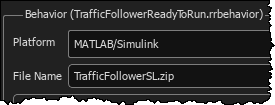
While Simulink co-simulation is preferable for high-fidelity algorithm development, detailed vehicle modeling, or when full access to the Simulink toolchain is needed at runtime, executing behaviors with the ready-to-run package significantly reduces per-step inter-process communication (IPC) and instantiation overhead. This results in lower latency and much better scalability, especially in scenarios with many actors.
For more information about this workflow and additional resources, please see the following link:
Conclusion
Transitioning the actor behavior model from a MATLAB-based framework into Simulink enables us to fully leverage the Model-Based Design (MBD) workflow. By integrating fundamental controllers, Trajectory Following, Adaptive Cruise Control, and Intersection Collision Avoidance, we have developed a robust “brain” for our ambient traffic actors. The ability to publish these behaviors as ready-to-run packages allows us to efficiently assign the same behavior to multiple actors, significantly improving latency and scalability in large-scale simulations.
To request the Simulink model or receive technical support for the workflow described in this post, please contact MathWorks at automated-driving@mathworks.com.


评论
要发表评论,请点击 此处 登录到您的 MathWorks 帐户或创建一个新帐户。