
From PyTorch & LiteRT to C, C++, and CUDA source code
| Guest writer: Christoph Stockhammer Christoph Stockhammer is an application engineer at MathWorks, focusing on AI use cases. Christoph holds a Master's in Mathematics from the Technical University of Munich. |
If you have ever tried to deploy a PyTorch model on embedded hardware, you know the story: the model itself is only half the battle. The real challenge starts when you need a runtime, shared libraries, hardware-specific builds, and a toolchain that somehow still fits on your target device.
Starting with MATLAB R2026a, there is an alternative route. Instead of shipping a runtime to the device, you can now generate standalone C/C++ (and CUDA®) source code directly from PyTorch ExportedProgram and LiteRT models. No interpreter. No inference engine. No import process into MATLAB. Just readable and portable source code that you compile with your existing toolchain.
Why standalone code generation?
Embedded targets--from microcontrollers to devices like Raspberry Pi or NVIDIA® Jetson™--care deeply about predictability. Memory usage, startup time, and binary size often matter more than flexibility. Runtime-based solutions such as LiteRT (for Microcontrollers) or ONNX Runtime do a great job, but they still bring dependencies and abstraction layers that require more processing power and memory usage above and beyond pure source code.
Standalone code generation removes that layer entirely. The generated code contains only what your model needs: loops, math, and data. That makes it easier to analyze, debug, certify, and integrate with existing embedded software.
Under the hood: MLIR as the secret sauce
The key technology behind this workflow is MLIR (Multi-Level Intermediate Representation). MATLAB Coder lowers PyTorch ExportedProgram and LiteRT models into MLIR, applies a series of graph- and hardware-aware optimizations, then emits C/C++ or CUDA source code.
Because the optimizations happen at the IR level, the generated code can take advantage of:
- Operator fusion to reduce memory traffic
- Parallel execution using OpenMP on multicore CPUs
- Vectorization (for example, ARM® Neon or Intel® AVX)
- Hardware-specific kernels where available
The result is code that can be both portable and efficient.
PyTorch and LiteRT, supported directly
The workflow supports two input formats:
- PyTorch ExportedProgram, for a clean and stable representation of PyTorch models
- LiteRT, whether it originates from TensorFlow or is converted from PyTorch models
A classic example: multi-layer perceptron (MLP)
Feedforward networks based on dense layers are one of the most popular network architectures and they are ideal for introductory examples. So let's look at one:
Defining such a network only takes a few lines of code in torch:
self.net = nn.Sequential(
    nn.Linear(in_features, hidden1),
    nn.ReLU(),
    nn.Linear(hidden1, hidden2),
    nn.ReLU(),
    nn.Linear(hidden2, out_features)
)
Usually, we would train the model with actual data, but for our purposes it suffices to just write the model to disk with the original (randomly initialized) weights and biases:
example_inputs = (torch.randn(batch_size, in_features),)
exported_program = torch.export.export(model, example_inputs)
out_file = "three_layer_mlp.pt2"
torch.export.save(exported_program, out_file)
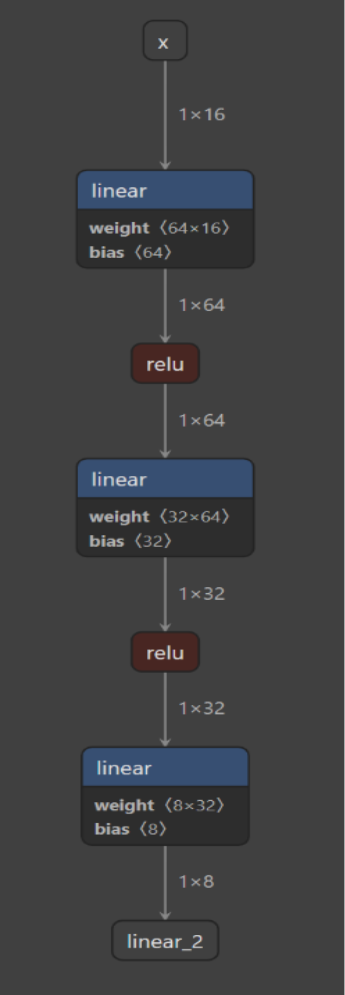
This will produce a file "three_layer_mlp.pt2" and we can visualize it in tools such as Netron. As expected, we see three dense layers (titled "linear") with relu activations in between:
Now, we can go ahead and load this model in MATLAB as well:
>> mlp = loadPyTorchExportedProgram('three_layer_mlp.pt2')
Loading the model. This may take a few minutes.
mlp =
PyTorchExportedProgram contained in three_layer_mlp.pt2:
Input Specifications
______________________________________
Input Name Size Type
_____ _____ ________ ________
1 "in1" "1 x 16" "single"
Output Specifications
_______________________________________
Output Name Size Type
______ ______ _______ ________
1 "out1" "1 x 8" "single"
This looks good: We see the correct number of input features (16) and output features (8). It is advisable to also run some inference tests from within MATLAB. For example, I can have the model predict just with some random data:
>> invoke(mlp, randn(1,16,'single'))
ans =
1×8 single row vector
-0.0442 -0.2474 0.3094 0.1759 -0.0768 0.0293 0.1398 -0.0767
We now want to move ahead and generate C source code from the model's prediction function. To this end, we just need to put the above commands into a MATLAB function:
function predictions = predictModel(inputFeatures)
    mlp = loadPyTorchExportedProgram('three_layer_mlp.pt2');
    predictions = invoke(mlp, inputFeatures);
end
As a final step, we generate C source code files with a single MATLAB command:
>> codegen -c predictModel.m -args {zeros(1,16,'single')}
My laptop has an Intel i7 processor. In order to improve performance, the code generator recognizes my processor configuration automatically (I could also manually override this with a different configuration if I wanted to). Using this piece of information, the code generator leverages AVX instructions (which my processor supports) for calculating the matrix-vector multiplications which are at the heart of the dense layers. So rather than naive for-loops, I get something like the following in the generated C code:
c = _mm256_add_ps(c, _mm256_mul_ps(_mm256_loadu_ps(&A[idxA]), b));Here _mm256_mul_ps is the single precision (FP32) packed multiplication operation using Intel intrinsics, which can lead to much better performance. The above is just one example of how the generated code is optimized to the specific hardware it is intended to be executed on.
More than just inference
In real applications, neural networks almost never run in isolation. Preprocessing, postprocessing, other control logic and more are almost always part of the story, too. One nice thing about using automated code generation is that you can generate code for the entire application--signal processing, feature extraction, and neural network inference--in one deterministic step.
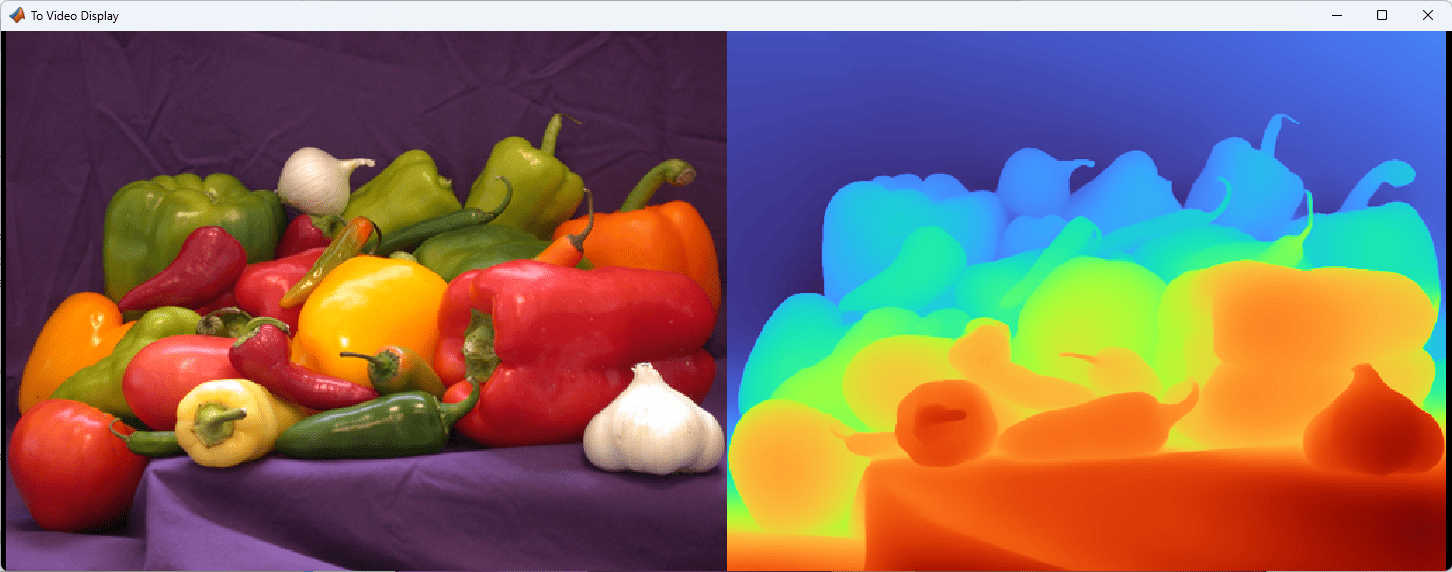
Example applications, including the MATLAB code and Simulink models, ship with this capability. For example, running monocular depth estimation using Depth Anything V2 PyTorch Model can be used for applications such as autonomous driving and navigation.
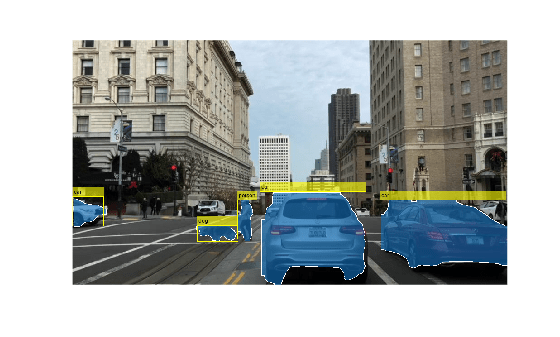
The segmentation and object detection using YOLO v11 LiteRT model example shows how to identify and outline objects to enable image segmentation and detection, all without relying on NVIDIA cuDNN or TensorRT™ libraries.
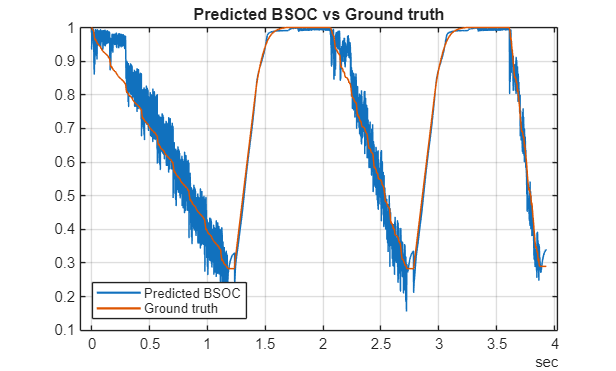
Finally, the predict battery state of charge using LiteRT model example shows the workflow to deploy an AI model that predicts the battery state of charge (SOC), a key metric for energy management systems in electric vehicles and other battery-powered devices.
In this day and age, one could also consider Generative AI tools when looking for C or C++ source. One major distinction of the workflow we described above is that it is deterministic and traceable. If you generate the C sources ten times (using the same configuration) it will produce the exact same C sources ten times. No dependency on backend large language models, context or prompts.
A practical alternative to runtimes
Our benchmarks show that the generated code delivers performance quite comparable to runtime-based approaches. Just as importantly, the code is human-readable, configurable, and re-entrant as needed.
Here is a chart showing the performance of the automatically generated code vs LiteRT for several popular network architectures on Raspberry Pi 4. In the initial release, our focus is on supporting as many networks and layers as possible given our users' propensity to use many different types of networks. Many optimizations are planned and we anticipate matching and exceeding the performance of the interpreter in subsequent releases:
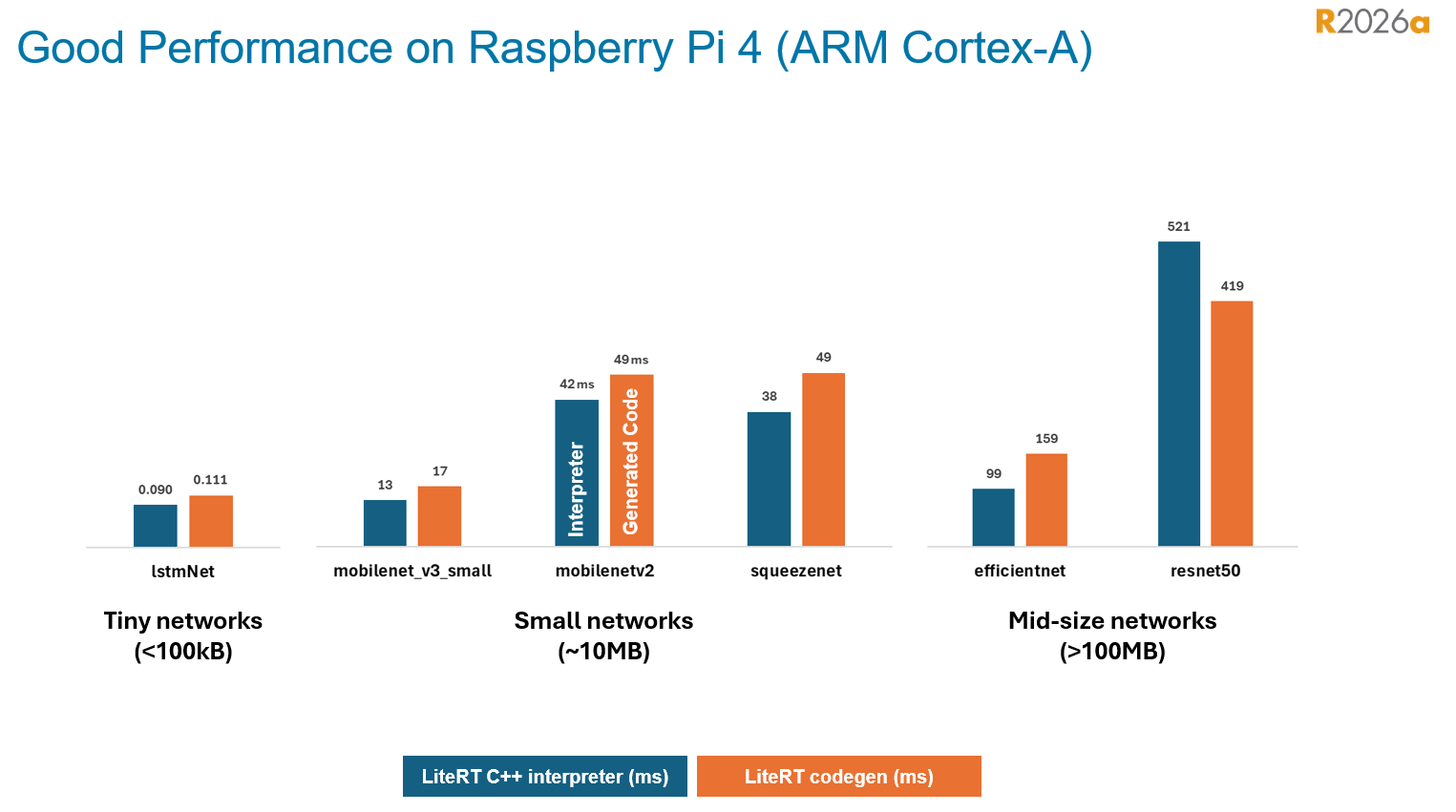
In summary: If you are looking for an AI deployment workflow that prioritizes transparency, portability, and tight integration with embedded systems, standalone code generation from PyTorch and LiteRT using MATLAB Coder is well worth a look.
- 类别:
- Deep Learning





评论
要发表评论,请点击 此处 登录到您的 MathWorks 帐户或创建一个新帐户。