
Running Large Language Models on the NVIDIA DGX Spark and connecting to them in MATLAB
When experimenting with AI, I often like to use local large language models (LLMs), i.e. models that I run on my own hardware. I've written about how to do this with MATLAB a couple of times over the past year:
- How to run local DeepSeek models and use them in MATLAB - Using Ollama, I installed a small 1.5 billion parameter model on my Windows desktop and connected it to my MATLAB session using the Large Language Models (LLMs) with MATLAB support package.
- Giving LLMs new capabilities: Ollama tool calling in MATLAB - In this post, I upgrade to a 12 billion parameter model called mistral-nemo that was built in collaboration with NVIDIA. Its pretty much at the limit of what my aging desktop GPU can handle.
Using my 5 year old desktop machine, I've very much been paddling in the shallow end of local large language models but a couple of guys in MathWorks' development team recently reached out to me asking 'How would you like to play with a 120 billion parameter local model?'. 10x bigger than anything I've been able to run before on my own hardware!
NVIDIA DGX Spark
The hardware that allows us to easily run such a large model is the recently released NVIDIA DGX Spark. It's powered by an NVIDIA GB10 Grace Blackwell Superchip that has access to 128GB RAM; rather more than the 6GB that my 5 year old RTX-3070 can manage.
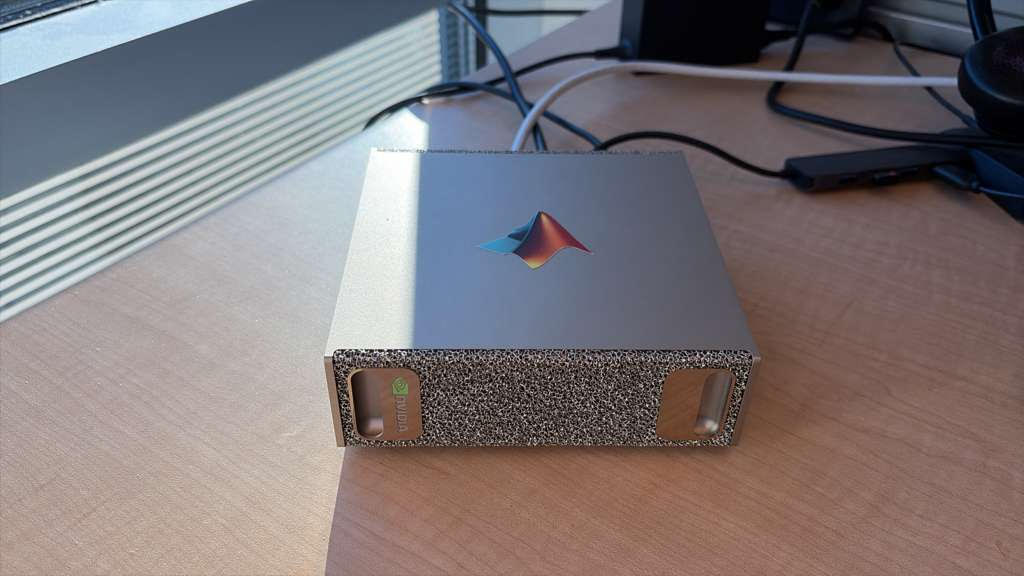
The machine is pretty tiny and you can hold it in one hand but, unfortunately for me, I don't have one on my desk. My colleague, Nick, does however so the plan is for me to connect my MATLAB running on my Mac laptop to his DGX Spark over our internal network. Since he's in Boston and I'm in the UK, this might be stretching the definition of 'local' LLM a little but the fact remains that we are running everything on our own hardware.
Setting up the Ollama Docker container on the DGX Spark and connecting it to my local Mac
On the DGX spark, I start by pulling and running the Ollama Docker image
# I run this on the DGX Spark
sudo docker run -d --gpus=all -v ollama:/root/.ollama -p 11434:11434 --name ollama ollama/ollama
Next, I install the gpt-oss:120b model into Ollama. This is a 120 billion open weight model released by OpenAI
# I run this on the DGX Spark
sudo docker exec -t ollama ollama run gpt-oss:120b
That's pretty much it as far as setup goes on the DGX Spark. Ollama is running on port 11434 on the Spark and I want to access it on port 11437 on the local machine. Assuming that the Fully Qualified Domain Name (FQDN) of my Spark is dgx-miketest.mathworks.com, I execute the following on my Mac to create a ssh tunnel
# I run this on my Mac
ssh -fNT -L 11437:127.0.0.1:11434 dgx-miketest.mathworks.com
Once I've authenticated, I can check that this is working, by running the following on my Mac
# I run this on my Mac
curl http://localhost:11437/api/tags
The output you get might be a little different from what I show below because I've also set up some additional models on my DGX Spark. The important thing is that you get something and that the output includes gpt-oss:120b. It shows that the ssh tunnel between the Mac and the DGX Spark is working.
{"models":[{"name":"gpt-oss-fullgpu:latest","model":"gpt-oss-fullgpu:latest","modified_at":"2025-12-03T21:06:30.338078585Z","size":65369818955,
"digest":"a97757631e2bca723fa6cf8d30c6b105ffd6b12a6c241e9aba69da23e116df68","details":{"parent_model":"","format":"gguf","family":"gptoss",
"families":["gptoss"],"parameter_size":"116.8B","quantization_level":"MXFP4"}},{"name":"gpt-oss:120b","model":"gpt-oss:120b","modified_at":
"2025-12-03T19:09:37.921238787Z","size":65369818941,"digest":"a951a23b46a1f6093dafee2ea481d634b4e31ac720a8a16f3f91e04f5a40ecd9","details":
{"parent_model":"","format":"gguf","family":"gptoss","families":["gptoss"],"parameter_size":"116.8B","quantization_level":"MXFP4"}}]}%
Connecting to the gpt-oss:120b model in MATLAB
Now we can open MATLAB on my Mac and make use of the Large Language Models (LLMs) with MATLAB Support Package that I've used in all of my other articles on local LLMs. The model is running on the DGX Spark and connecting to it is straightforward
model = ollamaChat("gpt-oss:120b",Endpoint="localhost:11437")
Let's ask it to generate some text
generate(model,"In one sentence, Tell me who you are")
Running a simple chat bot in MATLAB
One of the examples in the Large Language Models (LLMs) with MATLAB Support Package is a simple chat bot which I reproduce here so that I can have a conversation with the model running on the DGX Spark. I've found that it tends to be rather verbose unless I explicitly ask it not to be.
messages = messageHistory;
wordLimit = 2000;
stopWord = "end";
totalWords = 0;
messagesSizes = [];
The main loop continues indefinitely until you input the stop word or press Ctrl+C.
while true
query = input("User: ", "s");
query = string(query);
dispWrapped("User", query)
if query == stopWord
disp("AI: Closing the chat. Have a great day!")
break;
end
numWordsQuery = countNumWords(query);
% If the query exceeds the word limit, display an error message and halt execution.
if numWordsQuery>wordLimit
error("Your query should have fewer than " + wordLimit + " words. You query had " + numWordsQuery + " words.")
end
% Keep track of the size of each message and the total number of words used so far.
messagesSizes = [messagesSizes; numWordsQuery]; %#ok
totalWords = totalWords + numWordsQuery;
% If the total word count exceeds the limit, remove messages from the start of the session until it no longer does.
while totalWords > wordLimit
totalWords = totalWords - messagesSizes(1);
messages = removeMessage(messages, 1);
messagesSizes(1) = [];
end
% Add the new message to the session and generate a new response.
messages = addUserMessage(messages, query);
[text, response] = generate(model, messages);
dispWrapped("AI", text)
% Count the number of words in the response and update the total word count.
numWordsResponse = countNumWords(text);
messagesSizes = [messagesSizes; numWordsResponse]; %#ok
totalWords = totalWords + numWordsResponse;
% Add the response to the session.
messages = addResponseMessage(messages, response);
end
Not too bad at all, although the set of functions lab* that it discusses are no longer recommended having been superseded by similar functions spmd* such as spmdBarrier instead of labBarrier, for example.
I've found that this model is much more capable than any other local model I've used and a few of us at MathWorks are experimenting with various agentic workflows using it. I'm curious what applications you have in mind for an AI model like this.
Helper Functions
Function to count the number of words in a text string
function numWords = countNumWords(text)
numWords = doclength(tokenizedDocument(text));
end
Function to display wrapped text, with hanging indentation from a prefix
function dispWrapped(prefix, text)
indent = [newline, repmat(' ',1,strlength(prefix)+2)];
text = strtrim(text);
disp(prefix + ": " + join(textwrap(text, 70),indent))
end




Comments
To leave a comment, please click here to sign in to your MathWorks Account or create a new one.