
Agentic AI for 5G Engineering: Turning AI Assistants into Wireless Experts
The excitement around AI coding assistants is hard to overstate. Engineers use tools like GitHub Copilot, Claude Code, and OpenAI Codex every day to accelerate software development and automate routine tasks. But when it comes to wireless engineering, generating code is only part of the challenge.
Modern wireless systems involve complex standards, domain-specific conventions, simulation workflows, and validation processes that cannot be reduced to simple code completion. As Agentic AI emerges as the next evolution of AI-assisted engineering, a critical question arises: how do we transform a general-purpose AI assistant into a wireless engineering expert? This post explores the answer and demonstrates how MathWorks expert-curated tools and skills can turn AI assistants into capable engineering partners.
Why Wireless Engineering is Hard for AI
Large Language Models (LLMs) can be highly capable, but they remain prone to errors that are especially problematic in technical domains. Much of the expertise wireless engineering requires may not be well represented in training data — from standards and tools to professional engineering experience. As a result, a general-purpose model can write code that runs but is still wrong for the task or solves it inefficiently.
Some common challenges observed when using AI coding assistants for wireless engineering include:
- Hallucinated functions, syntax, and standard-specific equations
- Outdated engineering practices and workflows
- Misapplied domain knowledge
- Complex and difficult-to-maintain generated code
- Inefficient, trial-and-error problem solving
These issues become increasingly apparent when engineers ask agents to work with standards such as 3GPP 5G NR or perform sophisticated wireless engineering tasks.
Want to learn more? Explore our MATLAB Agentic Toolkit page.
Teaching AI How Wireless Engineers Work
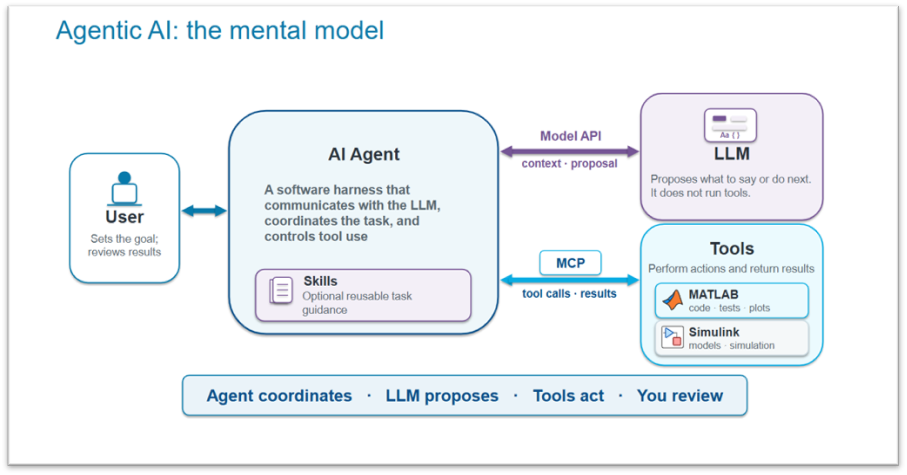
With the introduction of the MATLAB Agentic Toolkit, AI agents can use the full capabilities of MATLAB through the MATLAB MCP Server. But even when agents have access to engineering tools, they still need domain knowledge. To address this challenge, MathWorks has introduced expert-curated skills within the MATLAB Agentic Toolkit. These skills encode engineering guidance, workflow expertise, recommended APIs, and domain-specific knowledge that help agents solve tasks more effectively.
The wireless communications catalog includes skills covering areas such as:
- AWGN and SNR definitions
- OFDM system design
- 5G NR waveform generation
- Wireless network simulation
- Bluetooth network simulation
- USRP radio configuration
Instead of repeatedly discovering solutions through trial and error, these skills help guide the agent toward established engineering practices. 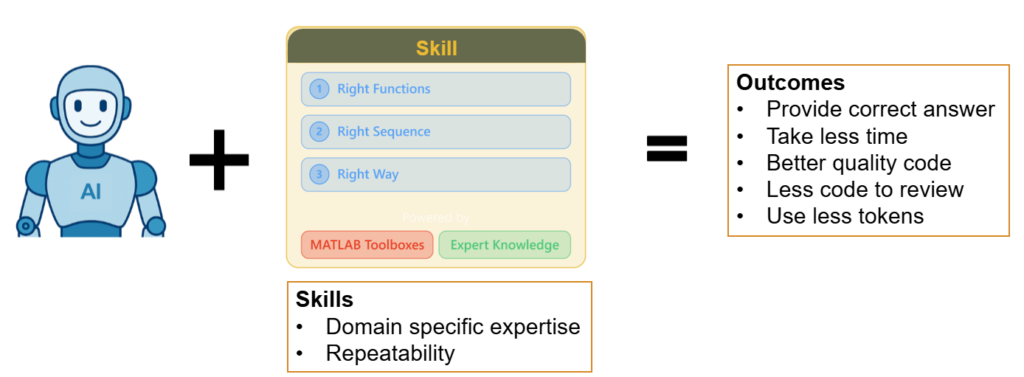
A 5G Waveform Generation Example
Consider a task a 5G engineer might hand to an agent: generating a downlink waveform for a specific bandwidth, numerology, and channel configuration. We gave an AI agent this prompt:
We reproduce here the first few lines of generated code:
%% Carrier-level configuration
cfg = nrDLCarrierConfig;
cfg.Label            = "20 MHz, 15 kHz SCS DL carrier";
cfg.FrequencyRange   = "FR1";
cfg.ChannelBandwidth = 20;
cfg.NCellID          = 1;
cfg.NumSubframes     = 20;
cfg.WindowingPercent = 0;
cfg.SampleRate       = [];

%% SCS carrier: 20 MHz @ 15 kHz SCS
scs = nrSCSCarrierConfig;
scs.SubcarrierSpacing = 15;
scs.NSizeGrid         = 106;
scs.NStartGrid        = 0;
cfg.SCSCarriers       = {scs};

%% Bandwidth part spanning carrier
bwp = nrWavegenBWPConfig;
bwp.BandwidthPartID   = 1;
bwp.SubcarrierSpacing = 15;
bwp.NSizeBWP          = 106;
bwp.NStartBWP         = 0;
cfg.BandwidthParts    = {bwp};
...
After some trial and error, the code produces the requested waveform, but only after multiple attempts that increase time and token usage. The code is also long, repeats hard-coded values, sets default properties unnecessarily, and relies on outdated conventions.
This is where a skill helps. The matlab-generate-5g-waveform skill in the MATLAB Agentic Toolkit teaches agents how experienced wireless engineers approach waveform generation, including the right functions, resource grid configuration, and current toolbox best practices. With the skill available, the agent takes a more efficient path to the same solution:
%% Carrier configuration: FR1, 20 MHz, 15 kHz SCS
cfg = nrDLCarrierConfig('FR1', 20, 15);

% Two radio frames (20 subframes)
cfg.NumSubframes = 20;

%% PDSCH data channel: QPSK, fully allocated 20 MHz at 15 kHz SCS
nSizeBWP = cfg.BandwidthParts{1}.NSizeBWP;
cfg.PDSCH{1}.Modulation = 'QPSK';
cfg.PDSCH{1}.PRBSet = 0:nSizeBWP-1;
cfg.PDSCH{1}.SymbolAllocation = [0 14];
...
With the skill, the agent generates correct code on the first attempt, producing the expected waveform with fewer tokens and less time. The resulting code is about half the length and follows current toolbox conventions.
Across 12 waveform-generation tasks, the skill consistently helped the agent produce more concise code, reduce iterations, and complete tasks significantly faster.
| Metric | Without Skill | With Skill | Improvement |
|---|---|---|---|
| First-try success | 0% | 58% | +7 tasks |
| Mean iterations | 6.7 | 3.1 | 54% fewer |
| Mean tokens | 54,955 | 36,668 | 33% fewer |
| Mean duration | 718 s | 330 s | 54% faster |
| Code length | 77 LOC | 60 LOC | 22% shorter |
| Pass rate | 100% | 100% | — |
Agentic AI Applications for 5G PHY Engineering
Agents can support advanced tasks in several wireless engineering workflows:
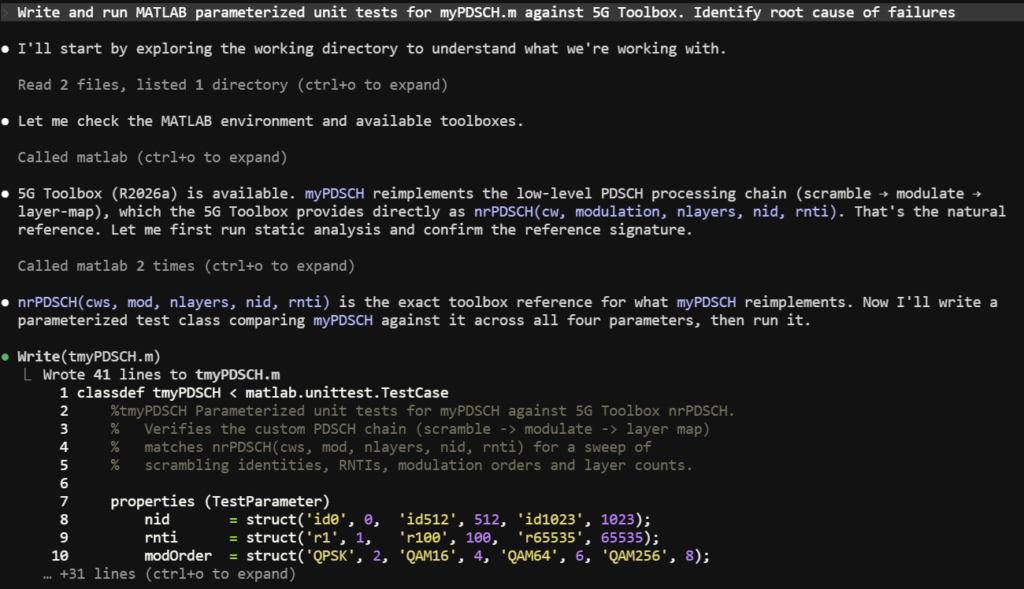
Design Verification: Verifying a 5G NR physical layer implementation requires a trusted reference of the 3GPP-defined technical specifications. MathWorks 5G Toolbox provides that golden reference, helping AI agents verify in-house implementations and pinpointing discrepancies. With MATLAB Test and 5G Toolbox, agents can write and execute tests, diagnose failures, identify root causes, apply fixes, and verify corrections against the golden reference. To demonstrate this, we prompted an AI agent as follows:
From a single instruction, the agent reads myPDSCH and uses the MATLAB MCP server to discover the corresponding 5G Toolbox reference function nrPDSCH, then writes a test spanning 108 parameter combinations (4 modulations × 3 layers × 3 NIDs × 3 RNTIs). When tests fail, the agent diagnoses a scrambling sequence corrupted and, on its own, traces the root cause to a single line of code. It applies the fix and re-runs, and all 108 tests pass — the entire diagnose-fix-verify loop completed autonomously.
The image below shows the first few steps taken by AI agent autonomously.
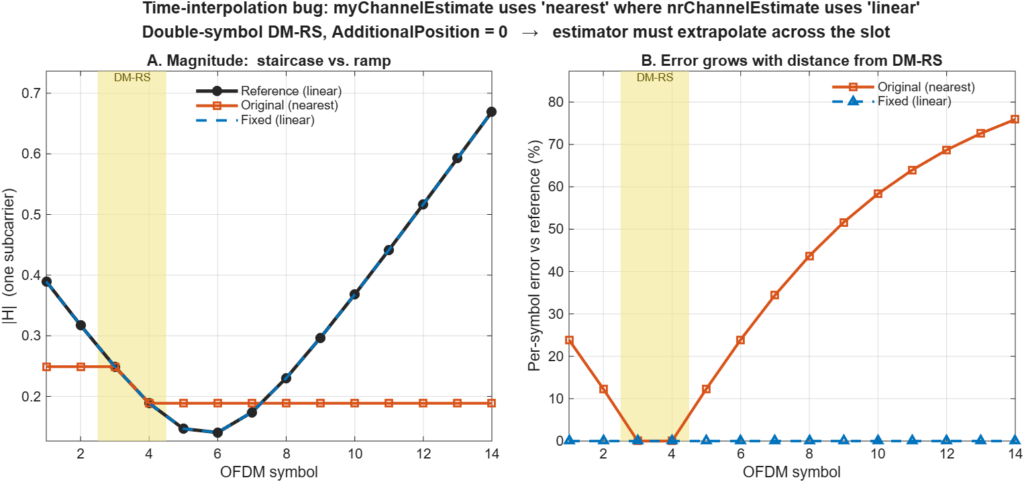
Performance Testing and Simulation: 3GPP defines minimum performance requirements that 5G transceivers must meet. MathWorks 5G Toolbox provides flexible reference designs suitable for performance testing. Agents can use these verified designs instead of constructing them from scratch, reducing hallucinations, token use, and time to completion. For instance, the following prompts an AI agent to test a custom 5G NR channel estimation algorithm against 5G Toolbox channel estimator:
The agent reads the NR PDSCH Throughput reference, identifies code injection points, runs parameterized sweeps, isolates high Doppler as the point of failure, and traces the root cause to a single line of code — a ‘nearest’ versus ‘linear’ time-interpolation choice. Grounded in a validated testbench, the agent focuses on analysis and diagnosis rather than reconstructing the simulation framework, arriving at a precise, verifiable answer in a fraction of the time an unaided agent would need.
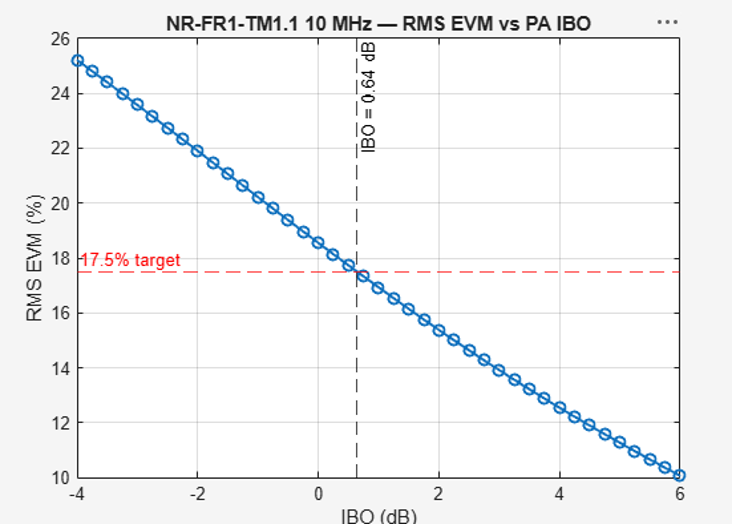
RF System Characterization: 3GPP defines test vectors and measurement procedures for RF conformance testing. MathWorks 5G Toolbox provides both standard-compliant waveform generation and analysis tools. Agents can use these to build and run sweeps over hardware model operating points and converge on the setting that meets the requirements defined by the technical specifications. For instance, the following prompts an agent to find the amplifier back-off that satisfies the EVM requirement.
The agent discovers the tools available, sweeps the amplifier back-off and pinpoints the operating point — IBO = 0.64 dB — that meets the 17.5% EVM limit. Since the measurement testbench is already standard-compliant, the agent focuses on the search and arrives at a precise, spec-referenced answer far faster than an unaided agent could. The following figure shows the IBO sweep and the target EVM.
Conclusion
You can transform a general-purpose AI assistant into a wireless engineering expert by equipping it with MathWorks tools and expert-curated skills that encode domain knowledge, engineering workflows, best practices, and standards-compliant methods. These tools and skills ground and guide the agent to solve problems the way experienced wireless engineers do.
The result is faster task completion, fewer iterations, lower token usage, higher-quality code, and more reliable engineering outcomes. With MathWorks tools and skills, Agentic AI can evolve from a coding assistant into a capable wireless engineering expert.
How are you using AI assistants in your wireless engineering work? We’d love to hear about your experiences, challenges, and lessons learned. Share your perspective in the comments below!
Want to learn more? Explore our MATLAB Agentic Toolkit page.


评论
要发表评论,请点击 此处 登录到您的 MathWorks 帐户或创建一个新帐户。