
From Simulation to Reality: How UOS Robotics Won the RoboCup ARM Challenge 2026
UOS Robotics from the University of Seoul returned to the RoboCup ARM Challenge in 2026 after winning titles in 2022 and 2023. With RoboCup 2026 held in Incheon, South Korea, the team took first place in the global simulation round and went on to win the on-site final on home soil. Today’s blog highlights the engineering work behind this success: bringing perception, planning, and control algorithms from a virtual environment to a real Universal Robot.
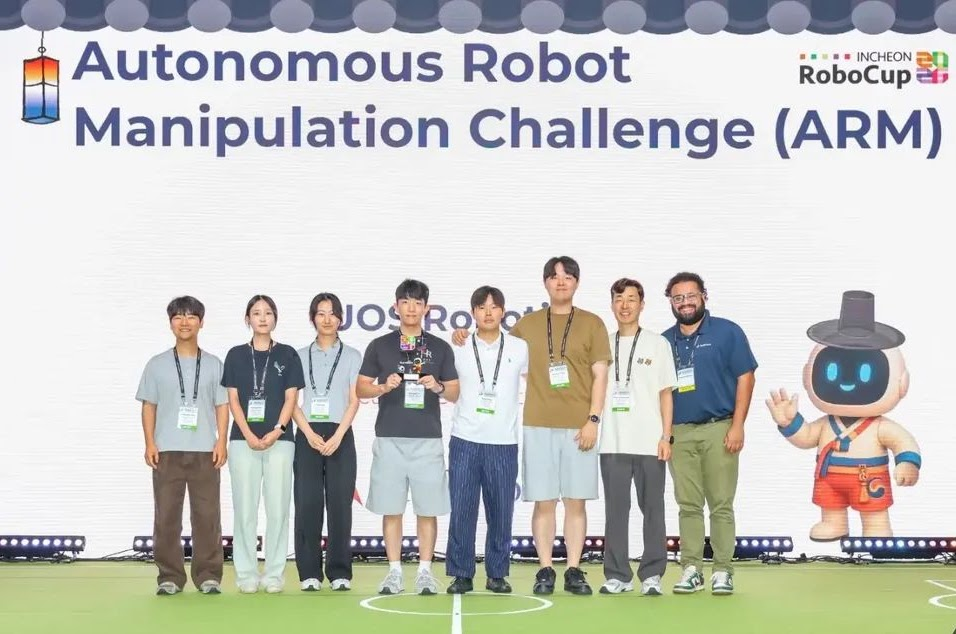
Figure 1. UOS Robotics celebrates its ARM Challenge victory at RoboCup 2026 in Incheon, South Korea.
Meet the Team and the RoboCup ARM Challenge
The RoboCup Autonomous Robot Manipulation (ARM) Challenge brings together student teams and young researchers from around the world to tackle autonomous robotic manipulation. Robots must recognize objects, generate grasp poses, and pick-and-place them as their positions and orientations change—all without human intervention. The 2026 challenge centers on a recycling task involving objects of different shapes and colors, including bottles and cans.
A successful ARM challenge solution requires perception, planning, and control to work together as one reliable system. The competition serves as a comprehensive test of end-to-end robotics development and system integration, challenging teams to integrate these components and take their solutions from simulation to physical hardware.
The competition has two rounds. In Round One, the global simulation challenge, teams develop and test their perception, planning, and control algorithms in a photorealistic 3D environment provided by MathWorks using Simulink 3D Animation. They submit their code and a demonstration video for evaluation. In 2026, 259 teams registered for the simulation round, and 27 teams developed and submitted working solutions. The simulation round provides an excellent opportunity to practice robotic manipulation skills without hardware constraints and allow teams to simulate and test their algorithms before moving to the physical robot.
The top qualifying teams advance to Round Two, the on-site final, where they demonstrate their solutions on a physical UR5e robot from Universal Robots. UOS Robotics was one of five teams in the 2026 final, bringing a complete workflow that integrated deep-learning-based perception and grasp generation with robot control using Robotics System Toolbox™ Support Package for Universal Robots Series Manipulators.
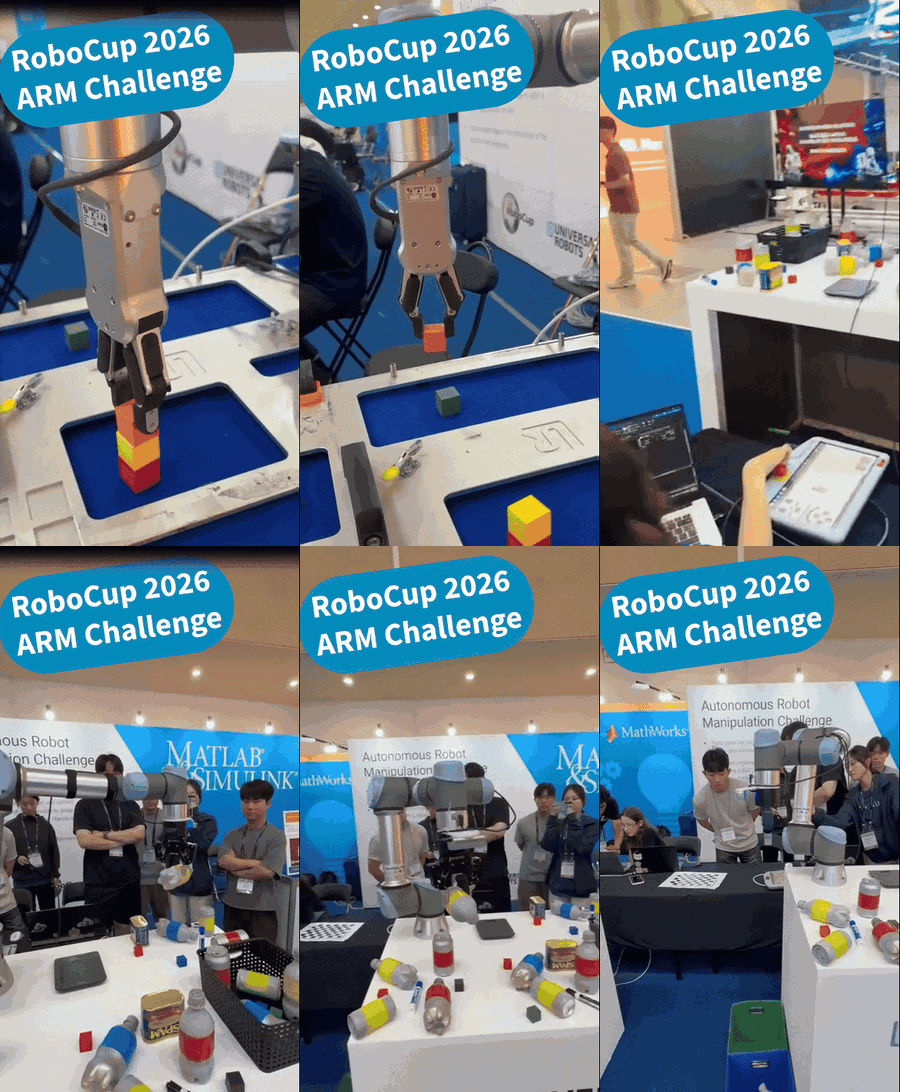
Let’s take a closer look at how the UOS Robotics team built its simulation solution, adapted it for the physical UR5e, and prepared for the on-site final. Over to the team.
We are UOS Robotics, a team of graduate and undergraduate students from the Robotics Laboratory in the Department of Mechanical and Information Engineering at the University of Seoul, led by Professor Myun Joong Hwang. Our research interests include robot perception, manipulation, motion planning, and control.
We joined the ARM challenge because it gave us the opportunity to test our research on a complete physical robot system. In the laboratory, perception, grasp generation, and robot control are often tested independently. This competition required all of these components to work together reliably in a limited amount of time and under changing object configurations.
Senior members of our lab won the championship in both 2022 and 2023. We missed the 2024 and 2025 competitions due to scheduling issues, but we made it a point to return in 2026 because the final was being held in South Korea.
For us, the challenge was also an opportunity to gain experience building an end-to-end robotic system. Our goal was to develop a UR5e-based autonomous sorting system that could detect objects, generate suitable grasp poses, and place each object into its designated bin. In order to achieve this, we needed to integrate deep-learning models, RGB-D image processing, coordinate transformations, inverse kinematics, and robot communication and gripper control into one single workflow.
Round One: Building a Winning Simulation Solution
Let’s break down the challenge. The task was to sort multiple objects placed randomly in the robot workspace. Their positions and orientations were not known in advance, so the grasping part of the task could not rely on fixed robot trajectories.
The robot first had to understand the scene from an RGB-D image. It needed to distinguish individual objects even when they were close together or partially occluded. Once an object was detected, the robot had to generate a grasp pose that was not only geometrically feasible but also reachable and stable for the robot.
Bringing the Components Together
We used MATLAB as the main integration environment for the complete workflow. The YOLO segmentation model and the conditional flow matching-based grasp-generation model were first trained in PyTorch. Then we exported both models in ONNX format and imported them into MATLAB for inference, using Deep Learning Toolbox™ and the Deep Learning Toolbox Converter for ONNX Model Format.
MATLAB enabled us to use our trained neural networks while connecting them directly to the remaining robotics pipeline. MATLAB enables us to process the model outputs, calculate robot configurations, and send the resulting commands within one environment.
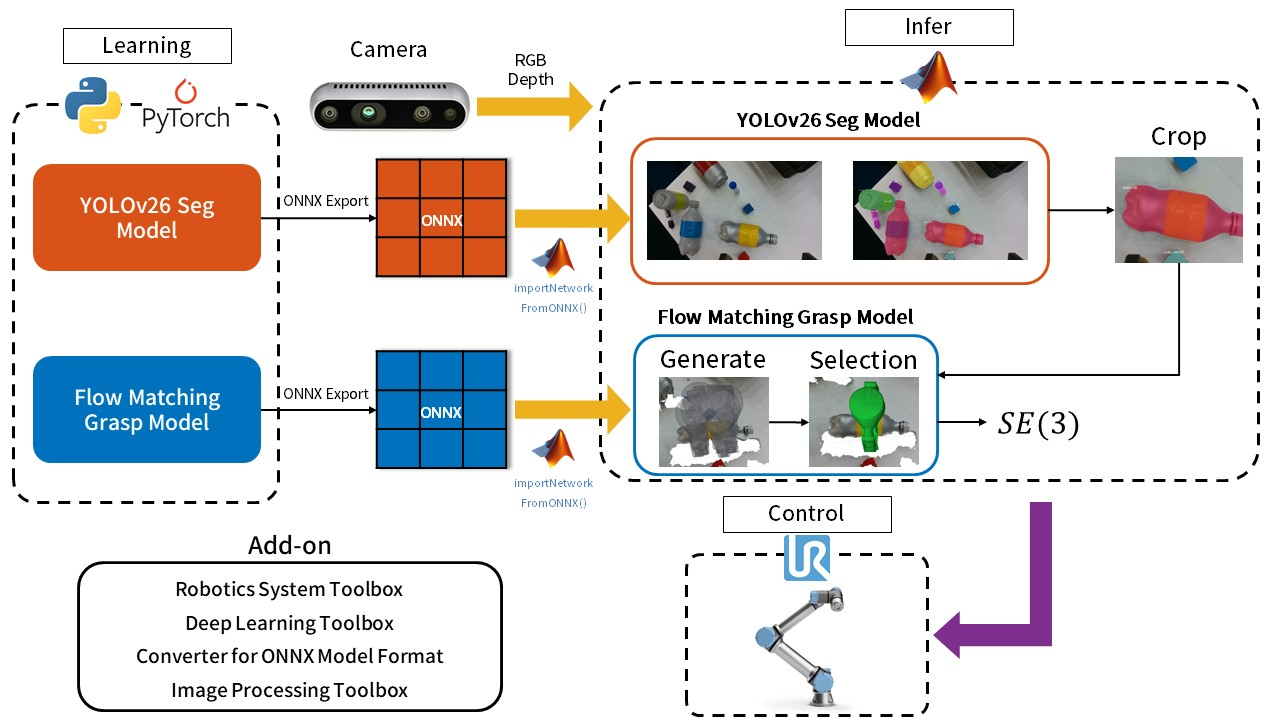
Figure 3. The team’s overall learning, inference, and control workflow.
We divided the problem into three main stages: object perception, grasp generation, and robot execution.
Stage 1: Finding the Target Object
The robot began each cycle by moving to an observation pose. The robot captured an RGB-D image and the YOLO model was used to identify individual objects and generate an instance mask for each detected object. Using the segmentation mask, we cropped a square region centered on the target object from the RGB and depth images. Invalid depth measurements were filtered out before this cropped observation was passed to the grasp-generation model.
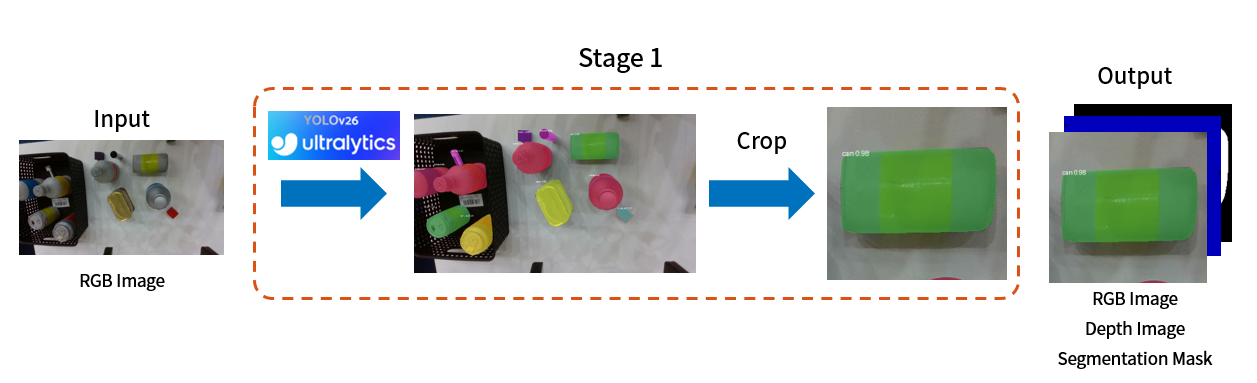
Figure 4. Object perception identifies the target and produces a segmentation mask.
Stage 2: Generating Possible Grasps
A single object can have several suitable grasp poses. We used an implementation based on the TorchCFM library to generate multiple candidates rather than predict a single deterministic pose. Each grasp pose describes where the gripper should be positioned and how it should be oriented in three-dimensional space. Our simulation configuration generated 64 candidates at each grasp-generation attempt. Producing several options gave the next stage a choice when a candidate was obstructed or could not pass the robot’s inverse-kinematics checks.
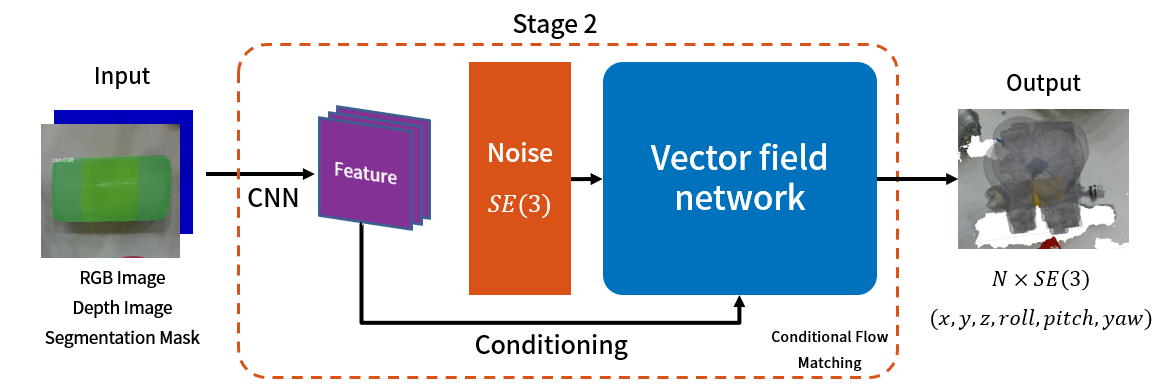
Figure 5. Conditional flow matching generates candidate gripper poses for the selected object.
Stage 3: From Grasp Candidates to Robot Motion
Not every generated candidate was suitable for execution. We filtered out candidates that could lead to unintended collisions. The remaining candidates were scored according to geometric criteria, including proximity to the object center and approach direction, and the highest-scoring feasible grasp was selected. In the competition environment, near-vertical, top-down grasps were often more reliable because they reduced the chance of contacting nearby objects.
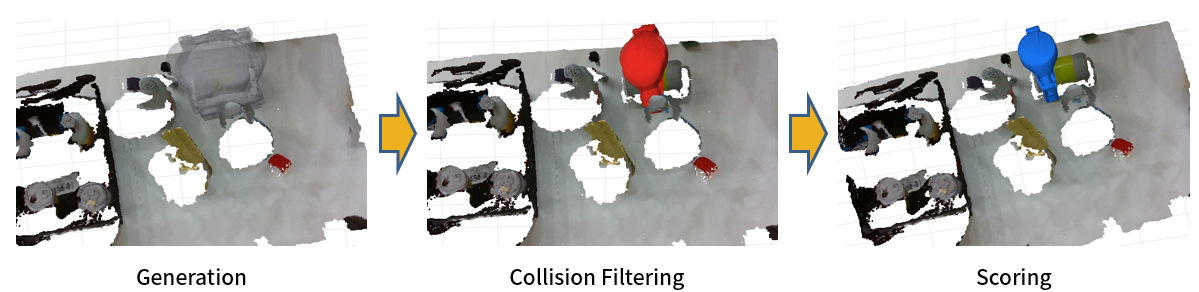
Figure 6. Generated grasps are screened and ranked before robot execution.
The generated grasp poses were initially expressed in the camera coordinate frame. In simulation, we used the camera pose calculated from the robot model and its mounting offset to transform the grasp poses into the robot base frame. We then used Robotics System Toolbox to solve inverse kinematics for both a pre-grasp pose and the grasp pose, selecting the first ranked candidate that passed both checks.
We sent joint and gripper commands through ROS 2 to the virtual robot in Simulink using ROS Toolbox. The virtual robot moved to a pre-grasp position, approached the object along the selected grasp direction, and closed the gripper. It then lifted the object vertically, moved to the destination bin, and opened the gripper. The provided simulation model handled object attachment and release through its gripper-contact logic.
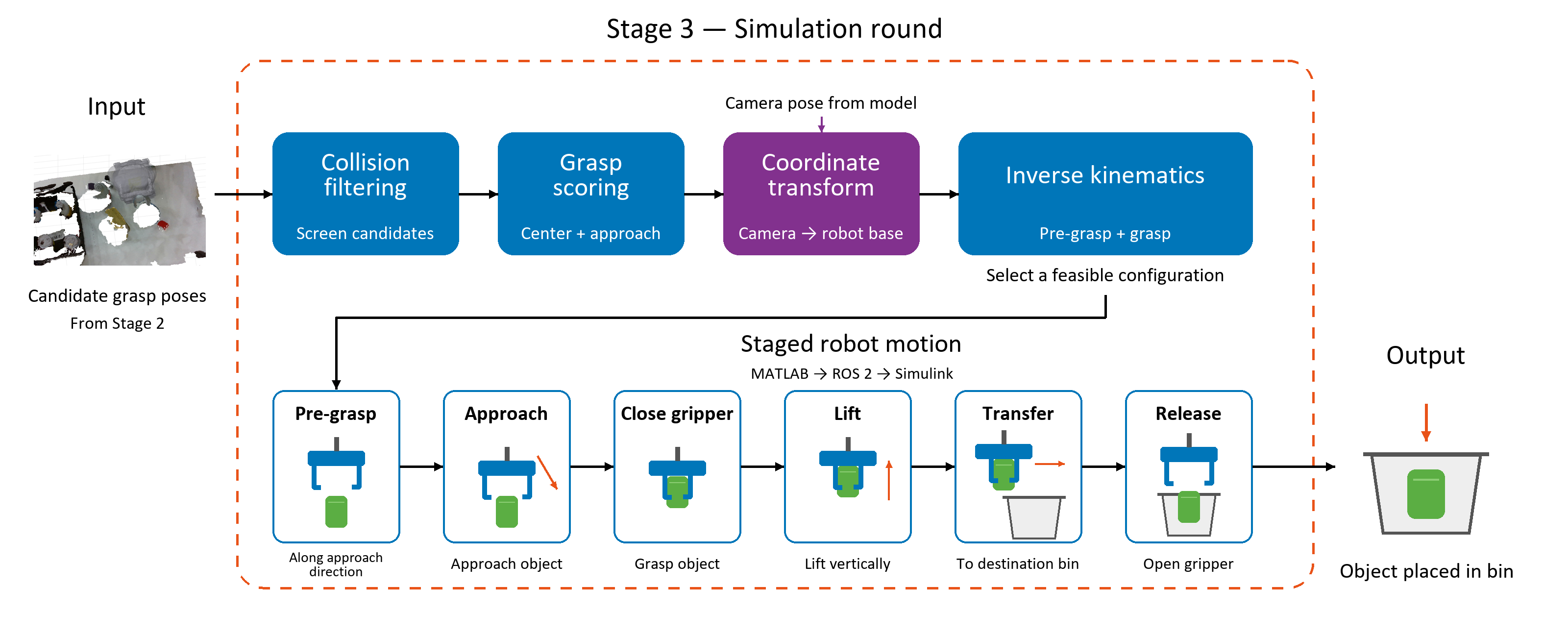
Figure 7. Stage 3 in the simulation round.
Testing the Complete Simulation Workflow
Our staged workflow structure made the system easier to debug. When a failure occurred, we could determine whether it came from segmentation, grasp generation, coordinate transformation, inverse kinematics, robot motion, or gripper operation.
Simulation allowed us to validate the overall task logic repeatedly before testing it on the physical robot. We could verify the perception-to-grasp pipeline, inspect generated grasp poses, and test the sequence of robot motions without the risk of collisions or hardware damage. This made it possible to iterate more quickly on the overall system structure before the final challenge.
Watch our simulation-round demonstrations below and download our code for the simulation round here.
We took first place in the simulation round and earned a place in the on-site final. The next step was to bring the workflow to the physical UR5e.
From Simulation to the Physical Robot
Successful behavior in simulation did not directly guarantee success on the physical robot. In the real environment, RGB-D noise, calibration errors, uncertain object placement, and physical contact introduced additional failure modes. Inverse-kinematics and motion constraints also remained important when moving from the model to the actual setup. A good segmentation result could still lead to a failed grasp, and a promising grasp candidate could still fail because of calibration error, inverse-kinematics limitations, or unstable robot motion.
We therefore combined the learned grasp model with practical filtering and staged robot motions, and tested the components again on the physical UR5e. To improve reliability, we added several practical checks between grasp generation and robot execution. We first removed grasp candidates that were likely to collide with the object or surrounding scene, and then scored the remaining candidates according to their distance from the object center and their approach direction. We also separated the motion into pre-grasp, vertical approach, grasp, lift, and transfer stages. This staged motion structure made it easier to identify and debug errors at each step of the robot execution.
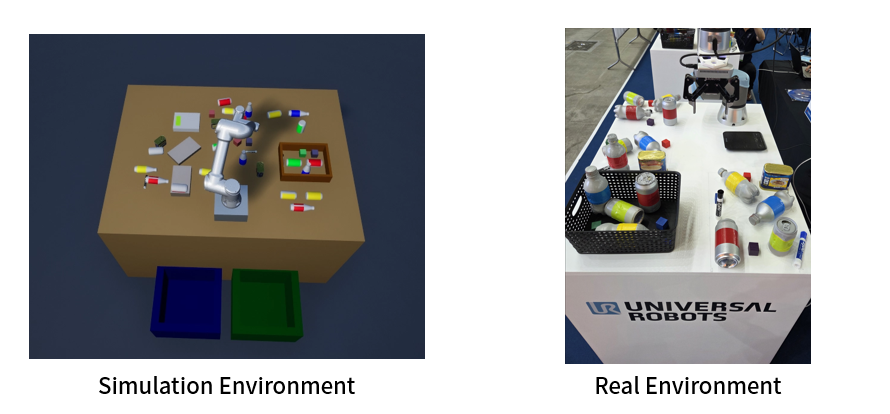
Figure 8. The simulation environment and physical competition setup.
Connecting Camera Coordinates to the Robot
As we mentioned earlier, the selected grasp was initially expressed relative to the camera. Using the camera-to-robot calibration result, we transformed it into the UR5e base frame. We then used Robotics System Toolbox to calculate a robot configuration through inverse kinematics.
This step mattered because the camera and robot described positions from different reference frames. The camera-to-robot transform established the relationship between them. A transform available from a simulation model could not replace checking that relationship on the physical setup.
Direct UR Remote Control with MATLAB
MATLAB was also where we issued commands to the physical UR5e. After processing the camera data and calculating the desired robot configuration, we sent the arm and gripper commands through the Real-Time Data Exchange (RTDE) Connectivity Interface. Direct remote control from MATLAB kept perception, grasp selection, and the task sequence connected within our program, while the robot controller executed the requested motions.
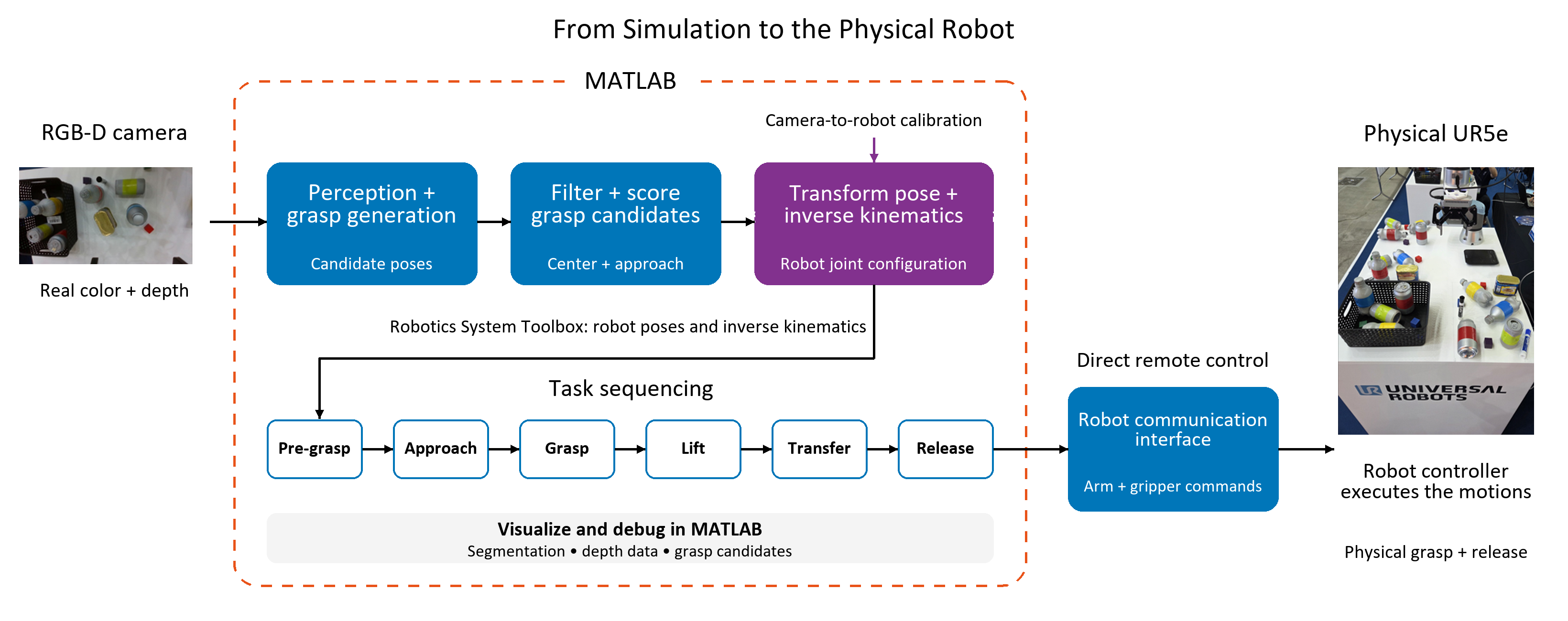
Figure 9. From perception to physical robot execution.
Another advantage of MATLAB was its visualization capability. We could inspect segmentation results, preprocessed depth data, and generated grasp candidates, which helped us detect errors before executing motion on the physical robot. Seeing these intermediate results alongside the robot calculations helped us understand how an error in one stage affected the next.
Round Two: Winning on Home Soil
During the competition, the robot autonomously observed the workspace, detected objects, generated grasp candidates, selected a suitable grasp, picked up the object, and placed it into the designated bin.
For us, the most important result was not just the final ranking. The competition showed how our learning-based models could be integrated into a complete physical robot system. It also gave us experience identifying and solving system-level problems that were difficult to observe in isolated laboratory tests.
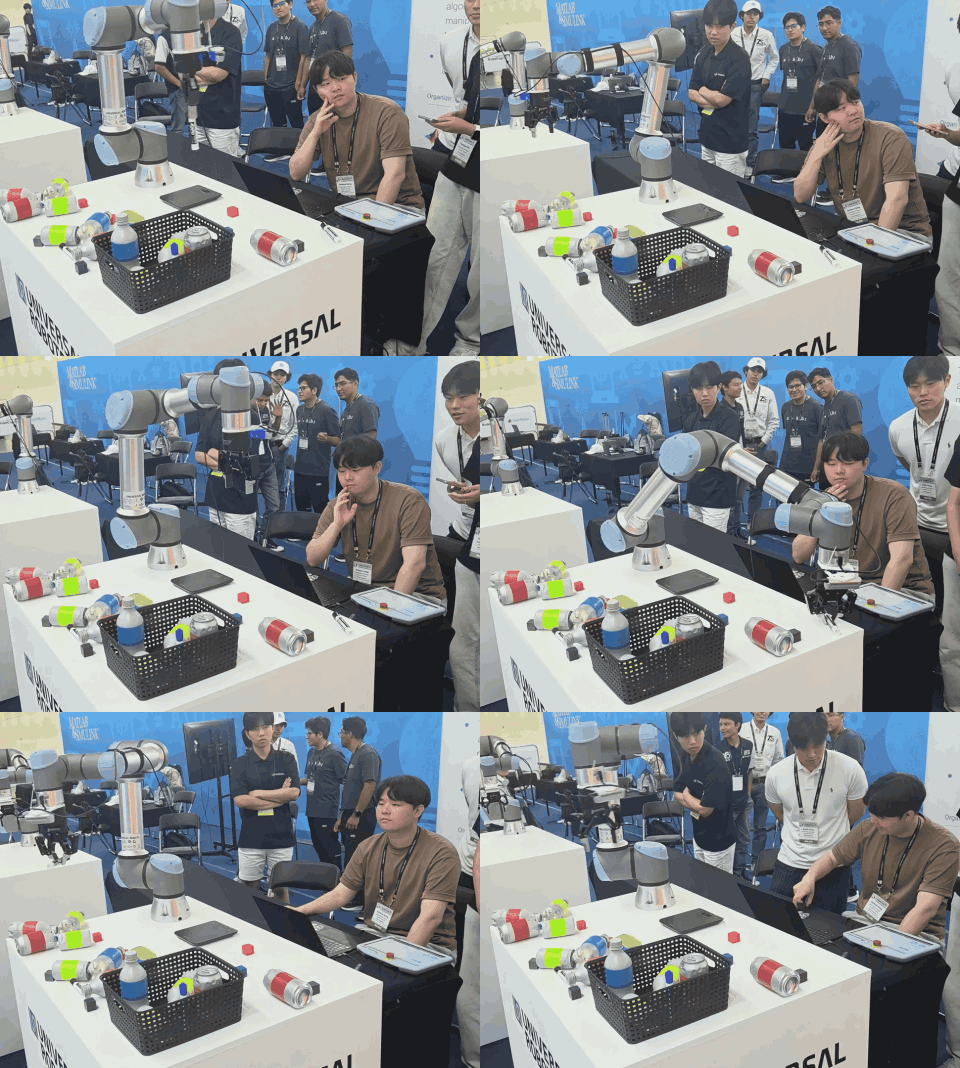
Figure 10. UOS Robotics monitors the UR5e during the on-site competition.
What the Team Learned—and What Comes Next
Our main takeaway was that a successful robotic manipulation system depends on more than the accuracy of an individual neural network. Perception, grasp generation, coordinate transformation, inverse kinematics, robot motion, and gripper operation all need to work together. Even a small error in one stage can affect the entire task.
MATLAB was useful because it provided a common environment for integrating these different components. We could import ONNX models, process RGB-D images, calculate robot poses, solve inverse kinematics, and control the UR5e.
We also learned that simple and understandable strategies can be effective in a real robot system. We used predefined observation poses, preferred centered and downward-facing grasps, and separated the motion into clear stages. We also considered the order in which objects were handled to reduce occlusion and keep the remaining objects accessible.
In future work, we plan to improve collision checking, grasp-candidate evaluation, and recovery behavior after failed detections or grasps.
Finally, the competition emphasized the importance of teamwork. Different members worked on perception, grasp generation, robot control, testing, and competition strategy. Frequent communication was essential because changes in one part of the pipeline often affected the others.
- 类别:
- Robotics


评论
要发表评论,请点击 此处 登录到您的 MathWorks 帐户或创建一个新帐户。