
Generating Synthetic Data for Urban Autonomy with Intersection-Centered Traffic Model
Developing ADAS and Automated Driving systems for urban environments is a high-stakes challenge. Intersections are particularly difficult to validate because autonomous vehicles must navigate complex road geometries, traffic signals, and highly dynamic interactions with other road users.
Simulation plays a critical role in addressing this challenge by providing a safe, scalable, and cost-effective environment for system validation and synthetic data generation (SDG) for fine-tuning AI models. However, manually creating realistic ambient traffic around intersections is time-consuming and does not scale, particularly when covering diverse behaviors and edge cases.
In the previous posts, we:
- Established the foundation for a MATLAB-based traffic swarm framework that generates randomized ambient traffic within a fixed region of interest (ROI).
- Developed a scalable actor behavior model in Simulink to fully leverage the Model-Based Design (MBD) workflow.
While the ROI approach is effective for open roads, it often lacks the density and precision needed to stress-test intersection dynamics. This post explores the transition to intersection-centered traffic generation, which allows us to focus actor spawning on critical intersections. To support this, we also extend the actor behavior model to comply with traffic signals, ensuring a realistic and high-fidelity simulation environment.
Create Urban Scenes in RoadRunner
We begin with a realistic, high-fidelity urban scene using the USCityBlockBidirectional.rrscene in RoadRunner (refer to this example for more details). This pre-built environment features 15 intersections with functioning traffic signals and four-lane bidirectional roads, providing the perfect playground for urban validation.

RoadRunner facilitates the design of these complex scenes, ensuring that the physical and semantic layout—including lane-level connectivity, complex junction geometries, and localized traffic signal placement—aligns precisely with the rigorous requirements of urban autonomy testing.
Create Scenarios in RoadRunner Scenario
To create scenarios in RoadRunner Scenario, we first add an ego vehicle and assign it a predefined route. This route serves as the “reference path” for our autonomous system’s task. You can define this path through two primary methods:
- Interactively: Manually draw a path by right-clicking the road surface to place waypoints. RoadRunner automatically snaps these points to lane centers, ensuring the path is lane-compliant and follows the road geometry.
- Programmatically: Use automated path planning to generate the route. This involves building a navGraph from the road network provided by the RoadRunner HD Map and using a plannerAStar object to calculate the optimal route between start and goal positions. A key advantage of the programmatic approach is the ability to perform replanning—the process of dynamically recalculating the vehicle’s route during the simulation in response to environmental changes, such as a blocked lane or a revised destination. This capability is critical for urban autonomy, as it allows the ego vehicle to remain flexible and find the most efficient, legal route when the initial path is no longer viable.

By defining the ego path first, we create the necessary foreground scenario. Then, we add background traffic to introduce the realism and unpredictability needed for validation.
For more details about this workflow, please refer to the following resources:
Add Randomized Ambient Traffic
To validate the path-following feature through intersections under realistic traffic conditions, we add randomized ambient traffic. This exposes the autonomous driving system to diverse, unpredictable interactions, ensuring robust and safe behavior across a wide range of scenarios.
An earlier post introduced a MATLAB-based traffic swarm framework that generates randomized ambient traffic within a fixed region of interest (ROI). However, the predefined ROI approach often lacks the density needed to stress-test specific junction dynamics. By transitioning to an Intersection-centered Traffic model, agents are positioned to interact with traffic signals and cross-traffic at targeted intersections. This setup enables rigorous stress-testing of perception and motion-planning systems in complex intersection scenarios.
Configure Traffic Swarm Parameters
Compared to the predefined ROI approach, the key distinction of the Intersection-centered Traffic model is the introduction of a circular traffic swarm area defined between inner and outer radii and centered at intersections, as shown in the figure below.

We introduce a spawn delay that defines the time between the simulation start and the spawning of the traffic swarm. This dynamic actor spawning can be achieved by adding a “Wait” action before the initial action phase.
Ambient traffic is generated only when the ego vehicle enters the swarm area. This dynamic spawning strategy reduces unnecessary computation in unrelated regions of the simulation while focusing resources on the intersection under test.
The following code snippet illustrates an example set of traffic swarm parameters used in the Intersection-centered Traffic model.
%--- Define traffic swarm configuration
trafficSwarmConfig.initialSpeedRange = [10, 15]; % Speed range [vmin, vmax] (m/s)
trafficSwarmConfig.TTC = 1.0;                    % Safe distance between vehicles in Time-To-Contact (sec)
trafficSwarmConfig.MinRouteLength = 239.9;       % Min route length (m)
trafficSwarmConfig.JunctionId = 25;              % Intersection id
trafficSwarmConfig.Rmin = 27.3;                  % Set the minimum radius for the traffic swarm (m)
trafficSwarmConfig.Rmax = 74.7;                  % Set the maximum radius for the traffic swarm (m)
trafficSwarmConfig.SpawnDelay = 1.5;             % Traffic spawning delay (sec)

%--- Define traffic distribution
actor(1).Asset = "Sedan";
actor(1).NumOfActor = 6; % Set number of actors for Sedan
actor(2).Asset = "SK_PickupTruck";
actor(2).NumOfActor = 3; % Set number of actors for Pickup Truck
actor(3).Asset = "DeliveryVan";
actor(3).NumOfActor = 2; % Set number of actors for Delivery Van

trafficSwarmConfig.TrafficDistribution = actor;
trafficSwarmConfig.NumberOfVehicles = sum([actor.NumOfActor]); % Total number of traffic swarm
Create the Traffic Swarm
After configuring the swarm parameters, we generate a randomized traffic swarm centered at intersections using the following MATLAB code snippet:
rrApi = roadrunnerAPI(rrApp);
AmbientTraffic = createTrafficSwarmAroundIntersection(mapInfo,trafficSwarmConfig,egoActor,rrApi);
The createTrafficSwarmAroundIntersection() function randomizes traffic poses centered at intersections while maintaining safe distances between vehicles according to the specified traffic swarm parameters (such as the Time-To-Contact).

It is important to note that these traffic swarms execute randomized maneuvers and routes at the intersection, with randomized initial poses. Maneuvers at each intersection are selected at random based on lane-connection information from the V2X map. This ensures that even though the traffic is randomized, every vehicle follows a valid, navigable path through the intersection.

For more details on generating V2X map messages from RoadRunner HD maps, please refer to the following resource:
Add Ambient Traffic to RoadRunner Scenario
We add the randomized traffic swarm to the RoadRunner Scenario using the RoadRunner Scenario Authoring APIs. These MATLAB functions allow you to programmatically create and author scenarios in RoadRunner.
The following MATLAB code demonstrates how to use MATLAB functions to define actor assets, initial positions, routes, behavior model, and scenario logic for each ambient traffic vehicle.
rrApp.newScenario();          % Create new scenario in RoadRunner Scenario
rrApi = roadrunnerAPI(rrApp); % Create RoadRunner authoring API object for the current RoadRunner session rrApp
prj = rrApi.Project;          % get current RoadRunner project
rrs = rrApi.Scenario;         % get current RoadRunner scenario
phaseLogic = rrs.PhaseLogic;  % Logic for scenario

numActors = height(AmbientTraffic); % trafficSwarmConfig.NumberOfVehicles;
colors = lines(numActors);
colors(:,4) = 1; % Alpha (opacity) = 1: no transparency
actors = cell(numActors,1);

builtInBehavior = getAsset(prj,"Behaviors/TrafficFollower.rrbehavior","BehaviorAsset");

for i = 1:numActors
   assetPath = getAssetPath(AmbientTraffic.ActorType(i));
   actorAsset = getAsset(prj,assetPath, "VehicleAsset"); % extract vehicle asset
   actors{i} = rrs.addActor(actorAsset, AmbientTraffic.InitPosition(i,:)); % add actor to RoadRunner Scenario
   actors{i}.ActorID = AmbientTraffic.ActorId(i); % assign actor ID
   if actors{i}.ActorID==EgoActor.ActorId % actor is ego?
      actors{i}.Name = string(EgoActor.Name);
   end

   actors{i}.Color = colors(i,:);             % assign actor color, RGBA
   actors{i}.BehaviorAsset = builtInBehavior; % assign builtInBehavior
   actors{i}.InitialPoint.autoAnchor();       % Anchor point (initial position) to nearest road

   % Set initial speed to an absolute value
   initPhase = phaseLogic.initialPhaseForActor(actors{i});
   initSpeedAction = initPhase.findActions("ChangeSpeedAction");
   initSpeedAction.Speed = AmbientTraffic.Speed(i);
   initSpeedAction.SpeedReference = "absolute";

   if actors{i}.ActorID~=EgoActor.ActorId % actor is not ego?
      % Add Serial Phase before initial phase for spawning actor
      spawnPhase = addPhaseInSerial(phaseLogic,initPhase,"SystemActionPhase",Insertion="before");
      addAction(spawnPhase,"WaitAction");
      durCondition = setEndCondition(spawnPhase,"DurationCondition");
      durCondition.Duration = trafficSwarmConfig.SpawnDelay; % Set spawn delay time
   end
end
Assign Actor Behaviors to the Ambient Traffic Vehicles
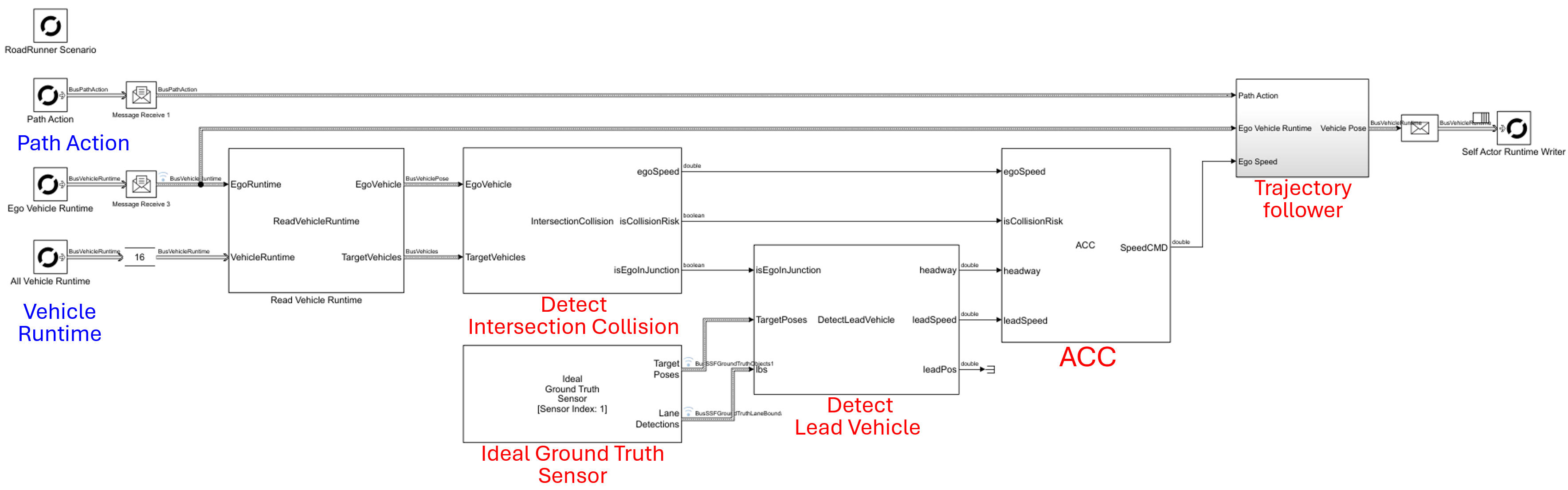
Each ambient traffic vehicle is assigned a behavior model that enables it to follow a designated route while complying with traffic signals and avoiding collisions using Adaptive Cruise Control (ACC). To fully leverage the Model-Based Design (MBD) workflow, this behavior model is implemented in Simulink, as shown below, and incorporates the following controllers:
- Trajectory Follower: Ensures the vehicle accurately tracks the randomized path generated at the intersection.
- Adaptive Cruise Control (ACC): Manages longitudinal speed to maintain safe distances from other vehicles.
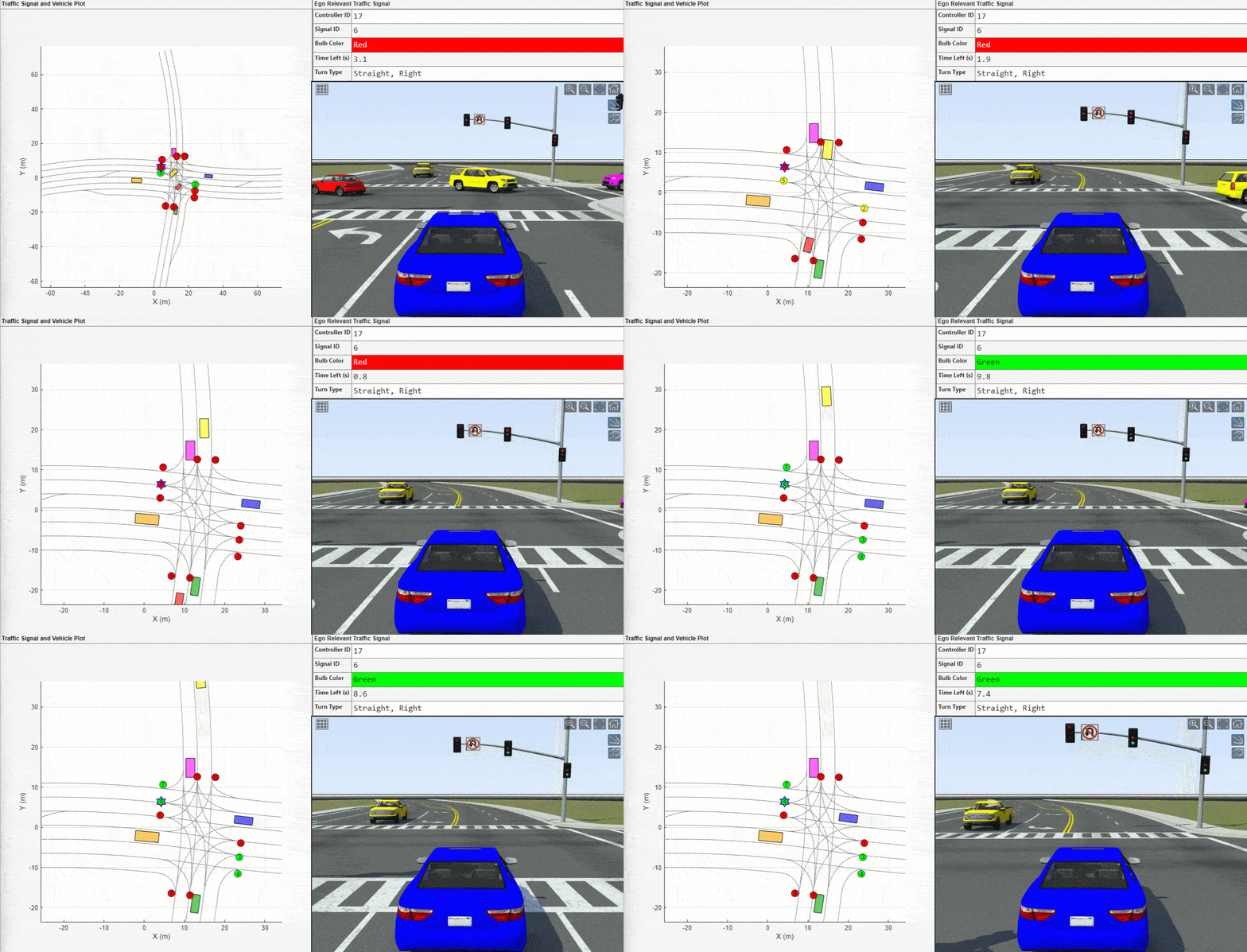
- Traffic Signal Follower: Allows the vehicle to perceive and respond to the state of traffic signals at the intersection.

In this implementation, the lead vehicle in the same lane as the ego vehicle is identified by localizing each vehicle’s pose on the V2X map. We chose this approach rather than using an ideal ground truth sensor to demonstrate an alternative implementation method—comparing map-based vs. sensor-based logic.
For more details on the implementation of ACC and the Trajectory Follower, see my previous post. Please note a key architectural detail: the predefined reference path is assigned directly to the Trajectory Follower block within the Simulink model, rather than being fed from the Path Following Action of the RoadRunner Scenario Reader. This provides another design alternative, allowing future flexibility in adopting online replanning.
The Traffic Signal Follower is implemented by accessing the traffic signal controller runtime and traffic signal runtime APIs in RoadRunner Scenario. For more details about the Traffic Signal Follower, please refer to the following resource:
Publishing Ready-to-Run Actor Behaviors
To assign the same Simulink actor behavior to multiple actors in RoadRunner, you can publish a ready-to-run package from your Simulink behavior model. This approach enables RoadRunner to execute the compiled behavior directly, without rebuilding the Simulink model at runtime, and allows the same package to be reused by many actors.
Use the following command to generate the package:
Simulink.publish.publishActor('TrafficFollowerSL',PackageType='ReadyToRun')
For further details on Ready-to-Run Actor Behaviors, see my earlier post and the following link:
Run Scenario Simulation
The video below shows an example simulation using this intersection-centered workflow. In this scenario, a blue ego vehicle approaches an intersection; after a predefined spawn delay, the ambient traffic swarm is dynamically spawned. All vehicles, including the ego, comply with traffic signals, and no collisions occur despite the high density of the intersection.
By using this workflow, you can validate your urban autonomy models in a realistic, dynamic environment that accurately represents the unpredictability of city driving.
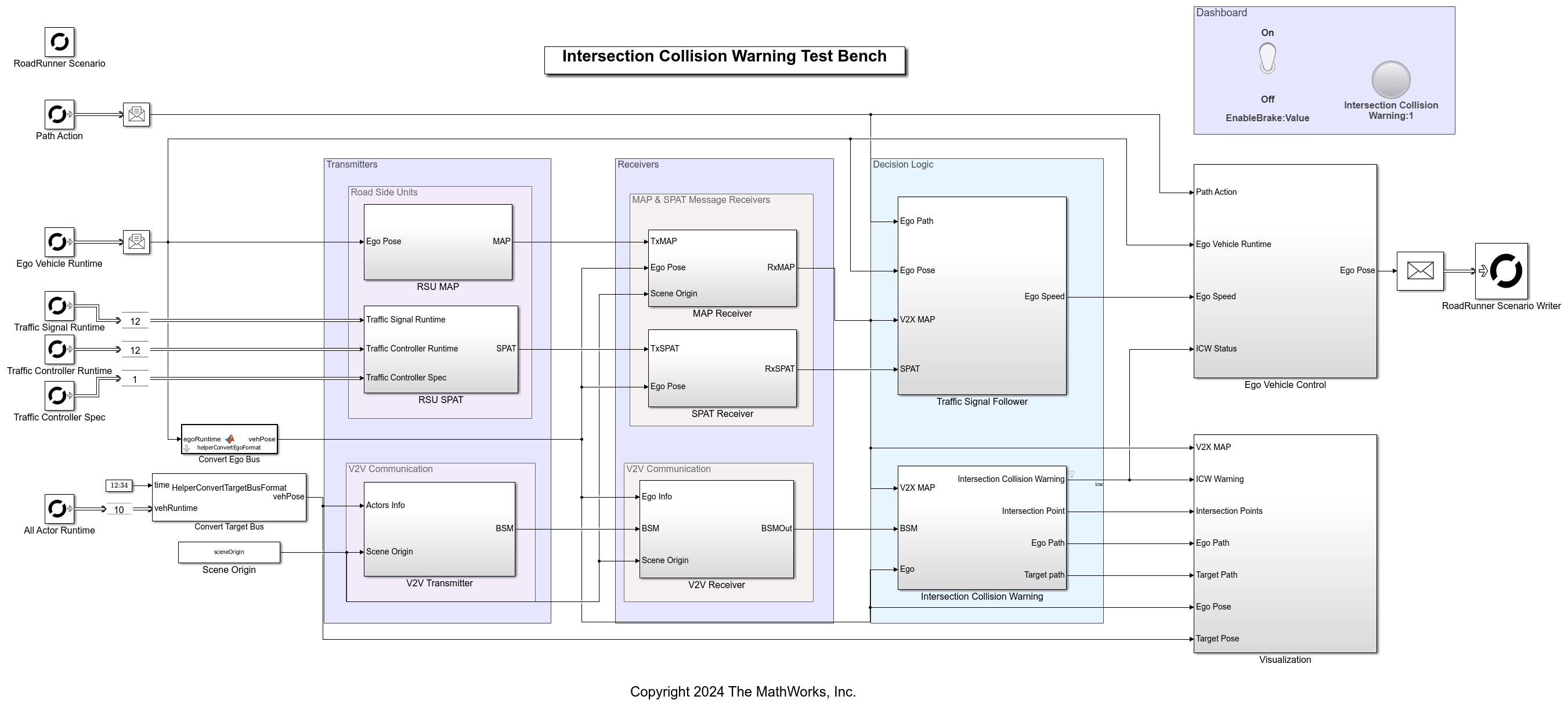
See an example of such a model below:
Conclusion
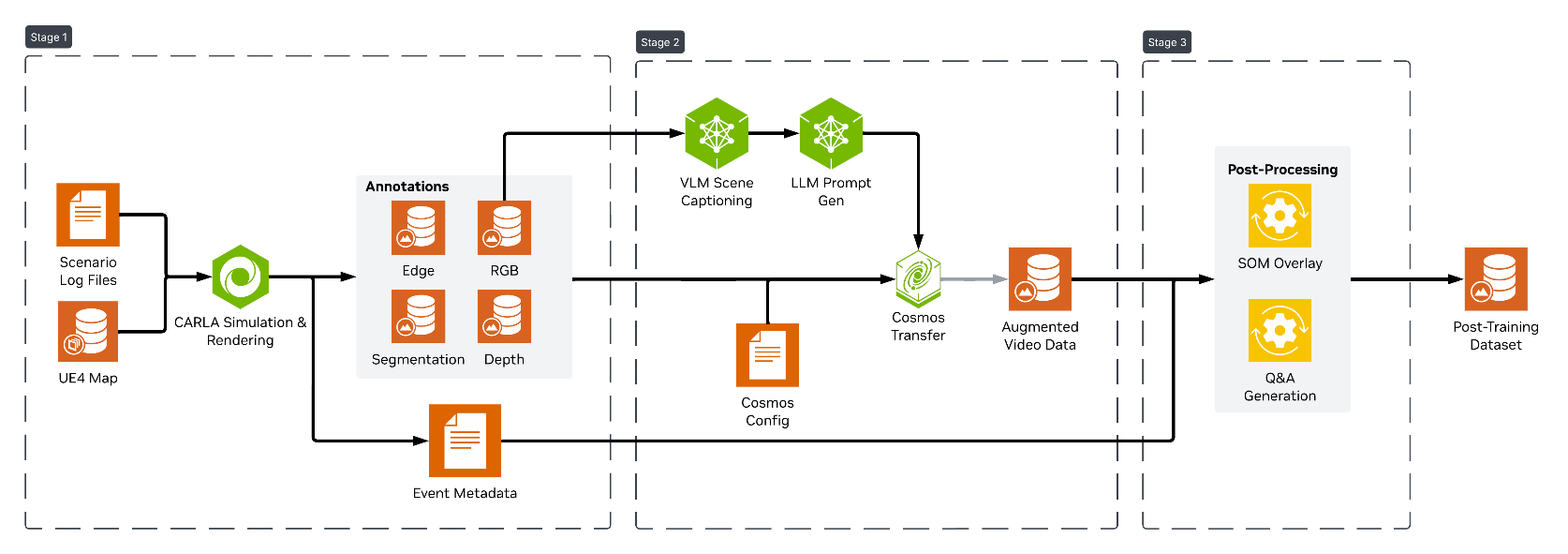
The Intersection-Centered Traffic Model allows us to focus actor spawning on critical intersections. This workflow ensures that the resulting synthetic data captures complex edge cases—such as signal compliance and cross-traffic yield behaviors—that are often missed in broader ROI approaches. Ultimately, this process not only validates the safety and robustness of motion planners in complex urban environments but also provides the high-fidelity synthetic data necessary for fine-tuning next-generation AI, such as NVIDIA’s Cosmos or Alpamayo vision-language-action (VLA) models.
To request the MATLAB code and Simulink model described in this post or receive technical support for the workflow, please contact MathWorks at automated-driving@mathworks.com.



Comments
To leave a comment, please click here to sign in to your MathWorks Account or create a new one.