
Teaching AI Agents How Engineers Work
|
Guest blogger: Akash Gopisetty I'm pleased to welcome guest blogger Akash Gopisetty, Product Marketing Manager, Radar and Signal Processing. Akash explores how reusable skills help AI agents follow established engineering methods. |
Connecting AI agents to engineering tools gives them the ability to write code, execute workflows and evaluate results, all within an established engineering environment. This ensures the results are inspectable, testable and verifiable.
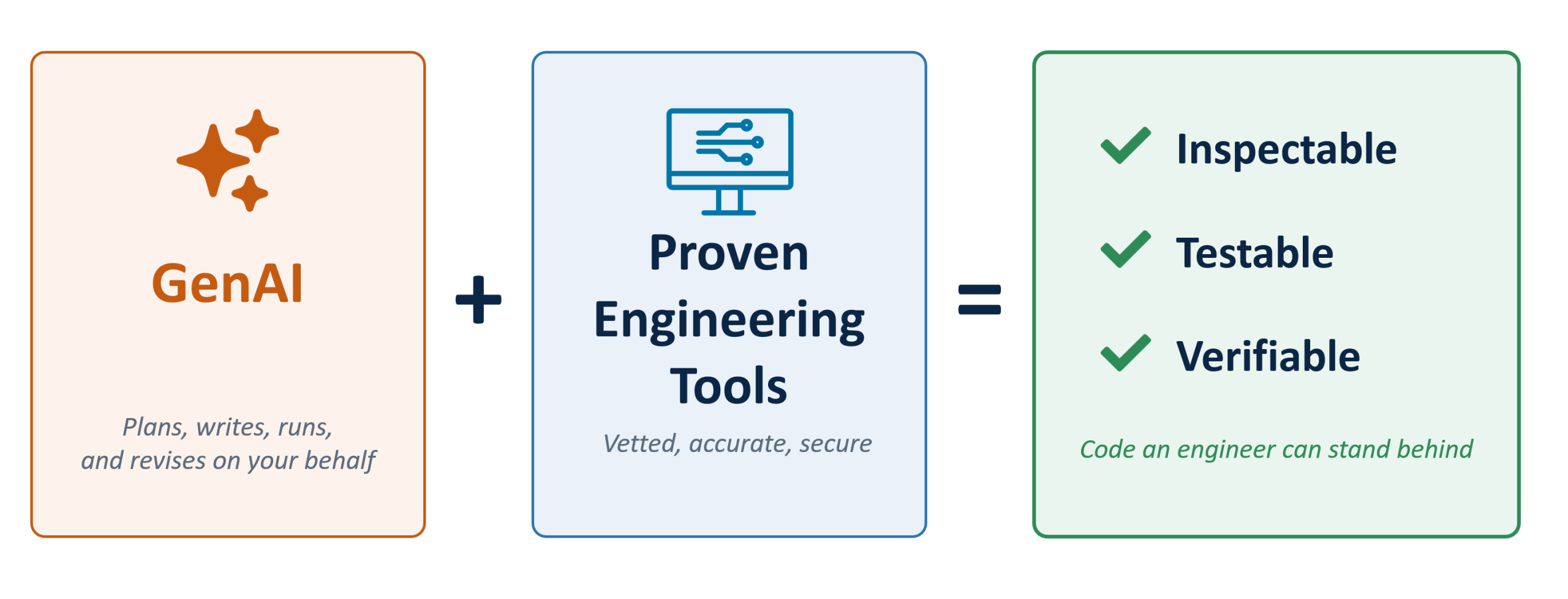
Figure 1: Grounding AI in engineering tools
However, access to engineering tools alone does not provide the agent with the domain expertise needed to solve specialized engineering problems. That is where skills come in.
Skills are a way to capture how an experienced engineer would approach a problem. They are especially useful in technical domains like wireless communication, signal processing, and RF and antenna design, where there may be multiple valid approaches and the right choice depends on domain-specific assumptions, selecting the right methods and engineering tradeoffs. For example, an RF or antenna engineer may need to translate requirements for frequency, gain, coverage and polarization into various antenna and array architecture. They may also need to factor in impedance matching, mutual coupling and array effects and evaluate whether the resulting design meets the system-level performance requirements. Skills could be used to capture this reasoning and guide the agent through a workflow, allowing the engineer to focus on reviewing the design choices and exercising judgement over the final design.
Instead of asking an agent to discover or guess the right procedure at each prompt, engineers can codify proven methods into skills, version them like any other artifact and reuse them across relevant workflows and across compatible AI agents.
Skills are especially valuable when workflows require:
- Domain knowledge: The assumptions, calculations, tool choices, and validation steps that define a sound approach to tasks such as digital filter design, standards-based wireless waveform generation, model calibration, or test development.
- Consistency and traceability: A repeatable workflow whose instructions can be reviewed, tested, audited, and improved like any other engineering artifact.
- Reusability: A portable way to apply the same engineering process across projects, teams, and compatible AI agents without rebuilding the guidance from scratch.
Using Agentic AI Skills with MATLAB:
AI Agents can be connected to MATLAB using MATLAB Agentic Toolkit. With the guardrails of MATLAB engineers can produce verifiable results with AI Agents. For technical domains like radar, communications, RF and mixed signal design the toolkit also includes a catalog of reusable skills.
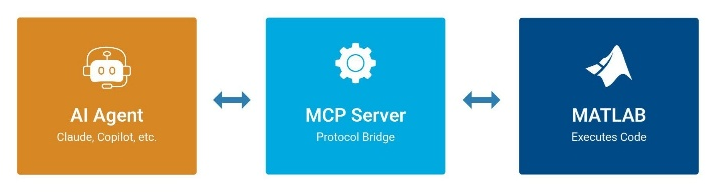
Figure 2: Connect AI Agents to MATLAB
You don't need to choose individual skills for each task. Install the skill groups relevant to your work, and the agent can identify and apply appropriate skills based on your request.
| Skill Group | Example Workflows |
|---|---|
| Radar |
|
| Reporting and Database Access |
|
| RF and Mixed Signal |
|
| Robotics and Autonomous Systems |
|
| Signal Processing |
|
| Test and Measurement |
|
| Wireless Communications |
|
Table 1: Selected MATLAB Agentic Toolkit skill groups and example workflows
Applying Skills to a Real-World Design Challenge:
Let’s put these skills to the test. Consider a wireless system that uses the same infrastructure and spectrum for both communication and radar sensing. Commonly referred to as Integrated Sensing and Communication (ISAC), this approach enables a system to exchange data while also detecting and locating objects in its coverage area. ISAC is becoming increasingly important as wireless spectrum grows more congested.
In this example, an ISAC base station operates at 28 GHz and must sense targets within its coverage area while communicating in spectrum shared with a neighboring system. The sensing waveform must provide the required range resolution, maintain low range sidelobes, and minimize transmitted energy within the portion of the band occupied by the neighboring system.
The ask. The agent was given a single prompt (below) describing the system goals, while specific functions and preferred design methods were intentionally omitted. The agent was asked to formulate a plan before implementing any code. The skills included in the MATLAB Agentic Toolkit should help the agent select the appropriate tools and workflow.
I'm working on an ISAC system. A 28 GHz base station panel needs to sense targets in its coverage area while a neighboring operator uses part of the band. Design a pulsed sensing waveform in MATLAB that gives me 2 m range resolution, keeps range sidelobes below 40 dB, and puts as little energy as possible into the 100 MHz slice at the center of my sweep where the other system operates. Explain your approach before writing any code.
Here Open AI Codex identifies and applies the relevant MATLAB and radar-waveform-design skills. These skills do not contain a fixed answer to the problem. Instead, they provide the engineering process the agent should follow, including how to translate requirements into waveform parameters, evaluate design tradeoffs, and generate evidence that the final design meets its objectives.

Figure 3: AI Agent identified a relevant skill to apply
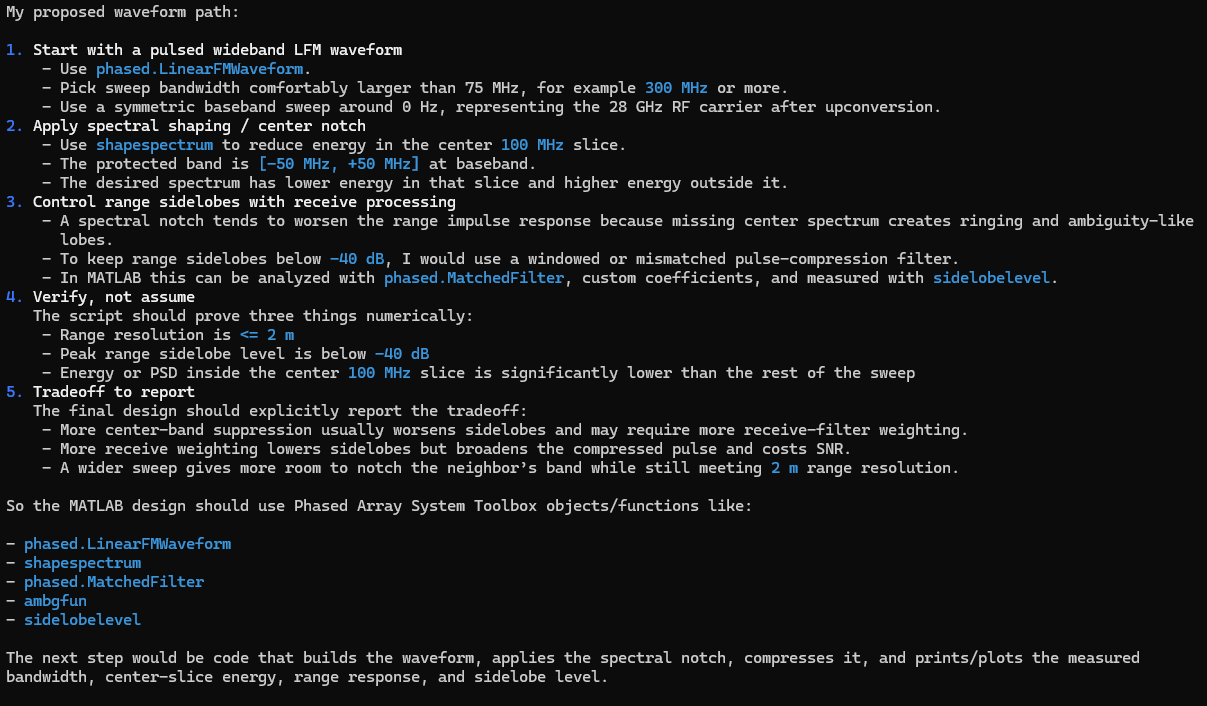
Figure 4: Proposed plan from the AI Agent that uses MATLAB functions and System objects
Added a few more system requirements to characterize the targets:
Targets move up to 30 m/s. Maximum range of interest is 600 m.

Figure 5: Additional system requirements
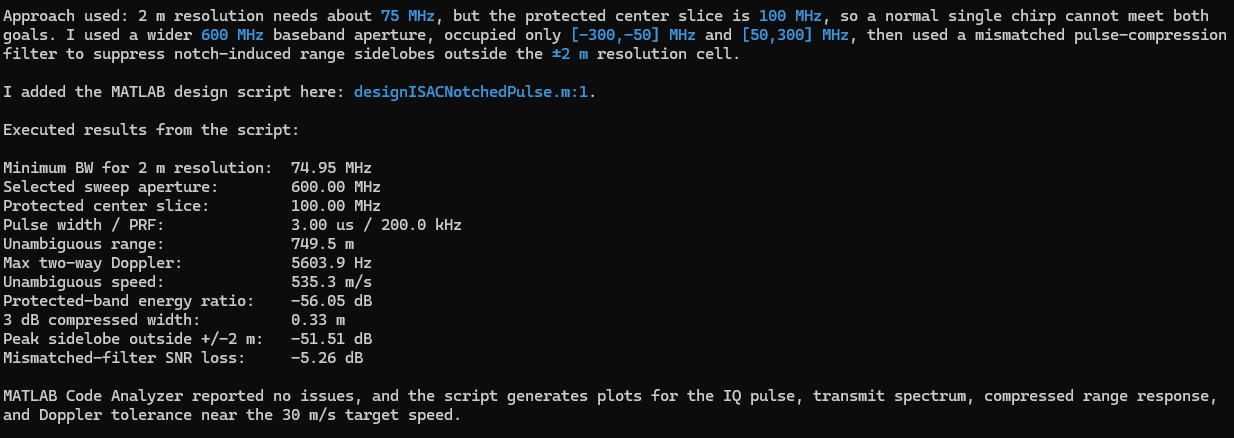
Figure 6: AI Agent writes, runs and tests a MATLAB script
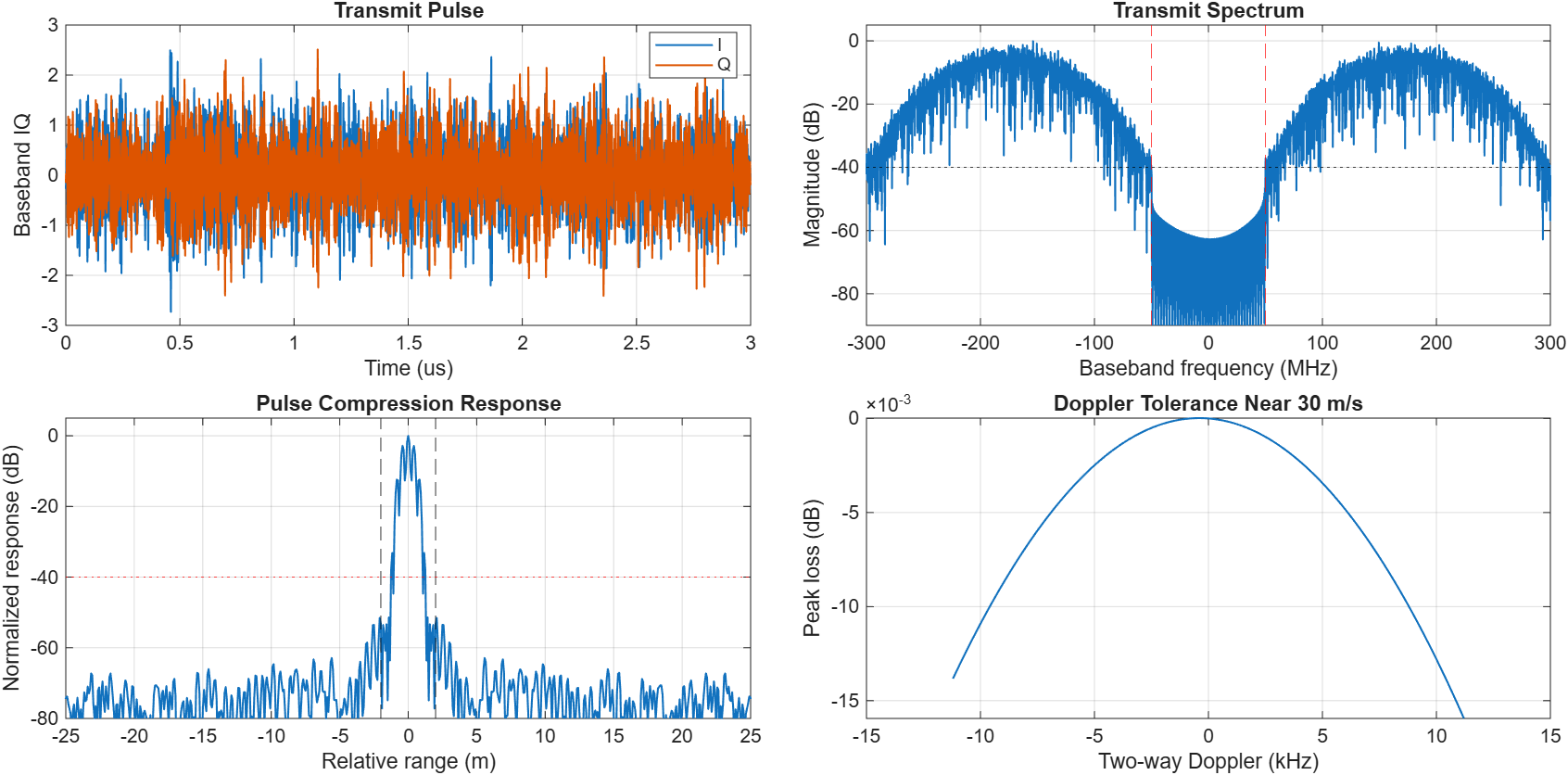
Figure 7: Resultant MATLAB Plots - I/Q data, spectrum, pulse compression response and Doppler tolerance
The results. The four panels show that the waveform produced indeed meets all the stated requirements, so the agent was able to use the skill to create and run MATLAB code. The transmit spectrum shows the protected 100 MHz slice suppressed by more than 50 dB to avoid interference with the neighboring system. The pulse compression response puts the main lobe inside the 2 m range resolution requirement with peak sidelobes near 55 dB down, 15 dB better than what was required. The Doppler curve shows negligible loss of a few kHz at 30 m/s.
What the skill changed. Rather than leaving the AI agent to determine the process from scratch, the skill provided reliable, constraint-aware engineering guidance. It directed the agent to derive waveform parameters from the system requirements, select an appropriate spectral-shaping method, and verify the resulting design against resolution, sidelobe, and Doppler constraints. This produced a more repeatable and verifiable result without requiring the engineer to specify every design and validation step in the prompt. A two-attempt debugging limit also prevents the agent from entering unproductive loops and returns unresolved issues to the engineer for review and decision-making.
Teaching agents how engineers work
This points to a more effective way for engineers to work with AI. Instead of encoding an entire procedure in every prompt, engineers can focus on requirements, constraints, and design decisions. Skills supply reusable engineering methods, agents carry out the workflow, and engineers review the evidence and make the final call.
- 类别:
- Deep Learning


评论
要发表评论,请点击 此处 登录到您的 MathWorks 帐户或创建一个新帐户。