
Engineering Embedded AI with MATLAB Agentic Toolkit

Guest blogger: Arkadiy Turevskiy
Arkadiy is the product manager for AI and controls products at MathWorks. He has been with MathWorks for more than 20 years. Before joining MathWorks, he designed aircraft engine control systems at Pratt & Whitney.
Developing an embedded AI application involves preparing data, training a network, reducing its memory requirements, and verifying the generated code. These steps require engineering judgment about accuracy, resource constraints, and implementation behavior. I wanted to explore how a coding agent could help carry out this workflow using reusable engineering guidance, while keeping me involved in the decisions.
My test case was a battery state-of-charge estimator intended for an Arm Cortex-M7 processor. The objective was to minimize storage for the network’s weights and biases while allowing no more than a 5% increase in root mean squared error (RMSE) relative to the uncompressed network.
I asked a coding agent to use the matlab-deploy-embedded-ai skill in MATLAB Agentic Toolkit with battery data from the state-of-charge estimation example. The objective was to train a deep learning virtual sensor in MATLAB®, integrate it into Simulink®, and generate C code for deployment. The sensor estimates battery state of charge from temperature, voltage, and current measurements.
Package Best Practices with the Code
Large language models train on vast amounts of source code, so a coding agent can quickly write a deep learning training script. Engineering practice is harder to learn from public data. It lives in an organization’s standards, project reviews, and experience.
That knowledge may live in an engineer’s head, but putting it into every prompt is impractical. A skill file makes the guidance reusable.
A skill packages best practices as readable, versioned markdown that engineers can inspect. The agent usually invokes a relevant skill from your prompt, but in my experience, it occasionally failed. To make sure, name it explicitly. In Codex, type $matlab-deploy-embedded-ai or tell the agent to use matlab-deploy-embedded-ai.
The Embedded AI skill gives the agent a workflow to follow, including recommended functions, verification steps, and review checkpoints. For example, the skill directs the agent to train the neural network with trainnet, then open the trained network in Deep Network Designer for my review. The next step is model compression: reducing the storage required for the network’s weights and biases while evaluating the effect on prediction accuracy. The skill also calls for numerical comparisons between the approved network in MATLAB, its Simulink implementation, and generated code. At each checkpoint, the agent saves a script and presents results for my review before continuing. MATLAB Agentic Toolkit and Simulink Agentic Toolkit connected the agent to a live MATLAB session for running scripts, simulating models, and reporting results.
Reviewing each step let me correct a wrong turn before it propagated.
Let Requirements Choose the Model
The battery data spanned −10, 0, 10, and 25 °C. I followed the data preparation procedure in the MATLAB state-of-charge estimation example, dividing the data into 500-step sequences and using a 70/30 training–validation split. This produced 201 training and 87 validation sequences. The example’s separate test data yielded 288 test sequences. The baseline network had 463,489 learnable parameters and achieved an RMSE of 0.034258 on the independent test set.
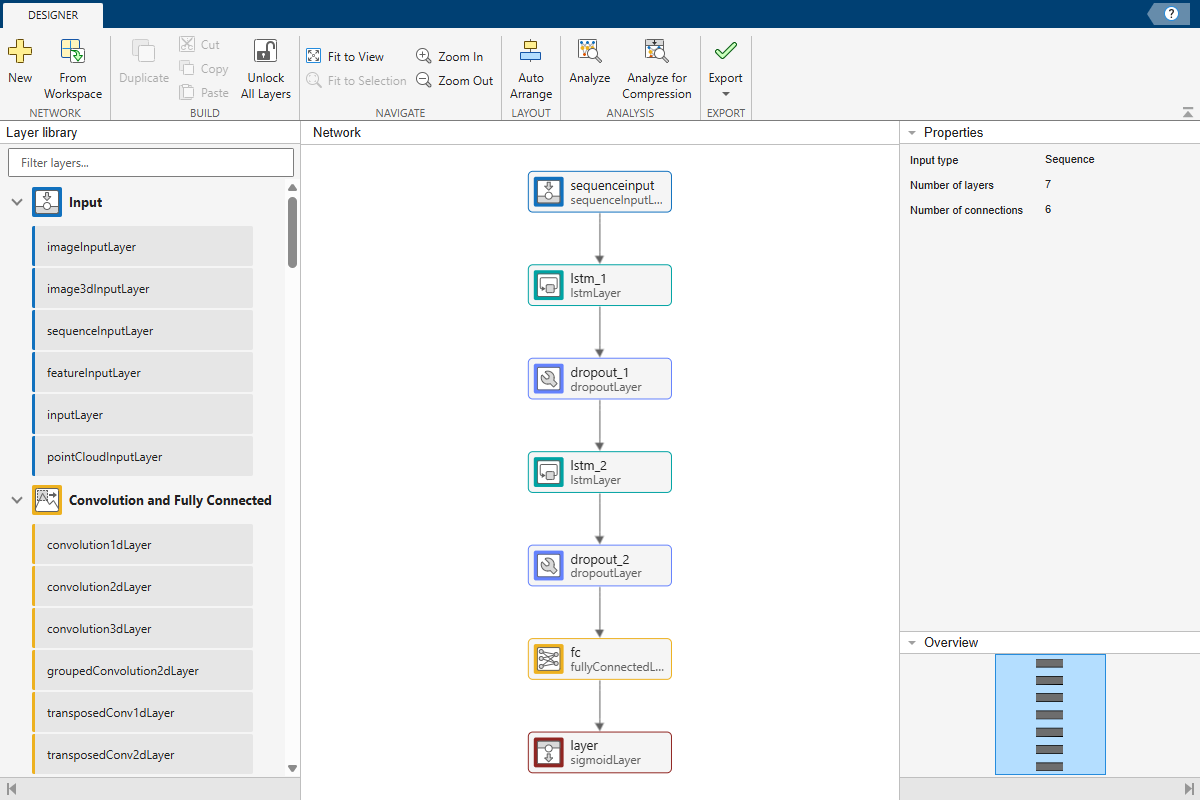
Figure 1: The agent opened the trained battery state-of-charge network in Deep Network Designer for review before compression.
After training, I wanted to compress the model for a resource-constrained microcontroller. I used a Pareto frontier to compare accuracy and parameter storage. Projection and quantization can reduce parameter storage, alone or together, with different accuracy tradeoffs.
Compression methods need to suit the network architecture. For this network, I compared projection, which reduces the number of parameters in its long short-term memory (LSTM) layers, and quantization, which uses lower-precision numbers. I evaluated the methods separately and together.
I allowed no more than a 5% increase in RMSE relative to the uncompressed model. The agent calibrated the quantized candidates on all 201 training sequences and evaluated the three compressed candidates on the same 32 held-out sequences. Using a common comparison set kept a change in data from looking like a change in model performance.
Here, parameter storage means the memory that estimateNetworkMetrics reports for learnable weights and biases. It is a proxy for flash or ROM and excludes generated code, network states, activations, and runtime SRAM.
| Candidate | Parameter storage | RMSE change | 5% budget |
|---|---|---|---|
| Uncompressed: Baseline float32 | 1.768 MB | Baseline | Pass |
| Projected float32 | 0.0464 MB | +1.64% | Pass |
| Quantized baseline | 0.4464 MB | −3.94% | Pass |
| Projected and quantized | 0.0160 MB | −0.62% | Pass |
Table 1: Measured results on the same 32-sequence comparison set. RMSE change is relative to the baseline on that set; negative values indicate lower RMSE.
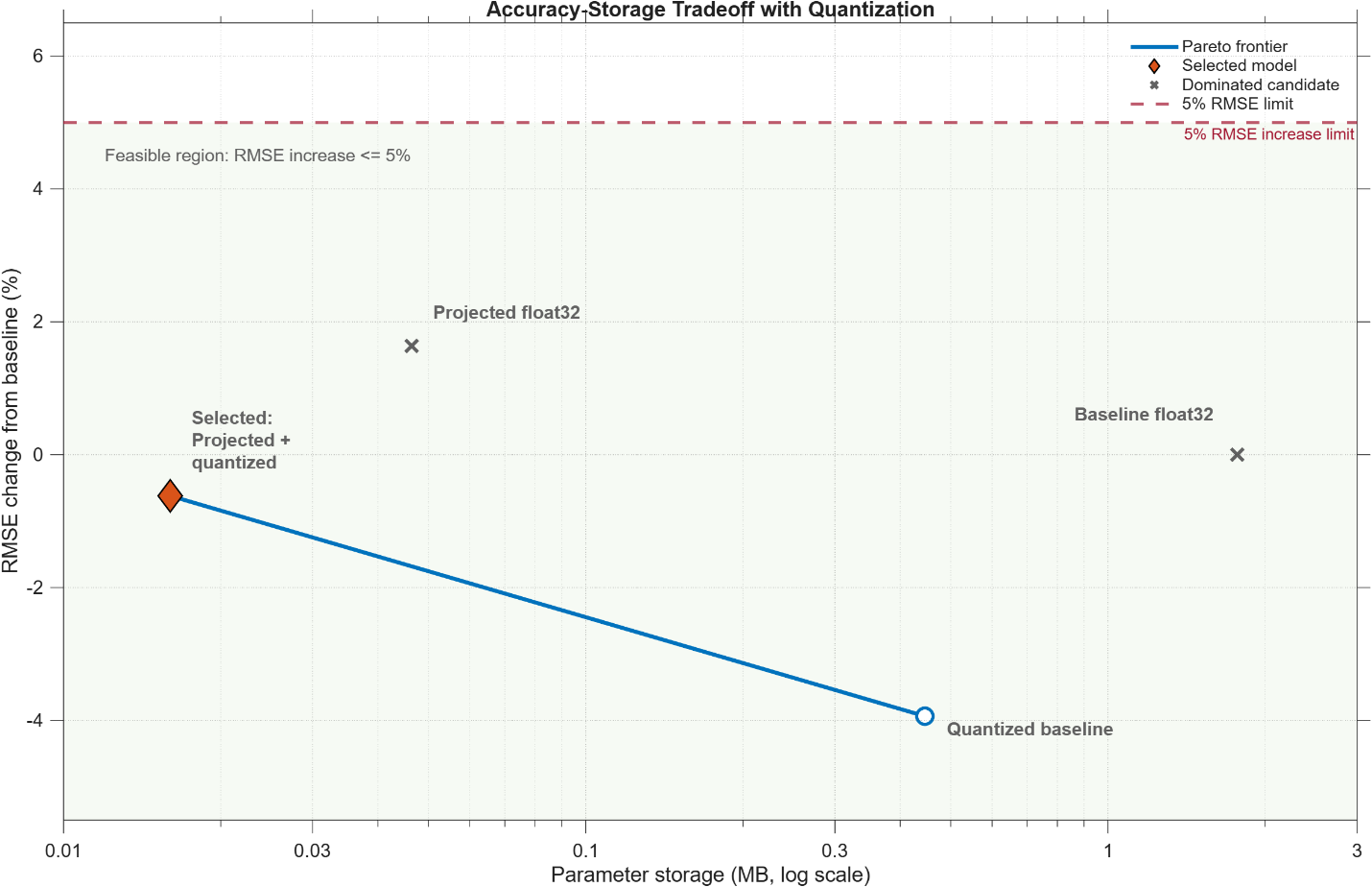
Figure 2: The measured Pareto frontier for the four candidates.
At 0.0160 MB, the projected and quantized model cut parameter storage by 99.10% versus float32. Its RMSE was 0.62% lower on the 32-sequence comparison set and 8.69% lower on the full validation set. I selected it as the smallest candidate within the limit.
Agent: The projected and quantized model is the smallest within the 5% RMSE budget. Its RMSE is also 0.62% below baseline on the comparison set. Next comes Simulink integration and numerical equivalence testing. Shall I proceed?
Engineer: Yes, but first explain how the quantized model could have lower RMSE.
Agent: Quantization rounds values to the nearest value representable at lower precision. On this dataset, those changes happened to move predictions closer to the targets. The result is specific to this model and data; quantization does not generally reduce RMSE.
Engineer: Ok, proceed.
Agent: The Simulink equivalence test passed. The next step is code generation and software-in-the-loop testing. Shall I proceed?
Engineer: Go ahead.
Separate Compression Effects from Implementation Drift
Compression changes a model, so its acceptance test measures application performance on held-out data. That is the RMSE comparison above. Implementation testing asks a different question: Does the approved model produce equivalent numerical results as it moves from MATLAB to Simulink and generated code?
I had the agent run one 500-step sequence at each temperature, producing 2,000 outputs for each implementation. The quantized network in MATLAB, normal Simulink simulation, and software-in-the-loop (SIL) simulation produced bit-identical outputs on those test vectors. MAE, RMSE, and maximum error were all exactly zero. Those zeros measure implementation drift, not prediction error against the measured state of charge.
C code generation completed with an Arm Cortex-M configuration, and the generated source used fixed-width integer types. The quantized workflow reported a fixed-point saturation warning in the second LSTM layer. The implementations still showed no drift in this test, and any effect on model quality was already reflected in the held-out RMSE. The warning warrants broader testing. Without a development board or cross-compiler, flash use, SRAM use, and execution time remain unmeasured. The agent stopped its claims at that boundary.
Let Proven Tools Produce the Evidence
You may reasonably ask whether the agent invented those metrics. It did not estimate them. The agent orchestrated the workflow; MATLAB, Simulink, code generation, and verification produced the evidence. I set requirements, reviewed tradeoffs, and approved important decisions.
The skill tells the agent to compute metrics from current variables and avoid hard-coded results. The LLM remains nondeterministic and unqualified. With the network, test data, and configuration fixed, code generation and test execution follow repeatable procedures. In qualified workflows, qualification belongs to the specific tools, process, and project evidence. It never extends to the coding agent.
Make the Workflow Reusable
My earlier post introduced an early version of this skill in the MATLAB Agent Skills Playground. Since then, broader testing with coding agents such as Claude and Codex has shown that the skill helps agents complete user objectives and select recommended MATLAB functions and capabilities more consistently. The skill is now available in MATLAB Agentic Toolkit.
Because skills are text files, teams can review them, place them under version control, and adapt them with their own budgets, tests, reports, and approval gates. Try the Embedded AI skill with a real deployment objective: inspect the scripts, challenge the model choice, and trace the measurements. A useful engineering agent should make expert practice easier to apply while leaving the evidence and final decisions where they belong.
© 2026 The MathWorks, Inc. MATLAB and Simulink are registered trademarks of The MathWorks, Inc. See mathworks.com/trademarks for a list of additional trademarks. Other product or brand names may be trademarks or registered trademarks of their respective holders.
- 범주:
- Deep Learning


댓글
댓글을 남기려면 링크 를 클릭하여 MathWorks 계정에 로그인하거나 계정을 새로 만드십시오.