
MATLAB R2026a has been released – What’s new?
Every MATLAB release has an enormous number of new features across over a hundred different toolboxes and blocksets; far too many to discuss in a single blog post. So, I don't even try! What I do is take a dive into the full release notes and pick out what is of personal interest to me.
Some of my picks are major new products such as Simulink Copilot or MATLAB Course Designer. Others are individual functions, workflows or even updates to individual functions that I'm interested in. Some are big, others are small. This is my tour of What's new in MATLAB R2026a. I hope you enjoy it and I hope you'll tell me what your highlights are from this release.
Automatic Differentiation Support for ODEs
Automatic Differentiation is a good idea. So good in fact that MATLAB has three different implementations of it (long story!). You'll find it in Deep Learning Toolbox, Optimization Toolbox and now, base MATLAB in the particular case of solving systems of Ordinary Differential Equations.
In R2026a you can use the JacobianMethod property of an ode object to specify whether the solver calculates the Jacobians for a given problem using finite differences or automatic differentiation. By default, the Jacobians are calculated using finite differences. By setting JacobianMethod="autodiff" you'll switch to using Automatic Differentiation which might be faster for large stiff systems and more accurate for sensitivity analyses. For more details see https://www.mathworks.com/help/matlab/math/ode-autodiff-background.html
This is the latest in a multi-release series of updates for ODEs and the first in a new series of updates for Automatic Differentiation.
Function metadata and Introspection
The new metafunction object allows you to programmatically get information about function signatures and arguments. Here's a quick example. Save this function to your path as greet.m
function msg = greet(name, greeting)
% greet Create a greeting message
% This is an example that Mike made up for his blog post
arguments (Input)
name (1,1) string
greeting (1,1) string = "Hello"
end
msg = greeting + ", " + name + "!";
end
Here's an example of it in use
greet("Mike","Subscribe to the MATLAB Blog")
Applying metafunction to this gives
mf = metafunction("greet")
Drilling down further, we can find the CallSignature of our function and can see that it has 2 inputs, 1 output and that input validation is in use.
mf.Signature
Taking a look at the second Input, I can see that it has a default value
mf.Signature.Inputs(2)
Let's see what that default value is
mf.Signature.Inputs(2).DefaultValue
This is just scratching the surface of what you can do with this new functionality. Head over to Function Instrospection and Metadata in the documentation to learn more.
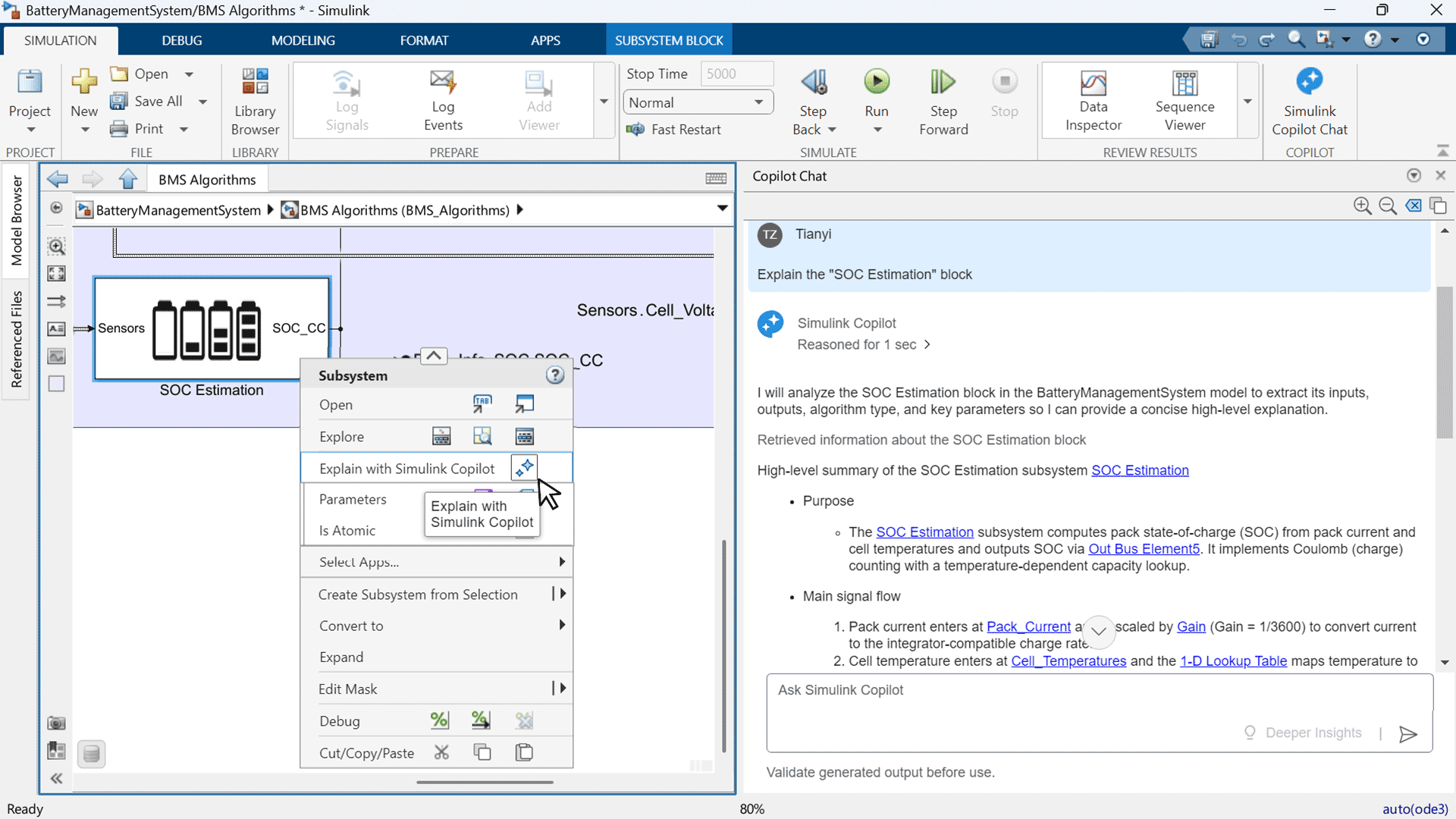
Simulink Copilot
MATLAB Copilot was released in R2025a and with over 1 million users at the time of writing, it has proven to be rather popular. This year it is joined by Simulink Copilot which brings generative AI-powers to Model-Based Design.
Managing Python environments in MATLAB
MATLAB's Python integration gets better with every release and the big news in R2026a is that you can now manage and create Python environments directly from MATLAB. This is done via the new External Languages panel. When I opened it, this is what I saw on my machine
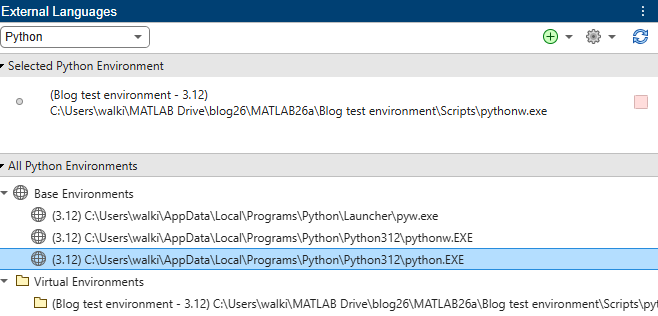
I right clicked on the base environment shown above and saw all of the Python packages that I have installed in that environment.
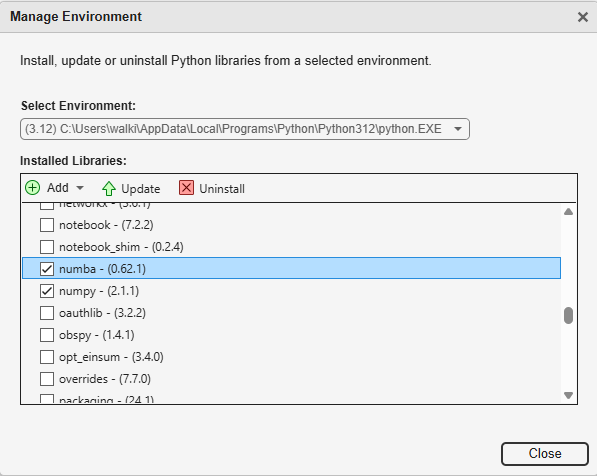
My versions of Numba and Numpy were not as up to date as I'd like so I selected them and clicked Update. As easy as that! The system supports Virtual Environments, installing a suite of packages from a requirements.txt file and more. Full details in the documentation at Manage Python Environments Using External Languages Panel.
The latest version of Python supported by MATLAB R2026a is now 3.13 and versions back to 3.9 are also supported in this release.
Additional automatic conversions between MATLAB and Python datatypes
MATLAB has had direct support for various Python types for several years now and this continues to be expanded over time. I discussed the use of numerical NumPy arrays in MATLAB back in December 2024 when this had already been available for several releases. Converting between Pandas DataFrames and MATLAB tables was added in R2024a and R2026a adds the automatic conversion between MATLAB string arrays and Python lists. Let's bring all of this together into a code example.
In Python, we can create a DataFrame from a NumPy array and a Python list like this
import pandas as pd
import numpy as np
arr = np.random.rand(10, 4)
colnames = ['A', 'B', 'C', 'D']
df = pd.DataFrame(arr, columns=colnames)
Using the MATLAB interface to Python, we have been able to do this from within MATLAB for some time
arr = py.numpy.random.rand(int32(10),int32(4));
colnames = py.list(['A','B','C','D']);
df = py.pandas.DataFrame(arr, columns=colnames);
However, thanks to the cumulative support for automatic conversion between MATLAB and Python datatypes, we can now create a Pandas DataFrame from a MATLAB numerical array and a MATLAB string array.
% This works in R2026a because ["A","B","C","D"] is auto-converted to a
% Python list
df = py.pandas.DataFrame(rand(10,4),columns=["A","B","C","D"])
I can use this DataFrame in whatever Python functions can consume it and when I am done I can convert the result to a MATLAB table.
myTable = table(df)
I hope that this gives some flavor of how seamless the integration between MATLAB and Python is becoming. Another new addition in R2026a is the pystringarray function that converts MATLAB string arrays to NumPyStringDtype arrays
mla = ["Subscribe" "To" missing; "The" "MATLAB" "Blog"]
npa = pystringarray(mla)
For more details on how to pass MATLAB Data to Python along with everything that's supported see the documentation: Pass Data Between MATLAB and Python from MATLAB - MATLAB & Simulink
OpenJDK Java Support
While on the subject of language interoperability, I now turn my attention to Java. Currently, MATLAB installations on Windows and Linux platforms include Oracle Java. However, in a future release, MATLAB will no longer include Oracle Java as part of its installation. Instead, you will have to download and install the MATLAB Support for OpenJDK add-on or any compatible OpenJDK.
You can do this from directly within MATLAB from the Add-On Explorer
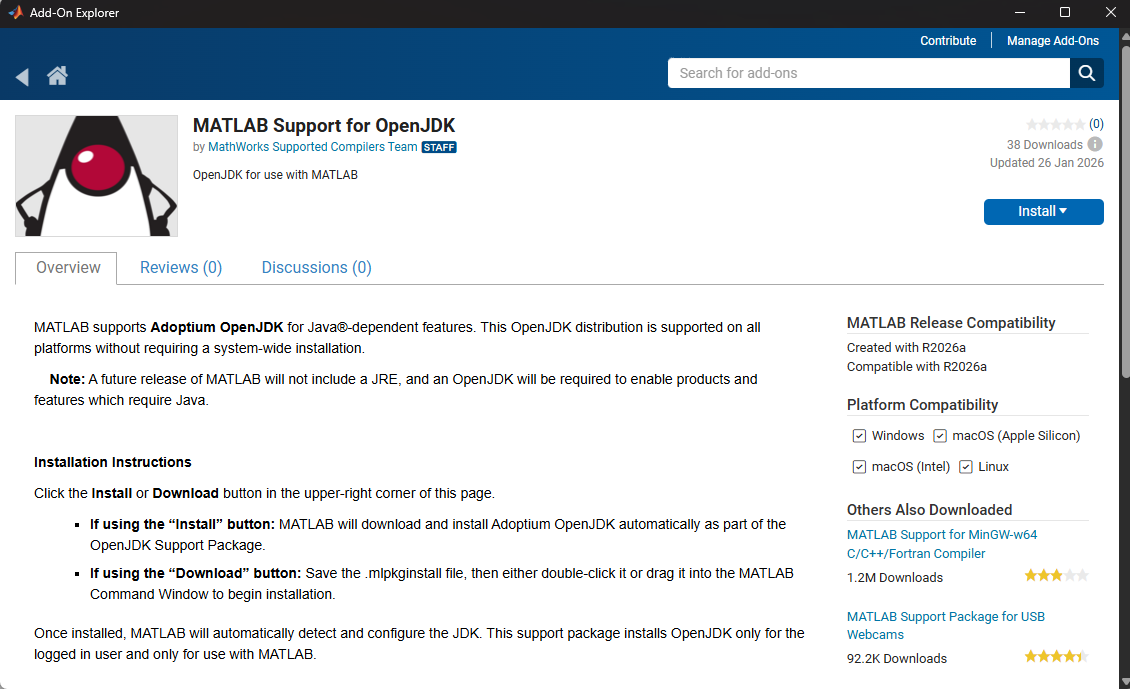
Alternatively, you can download and install any compatible OpenJDK distribution from https://adoptium.net/. For information about supported versions, see Versions of OpenJDK Compatible with MATLAB by Release. The jenv command has also been updated to support the use of OpenJDK.
MATLAB Coder Support Package for PyTorch and LiteRT Models
MATLAB Coder has been one of my secret weapons for years, allowing me to deterministically generate high performance and portable C/C++ code directly from MATLAB code. If you've never used it before, work through the MATLAB Coder Onramp: it will be half an hour well-spent.
The new MATLAB Coder Support Package for PyTorch and LiteRT Models is an add-on for MATLAB Coder that allows you to generate C/C++ code directly from PyTorch and LiteRT models. You can also generate CUDA code from these models via this add on and GPU Coder.
The best way to understand what this can do for you is to work through some examples and I have three for you, all new in R2026a
- Deploy PyTorch Image Classification Model on Host and Raspberry Pi
- Deploy LSTM PyTorch ExportedProgram Model on Host and STM32 Microcontroller
- Generate Code for Segmentation and Object Detection Using YOLO v11 LiteRT Model
Performance improvements
As with most releases of MATLAB, R2026a comes with a lot of performance enhancements. Some of these are rather fundamental in nature! Here are just a small number of them. For the full list, check out the Performance category of the release notes.
- Winning the award for 'performance enhancement most likely to be noticed by the largest number of users' we have faster MATLAB start-up times. Compared to R2024b, R2026a is around 1.3x faster to start-up. Details are here. If your MATLAB start-up speeds are not as good as you'd like, here's a page to help you resolve slow start-up.
- The element-wise power function is about 3.8x faster when dealing with integer exponents above 2. So things like x.^3 and x.^4 will be much faster now and even slightly more accurate in some cases.
- The log function has seen a similar speedup in double precision. 2.8x faster according to the test shown in the documentation
- The nufft and nufftn functions have been made faster when operating on nonuniformly spaced sample points and query points. This benchmark is around 330x faster than R2025b which is the most largest speed-up I've found so far in this release. Details are here.
function t = timing_nufft
n = 10000;
x = randn(n,1);
t = rand(n,1);
f = 10000*rand(n,1);
y = @() nufft(x,t,f);
t = timeit(y);
end
There are also several performance enhancements in graphics and you'll find a lot of plots are more responsive when working interactively. Consider the following, for example
[x1,y1] = meshgrid(0:1:150, 0:1:300);
[x2,y2] = meshgrid(151:1:300, 0:1:300);
u1 = cos(x1);
v1 = sin(y1);
quiver(x1,y1,u1,v1,LineWidth=2)
hold on
u2 = cos(x2);
v2 = sin(y2);
quiver(x2,y2,u2,v2,LineWidth=2)
xlim([130 170])
ylim([130 170])
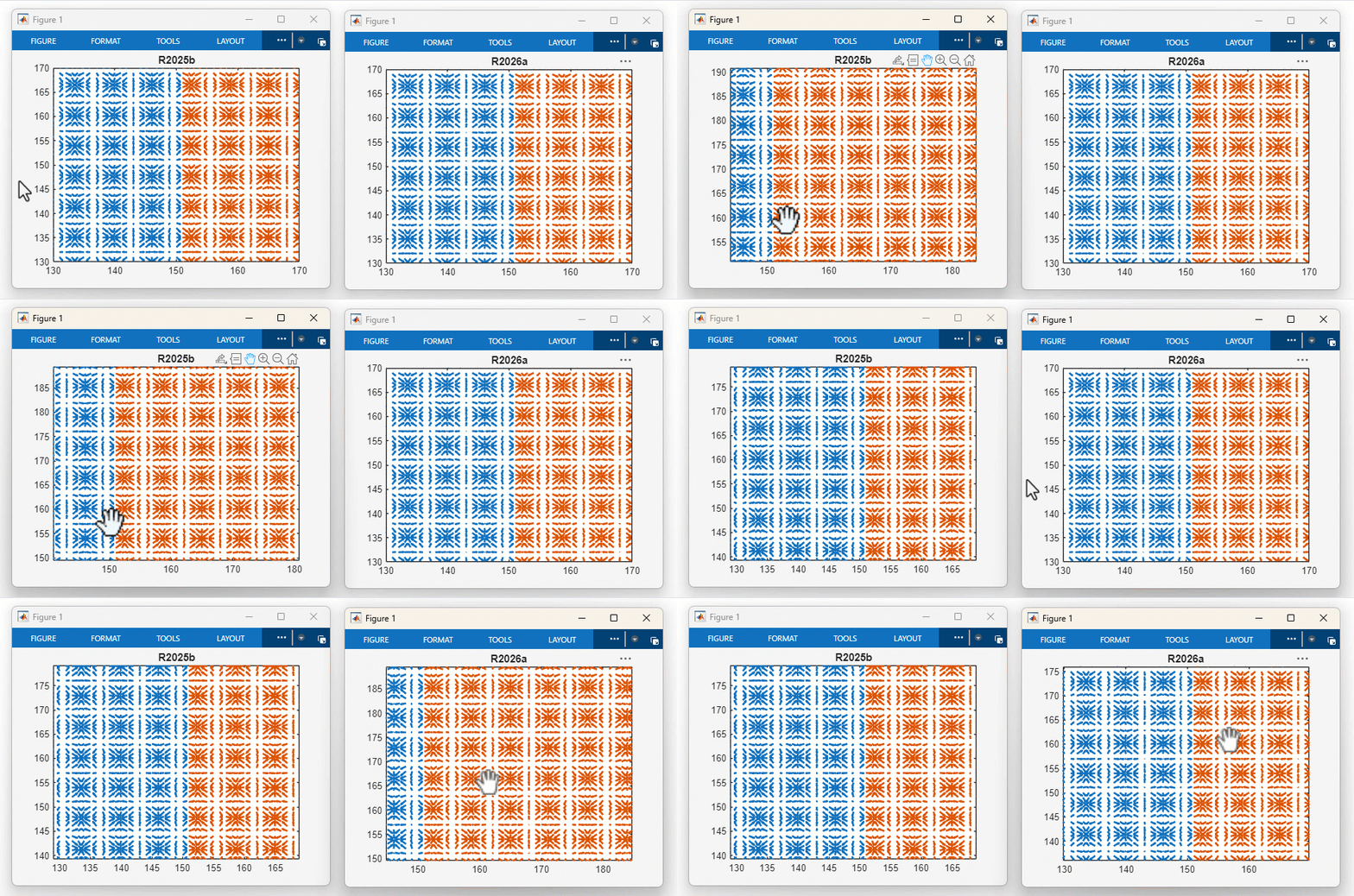
There are several more like this and I encourage you to dive into the release notes for more detauils.
Many other areas include performance enhancements including training multi-layer perceptron (MLP) networks in Deep Learning Toolbox (27x faster), Quantum computing simulation (32x faster) and readlines (2.9x faster).
Parallel Computing Onramp
This was actually released some time before R2026a but is officially part of this release. Parallel Computing Onramp is an online, interactive course covering the basics of parallel computing that's free to everyone. I deliver in-person seminars on High Performance Computing in MATLAB and now recommend this as a pre-session warm up.
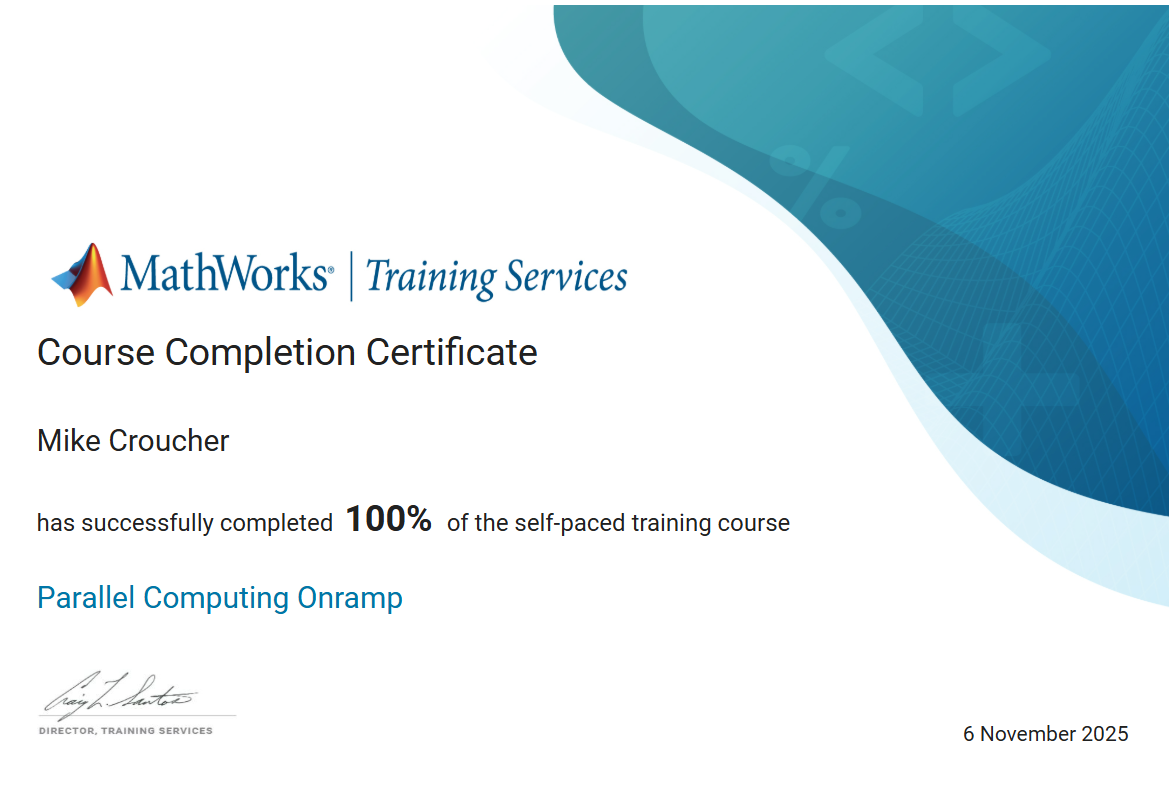
You'll learn the basics of parallel pools, performance measurement and parfor in around a couple of hours and you'll even get a course completion certificate that you can share on social media platforms such as LinkedIn. Here's mine to prove that I've passed the course.
MATLAB Course Designer
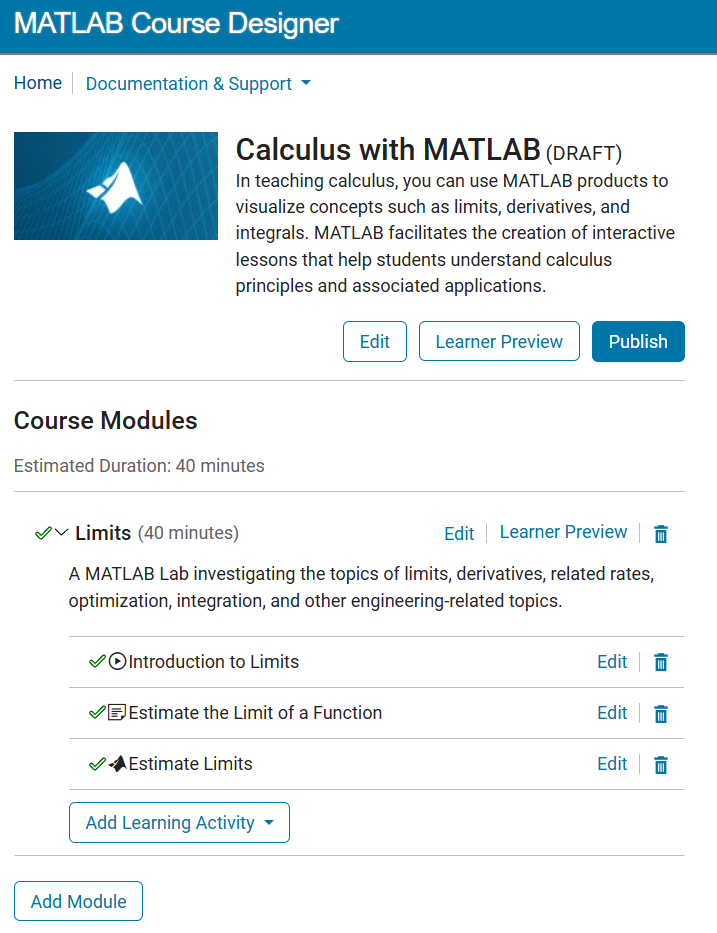
The Parallel Computing Onramp is one of many Self-Paced Online courses available from MathWorks. MATLAB Onramp has been the way millions of users have got started with the basics of using MATLAB with others such as Deep Learning Onramp, Signal Processing Onramp and Image Processing Onramp taking care of the introductory steps to more specialized usage. There are hundreds of hours of training available!
In R2026a, we've released the software. MATLAB Course Designer, that we use to create these courses so that you can develop your own.
Machine learning pipelines
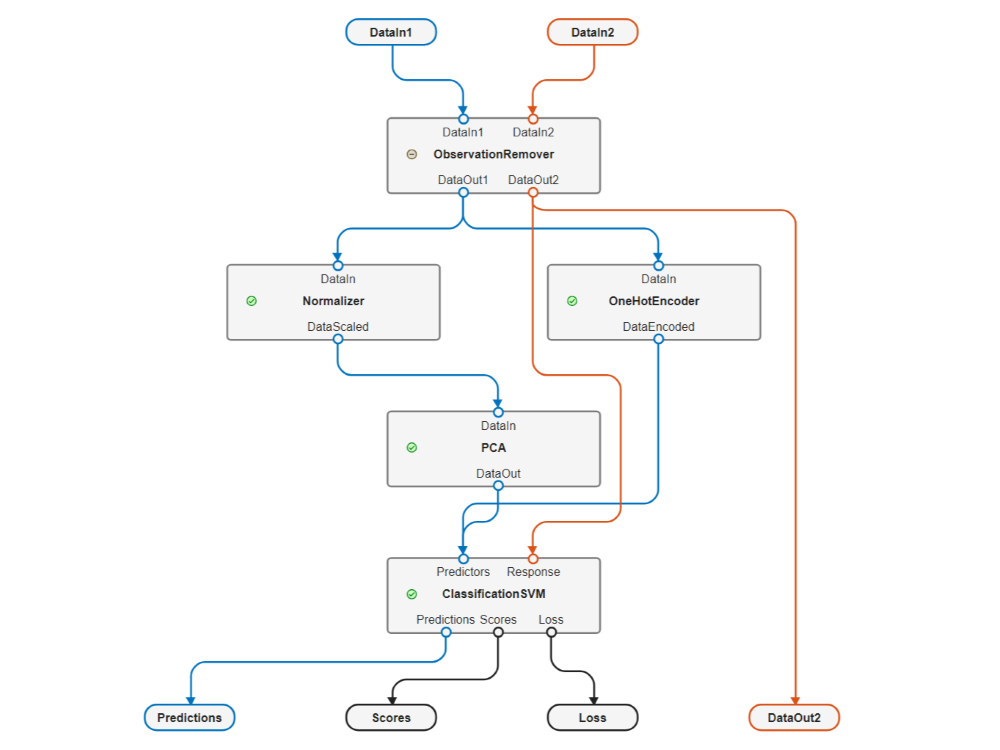
This is a really interesting new workflow in Statistics and Machine Learning toolbox. A pipeline combines and organizes multiple data processing steps into a single representation. For machine learning, these steps include data preparation, feature engineering, feature selection, modelling and postprocessing. For more details see the documentation here.
Visualize High-Dimensional Data Using UMAP
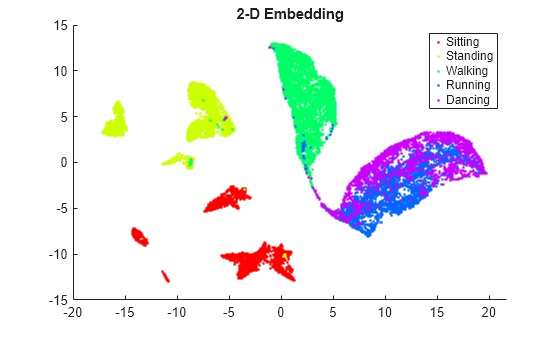
umap is a new function in Statistics and Machine Learning Toolbox that allows you to visualize high dimensional data as an embedding in 2D or 3D. MATLAB has had the related tsne function since 2017a and I've been looking forward to having UMAP for a while now.
The humanactivity data set contains 24,075 observations of five different physical human activities: Sitting, Standing, Walking, Running, and Dancing. Each observation has 60 features extracted from acceleration data measured by smartphone accelerometer sensors and here it is visualized in 2D using UMAP. Full details and code in the documentation
DuckDB in Database Toolbox
Database Toolbox has been making it easier to connect MATLAB to Databases for years and now it actually ships with a database engine built-in. That engine is DuckDB and the function you are looking for is duckdb.
Time Series Modeler App in Deep Learning Toolbox
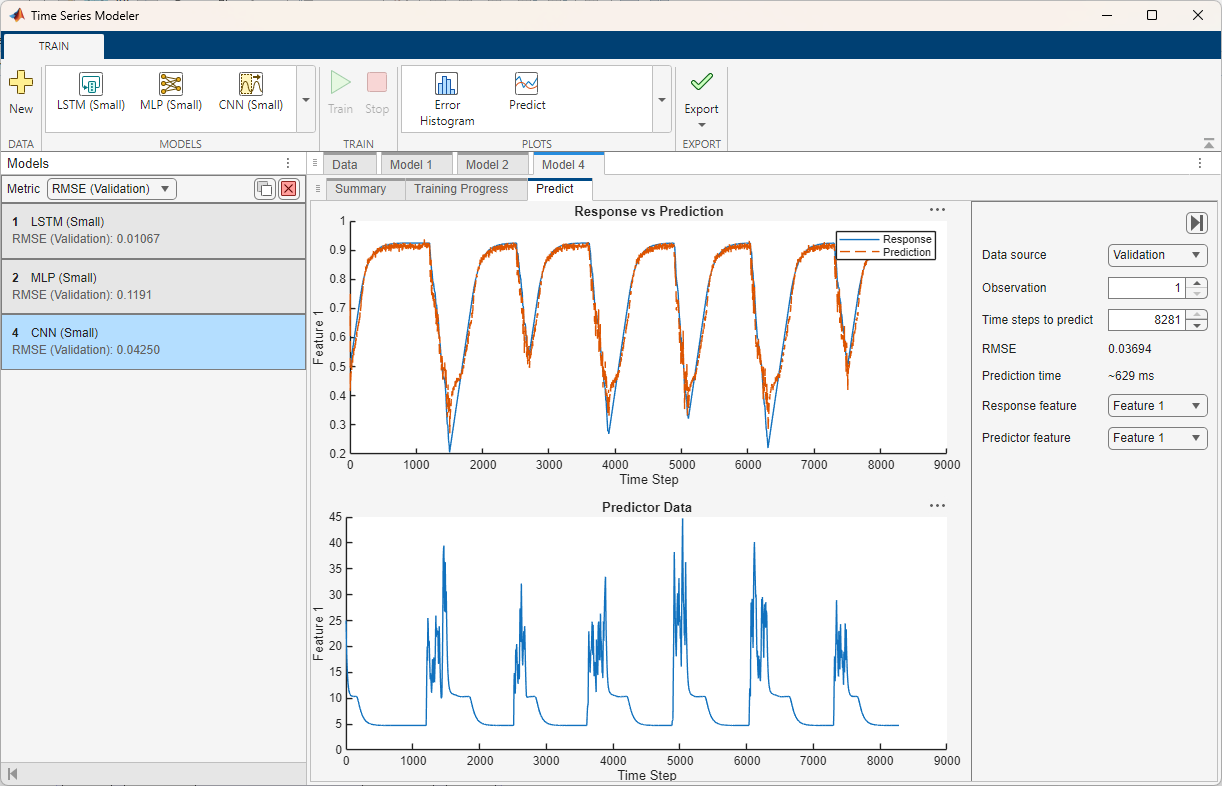
I've found that most 'Introduction to Deep Learning' courses tend to focus on the use of deep learning for image classification. Recognizing handwritten digits, cats and dogs, or CIFAR-10 come up all the time.It turns out, however, that when you actually need to use deep learning methods in industry the data that you often have are time series.
The Time Series Modeler app, new in R2026a, can be used to train models for time series prediction. Run the command timeSeriesModeler or work through the documentation example Get Started with Time Series Forecasting to get started.
Structure from Motion or 'How to build a 3D Model from a bunch of photos'
Structure from Motion (SfM) is a computer vision technique for estimating the 3-D structure of a scene from a collection of 2-D images and you can now do it using Computer Vision Toolbox. Here are 16 images of the asteroid Bennu captured by NASA’s OSIRIS-REx spacecraft.
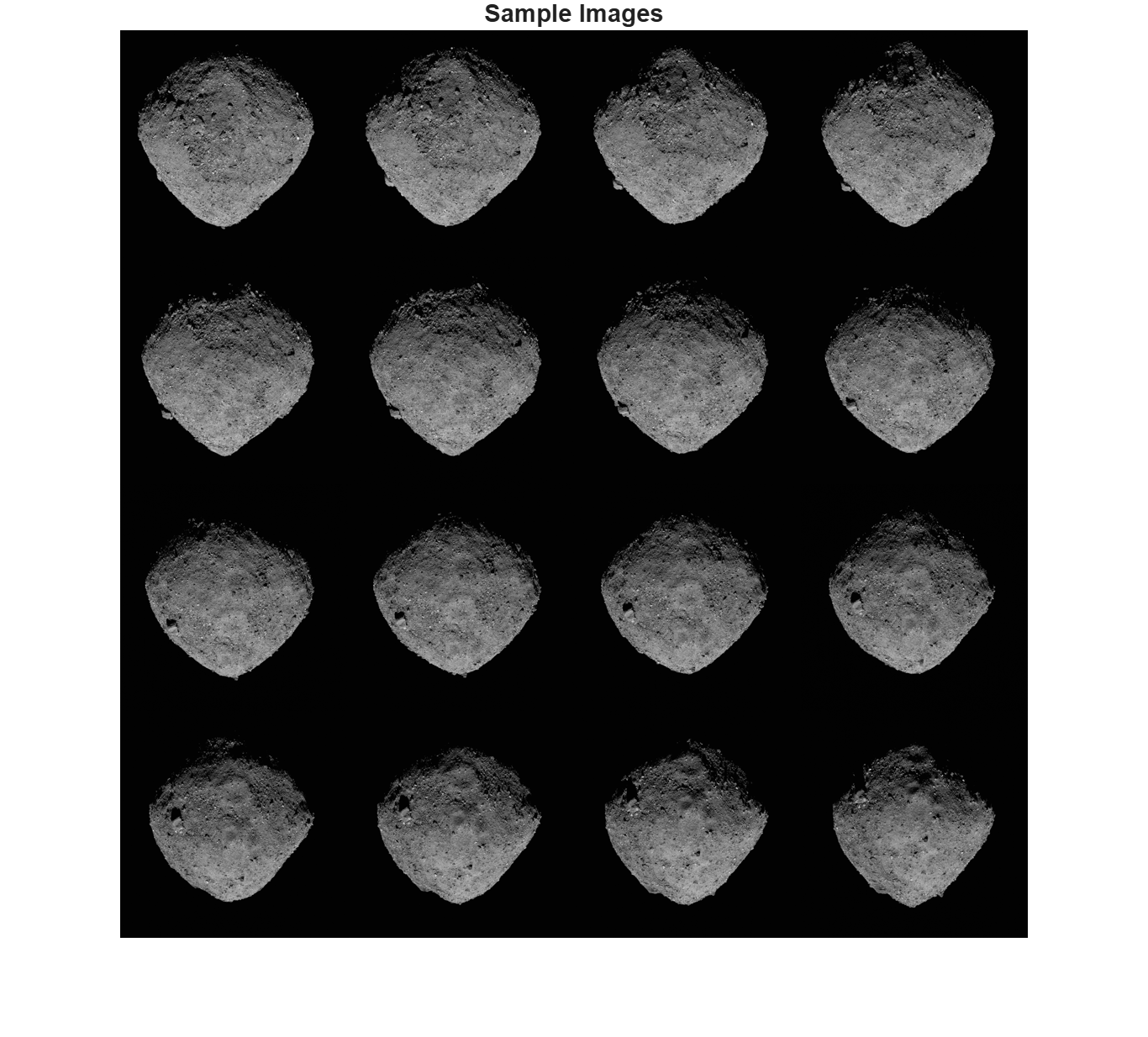
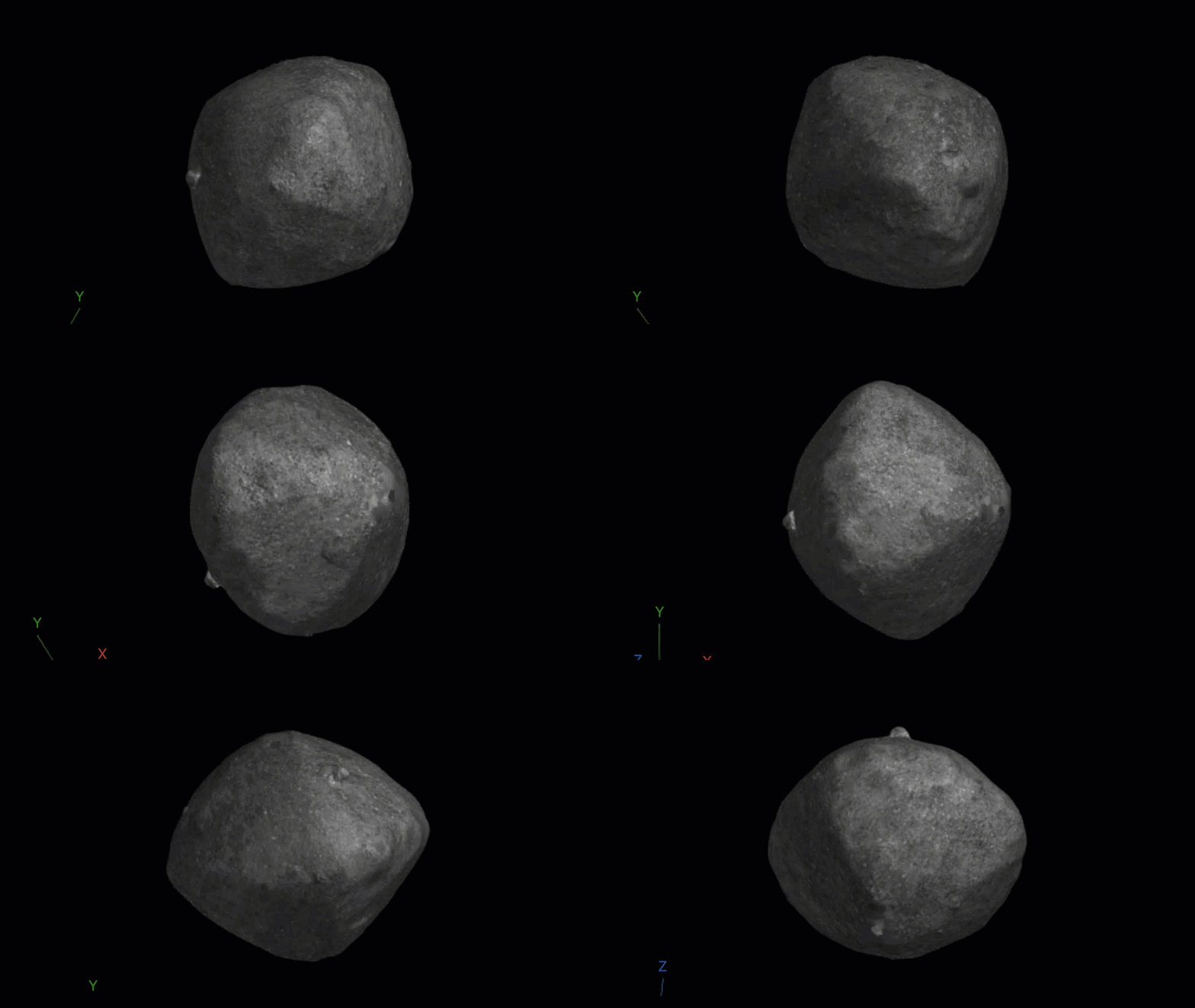
The documentation example Dense 3-D Reconstruction of Asteroid Surface from Image Sequence takes a total of 37 of these images and uses Structure from Motion to construct a 3D model. In the animation below I am interacting with the resulting model using the mouse.
Tell me what I missed! What are your favorite features of MATLAB R2026a?
So much for my tour of R2026a. There are hundreds of features that I've not included in this overview. Please let me know any that I've missed that you think deserve more attention.


评论
要发表评论,请点击 此处 登录到您的 MathWorks 帐户或创建一个新帐户。