
Toolbox-Specific AI Skills for MATLAB: Faster, Cheaper, More Reliable Code Generation from Claude, Gemini and friends
TL:DR: The latest update of the MATLAB Agentic Toolkit includes the first of a set of advanced toolbox-specific skills that allow AI agents to perform various tasks more quickly, cheaply and robustly. This first round focuses on Database Toolbox with other toolbox-related skills in the pipeline.
Skills: Strengthening an AI's MATLAB-Fu
There's a scene in the 1999 movie 'The Matrix' where Neo has martial arts skills downloaded to his brain. His eyes snap open and he announces "I know Kung-Fu!". It's very cool!
AI skills are a bit like that for but for AI agents and when MathWorks released the MATLAB Agentic Toolkit, we started providing curated skills that work with the most commonly used AI agents today. That is, if you use the toolkit then you can dramatically improve an AI agent's 'MATLAB-Fu'.
The first set of skills in the toolkit were very generic; things like 'Modernize Code' and 'Create Live Script'. Last week, just two weeks after the first release, we released an update that contains the first toolbox-specific skills. They are for Database Toolbox and include the following
- map-database-objects
- read-database
- use-duckdb
- write-database
Updating to this version of the toolkit was straightforward. I used the same procedure that I did when I updated it to use MATLAB R2026a.
Having Claude or Gemini suddenly say 'I know how to use DuckDB databases in MATLAB 2026a' might not be as dramatic as 'I know Kung-Fu!' but its arguably more useful in technical computing; unless you're having a particularly bad day of course.
Today I'm taking a look at how toolbox-specific skills like these can measurably improve how AI agents complete MATLAB-related tasks.
The new skills can help agents complete MATLAB tasks more quickly and cheaply
I asked Brian Hu, the product manager for Database Toolbox, which of these skills he suggested I take a look at in order to demonstrate how they work. "Do you know what Object-Relational Mapping (ORM) is?" he asked "....No? Perfect! Let's do that then!"
Without ORM, database queries look like this:
sqlquery = strcat("SELECT e.Name, e.Salary, d.DepartmentName ", ...
"FROM employees e JOIN departments d ", ...
"ON e.DepartmentID = d.DepartmentID ", ...
"WHERE (e.JobTitle = 'Engineer' OR e.JobTitle = 'Senior Engineer') ", ...
"AND e.HireDate > '2023-01-01'");
This works, but it is fragile: no autocompletion, no type checking, just strings that work or fail at runtime. ORM eliminates this. You define a MATLAB class that maps to a database table and use simple functions to move objects in and out of it. There's a full, end-to-end ORM Workflow example in the MATLAB documentation but let's now take a look at how AI can help you get started with this workflow; both with and without these new database skills.
Let's start with a small database. I'm going to use a DuckDB database since that's new in R2026a and so most AI agents won't yet know how to do anything with it if they rely solely on their training knowledge. I populated it with random data and it's very simple, containing only one table.
conn = duckdb("C:\Users\walki\testing123\sensors.duckdb");
data = sqlread(conn, "sensors");
disp(data);
You can query this with raw SQL:
sqlquery = strcat("SELECT SensorID, Location, Type, CalibrationDate ", ...
"FROM sensors ", ...
"WHERE SensorID >= 300");
sqlResult = fetch(conn, sqlquery);
disp(sqlResult);
and if you have created a suitable ORM class, called Sensor say, you can use an object oriented approach:
rf = rowfilter("SensorID");
filter = rf.SensorID >= int32(300);
ormResult = ormread(conn, "Sensor", RowFilter=filter)
Show the first result in the array
ormResult(1)
Finally, we close the database
close(conn);
The task for the AI is to create the Sensor class that allows this mapping and a demo to go with it.
Creating the ORM interface without using the database skill
I fired up an instance of Claude Code using the Opus 4.7 model that had access to the MATLAB MCP Server but not to any of the new database skills and prompted it as follows:
Create a MATLAB ORM class called Sensor that maps to the sensors database table in the file sensors.duckdb. Explore the database and choose suitable colummns. Include a recalibrate() method that sets CalibrationDate to today. Then write a short script that connects to the DuckDB database file, writes a couple of sensors, reads them back with a filter, recalibrates one, and updates it.
I was actually expecting Claude to fail at this task since it could not possibly have the fact that DuckDB is supported in R2026a as part of its training knowledge. However, it is much smarter than I expected! It determined via MCP that I was using R2026a and then did a web search about how to use DuckDB with MATLAB R2026a. It even read my blog post about the R2026a release! It went on to explore the ORM interface in MATLAB, using a combination of doc searches and reading the contents of functions such as ormread on my local machine.
This is a screenshot of the terminal as Claude Code was working through the plan it had formed from my initial prompt

This was pretty cool! I guess it didn't know how to do ORM in MATLAB but rather than just say so, it went and figured out how to do it from first principles. After almost 6 minutes of churning, it returned a class and demo that worked fine and they didn't look too bad at all.
From the Claude /cost command I determined that those 6 minutes of work had cost me $2.77 and had burned through a lot of tokens.
Creating the ORM interface again, this time using the skill: Faster and cheaper
I deleted all of Claude's memory files from this session and moved the code to where Claude wouldn't see it. Then I installed the database skills and tried again with the same prompt. It immediately realized that they would be useful and loaded them!
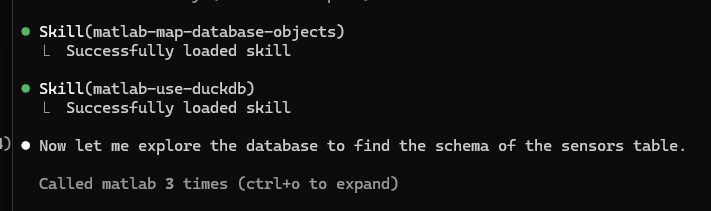
This session was MUCH faster than the previous one. It took about 33 seconds and cost me $0.57 and the code was of comparable quality.
Notes on repeatability
I'm showing you the result of just two runs but I actually did a few more than this, installing and uninstalling the skill, deleting previous attempts along with Claude's memory of each session and so on. I was concerned that maybe Claude was learning how to do this better over time and so wanted to ensure that I genuinely had some kind of control over its abilities. I did!
Agentic AI work is stochastic and no two runs were identical. When it didn't have access to the skill, Claude would sometimes figure out the ORM API more quickly and so the cost saving wasn't so dramatic. Other times, it took slightly longer than I showed here and so the cost saving would be larger.
What was always the case, however, was that without the skill, Claude always had to figure out how to proceed before doing so. With the skill, it just got on and did it.
The skills are like user-manuals for the AI
I reached out to the developer of these skills, Rikin Mehta, and asked him how he demonstrated that the skills were useful before releasing them. This is a more complex process than I originally appreciated but one of the things that his team does is try a set of prompts on a range of AIs both with and without the skill. These prompts explore different aspects of the workflows supported by Database Toolbox and Rikin shared the results of queries related to ORM mapping when tried on Claude using Opus 4.6. The 'ORM Pattern Tested' column is just a summary of what the prompt tests for.
The methodology used here is different from what I did in the blog post and essentially asks what the AI can do in 'one shot'. That is, it's not allowed to explore or iterate as Claude did when i used it earlier. Instead its set up like a trivia quiz: Can you answer this question from your base knowledge only or from your base knowledge + the database skills.
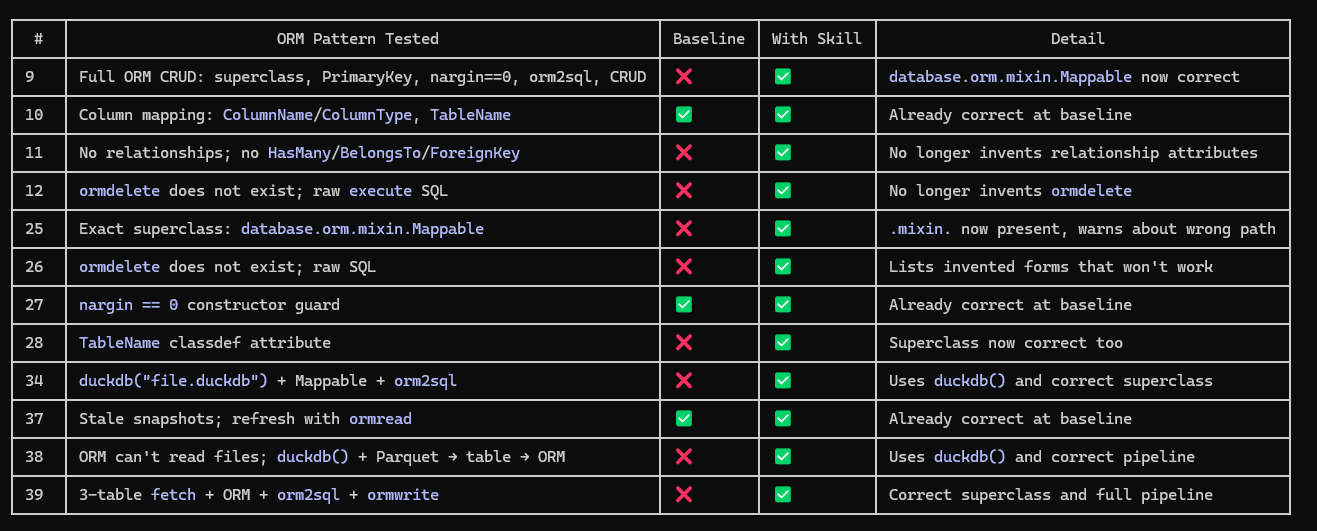
So one aspect of these skills is to improve the MATLAB knowledge of whatever AI you are using. Without them, you are relying on whatever training knowledge the AI happened to have. Some models will be great at MATLAB out of the box, others less so but the Skills should make pretty much all of them better.
Future MATLAB Skills
If you are into databases then I encourage you to start using these skills with your favorite AI straight away. Other skills related to different toolboxes will be coming soon and we are interested in learning more from you about what you'd like to see. Feel free to let us know in the comments section here or via the Agentic AI Toolkit's Issue Tracker.





Comments
To leave a comment, please click here to sign in to your MathWorks Account or create a new one.