
From Whiteboard Sketch to Pareto Front: Using Symbolic Math Skills in the Agentic AI Playground
Bio: Today's guest blogger is Jack Erickson. Jack is a product manager for Symbolic Math Toolbox and Quantum Computing at MathWorks. He was previously in AI software developer marketing at Intel.
Engineers communicate in diagrams; from sketches on whiteboards and circuits in textbooks to control loops in notebooks and beyond. What if you could turn a diagram into closed-form analysis and exploration in MATLAB, starting your new projects from first principles?
The recently-launched MATLAB Agentic Toolkit pairs the power of MATLAB with your AI agents and coding assistants. Many of the foundation models powering these tools also have multi-modal vision-language capabilities, encoding visual concepts as tokens that can be processed together with language tokens to understand an image. Since many engineers and scientists start projects by manually coding equations from a diagram, sketch, research paper, or textbook, we have used GenAI to make it easier to use these as a starting point to leverage the capabilities of Symbolic Math Toolbox.
We have published Symbolic Math Toolbox skill v1.0 in the Agent Skills Playground, which is an experimental repository for prototyping and demonstrating Agent Skills for MATLAB and Simulink work. The repo README explains how to install a single skill.
The matlab-symbolic-math skill covers the basic nuances of defining, assigning, and manipulating symbolic variables and equations. It includes hierarchical skills for specific workflows and tasks, such as deriving transfer functions, converting to state-space equations, using variable-precision arithmetic (VPA), and generating MATLAB functions for numerical analysis in engineering workflows. You can even use these skills together with natural language prompts to learn how to get started with Symbolic Math Toolbox best practices.
Symbolic Code Generation with Agentic AI
For the task at hand, I drew a simple PI control loop on my whiteboard:
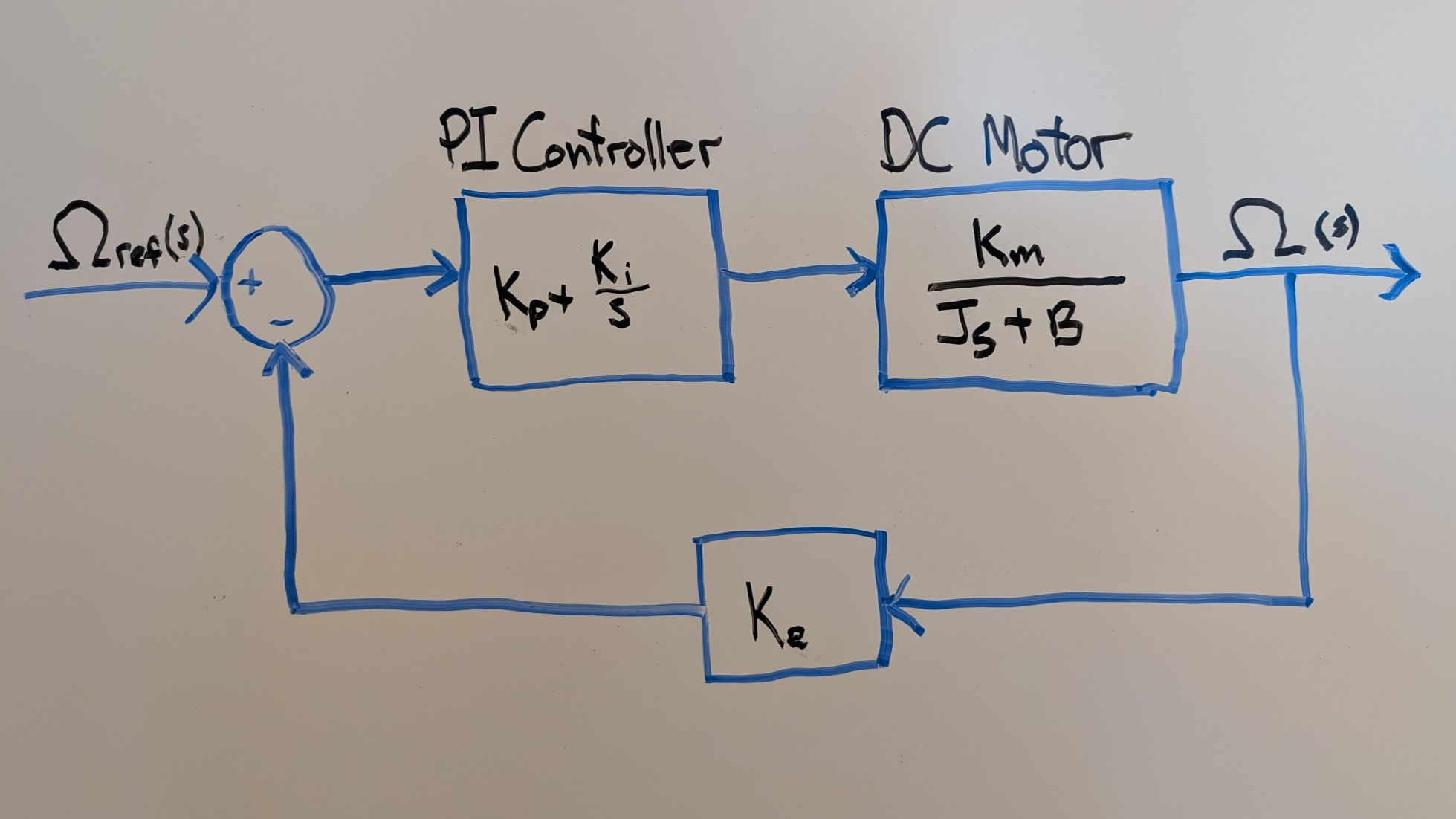
I apologize if you can’t read my handwriting, I often struggle to read it as well, but most vision-language models can figure it out. Anyway, here is what the blocks encode:
- PI Controller: C(s) = Kp + Ki/s
- DC Motor Plant: G(s) = Km / (Js + B)
- Encoder Feedback: H(s) = Ke
And this is the prompt I fed to OpenAI Codex with the Symbolic Math Toolbox skill installed in my ~/.agents/skills directory, running with the MATLAB Agentic Toolkit:
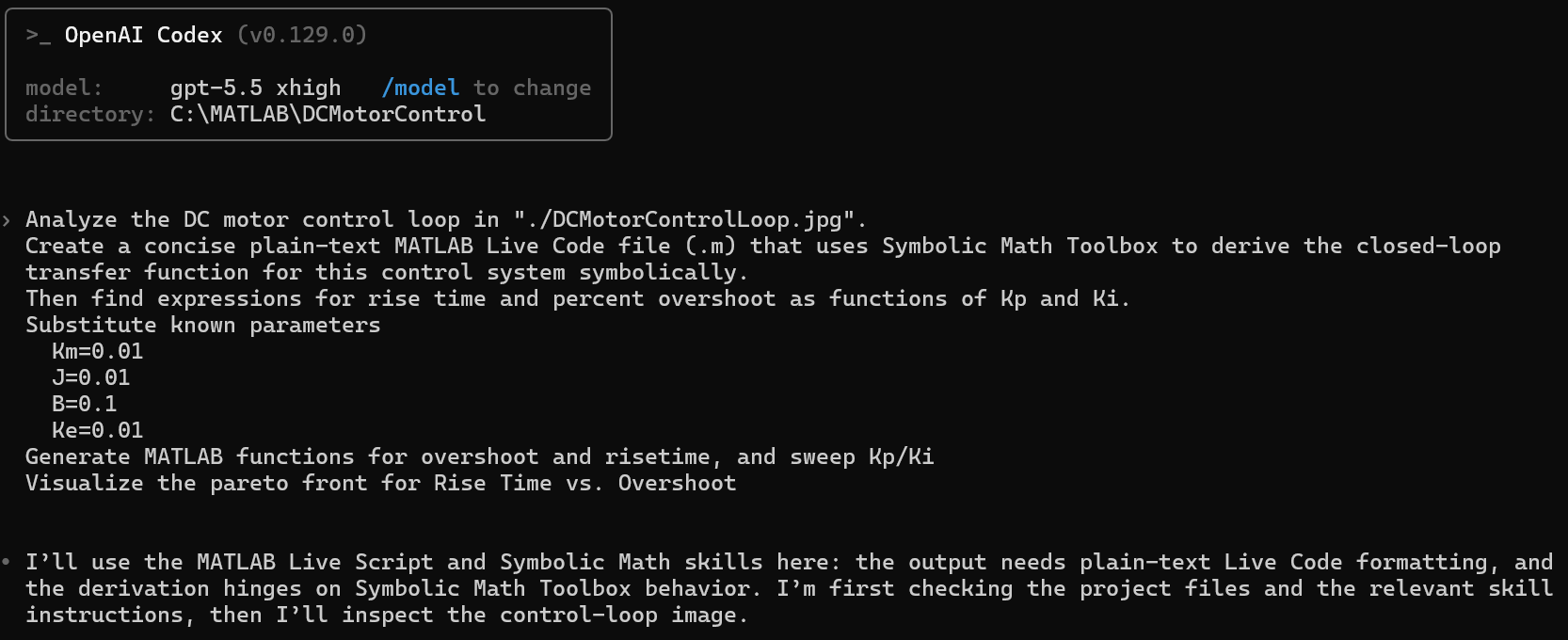
This is a typical application workflow that goes beyond equation manipulation by plugging in known values for fixed parameters and exploring a Pareto front for tunable parameters. Because symbolic equations display nicely in Live Scripts, I asked it to generate a plain-text Live Code file format (.m). The MATLAB Agentic Toolkit contains a skill for this because this file format was recently introduced in R2025a and some AI models might not yet be trained to generate it properly. The last message from Codex shows that it used the MATLAB live script and symbolic math skills.
Results
The resulting script can vary because of the non-deterministic nature of generative AI. However, as long as you provide sufficient information in the prompt and image input, the provided skills should guide the AI model to produce proper code. The MATLAB Agentic Toolkit connects the GenAI process to MATLAB to test the generated code, ensuring that it runs without errors.
My run produced a script that interprets the diagram as a PI controller, motor plant, and negative feedback gain, and builds the transfer function:
syms s
syms Kp Ki Km J B Ke positive
Gc = Kp + Ki/s;
Gp = Km/(J*s + B);
T = collect(simplify((Gc*Gp)/(1 + Ke*Gc*Gp)),s)

For brevity I will not show all the generated code, but the script then normalized the transfer function into a standard second-order format, extracting key system parameters like σ(damping factor), $ \omega_n $ (natural frequency), and α. It then used these analytical building blocks to derive exact symbolic equations for rise time and percent overshoot. Finally, it substituted the physical motor constants, providing closed-form equations with only $ K_p $ and $ K_i $ as the independent variables.
Here is where closed-form analysis shows its value to the engineering workflow. You can deploy these symbolic equations as numeric code for use in MATLAB toolboxes, Simulink, or Simscape. In this example, we want to identify an optimal combination of the $ K_p $ and $ K_i $ gain parameters. To do this, we use matlabFunction to convert symbolic expressions into numeric MATLAB functions while keeping $ K_p $ and $ K_i $ as variables, whose values can be scanned to find the optimal combination.
While generating this code, Codex showed that it was using one of the Symbolic Math Toolbox skills:

The matlabFunction-patterns.md skill provides the proper way to generate MATLAB functions by correctly specifying the free variables. In this case, Codex used the Troubleshooting section of the skill when calling matlabFunction.

The resulting code properly generates MATLAB function handles with $ K_p $ and $ K_i $ as free variables:
riseTimeFcn = matlabFunction(riseTimeExpr,'Vars',{Kp,Ki});
percentOvershootFcn = matlabFunction(percentOvershootExpr,'Vars',{Kp,Ki});
zetaFcn = matlabFunction(zetaVal,'Vars',{Kp,Ki});
We could use the resulting functions in a nonlinear solver like fmincon in Optimization Toolbox. But since this is a simple problem, Codex used the functions to sweep the parameter values to generate a Pareto front. The following section of code shows how it generated logarithmic grids and kept only underdamped and finite gain pairs.
KpVals = linspace(0,1000,251);
KiVals = logspace(3.5,6,251);
[KpGrid,KiGrid] = meshgrid(KpVals,KiVals);
zetaGrid = zetaFcn(KpGrid,KiGrid);
validGrid = isfinite(zetaGrid) & zetaGrid > 0 & zetaGrid < 1;
riseTimeGrid = nan(size(KpGrid));
percentOvershootGrid = nan(size(KpGrid));
riseTimeGrid(validGrid) = real(riseTimeFcn(KpGrid(validGrid),KiGrid(validGrid)));
percentOvershootGrid(validGrid) = max(0,real(percentOvershootFcn(KpGrid(validGrid),KiGrid(validGrid))));
Again, I will skip over the details of the code, but it extracts only the non-dominated points where you can't improve rise time without worsening overshoot, sorting from fastest to slowest rise time.
head(paretoTable)
Visualization
I asked Codex to visualize the Pareto front.
scatter(riseTimeVec,percentOvershootVec,12,[0.65 0.65 0.65],"filled","MarkerFaceAlpha",0.25)
hold on
plot(paretoTable.RiseTime_s,paretoTable.Overshoot_percent,"r.-","LineWidth",1.5,"MarkerSize",10)
hold off
grid on
xlabel("Rise time (s)")
ylabel("Percent overshoot (%)")
title("Pareto front for PI gains")
legend("Sweep samples","Pareto front","Location","northeast")
xlim([0.00 1.056])
ylim([0.00 1.35])
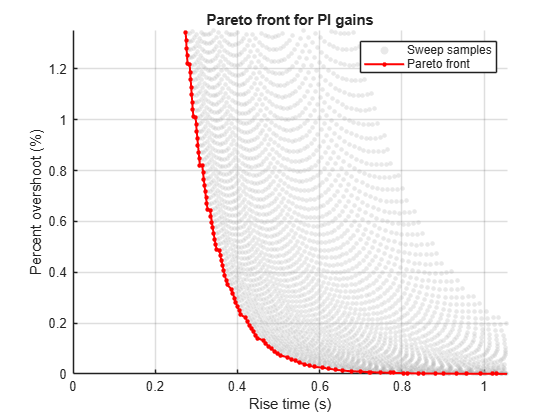
I manually added the xlim/ylim commands to zoom in to show some of the individual samples. The red dots represent the Pareto front. We're trying to minimize both rise time and overshoot, and here we have a set of options.
Next Steps: From Idealized Equations to Realistic Physical Models
The symbolic sweep reduces a large gain search space to a small Pareto set. After filtering the grid down to valid underdamped candidates, only about 20 gain pairs remain Pareto-optimal. You can then evaluate those candidates in a higher-fidelity Simscape model that includes effects such as current limiting, stiction, PWM quantization, sensor noise, and thermal behavior.
Try it yourself if you have access to Simulink and Simscape - prompt your agentic AI to generate code to plug these candidates into a Simscape model and programmatically simulate them in parallel.
The bottom line is that this fast narrowing step using closed-form analysis avoids relying on manual trial-and-error tuning or brute-force sweeps of detailed nonlinear models.
Get Started
This was a simple example for illustration purposes. In practice, I have used this approach on a variety of applications and I've learned a few things along the way.
- Provide as much information as you can about your problem and task. This can be any combination of textual and visual input. Always confirm the information the model extracts from visual input, but I have been impressed by recent advances in vision-language capabilities.
- Clearly specify what you want to generate. Like any programming paradigm, it doesn't read your mind. GenAI will fill underspecified areas with plausible but often unhelpful outputs that can waste your time.
- Provide supporting skills. Providing skills – particularly for Symbolic Math Toolbox and live script generation– significantly improves output quality. Until such skills are incorporated into the AI model training data, these skills supplement the AI model for specialized tasks such as workflows with closed-form analysis. If you identify a gap, try prompting your GenAI tool to generate new reusable skills.
This workflow helps you bring your projects into Symbolic Math Toolbox, where you can efficiently derive, manipulate, and explore the mathematical foundations of your work. If you are new to the toolbox, the self-paced training course is a good starting point to build proficiency.
The Symbolic Math Toolbox skills in the Agent Skills Playground are experimental. We are eager to improve them based on your experiences and feedback, so please comment below or post a repo issue.




コメント
コメントを残すには、ここ をクリックして MathWorks アカウントにサインインするか新しい MathWorks アカウントを作成します。