
An AI Coding Agent for Embedded AI
 |
Guest blogger: Arkadiy Turevskiy Arkadiy Turevskiy is the Product Manager for AI and Controls products at MathWorks. Arkadiy has been with MathWorks for over 20 years. Before MathWorks he designed aircraft engine control systems at Pratt & Whitney. |
When I deploy a deep learning model from MATLAB to an embedded target, I follow a specific workflow. I know which Deep Learning Toolbox blocks to use in Simulink for simulation speed and code generation. I know when to apply pruning, projection, or quantization to fit a model onto a constrained processor. I've built that expertise over years.
The first time I asked Claude Code to help with this workflow, it didn't have any of that context. It burned tokens trying approaches I would have skipped, and missed tools I would have reached for immediately.
That was the gap I wanted to close.
For the last several weeks my colleague Lucas Garcia and I have been building a skill file for Embedded AI that captures that workflow knowledge and gives it to an agent to avoid the frustrating iterations I experienced. I am excited to share that the improved version of this skill has now been published as part of MATLAB Agentic Toolkit. The skill will trigger when a coding agent detects it is relevant to your project. You can also explicitly tell the agent to invoke this skill.
What We Mean by Embedded AI
Embedded AI is AI that runs on resource-constrained hardware, integrated alongside control logic, signal processing, and application code, and validated as part of a larger engineered system. Model accuracy is necessary, but not sufficient: the algorithm must also behave correctly under real-world constraints and remain maintainable.
The skill covers two workflow patterns that account for most projects:
- Pattern 1 for small models (under 500 KB) on lean hardware such as ARM Cortex-M, Cortex-A/R, and DSPs. Pattern 1 has two pathways. In the first, you train the model directly in MATLAB using Deep Learning Toolbox or Statistics and Machine Learning Toolbox. In the second, you bring in a pre-trained model from a third-party framework such as PyTorch or ONNX, and the agent imports it as a dlnetwork. From there the path is the same: the agent applies compression - pruning, projection, and/or INT8 quantization - depending on your objectives, integrates the network into Simulink for system-level simulation, and generates C with Embedded Coder.
- Pattern 2 for larger models (over 1 MB) on high-performance hardware such as x86, GPUs, and Cortex-A. The agent generates C/C++ directly from a PyTorch or LiteRT model using the MATLAB Coder Support Package for PyTorch and LiteRT, with no native rebuild required.
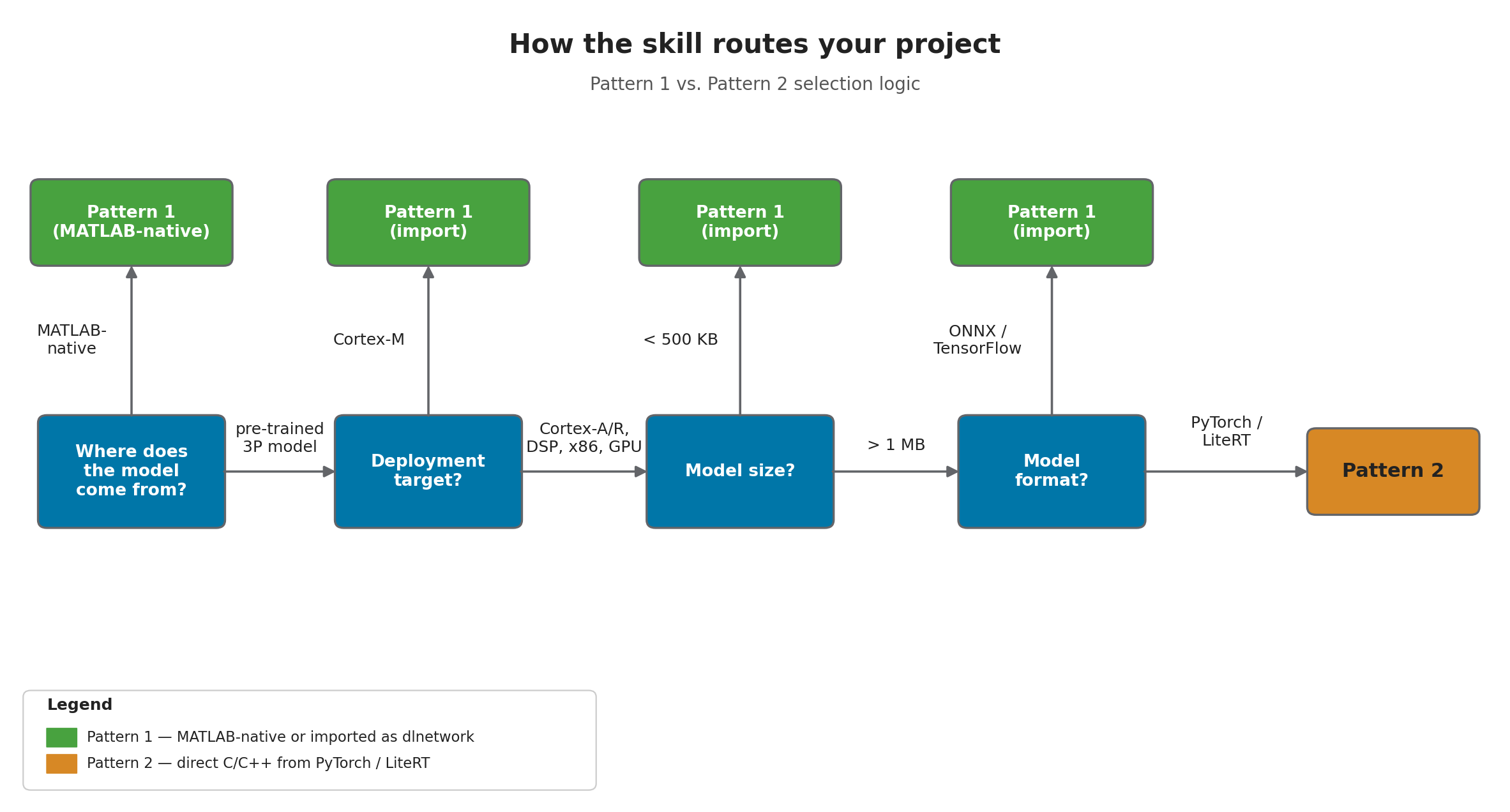
The skill picks the pattern automatically after a short conversation about your model, your target, and your constraints.
A Short Demo
Here is the agent walking through Pattern 1 - importing a PyTorch LSTM, compressing it for a Cortex-M7, and generating the C code:
This demo plays without sound and is shown at accelerated speed. Your experience might be different from what is shown as the skill is frequently updated.
A few things worth noticing:
- The agent pauses after every workflow step and asks before moving on. You see each MATLAB script before it runs or after it runs.
- It detects your installed toolboxes and support packages silently before the workflow starts, so it never asks you to use something you do not have.
- It opens Deep Network Designer so you can inspect the architecture visually, rather than trust a wall of layer-by-layer text output.
- After import, it runs the original model through PyTorch and the rebuilt MATLAB model side by side, then reports mean absolute error and max error explicitly.
These behaviors are explicitly encoded as rules in the skill file.
What Is Inside
The skill is plain markdown - a top-level SKILL.md plus about a dozen reference files split between pattern1/ and pattern2/, with shared references for environment discovery, project discovery, and AI verification. SKILL.md itself is a router with a decision tree, a list of banned legacy functions (trainNetwork, DAGNetwork, importONNXNetwork, etc), and explicit ALWAYS / ASK FIRST / NEVER rules.
A few examples:
- ALWAYS create a MATLAB script for every workflow step - never run ad-hoc commands - so the engineer can read it, re-run it, and put it under version control.
- ASK FIRST before code generation: is the target an ARM Cortex-M? If so, enable CMSIS-NN for a significant speedup.
- NEVER install support packages on the user's behalf.
The result is an agent that behaves the way an experienced embedded engineer expects a junior teammate to behave: methodical, transparent, and willing to stop and ask.
Why This Matters
Agentic coding tools are fast, but the code they produce is non-deterministic and hard to verify. The Embedded AI skill bridges this gap: the agent gives you the speed of natural-language iteration, while MATLAB, Simulink, and Embedded Coder give you deterministic code generation, system-level simulation, and a path to SIL, PIL, and HIL verification. Every step is a MATLAB script and/or Simulink model you can read, re-run, and put under version control.
The agent does the typing while you stay in control.
Try It Yourself
You will need MATLAB R2026a with Deep Learning Toolbox, MATLAB Coder, Embedded Coder, and the support packages listed in the repo's README. You will also need MATLAB Agentic Toolkit and Simulink Agentic Toolkit - both provide the MCP servers the agent uses to talk to MATLAB and Simulink. I tested everything with Claude Code, but the skill format should be straightforward to port to other coding agents.
Drop the skill folder into your project's .claude/skills/ directory, start the agent, and describe what you want to deploy. The first thing the agent will do is ask about your model, your target hardware, and your constraints.
If you build something with this, I would love to hear about it. Leave a comment below with your thoughts and feedback!
- 범주:
- Deep Learning




댓글
댓글을 남기려면 링크 를 클릭하여 MathWorks 계정에 로그인하거나 계정을 새로 만드십시오.