
Best Practices for Large Simscape Models

I have been supporting users of Simulink and Simscape for many years. During this time, I built up in my head a list of best practices that I systematically go through when I receive new Simscape models from colleagues and customers.
In this post, I will share that checklist, with examples.
Before getting started, a few disclaimers:
- It's not a must to follow all those practices 100% of the time. Many small and medium scale Simscape networks can simulate successfully and efficiently even if you do not follow my recommended best practices. Based on my experience, following those best practices is especially important for large Simscape simulations where, at scale, any small issue gets amplified.
- Most of my experience with Simscape is with the mechanical and isothermal liquid domains, so what I am describing has been learned with those domains.
- Many of those best practices are targeted at Simulink variable step solvers, to avoid unnecessarily small time steps that can slow the simulation unnecessarily.
Let's get started.
Initialization
When configured properly, Simscape networks usually initialize quickly. When variables do not converge on the first attempt, the Simscape initialization falls back to more advanced modes that require more computation and can take time. When that happens, you will see this warning:
Warning: First solve for initial conditions failed to converge. Trying again with all high priorities relaxed to low.
You really want to avoid this warning.
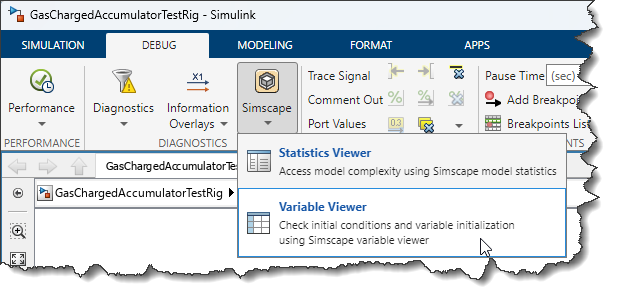
The tool I like to use to investigate this issue is the Simscape Variable Viewer
What I recommend is to enable the Advanced configuration so you can see the column titled Differential.
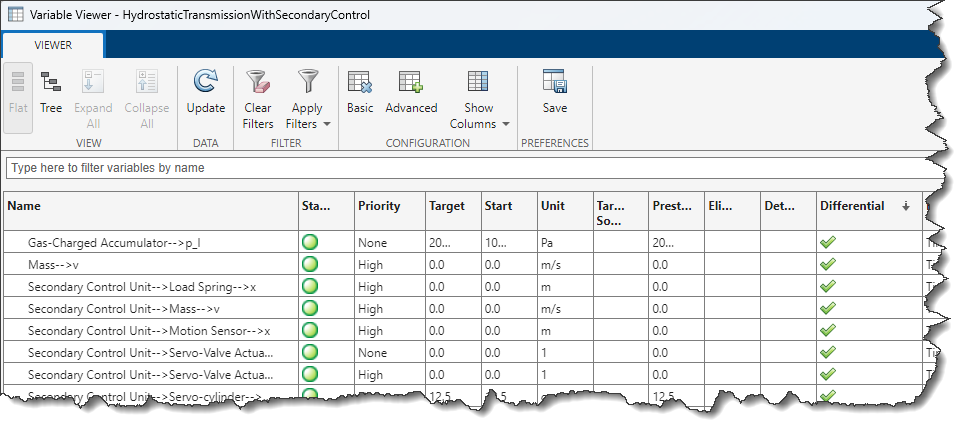
Differential variables are the actual degrees of freedom in the system, the variables that will be integrated by the Simulink solver. Because of that, the general advice I typically give is:
Set the priority of all differential variables and only the differential variables to High, set all other priorities to none. Never use Low priority.
This comes with three exceptions:
- Simscape Multibody: Low priority should be used only with Simscape Multibody joints. For example, a low priority can be used to guide a closed loop mechanism that has two valid configurations of type "elbow-up vs elbow-down", like this four bar mechanism.
- Some shipping Simscape components have variables that will end up being differential for which the user does not have control. Those typically have a priority of None and are fine like that, no worries.
- When you can manually swap a differential variable for an equivalent algebraic variable.
Let's look at an example.
Conflicting Initial Conditions
mdl = 'GasChargedAccumulatorTestRig';
open_system(mdl);
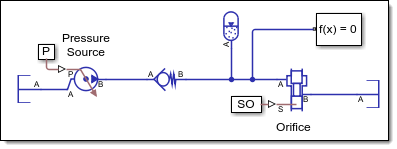
out = sim(mdl);
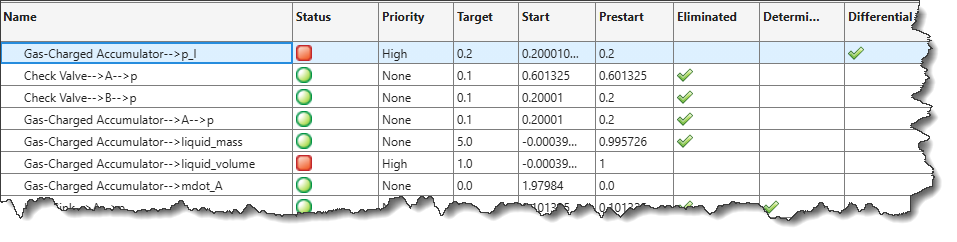
In this case, the Gas Charged Accumulator specifies both an initial pressure and initial volume. Those two variables are not independent and only one should be specified with High Priority.
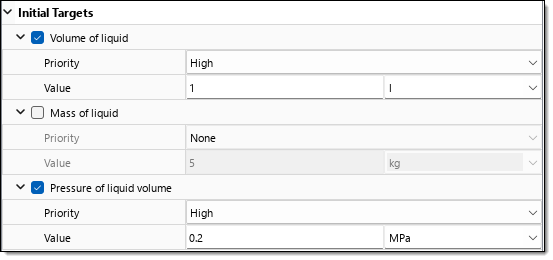
The Simscape Variable Viewer shows that the Pressure is the differential variable, so I would set the Volume of Liquid priority to None to make the warning go away.
Algebraic Loops
The Simscape documentation states it clearly: A Simscape physical network should not exist within a Simulink algebraic loop*.*
However this is not enforced, because it can work in some cases. Based on my experience, even if it works for your model today, fix it, this will likely cause you trouble as your model grows.
To avoid algebraic loops, I can recommend two approaches:
- If the algorithm is relatively simple, instead of going out to Simulink and back into Simscape, stay in Simscape and use the blocks from the Physical Signals section of the library. For example, see these posts where I described how to create custom valves for Simscape (Custom hydraulic valve, Custom Gas valve)
- If the algorithm is too complex to be implemented using the Simscape Physical Signals blocks, use a Transfer Function to break the algebraic loop. See this post for more details: Why you should never break a continuous algebraic loop with a Memory block
DAE Failures
You really want to avoid this warning:
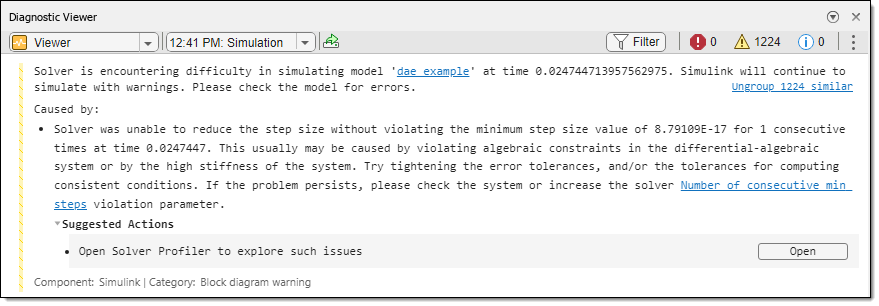
Warning:Solver is encountering difficulty in simulating model 'modelname' at time 1.0000000000000036. Simulink will continue to simulate with warnings. Please check the model for errors.
Caused by:
Solver was unable to reduce the step size without violating the minimum step size value of 3.55271E-15 for 1 consecutive times at time 1. This usually may be caused by violating algebraic constraints in the differential-algebraic system or by the high stiffness of the system. Try tightening the error tolerances, and/or the tolerances for computing consistent conditions. If the problem persists, please check the system or increase the solver Number of consecutive min steps violation parameter.
Suggested Actions:
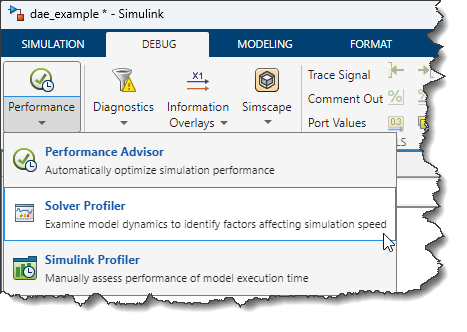
Open Solver Profiler to explore such issues
I wrote about this topic a long time ago here: Identifying the root cause of an algebraic constraint violation. While the core issue is the same, the tools to investigate those have improved a lot.
If you have only one or two instances of this warning and the simulation completes successfully, you can probably ignore it, but it's a sign of bad numerical robustness. Typically, this kind of warning is related to the fact that the system is modeled too ideally.
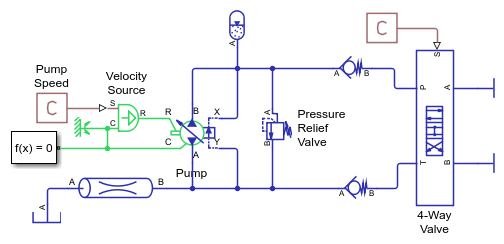
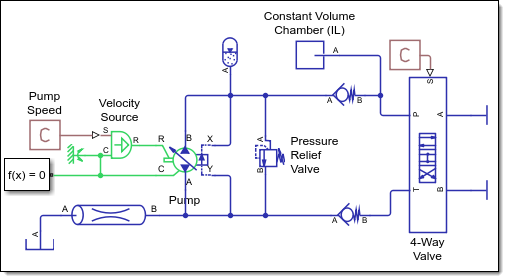
To illustrate this situation, I made this simple model using the Isothermal Liquid domain. On the right of the diagram, I used two Cap (IL) blocks. This block is an ideal component that allows zero flow.
mdl = 'dae_example';
open_system(mdl);
If I try simulating this model, it will hang with an infinite number of the above warnings, so I will run it with the TimeOut option.
out = sim(mdl,'TimeOut',2);
As mentioned in the Suggested Action, let's run the model through the Solver Profiler.
In the configure section, I always enable logging for these three options:
- Continuous States
- Simscape States
- Zero Crossing
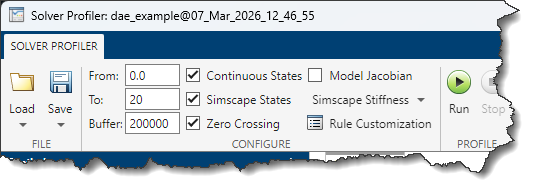
I click run, wait for a few seconds that many instances of the diagnostic are triggered, and stop it. What we can see here is that the solver step size "stalls", taking very small step of only 1e-15sec.
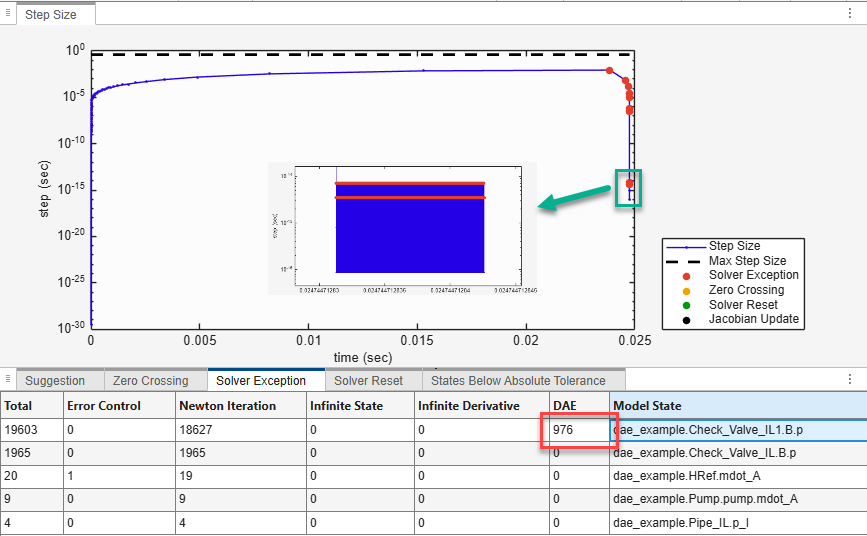
In the Solver Profiler Solver Exceptions table, we try sorting the states such that the most likely culprits are at the top of the list. Any non-zero value in the DAE column should be addressed.
In the Solver Profiler, try opening the State Explorer and/or the Simscape Results Explorer.
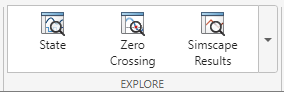
These two tools present similar results in different ways:
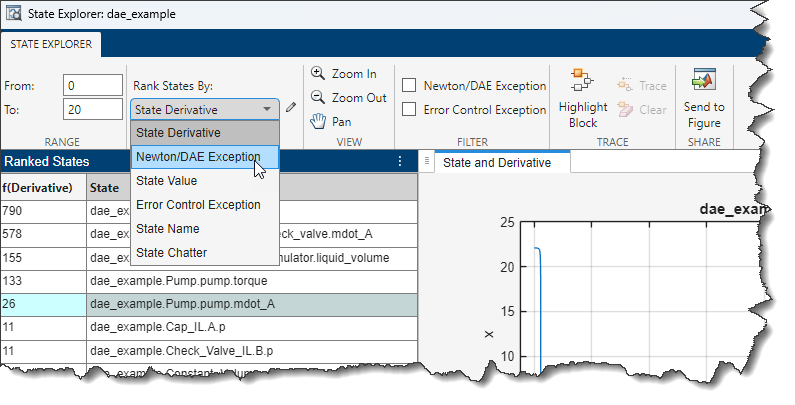
- State Explorer: Visualize the states integrated by the Simulink solver. States are listed in a table and sorted based on different criteria. I like to start here, sort the states by Newton/DAE Exception and look for anything unexpected or nonphysical, like sudden jumps. This helps me identify which blocks in the model are the most likely culprits.
- Simscape Results Explorer: Displays all Simscape variables (a subset of these become states and are shown in the State Explorer). This allows me to "zoom in" the culprit area identified in the previous step and see all variables and get a better understanding of the problem.
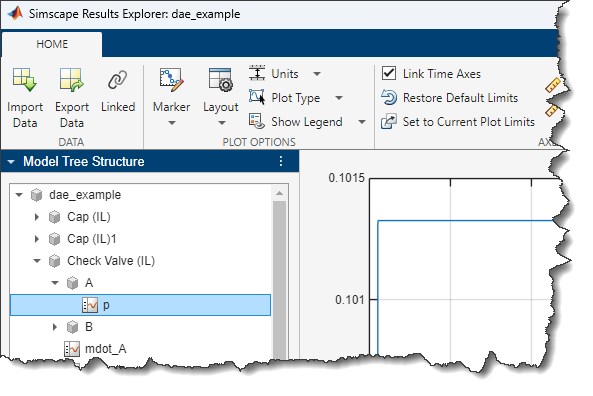
For the example we are looking into today, the first block listed in the solver profiler is the pressure at port B of the upper Check Valve. The problem is that this node is "dry", or too ideal. The Check Valve is trying to open, but the fluid has nowhere to go. In the real system, there is most likely a volume of fluid between the check valve and the 4-way valve.
To avoid the problem, the simplest trick is usually to insert a Constant Volume Chamber on the node to allow the fluid to go somewhere.
In terms of equations, this happens when many variables are linked together by complex algebraic constraints. Adding a volume of fluid on that node breaks the algebraic constraint and the variables involved become independent degrees of freedom.
Solver Resets
I covered this concept in this post: A New First Order Hold! » Guy on Simulink - MATLAB & Simulink
When a block with continuous states (Integrator, State-Space, a Simscape network, etc) is driven by a signal with a discrete sample time, the Simulink solver needs to reset. When the model contains Simscape blocks and uses an implicit solver (ode15s, ode23t, daessc), a solver reset systematically triggers a recomputation of the solver Jacobian. This is an expensive operation that scales exponentially with the size of the model, so you want to avoid that as much as possible.
Here are my tips to avoid that:
- When looping out to Simulink and back into Simscape, avoid introducing Fixed-In-Minor sample times. See this post for more details: Why you should never break a continuous algebraic loop with a Memory block
- When the Simscape network is connected in a loop with a fixed-step discrete controller, insert First Order Hold blocks on the discrete signal. See this blog post for more details on how to use this block properly.
Zero-Crossing Events
The other type of events that forces the Simulink solver to recompute its Jacobian is zero-crossing. If you are not familiar with the concept of zero-crossing detection, I recommend starting with the Simulink documentation: Zero-Crossing Detection - MATLAB & Simulink
Once you are familiar with zero-crossing detection in Simulink, see this Simscape-specifics guidance:
Here is my take on that.
With Simulink variable-step solvers, zero-crossing detection is necessary to accurately capture discontinuities. However, you don't want to capture more than needed.
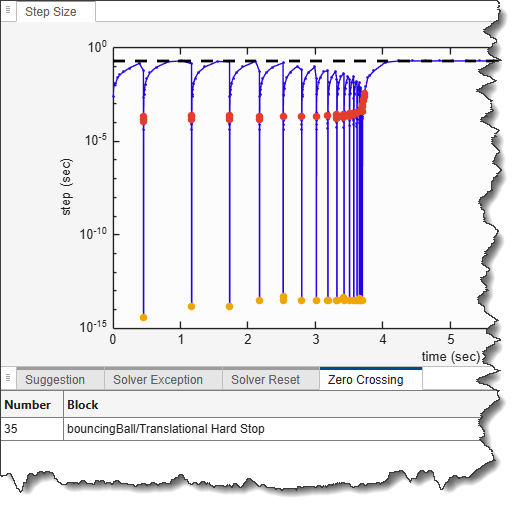
The first thing to do to determine if zero-crossing is a problem for a simulation is to run it through the Solver Profiler. Look at the zero-crossing tab and use your knowledge of the model to determine if the blocks listed and the number of events seem appropriate. If you see more events than you expect, open the Zero-Crossing Explorer, and look for the following patterns:
- If a variable is chattering around one event, try adding damping to damp out the oscillations faster, or see if you could steer the system to operate slightly on one side or the other of the zero-crossing threshold
- If a variable crosses its zero level often, but seems continuous and this is a component for which you have control over the Simscape language source code, try disabling zero-crossing.
In a similar way as I do with the State Explorer and the Simscape Results Explorer, when investigating zero-crossing events I alternate between the Zero-Crossing Explorer and the Simscape Results Explorer.
Let's illustrate that with a classic: The bouncing ball, which I implemented using a Translational Hard Stop:
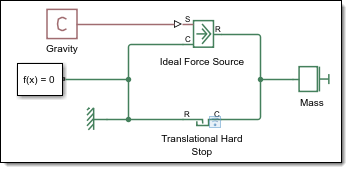
The Solver Profiler tells me that the zero-crossing events are coming from the Hard Stop block, but not exactly which equation within the Hard Stop block.
If you open the Simscape Results Explorer, you can see that the Hard Stop block has two zero-crossing equations registered. If you select "zc_2", the Node Statistics panel contains a hyperlink to the location.
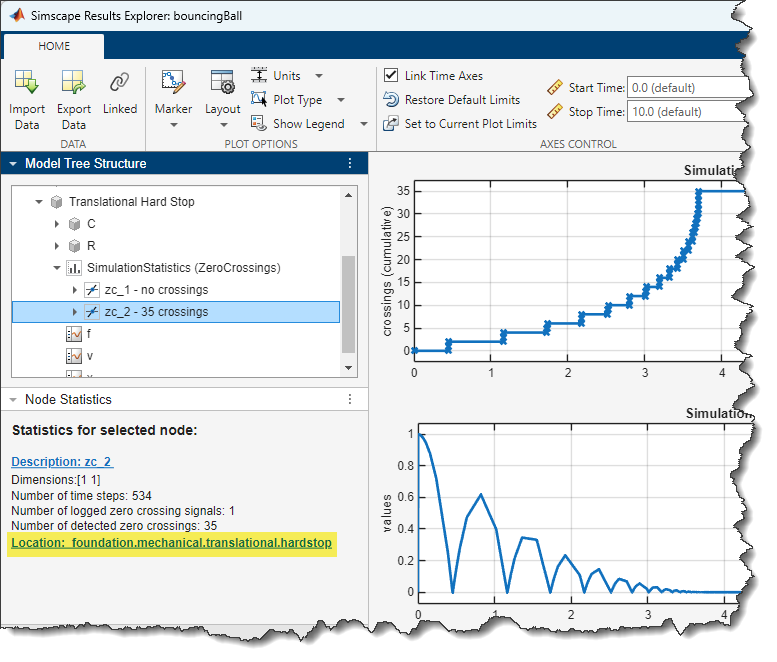
Clicking the location hyperlink opens the source code for the block and puts the cursor on the line generating the zero-crossing event.
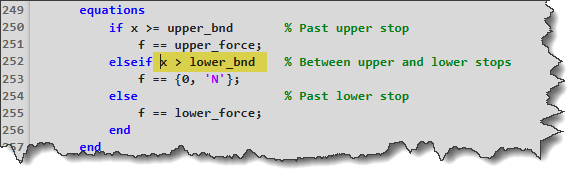
Knowing exactly which equation triggers the zero-crossing events should help you determine if it is really needed for your application and make appropriate engineering decisions.
Now it's your turn
In this post, I listed a set of things to look for to keep your Simscape simulations healthy. This includes:
- Initial conditions
- Algebraic loops
- DAE failures and dry nodes
- Solver Resets
- Zero-Crossing events
Let us know in the comments below if there are other items you typically look for to assess if your Simscape simulations run efficiently.


댓글
댓글을 남기려면 링크 를 클릭하여 MathWorks 계정에 로그인하거나 계정을 새로 만드십시오.