Skip to Main Content Skip to Search
File Exchange
MATLAB Newsgroup
Link Exchange
  Blogs  
 Contest 
MathWorks.com

Steve on Image Processing

June 25th, 2008

False-color visualization of binary image object sets

Today I want to demonstrate a useful technique to produce a false-color visualization of different sets of binary image objects. Here's the sample image that we'll use:

url = 'http://blogs.mathworks.com/images/steve/2008/segmented_rice.png';
bw = imread(url);
imshow(bw)
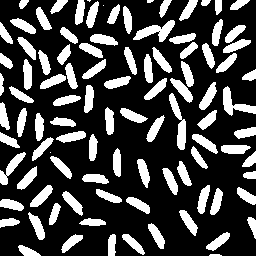
Let's look at two sets of objects: Those that touch the image border, and those that do not.

notouch = imclearborder(bw);
imshow(notouch)
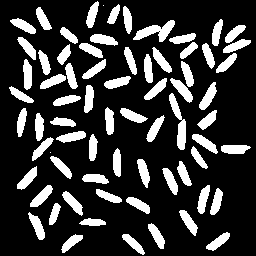
The objects that do touch the border can be computed using logical operators:

touch = bw & ~notouch;
imshow(touch)

Here's one way to turn these two sets of objects into a single, false-color, indexed image. First, initialize the index matrix:

X = zeros(size(bw), 'uint8'); % Did you know about
                              % this way to call zeros?

Now assign 1 to the elements of X corresponding to the border-touching set, and assign 2 to the elements corresponding to the interior set.

X(touch) = 1;  % Logical indexing!
X(notouch) = 2;

Now we just need to pick some colors for the color map. I'll make the background white:

map(1,:) = [1 1 1];

Make the touching objects be purple-ish.

map(2,:) = [0.7 0.3 0.8];

And use a green shade for the removed objects.

map(3,:) = [0.4 0.8 0.7];

Now we can display the resulting indexed image.

imshow(X,map)


Get the MATLAB code

Published with MATLAB® 7.6

2 Responses to “False-color visualization of binary image object sets”

  1. Ted replied on :

    Much simpler:
    1. Append 1 pixel white border to original image
    2. Flood fill starting from upper left hand white pixel (0,0) with purple. The 1 pixel border added guarantees that all rice grains touching the edge get filled with purple.
    3. Replace white with aquamarine
    4. Remove 1 pixel from each of the 4 sides

    Longer alternative series of steps given I is input image
    1. A = I with edge touching elements removed
    2. B = I minus A
    3. C = A with white replaced with green
    4. D = B with white replaced with purple
    5. RESULT = C + D

  2. Steve replied on :

    Ted—Thanks.

Leave a Reply


Steve Eddins manages the Image & Geospatial development team at The MathWorks and coauthored Digital Image Processing Using MATLAB. He writes here about image processing concepts, algorithm implementations, and MATLAB.

  • Assaf: Hi, I have 3 questions regarding the following sentence: “Rather than using the power spectrum from a...
  • Steve: Cara—I do not understand your question. Can you clarify it?
  • Cara Schiek: Hi. How could I do this same thing with image vales within the patches? cara
  • Steve: Vincent—OK, thanks for the information.
  • Vincent: My only data point on multithreading is that the Performance tab of the Task Manager shows increased CPU...
  • Steve: Vincent—Thanks for giving it a try and reporting back. I’m a bit skeptical that multithreading...
  • Vincent: Oops numbers were wrong. Data set was 450MB large so the numbers are: Results: ImageJ alone =< 5 s (or 90...
  • Vincent: Steve- I just had a quick run at the new imread.m patch. It’s much faster than the previous version...
  • Steve: Erik—Also, separability of the kernel provides no speed benefit in FFT-based implementations....
  • Steve: Erik—Good questions. Remember that, practically speaking, when we filter a 2-D signal with a 1-D filter...

These postings are the author's and don't necessarily represent the opinions of The MathWorks.

Related Topics