Steve on Image Processing

August 20th, 2008

Image visualization using transparency

Transparent graphics objects can be used effectively to visualize image processing concepts. Two particularly useful techniques are:

  • Highlighting image regions with transparent patches
  • Displaying one image transparently over another

Today I'll show how to highlight image regions with patches. For this example I'll use the 'Extrema' measurement returned by regionprops. The extrema for a given object are eight points: the left-most pixel on the bottom, the right-most pixel on the bottom, the top-most pixel on the right, the bottom-most pixel on the right, and so on.

I'll start with the rice image, segmenting it using techniques I've shown before.

I = imread('rice.png');
imshow(I)
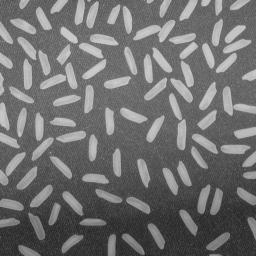
Even out the illumination with the tophat operator, threshold, and then clean up the thresholded image a bit.

I2 = imtophat(I, ones(15, 15));
bw = im2bw(I2, graythresh(I2));
bw2 = bwareaopen(bw, 5);
bw3 = imclearborder(bw2);
imshow(bw3)
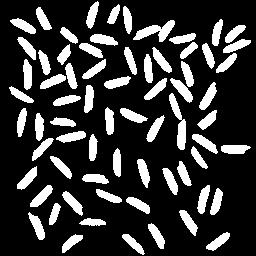
Label the binary objects and compute the extrema.

L = bwlabel(bw3);
s = regionprops(L, 'Extrema');

Each object has 8 extrema points associated with it.

s(1).Extrema
ans =

   11.5000   86.5000
   12.5000   86.5000
   34.5000  100.5000
   34.5000  102.5000
   33.5000  103.5000
   27.5000  103.5000
    9.5000   89.5000
    9.5000   87.5000

We can superimpose the extrema-bounded shapes on top of the original rice image by using patch objects.

imshow(I)

hold on
for k = 1:numel(s)
    x = s(k).Extrema(:,1);
    y = s(k).Extrema(:,2);
    patch(x, y, 'g')
end
hold off
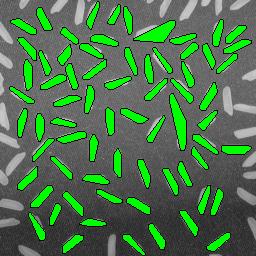
The above visualization is pretty clear. If you zoom in on some of the odd, larger shapes, though, you can't really tell what's going on.

axis([120 200 1 75])
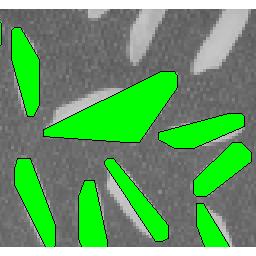
We solve that by displaying the patches transparently.

imshow(I)

hold on
for k = 1:numel(s)
    x = s(k).Extrema(:,1);
    y = s(k).Extrema(:,2);
    patch(x, y, 'g', 'FaceAlpha', 0.3)
end
hold off
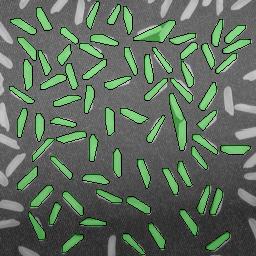
Now if you zoom in on the same region, we can see exactly what caused the unusual region.

axis([120 200 1 75])
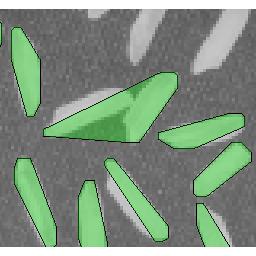
Two of the rice grains were touching.

Next time I'll show a couple of techniques for visualizing one image transparently superimposed on another.


Get the MATLAB code

Published with MATLAB® 7.6

12 Responses to “Image visualization using transparency”

  1. Cara Schiek replied on :

    Hi.

    How could I do this same thing with image vales within the patches?

    cara

  2. Steve replied on :

    Cara—I do not understand your question. Can you clarify it?

  3. Cara replied on :

    Hi.

    Sorry for the confusion. I would like to produce an image with a transparency similar to what you have done here. Except I would to fill the patches with data from another image. For example, I would like to make a transparency made of patches, where the patches are filled with elevation data. I would like to then overlay the patch transparency onto another image.

    cara

  4. Steve replied on :

    Cara—You can use your elevation data as a texture map on a flat surface object. You might want to take a look at the texture mapping section in the MATLAB 3-D visualization doc, or at the doc for surface properties.

  5. DP replied on :

    Hi Steve,
    As you shown in your example above you have connected two objects on the image, i want to do the opposite, can we seperate the connected two or more objects, in the image?
    thanks
    sincerely
    DP

  6. Steve replied on :

    DP—Check out the segmentation demos in the Image Processing Toolbox.

  7. abc replied on :

    Hi Steve,
    Thanks for all your helpful tutorials. I have a problem trying to overlay a PET image with gray colormap onto a CT image with hot colormap. My data set is unit16. I am SUCCESSFULLY able to overlay the images but the background CT image is VERY unclear/dark (hardly visible). My code looks like this…. Kindly advise

    I_CT = Load CT_IMAGE;
    imshow(I_CT,’displayrange’,[]); colormap(gray)
    I_PET = Load PET_IMAGE;
    hold on
    imshow(I_PET,’displayrange’,[]); colormap(hot)
    set(I_PET_h,’alphadata’,0.5)
    hold off

  8. abc replied on :

    Hi again, i could successfully show PET and CT image in 2 different axes in one figure, but still having difficulty seeing the background CT image after overlaying them. please help. Thanks in advance

  9. Steve replied on :

    Abc—You could try varying the display range for I_CT and also the ‘AlphaData’ parameter.

  10. abc replied on :

    Hi Steve, Thanks for all your previous inputs. i have another problem. i have a volume similar to as shown in this link.

    http://www.mathworks.se/products/matlab/demos.html?file=/products/demos/shipping/matlab/transpdemo.html

    When i using the alpha a value to 0.3 to visualise the inner structure similar to that in the above link . Now I want to calculate the surface area of that inner structure ONLY. Is that possible, and how do i go about finding it.

    Thanks a lot

  11. abc replied on :

    Hi,
    i am successful in finding the total surface area, but i am not able to differentiate the out faces from inner faces ?

    thanks

  12. Steve replied on :

    Abc—I don’t know how to distinguish the faces. You might try posting your question in the MATLAB newsgroup.

Leave a Reply

Wrap code fragments inside <pre> tags, like this:

<pre class="code">
a = magic(3);
sum(a)
</pre>

If you have a "<" character in your code, either follow it with a space or replace it with "&lt;" (including the semicolon).


Steve Eddins manages the Image & Geospatial development team at The MathWorks and coauthored Digital Image Processing Using MATLAB. He writes here about image processing concepts, algorithm implementations, and MATLAB.

  • Sana: hi steve, could you explain to me how i would be able to use the dir function, to do a loop through a directory...
  • Nishtha: Sir, I have preprocessed the image in following steps: [1] adaptive histogram equalization [2] thresholding...
  • Kristof: I also strongly support the idea. I have just recently bumped into the problem that im2single was not...
  • Steve: David—I’ m glad you found it useful!
  • David Lalejini: I found your example very useful for finding connected nodes in a large set of input pairs. I start...
  • tommy: Dear Steve, I have a question,please if you are kind to help me regarding the accumulator array dimensions of...
  • Steve: Abc—I don’t know how to distinguish the faces. You might try posting your question in the MATLAB...
  • Manju: well if we have a few ovals within each other like in a cell how do we measure the distance from the center...
  • Steve: Manju—What do you mean? How is each region defined?
  • Manju: if we have 2-3 regions within each other how do we measure the regions of each one?

These postings are the author's and don't necessarily represent the opinions of The MathWorks.