
Duncan Carlsmith’s Physics Experiments
Duncan Carlsmith is a busy man. Don't believe me? Take a look in the Generative AI discussion area and you'll see that he's made six posts in the last three weeks alone. And these posts are substantial, cataloguing significant achievements. His most recent piece (as of this writing!) is about his Double Pendulum Chaos Explorer. More on that in a bit.
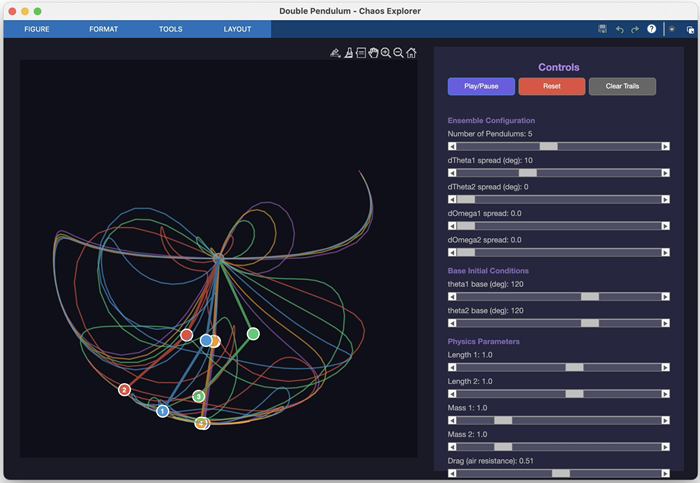
And just who is this hard-charging Duncan Carlsmith? He's a physics professor at the University of Wisconsin, and he recently discovered the power of Claude Code and the MATLAB MCP server. Now he wants you to know about them. I want you to know about them too!
The best way I can think of to convince you that these tools are worth learning is to show you how quickly you can create stuff. But don't take my word for it. Here's Carlsmith talking about how he built his Double Pendulum tool.
A remarkable thing I learned is not just the AI's ability to write HTML5 code in addition to MATLAB code, but its knowledge and intuition about app layout and user interactions. I played the role of an increasingly demanding user-experience tester, exercising and providing feedback on the interface, issuing prompts like "Add drag please" (Voila, a new drag slider with appropriately set limits and default value appears.) and "I want to be able to drag the pendulum masses, not just set angles via sliders, thank you." Then "Convert this into a MATLAB code." I was essentially done in 45 minutes start to finish, added a last request, and went to bed.
That's some serious productivity!
Back in November, I too was playing around with a double pendulum model (see Storyboarding with Live Script Skills). It's no big surprise that Carlsmith and I chose the same system. The double pendulum is a well-known classroom project, easy to build and endlessly fun to watch owing to its chaotic nature.
So I'm going to take this same double pendulum demo in a slightly different direction. I'm going to demonstrate a skill that allows you to build a JavaScript user interface that works entirely inside the context of MATLAB. The secret to this is something I call "Rick's Trick", named after my friend Rick Paxson, who taught it to me. The key insight is that there is a MATLAB UI component called uihtml that allows you to embed arbitrary HTML (and its associated JavaScript) right in a figure or AppDesigner app. But rather than have some MATLAB uicontrol buttons next to a small HTML display, you can actually make the entire figure window one big uihtml panel. Then all the UI elements, all the displays, everything becomes one single HTML/JavaScript entity. MATLAB is used for what it does best: accurate ODE integration. And we can leverage the world of HTML for the interface.
I made a Claude Skill to help me do this. Armed with this skill, you don't have to know anything about how to pass data back and forth from MATLAB to JavaScript. Want to try it? Here it is!
skills/skills/matlab-uihtml-app-builder/SKILL.md at main · matlab/skills · GitHub
Here is my prompt.
Use the uihtml skill to make a UI for the double pendulum ODE. I want sliders for the initial conditions theta1 and theta2, sliders for parameter controls, an animation pane for the double pendulum and another pane to plot theta1 vs theta2. There will be a "Go" button that will pass all parameters to MATLAB for calculation. Then, when the entire simulated run of 20 seconds is complete, pass all the data back to the HTML UI for display at the rate of 1 simulated second = 1 second of real clock time. Make sure the time vector you pass is evenly divided so that everything looks smooth and realistic.
I liked what I got back, but just for fun I added "Now make it look cool." Here's the result.
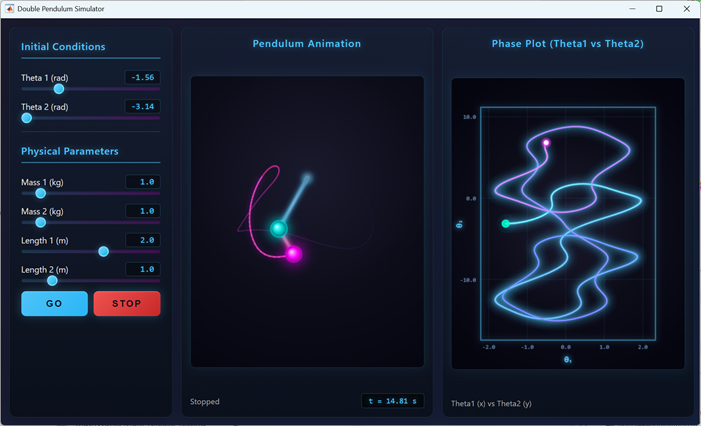
Now I have all the flexibility of JavaScript and HTML for displaying the simulation results. And because Claude Code is fast, it was a two minute exercise to say "Make the UI look like something you might see in a WWII airplane."
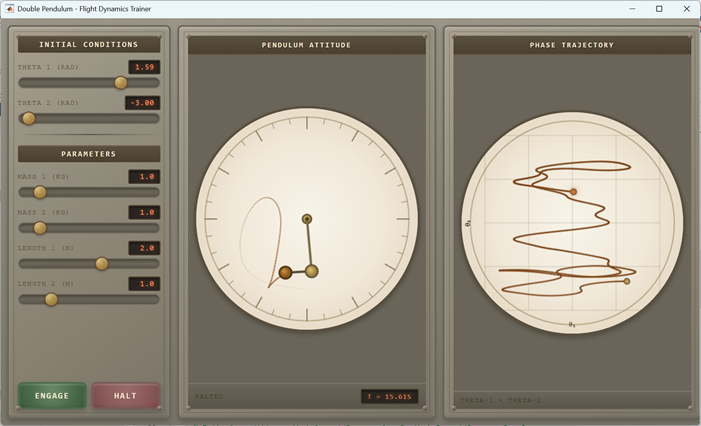
You might quibble about whether this UI looks like something from 1944, but the point is to show how quickly you can transform these UIs, whether in functionality or appearance.
Thanks for the inspiration Duncan!





Comments
To leave a comment, please click here to sign in to your MathWorks Account or create a new one.