
Introducing the MATLAB Agentic Toolkit
TL;DR - MathWorks have released the MATLAB Agentic Toolkit which will significantly improve the life of anyone who is using MATLAB and Simulink with agentic AI systems such as Claude Code or OpenAI Codex. Go and get it from here: https://github.com/matlab/matlab-agentic-toolkit
Some people are much better at using AI than others
Like me, I know that many of you are experimenting with using agentic AI to accelerate how you interact with MATLAB. I've seen people use it to turn old scripts into reusable toolboxes, to develop entire applications from scratch, to speed-up code thousands of times and even to turn MATLAB into a gaming platform!
AI appears to be easy to use; after all what's easier than saying 'build me the thing' and sitting back to watch the thing manifest before your very eyes? Some people,however, seem to be much better at manifesting things with AI than others. Orders of magnitude better!
So what's their secret?
The answer isn't prompt engineering wizardry or some hidden knowledge. It comes down to three things:
- giving the AI the right tools so it can actually run and test code
- giving it the right context so it understands MATLAB-specific conventions,
- giving it the right guidance so it follows best practices rather than guessing.
The MATLAB Agentic Toolkit gives you all three.
What is the MATLAB Agentic Toolkit?
The toolkit brings together two complementary technologies that MathWorks have been developing separately and makes them trivially easy to install, configure, and keep up to date. The first is the MATLAB MCP Core Server which allows an AI agent to directly interact with MATLAB running on your machine. The second is a curated library of Agent Skills which teach the AI how to do new things or change its behavior in various ways.
Both of these things are available elsewhere but the toolkit aims to make installing and using them much more straightforward. You can also just worry about one project, this one, rather than hunting around for all of the different parts. We plan to release quickly and update often as we develop these new tools.
The net result of having the MATLAB Agentic Toolkit installed is that when you ask the AI to 'build the thing', it will produce something that is of much higher quality than without it.
Let's dig into both parts of the toolkit little more.
Part 1 of the toolkit: MATLAB MCP Core Server
When I first started using AI systems to write MATLAB code, I was using chat based systems such as Claude Desktop or ChatGPT. I'd ask the AI to write some code, copy and paste it into MATLAB and then shake my head knowingly when it didn't run. Often it got function arguments wrong or even hallucinated the function name. "Ha! Dumb AI" I would mutter to myself.
The game changed completely last November when MathWorks released its Model Context Protocol (MCP) Core Server. This allows the AI to directly run the MATLAB on your machine so no more copy-and-pasting. The AI can write some code, try to run it and then automatically refine it based on whatever actually happens. It can also use MATLAB's code analyzer to check code for bugs as its being written and provides the AI access to resources such as the MATLAB Coding Standards. More features are being added all the time and currently the MATLAB MCP Core Server is being updated every two weeks or so!
One problem with it though is that it can be difficult to install and configure. An entire section of my article Exploring the MATLAB Model Context Protocol (MCP) Core Server with Claude Desktop was about how I resolved difficulties with getting it working with Claude Desktop and I am frequently asked on social media how to configure it for this or that AI system.
While you can still install and configure the MATLAB MCP Core sever yourself direct from GitHub, the toolkit will do it automatically and make it much easier to keep it up to date. Since updates can come as often as every two weeks, this alone makes it worth using the toolkit in my opinion.
Part 2 of the toolkit: Agent Skills
Agent skills seemed to come from nowhere. They were launched in October 2025 as a feature of Claude and I remember that a few people at MathWorks mentioned them in passing. I didn't pay much attention so obviously they became one of the most ubiquitous concepts in AI just a few months later. Today, every major AI system supports agent skills and the original skills GitHub repository has over 114,000 stars at the time of writing; which is a lot!
From a technological point of view, a skill is often just a Markdown file that tells an AI how to do something. It can be more than that but many of the skills I saw being passed around were just Markdown files. I think this is why I didn't pay much attention to them at the time. After all; how much difference can a few markdown files make?
Turns out, it's a big difference. Huge!
The skill system works because the AI reads the Markdown file before attempting to do related tasks, so instead of relying only on its general training knowledge, it will follow the specific, curated instructions in that file. That is, you can teach the AI to do things that it couldn't do before. You can show it what you prefer, you can distill aspects of your knowledge and guide the AI to do things another way. Your way, or maybe our way!
Some of us at MathWorks have been experimenting with the development of agent skills and putting them out on GitHub for people to try. Skills like teaching the AI how to write Live Scripts, optimize MATLAB code or design a digital filter among other things. Skills are straightforward to write and modify but they can be tricky to qualify. It sometimes seems like more of an art than a science and we are still figuring out what makes good ones vs bad ones. Rather than wait until we have perfected skills, our approach is to release them quickly and update often.
The skills released with the toolkit are more refined than those in our experimental GitHub repo but we still have a lot of work to do in this area. Your milage will vary and we are extremely interested in receiving feedback on these.
Enough background. Let's start using the toolkit.
Getting started with the MATLAB Agentic Toolkit
You need 3 things:
- MATLAB R2020b or later
- A supported AI coding agent
- Git
Here, I am using Claude Code but six AI platforms are currently supported including GitHub Copilot, OpenAI Codex and Gemini CLI.
To configure the toolkit with Claude code you clone the repository and launch Claude from its root folder
git clone https://github.com/matlab/matlab-agentic-toolkit.git
cd matlab-agentic-toolkit
claude
Ask Claude to "set up the toolkit". It finds MATLAB, installs the MCP server, registers the plugin, and verifies the environment. Once complete, start a new Claude Code session in any project directory and the MATLAB skills and MCP tools are available everywhere.
By the way, that made use of a skill provided by the toolkit called matlab-agentic-toolkit-setup. It's important to note that you didn't need to know that detail! You just asked Claude what you wanted and it figured out for itself that the skill we provided would be useful in completing the task.
I always like to check that Claude can use the MCP Server OK by asking it something like "Do you have access to the MATLAB Agentic Toolkit?" or "What version of MATLAB do you have access to and what toolboxes does it have installed?"
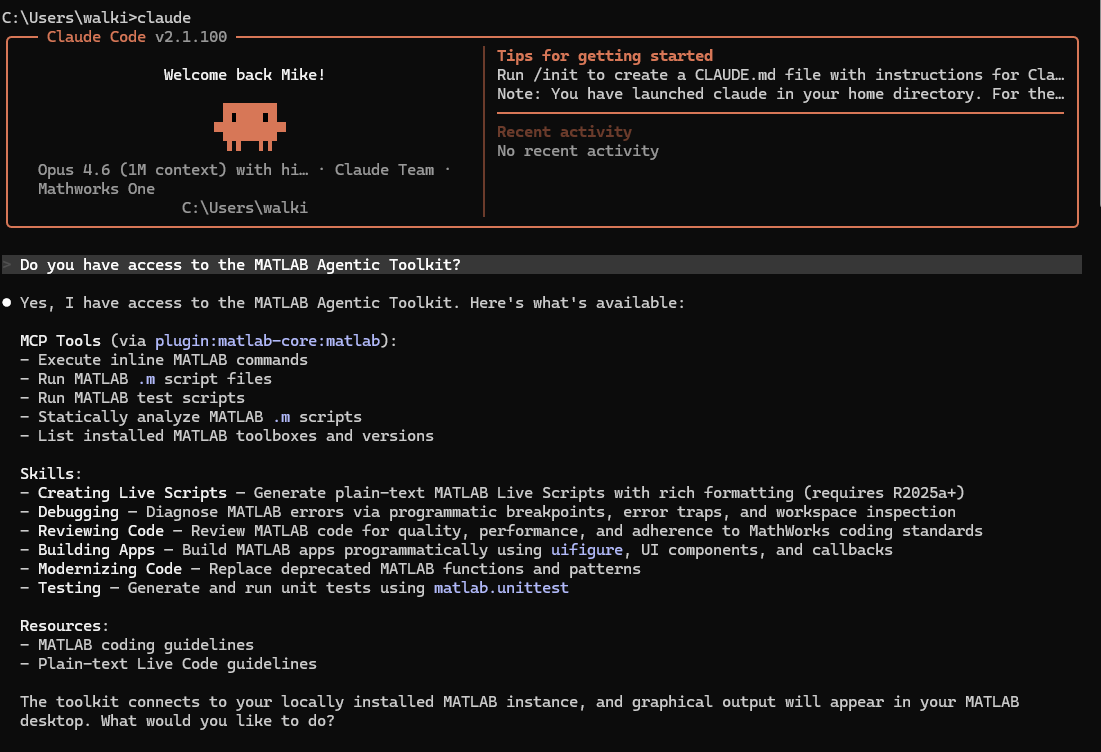
What's provided by the MATLAB Agentic Toolkit
The MATLAB Agentic Toolkit currently provides two sets of resources: MCP tools provided by the MATLAB MCP Core Server and Agent Skills that are organized in the skills catalog.
At the time of writing, here are the MCP tools and resources
|
Tool |
What your agent can do |
|
evaluate_matlab_code |
Run MATLAB code and return command window output |
|
run_matlab_file |
Run a MATLAB program |
|
run_matlab_test_file |
Run tests via runtests with structured results |
|
check_matlab_code |
Static analysis with the Code Analyzer |
|
detect_matlab_toolboxes |
List installed MATLAB version and toolboxes |
The server also provides two MCP resources: matlab_coding_guidelines (coding standards) and plain_text_live_code_guidelines (Live Script format rules).
The current agent skills are all MATLAB related and are as follows :
Toolkit - setup and configuration:
|
Skill |
What it teaches your agent |
|
matlab-agentic-toolkit-setup |
Install and configure the toolkit — detect MATLAB, install MCP server, register plugin |
matlab-core - foundational MATLAB skills:
|
Skill |
What it teaches your agent |
|
matlab-testing |
Generate and run unit tests with matlab.unittest. Parameterized tests, fixtures, coverage |
|
matlab-creating-live-scripts |
Create plain-text Live Scripts with rich text, equations, and inline figures (R2025a+) |
|
matlab-building-apps |
Build apps programmatically with uifigure, uigridlayout, components, and uihtml |
|
matlab-reviewing-code |
Review code for quality, performance, and adherence to MathWorks coding standards |
|
matlab-debugging |
Diagnose errors via MCP eval. Programmatic breakpoints, diagnostic instrumentation |
|
matlab-modernizing-code |
Replace deprecated MATLAB functions and anti-patterns with modern equivalents |
These lists will get out of date quickly! Always check the GitHub repo for the latest release.
Using the toolkit's resources and skills
This is my favorite part! While you can explicitly use these tools and resources directly from within the AI; you don't have to in order to benefit from them. Simply activating the toolkit is enough for your AI to start developing MATLAB code better.
For example, I launched Claude in a folder that contained some old MATLAB code and asked it to simply "Update the matlab code in this directory." It automatically made use of check_matlab_code and matlab_coding_guidelines before forming a solid plan for updating it. This is already much better than without the toolkit since it's essentially asking both my installed MATLAB and MathWorks for guidance before writing any code
I had hoped that it would have also automatically tried the matlab-modernizing-code but it did not in this case. So I just told it to do so. Rather than approving the first plan that Claude had come up with I just told it "Apply the matlab-modernizing-code skill" which it did before coming up with an improved plan. Once I accepted this improved plan, Claude wrote the code and automatically used the toolkit again to first check and then run the final code.
How to directly apply a skill varies from AI to AI but in Claude you preface the skill name with a /. For example, to get Claude to apply the matlab-creating-live-scripts skill to the file training.m you tell Claude
/creating-live-scripts training.m
I was initially confused that I didn't have to type /matlab-creating-live-scripts since that's the name of the skill in the table above but it didn't take long to figure out. Exactly how to invoke each skill will vary from AI to AI and maybe from release to release of this toolkit but you can always ask your AI for guidance if you are stuck.
For this first release only core MATLAB skills are supported but more will be coming very soon. You can see how they are implemented by taking a look at the various skill files on GitHub. Here's the one for reviewing-code, for example: https://github.com/matlab/matlab-agentic-toolkit/blob/main/skills-catalog/matlab-core/matlab-reviewing-code/SKILL.md
Go get it and give us feedback
If you're using any agentic AI system with MATLAB, this is the highest-leverage thing you can do right now. We are working on this in the open, updating frequently and would love to get your feedback. If you have any bug reports or enhancement requests, please create an issue on the project's GitHub repository.




评论
要发表评论,请点击 此处 登录到您的 MathWorks 帐户或创建一个新帐户。