
Direct Communication between Multiple GPUs using MATLAB’s spmd Functions
Today's guest blogger is Weinan Chen. Weinan is an Application Engineer on the Parallel Computing team at MathWorks. Additional thanks to Linda Koletsou Soulti, Joss Knight, and the Parallel Computing development team for their help writing up this article
TL;DR: spmd lets MATLAB users efficiently coordinate and communicate across multiple workers. Behind the scenes, GPUs can exchange data directly with each other, skipping the CPU entirely. Researchers from TU Dresden used this technology to implement a fast multi-GPU FFT.
When it comes to running multi-GPU simulations in MATLAB, a good starting point (depending on the task) is to use simple parallel constructs to distribute work across multiple GPUs. For example, one can parallelize deep learning training with a flip of a switch or run data-parallel for-loops using parfor across multiple GPUs.
But what if our computational task doesn't resemble either example? For instance, if our multi-GPU application requires frequent exchange of information during the computation, what options do we have?
In this case, the spmd family of MATLAB functions is the right choice. For those familiar with the Message Passing Interface (MPI), the syntax of spmd closely resembles MPI programming. Essentially, this construct gives users the flexibility to tackle advanced distributed-memory tasks (and it also works with shared-memory programming models in MATLAB).
Inter-worker communication on the CPUs
In this post, I’ll focus on the performance aspects of using spmd for inter-worker communication. Imagine our application needs to concatenate data across workers using an all-reduce-style operation, where . For example:
function spmdCatCPU(numWorkers)
if isempty(gcp("nocreate"))
parpool("Processes", numWorkers);
end
spmd
x = rand(10000, 2000);
tic
for i = 1:6
z = spmdCat(x);
end
y = toc;
end
y = gather(y);
% Turn y from cell array to numeric array
y = mean(cell2mat(y));
% Display the mean execution time
disp(['Mean execution time: ', num2str(y), ' seconds'])
end
numCPUWorkers = 4;
spmdCatCPU(numCPUWorkers)
In the code snippet above, each MATLAB worker initializes a random matrix x. We then concatenate all x values across workers and broadcast the result, z, back to every worker. Here, the spmdCat function performs both the computation (concatenation) and the communication in a single call.
So how long does this take? Running 4 MATLAB workers on 4 AMD EPYC 7R32 CPUs, the script takes 11.17 seconds.
We can use the MATLAB built-in mpiprofile function to investigate where that time is spent. In this case, communication between some worker pairs takes the majority of the time (around 10 seconds).
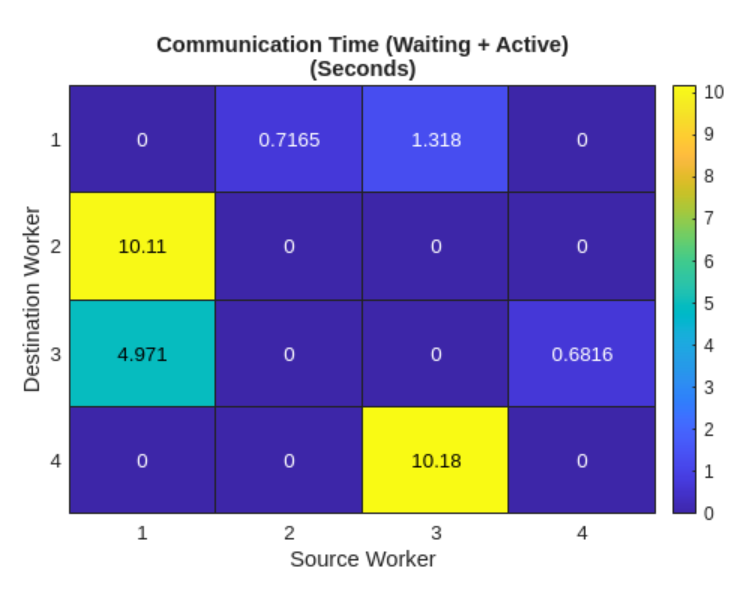
Figure 1. The communication heat map between CPU workers generated by mpiprofile.
Inter-worker communication on the GPUs
Now, what if we perform the same operation across multiple GPUs? The only change required is to make x a gpuArray, as follows.
function spmdCatGPU(numWorkers)
if isempty(gcp("nocreate"))
parpool("Processes", numWorkers);
end
spmd
x = rand(10000, 2000, 'gpuArray');
tic
for i = 1:6
z = spmdCat(x);
end
y = toc;
end
y = gather(y);
% Turn y from cell array to numeric array
y = mean(cell2mat(y));
% Display the mean execution time
disp(['Mean execution time: ', num2str(y), ' seconds'])
end
numGPUWorkers = 4;
spmdCatGPU(numGPUWorkers)
How long do we think this version will take? Intuitively, we might expect it to be slower than the CPU version: after all, GPUs are often viewed as co-processors, and moving data across multiple GPUs sounds like it would require staging via host memory. In practice, the GPU version is significantly faster. It completes in 1.24 seconds on 4 NVIDIA A10G GPUs over the same PCI-e connection—almost 9.0× faster than running the same code on 4 AMD EPYC 7R32 CPUs.
Running this script through mpiprofile reveals that transferring the same amount of data across multiple GPUs is much faster.
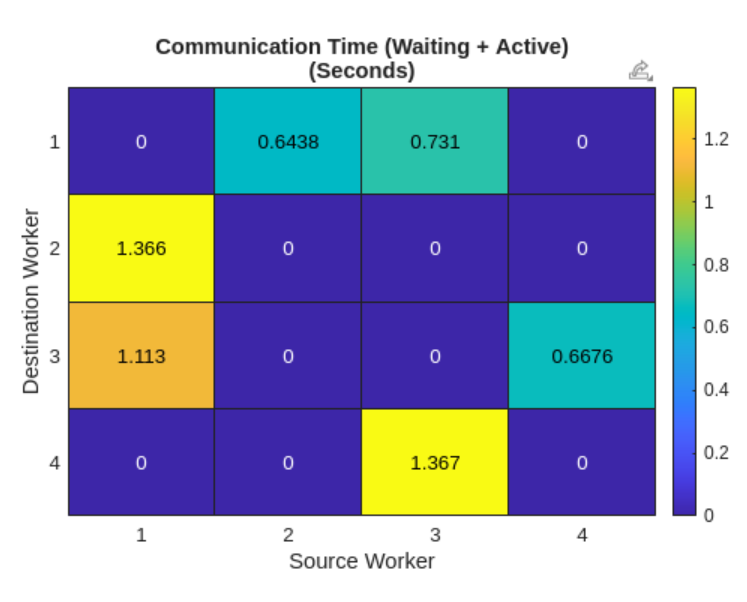
Figure 2. The communication heat map between GPU workers generated by mpiprofile.
Why is inter-worker communication on the GPUs faster?
Now, back to our original question, how is multi-GPU communication faster than its multi-CPU counterpart?
The answer is that our Parallel Computing Toolbox developers have employed a technique called NVIDIA CUDA Inter-Process Communication (IPC) when implementing spmd function for GPU communications. CUDA IPC makes it possible to share GPU allocations between processes via portable handles, so that data can be accessed without staging through host memory. Multi-GPU spmd workflows in MATLAB can benefit from these GPU-aware mechanisms, which contribute to the speedup we saw earlier. One limitation is that this applies to process pools (not thread-based pools).
As a result, when MATLAB runs multi-GPU code, it automatically benefits from these optimizations to accelerate simulations.
Implementing a multi-GPU Fast Fourier Transform
One example of how this technology has helped MATLAB speed up multi-GPU calculations is discussed in this paper (code). By using the spmd family of functions (spmdCat, spmdSend, spmdReceive, etc.) to implement a multi-GPU fft, the authors achieved a maximum speedup of approximately 60× when running on 4 NVIDIA H100 GPUs, compared to 100 CPUs.
If you are working with advanced data-communication patterns in your multi-GPU MATLAB applications, don’t hesitate to give the spmd functions a try!



댓글
댓글을 남기려면 링크 를 클릭하여 MathWorks 계정에 로그인하거나 계정을 새로 만드십시오.