
Objects are about to get much faster in MATLAB
MATLAB R2026b is available now and it includes a completely new object management system that is not turned on by default. When switched on, the new system promises to make object oriented MATLAB code faster without the need to change any code (most of the time). Sometimes, it will be much faster!
To activate it, you need to install this package from File Exchange
This is a big change to the language execution back-end of MATLAB and there's a lot to unpack. This is the first in a series of articles that will give you an idea of what to expect, when to expect it and what we mean when we say that you won't need to change any code 'most of the time.'
Release timeline
For most people, most of the time, code changes will not be required. The cases where code changes may be required as outlined below. However, this is a big change to MATLAB’s execution engine, so we are staging the changes as follows:
- MATLAB R2026b pre-release: There was a limited beta which is now closed since the pre-release is no longer available. You can use the full release of R2026b (see below).
- MATLAB R2026b: You can switch to the new object management system using this package from File Exchange.
- Future MATLAB: The new object management system will be on by default but you'll be able to switch it off if necessary.
- Further in Future MATLAB: The new object management system will be the only one you can use.
When will you need to make code changes?
Code that doesn't make use of objects at all will not be affected in any way by this update. The vast majority of object oriented MATLAB code will run exactly as before but hopefully rather faster.
There is a small subset of object oriented code, however, that will need some work. We are expecting this to only affect a small number of users. I, for example, have been using MATLAB for over 20 years and I've never written any code that will need additional work. We have been Beta testing the changes to the object management system for several months now and have seen very few cases where code has to be changed. For those few cases, the changes have been fairly minor.
You will only need to worry if your code is object oriented and hits all three of the following issues simultaneously. If your code hits none, one or even two of these issues then you'll be fine. All three, however, and there may be problems.
- Your classes contain custom destructors
- The custom destructors depend on the exact order or timing of destruction
- The object is referenced in a cycle. A cycle is a reference loop where objects reference each other
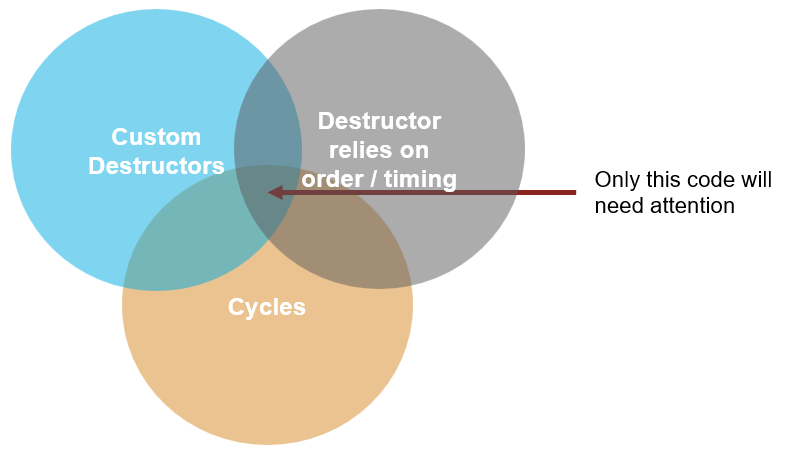
If you have no idea what any of this means, you probably don't need to worry. For those wondering why these three issues matter, it is to do with the fact that we've updated how MATLAB manages the lifecycle of objects to one that's more efficient. In turn, this has allowed us to further optimize objects within JIT-compiled code. More details will be given in the near future.
How much faster?
This is the fun bit because a lot of things are quite a lot faster. Your mileage may vary of course and we've seen code go anywhere from over 500x faster to just a few percent faster or even no change at all in the worst case. In this section, I want to give you an idea of what you can expect.
At the risk of stating the obvious, only code that uses MATLAB objects will see a performance benefit. All other code is completely unaffected. As such, I initially focused on demonstrations that made heavy use of object oriented programming.
For my first demo, I created an array of Employee objects that have the following properties
classdef Employee
properties
EmployeeNumber = 1
RecordDate = datetime(2020, 1, 1)
Name = "Mike Croucher"
end
end
Each Employee in the array had a random Employee number from 1 to 7500, random RecordDates and so on. The class also has overloaded methods for the comparison operators < and > which worked on EmployeeNumber. This allowed me to implement classic sorting algorithms such as Bubble Sort, Insertion Sort and Quick Sort on an array of these objects. The following animation tells the story
The new system got through all 6 algorithms twice in the time it took the old system to get through about 10% of just the first algorithm. Removing animation time from the story and I got the following timings on my M2 Macbook Pro
Algorithm | Old system (s) | New system (s) | Speedup |
Bubble Sort | 252.08 | 0.781 | 322.8x |
Quick Sort | 0.98 | 0.086 | 11.4x |
Insertion Sort | 95.6 | 0.29 | 329.7x |
Selection Sort | 122.03 | 0.63 | 193.7x |
Merge Sort | 1.21 | 0.132 | 9.17x |
Heap Sort | 1.98 | 0.078 | 25.38x |
To be clear, this did not involve any changes to the code. I simply switched on the new system.
The speed-ups vary so much because of the differences in how each algorithm operates on the Employee objects. Some operations involving objects have become significantly faster while others have much less dramatic speed-ups. I'll show some micro-benchmarks later. For now, I want to show the results of some object-oriented simulations.
I wrote an object-oriented version of the classic Boids simulation. Each Boid was an instance of a class with the following properties along with several member functions that determines their behavior.
classdef Boid
properties
x double = 0
y double = 0
vx double = 0
vy double = 0
end
end
The new object management system ran the simulation around 15x faster! Again, without any changes to the Boids source code. You can see the difference in the video below.
Boids are particularly simple and the fastest way to implement this simulation is to do away with the array of objects and work on vectors of position and velocity directly. This is many times faster than any object oriented version and can even be done on the GPU! That's a story for another time but it is fair to say that the gap between the OOP implementation and a vectorized implementation has been closed significantly.
The next demo is a more complex agent-based simulation of crowd behavior. Here, each dot represents a person who is trying to exit the simulation domain through one of several doors on the right hand-side. The rules could be as complex as you like although in the version shown in the animation they are rather simplistic ("Dumb" was the word Ned used!)
The new system runs this simulation around 100x faster than the old one! Again, no changes to source code were required. This is an illustration of a case that was completely infeasible to write as an OOP simulation but is now buttery smooth.
So far, I have not given you anything that you can run yourself although I do plan to release the source code for all of these demos in due-course. Let's fix that now with some microbenchmarks. Consider the following class that has one property, a constructor and an overloaded plus method function. If you want to follow along, save this as the file tinyClass.m
classdef tinyClass
properties
Id (1,1) double = 0
end
methods
function obj = tinyClass(id)
arguments
id (1,1) double = 0
end
obj.Id = id;
end
function result = plus(left, right)
arguments
left (1,1) tinyClass
right (1,1) tinyClass
end
result = tinyClass(left.Id + right.Id);
end
end
end
We are going to time 4 operations
% Creating an array with 1000 tinyClass objects
values = createArray(1, 1000, "tinyClass");
% Extracting a single element from an array
item = values(k);
% Swapping two elements in an array
temp = values(1);
values(1) = values(2);
values(2) = temp;
% Adding two scalar tinyClass objects
result = object1 + object2;
The timing code I used is in this blog's GitHub repo and here are the results for an M2 MacBook Pro.
Operation | Old system (nano seconds) | New system (nano seconds) | Speedup |
Create 1000 element array of objects | 776344.1 | 130148.6 | 5.97x |
Extract object from 1000 element array | 1246.0 | 4.2 | 296.67x |
Swap objects in 1000 element array | 5767.2 | 9.3 | 620.13x |
Add two scalar objects | 1511.1 | 64.1 | 23.57x |
Opening the pathway to new, performant data types in MATLAB
One of the exciting things about seeing these numbers on fundamental operations involving objects is that they open the pathway to potential new data types in MATLAB. Structures such as trees, queues are easy to implement using OOP but doing so would have been painfully slow in MATLAB using the old system.
A lot of our existing code gets faster for free
So far I've concentrated on simulations and micro benchmarks that make deliberate heavy use of operations on objects. As such, these are the most dramatic speed-ups you can possibly expect from these enhancements. In production code, the use of objects may be significantly lighter which will lead to much more modest speed-ups, if any at all.
The new object management system has had benefits across our own code base as well. Some examples from across various toolboxes include:
- Simulating a Scanning Radar (Radar Toolbox) runs about 1.4x faster
- fistree (Fuzzy logic toolbox) Some benchmarks are up to 2x faster
- analyzeNetwork (Deep Learning Toolbox). I observed speed-ups from 1.19x to 1.47x depending on the size and architecture of the network being analyzed.
- Problem based optimization workflow (Optimization Toolbox) The construction of problem-based optimizations using optimvar and optimproblem is up to 1.55x faster.
We've also found a few examples where MATLAB's table has become faster as a result of this work. The most dramatic involves deleting a chunk of the columns in the middle of a wide table which is around 2-3x faster on my machine. Here's a minimal reproducible example of what I mean that has been distilled from a user's code:
T = array2table(rand(2200, 3320));
tic
T (:, 1495:1826) = [];
toc
We continue to find new examples like this all the time and hope that you have similar success when trying out your own code.
The new object management system has no effect on old-style (pre-2008a) objects
If your object oriented code was written the ancient way (i.e before the introduction of classdef in 2008a), your code will not run any differently at all. You'll recognize such code by the fact that classes were defined by directories whose name started with @, like @polynom.





댓글
댓글을 남기려면 링크 를 클릭하여 MathWorks 계정에 로그인하거나 계정을 새로 만드십시오.