Skip to Main Content Skip to Search
File Exchange
MATLAB Newsgroup
Link Exchange
  Blogs  
 Contest 
MathWorks.com

Ken & Mike on the MATLAB Desktop

June 25th, 2007

Creating an M-file from selections in the Command History

Getting started writing an M-file can be difficult sometimes. It’s akin to writing a term paper. That first bit is always difficult to write.

Often when I am writing M code, I start in the Command Window, rather than the Editor, to help get the initial part of the code working in a more interactive fashion. In the Command Window I can play around with the code until I get it right. I then go back later and put the code into a function in the Editor. But instead of copying code from the Command Window or the Command History and pasting it in the Editor, I use the Command History context menu: “Create M-File”.
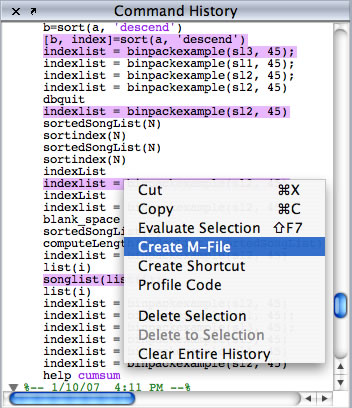
History Create M file

The “Create M-File” context menu item opens an Editor window and pre-populates the new file with any selected commands from the Command History.
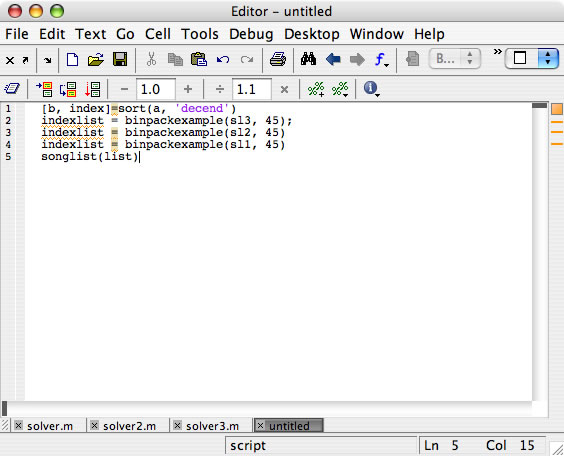
editor_history.jpg

The next time you find that you are working in this mode and you are ready to commit your code to a file, try using the “Create M-file” context menuitem from the Command History. This is easier and quicker than using copy/paste or re-typing the code.

4 Responses to “Creating an M-file from selections in the Command History”

  1. nkj replied on :

    i have Question I had been using the Matlab R2006b beta for mac intel and the matlab menus used to appear in the Mac OSX menu bar but in 2007a they appear in the main windows. Is there a way to switch back to the preivous way ?

    not sure if this is the right place but this is the dekstop team’s blog , i m hoping to find why the switch

  2. Kristin replied on :

    nkj -
    http://www.mathworks.com/support/bugreports/details.html?rp=230485

  3. nkj replied on :

    i tried this but on 2007a version does not seem to work

  4. Kristin replied on :

    Contact support@mathworks.com and they will be able to assist you further with this.

Leave a Reply


Ken & Mike work on the MATLAB Desktop team.
  • Peter Brady: Hi Ken, Thanks for the heads up on this one but I hope there is a resolution soon. The editor is now...
  • Ken: Hi Ian, Can you be more specific about where you see performance differences? We are aware of some bottlenecks...
  • Ian: More importantly, what are you going to do about the abysmal performance of Matlab on Leopard. Many of my...
  • din: hello…may i know about matlab command(absolute command)….i aready has the prog…but they use...
  • Ken: Hi Rich, We have a bug report on the first issue you mention. As for the Command Window time-stamp format,...
  • Rich Messeder: I have a few comments that I’m trying to find the right place for. One is that when I press the...
  • Steve Eddins: Stephen—You can extend your R2008b Prerelease license by choosing the Help -> Licensing ->...
  • Mike: Stephen, We cannot give an exact date as to when the next version of MATLAB will be released.
  • Stephen Colona: Do you think the new release will come out before the PreRelease expires? Thanks.
  • Mike: Nasir, Thank you for your feedback, it helps us refine the desktop and ultimately make it easier to use....

These postings are the author's and don't necessarily represent the opinions of The MathWorks.

Related Topics