Ken & Mike on the MATLAB Desktop

October 29th, 2007

Filter your help

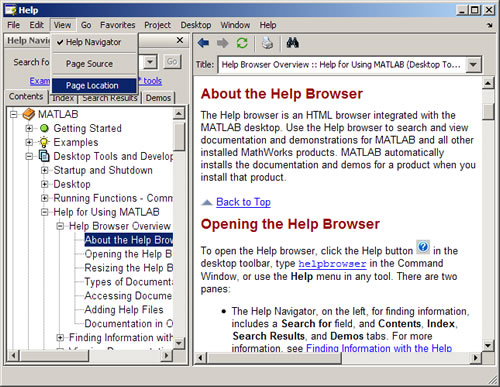
If you are using MATLAB with a lot of toolboxes and blocksets, there is a lot of documentation available to you in the Help browser. That’s almost always a good thing, but if you’re primarily interested in just a few of your installed products the others might just be cluttering up the Help browser, making it harder for you to quickly find what you need. With the product filter, you can configure the Help browser to only show documentation from the products that you really need help for.

To set the product filter, open the Preferences dialog (File -> Preferences…) and select “Help” in the left-hand side. You can get to the help preferences quickly from the command window by running

>> preferences Help
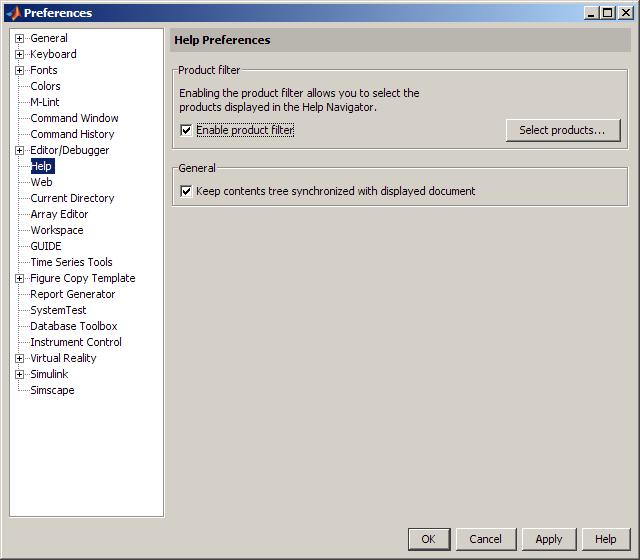
Help browser preferences

Check the box labeled “Enable product filter”, then click on the “Select products…” button to bring up the product filter dialog.
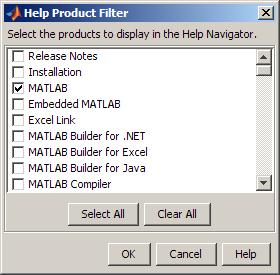
Help browser product filter

The product filter applies to the Contents, Index, Search, and Demos tabs in the Help browser, but does not apply to MATLAB commands such as help or doc. So, for example, if you have the product filter configured to hide the MATLAB documentation, you can still bring up the reference page for the MATLAB plot function by running

>> doc plot

3 Responses to “Filter your help”

  1. Ramon Bello replied on :

    Hello,

    I have a problem with Matlab not graphing a function. I have certain constants defined except I have variable “h” and a function “Ts”.

    I have this equation:
    0.13=b.*p.*A.*((Ts.^4)-(Tsurr.^4))+h.*(Ts-Tamb)*A

    I want to graph that function, but I have a hard time to define “Ts” as a function, but “h” is defined as a variable as I used {syms h} as a command.

    When I try to ezplot the function I get:
    rror in ==> ezplot>ezparam at 372
    X = ezplotfeval(x,T);

    Error in ==> ezplot at 163
    hp = ezparam(cax,f{1},f{2},vars,labels,args{2:end});

    Error in ==> sym.ezplot at 60
    h = ezplot(f.s,varargin{:});

    I don’t understand the language and I need help how to plot this function implicitly.

    Please can you help me?
    -Ramon

  2. Scott Hirsch replied on :

    Ramon -

    This isn’t the best forum to get help on a question like this. I’d like to suggest that you provide as much detail as you can, and either contact technical support (http://www.mathworks.com/support/), or post on the MATLAB newsgroup (http://www.mathworks.com/matlabcentral/newsreader/).

    - scott

  3. DP replied on :

    Hi

    i have a problem with ezplot3, i want to plot more than i curve in the same graph but hold on command doesn’t work with ezplot3. is there any other function, ideas to use instead.
    regds
    DP

Leave a Reply

Wrap code fragments inside <pre> tags, like this:

<pre class="code">
a = magic(3);
sum(a)
</pre>

If you have a "<" character in your code, either follow it with a space or replace it with "&lt;" (including the semicolon).


Ken & Mike work on the MATLAB Desktop team.
  • DP: Hi i have a problem with ezplot3, i want to plot more than i curve in the same graph but hold on command...
  • Ken: Hi Arsalan, Unfortunately there is no way to get the new Editor API in older versions of MATLAB. -Ken
  • Arsalan: Hi, I am very excited about the MATLAB API for editor because right now i am working on a project and i need...
  • Johannes: Since I started using matlab-emacs some days ago I never experienced Emacslink. But I experienced some...
  • Francisco J. Beron-Vera: Hi all, I have recently learned about ViEmu (http://www.vimemu.c om) which, for Vi/Vim...
  • OysterEngineer: When I first learned of the Publish feature in MatLab, I thought it might be useful to help to...
  • Ken: Hi Herve, I’m not quite sure what you mean by “stand-alone&# 8221; mode? -Ken
  • Herve: I wonder when the publish fonction will be supported in standalone mode.
  • Mike: Ravi, What you described should work as far I understand it. Please follow up with technical support. With a...
  • Mike: @Daniel, Thanks for that note.

These postings are the author's and don't necessarily represent the opinions of The MathWorks.