Mike on the MATLAB Desktop

November 16th, 2009

Publish to PDF

Sometimes one of my colleagues comes up with a big idea that’s so brilliant, it can be succinctly summarized in a small phrase that downplays its impact. Publish to PDF pretty much says it all. In MATLAB R2009b you can now publish your MATLAB code directly to a PDF-file.

If you’re like me, you probably used to publish to doc and then use Google docs to convert it to a PDF. Well now you can go to PDF directly, and get a higher quality document than you would by going through Word and then to pdf.

That’s pretty much the whole peanut butter sandwhich right there. The easiest way to set this up is through a Publish Configuration.
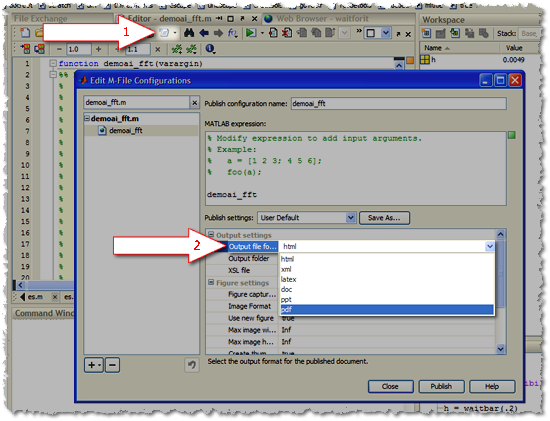
Publish to PDF from a publish configuration

Here is an image of the output of the sine wave publishing demo (click to see a larger version):

Published PDF of sine wave demo

.

You can also watch this lovely video on how this new feature works.

11 Responses to “Publish to PDF”

  1. Daniel Armyr replied on :

    A word of caution when using this feature, though. It appears that in some cases when regenerating a file, all plots are not properly updated. Bug report has been written.

    Other than that, this has been at the top of my wish-list for many years.

  2. Mike replied on :

    @Daniel, Thanks for that note.

  3. Herve replied on :

    I wonder when the publish fonction will be supported in standalone mode.

  4. Ken replied on :

    Hi Herve,

    I’m not quite sure what you mean by “stand-alone” mode?

    -Ken

  5. OysterEngineer replied on :

    When I first learned of the Publish feature in MatLab, I thought it might be useful to help to document my code. But, I haven’t figured out a work-flow that makes that work well.

    Since then, I’ve concluded that the Publish feature is really best for making technical lectures. Thus, MatLab has used this feature well for their own training materials & I suspect that many professors use it also in technical classes.

  6. Daniel Armyr replied on :

    @OysterEngineer:
    I use publish to document pretty much everything I do. first make one file which does everything that might require human och other machine interaction but as little else as possible. Save your data.
    Then make a publishable file where you read out your data and do signal processing as well as cosmetics on it. That file is the one you publish.

  7. OysterEngineer replied on :

    @Daniel,

    It seems like some of your post was truncated.

    Reading between the lines, it seems like your workflow would require 2 separate copies of the guts of the code. How do you manage the process of keeping the guts identical?

  8. Sune replied on :

    I have the same problem as reported by Daniel Armyr on november 17th 2009, ie. my plots are not updated when I regenerate a file publishing to pdf. What is the status of this bug?

    Sune

  9. Mike replied on :

    @Sune,

    We update our products twice a year (generally March and October) with new features and bug fixes…stay tuned.

  10. houssemus replied on :

    hi, i used to this option in Matlab 2009b, but with the 2011, i’m having an error message don’t know why,

    ??? Java exception occurred:
    java.io.FileNotFoundException: F:\Program
    Files\MATLAB\R2011a\toolbox\matlab\codetools\private\fop_config.xml
    (Le fichier spécifié est introuvable)

  11. Michael Katz replied on :

    @houssemus,
    I’m not sure what is going on with your issue, please contact Technical Support.

Leave a Reply

Wrap code fragments inside <pre> tags, like this:

<pre class="code">
a = magic(3);
sum(a)
</pre>

If you have a "<" character in your code, either follow it with a space or replace it with "&lt;" (including the semicolon).


MathWorks
Mike works on the MATLAB Desktop team.

These postings are the author's and don't necessarily represent the opinions of The MathWorks.