A long time ago the Publish team added the ability to include LaTeX formulas in published MATLAB files. This was seen as a nice way to include pretty-formatted formulas and equations without having to resort to ASCII art. In order to make sure the published formulas are cross-browser compatible, the generated formulas are included into the published document as images.
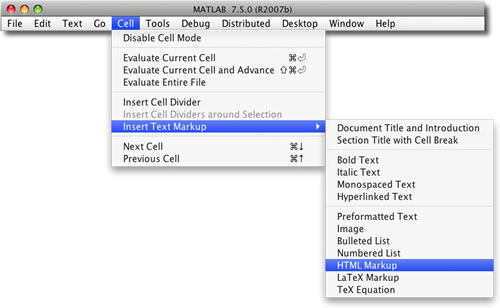
New in MATLAB R2011a is the ability to include inline LaTeX formulas. Previously they were only available in their own block. An inline LaTeX formula is surrounded by single “$“‘s, and a block is separated by double “$$“‘s. Sample markup can also be added using the top-level Cell Menu: “Cell -> Insert Text Markup -> LaTeX Inline Math” for inline markup and “Cell > Insert Text Markup > LaTeX Display Math” for block markup.
By
Michael Katz
Mike is a developer on the MATLAB Mobile team. When not describing himself in the third person, biking, homebrewing, or rooting for the home team, he's busy trying to make the world a better place for programming.
It is very hard to read the symbols in the inlined formula.
@Petter,
I updated the graphics, although they are a bit small, in general.
This is great, published M-files are excellent for tutorials and of course much of the content is math-heavy, so inline formulas are a wonderful addition.
Which reminds me of something. As we all know, most Matlab source code is *full* of clumsy ASCII notations for formulas. Even simple things like sub/superscripts must be replaced with weird notations that are made up on the spot, and are very hard to understand. (Sorry for the long rant, I realize the limitations of ASCII of course…)
But given that Matlab code is usually so math-heavy, wouldn’t it be great if the editor recognized LaTeX code in comments, and rendered them accordingly? A simple interface like clicking a formula to disable rendering so you can edit it along with the rest of the text, and suddenly comments with formulas would be wonderfully clear.
You’d recognize formulas from the literature immediately, and I’m sure a lot of people would comment their code more heavily, given the chance to do so with readable math notation :)
Hi Mike,
small typo: second section: formals –> formulas
–Han
@Han,
Thanks! I fixed the typo. I’m going to go ahead and blame it on careless autocorrect :)
Can it output to html? I would love to use Mathjax to render the equations on the web. All Matlab has to do is touch nothing and just spit it out as a proper html file. Leave the latex code as it is, mathjax will do the proper conversion to gorgeous vector equations.
@MySchizoBuddy,
Not at this time, but I’ll pass your suggestion along.
I should say it’s not that easy to use the latex language. I tried to use an editor (TeXmacs) which can save formulas in latex format. But unfortunately Matlab can’t interpret the latex string generated by this paricular software. Here it is as an example:
$\frac{\tmop{dx}}{\tmop{dt}} = \tmop{Ax} + E \cdot \frac{\tmop{dw}}{\tmop{dt}}+ \tmop{Bu}$Do you have an editor which you use to publish formulas?
Found recently an interesting thing on File Exchange: http://www.mathworks.com/matlabcentral/fileexchange/11946. But it’s not quite the thing I was looking for. The perfect solution of course would be a word-like equation editor.
And the last thing (sorry for these three messages) – you surely know that the published formulas have pretty low resolution. It’s even difficult to read them. So there is no chance to print them for sure unfortunately. Is there a chance to fix it somehow?
@Alexander,
I’ve always created formulas by hand. I’ll let the dev team know about that example. I don’t know what the latest set of LaTeX is supported by MATLAB. As for the resolution, I don’t know how to fix it but the team is aware of the issue.
I am trying code publish today.
The latex markup is fantastic,
but the display quality should be improved.
Using MathJax is a good idea.
After a quick study of MathJax, I found it relative easy to use it in the mathml markup instead of the Tex markup.
Just copy and paste the code below, and modify the section, then don’t forget to comment it by Ctrl+r.
The syntax for MathJax is the same as the Tex markup.
Single $ for in line equations and double $ for block equations
MathJax TeX Test Page MathJax.Hub.Config({tex2jax: {inlineMath: [['$','$'], ['\\(','\\)']]}}); When $a \ne 0$, there are two solutions to \(ax^2 + bx + c = 0\) and they are $$x = {-b \pm \sqrt{b^2-4ac} \over 2a}.$$Hello,
I used latex before entering into matlab and was very pleased when figuring out that it is integrated into the publishing of matlabscripts.
usually, problems with resolution in latex are due to the kind of compiling method used. using pdf-latex results in pixel-grafics. When compiling to post script, vector grafics result. maybe, there is a way to generate little vector grafics of the formulas and include these into the publishing output file.
Hi Mike,
It seems that my Matlab (version 7.12, R2011a) doesn’t publish Latex equations as equations, but simply as the same ascii code in the m-file. Is there any special configuration needed for my Macbook? I’ve tried the cell->insert Tex markup -> Latex displayed math and others, as wells as your example above, but it simply doesn’t work. I’d really appreciate it if you could point me to some right directions. Many thanks in advance!
@Joy,
Publish syntax is sensitive to whitespace. Make sure the comment line is under a cell header and there are continuous comment lines up to that line. If you’re still having trouble, please use technical support or MATLAB Answers. And, if you can, provide a sample cell.