Steve on Image Processing

February 21st, 2006

Tracing George

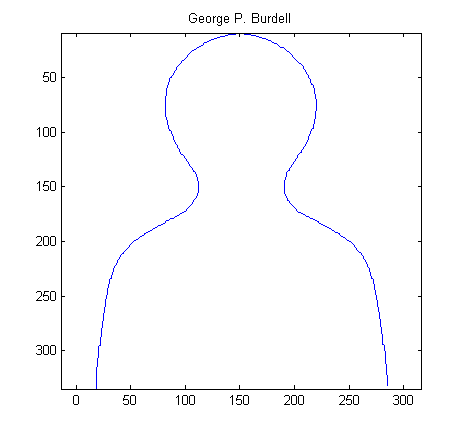
Last time, in my spatial transformations series, I introduced the head-and-shoulders outline that I like to call George (George P. Burdell). Today I want to diverge briefly from my main topic and show how I recently "recovered" George.

George appears in section 5.11 of Digital Image Processing Using MATLAB. While working on the book, I tried to keep all data files and M-files necessary for regenerating the book's figures. I found, however, that I could not locate the data for George's curve that appears in Figure 5.12 and Table 5.3.

After a few minutes of head scratching, I decided to get the curve data by taking a digital snapshot of the figure in the book. Here's a cropped version:

url = 'http://blogs.mathworks.com/images/steve/36/george.jpg';
I = imread(url);
imshow(I)
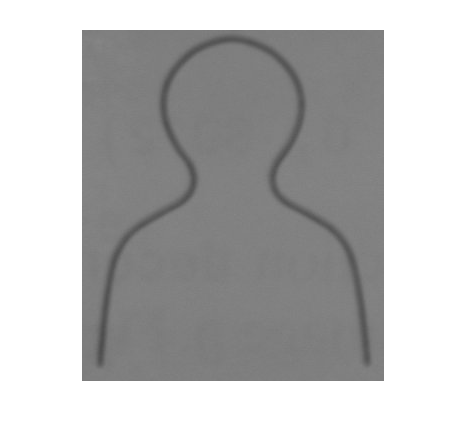
A little fuzzy and dark, but maybe workable. The first step is to threshold the image. The Image Processing Toolbox function graythresh computes binarization thresholds automatically. It works well for a variety of images.

threshold = graythresh(I);
bw = im2bw(I, threshold);
imshow(bw)
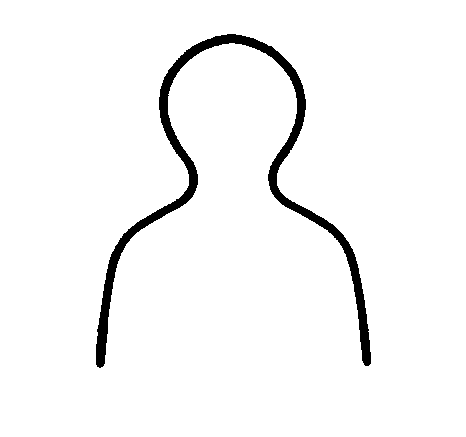
Now we have a nice fat line. Toolbox function bwmorph has a thinning option, but it works on white (foreground) pixels instead of black pixels. So complement the image:

bw2 = ~bw;

and then thin it. Specify the number of iterations to be Inf so that bwmorph will keep thinning until the lines are a single pixel wide.

bw3 = bwmorph(bw2, 'thin', inf);
imshow(bw3)
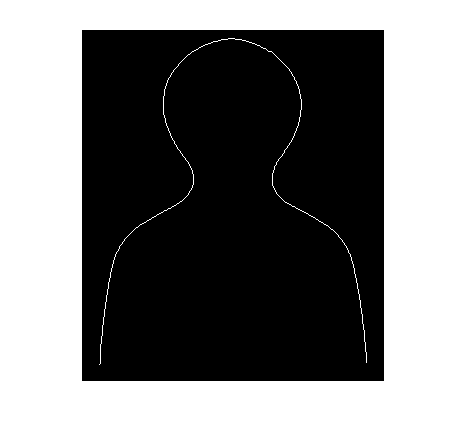
Now trace the line using toolbox function bwboundaries.

boundaries = bwboundaries(bw3);

boundaries is a cell array containing one P-by-2 matrix for each object boundary. This image contains only one object, so boundaries contains only one P-by-2 matrix. The matrix has twice as many rows as we need, because bwboundaries traces all the way around the object.

b = boundaries{1};
b = b(1:floor(end/2), :);

Finally we are ready to plot the curve.

x = b(:,2);
y = b(:,1);
plot(x,y)
axis ij     % Place the origin at upper left, with y values increasing from
            % top to bottom.
axis equal  % Set the aspect ratio so that the data units are the same in
            % every direction.
title('George P. Burdell')

Get the MATLAB code

Published with MATLAB® 7.1

95 Responses to “Tracing George”

  1. A.Senthil Arumugam replied on :

    Respected sir,
    I am Studying M.Tech At Manonmaniam Sundaranar University.Now i learn Matlab .My interest is Thinning Operation.I dont any knowledge about thinning.so i want to learn more about that concept.you use the default function BWMORPH.but i want how that function work. so please help me, and send the bwmorph function algorithm and code .
    Great thanks to you Sir

    By
    A.Senthil Arumugam M.S.,M.Phil.,M.Tech

  2. Steve replied on :

    Senthil, the documentation for bwmorph has a detailed description of the thinning algorithm used. You can find it here.

  3. moussadek replied on :

    hello, I am intrest in hand image segmentation , and I need help in using matlab to find the edge detection than how to compute features extractions likes fingers width, length,angles…..
    regards

  4. Steve replied on :

    Moussadek - Can you be more specific about what kind of help you are seeking?

  5. moussadek replied on :

    hello,
    I need know how to get hand countour signature and how to extract the nine salient point (five valleys and four peaks)in order to measure the length, width and height of the fingers and palm
    many thanks

  6. Steve replied on :

    Moussadek - That was more specific, but you’ve posed a nontrivial algorithm development question that involves many aspects of image processing - possibly including preprocessing for noise removal, edge detection, segmentation, feature measurement, classification, etc. I’m afraid that there’s no “get_hand_contour_signature_and_salient_points” function. :-) You’ll need to dig deep into a good image processing book. Some of the Image Processing Toolbox demos, which are available in the product and on our web site, may also be helpful for portions of the problem.

  7. moussadek replied on :

    hello,
    thank you for replaying,I am looking how to implement the border tracing algprithm (Sonka) using matlab
    many thanks

  8. Steve replied on :

    Moussadek - I am not familiar with the Sonka algorithm you mentioned.

  9. minu replied on :

    Respected Sir,
    I want ot implement operation like edge detection, segmentation etc using fuzzy logic.
    I short how to do fuzzy image processing using matlab…?
    May I request to help me to provide necessary details
    thanking you
    yours sincerely
    minu

  10. Arya replied on :

    I too want to implement operation like edge detection, enhanchement etc using fuzzy logic using matlab.

    May I request to help me to provide necessary details
    thanking you in advance

  11. hazhir replied on :

    hi everyone
    I need help on fuzzy edge detection would you please send me some sample m-file of fuzzy edge detector
    hazhiriq200@walla.com
    thanks

  12. Steve replied on :

    Hazhir - I’m sorry, but I don’t have anything on fuzzy edge detection.

  13. Maleika replied on :

    Hello!
    while implementing the codes using matlab,the function bwboundaries is not working.
    Can anyone help.
    Am working on biometric security based on dorsal vein pattern..
    First I have to remove the palm region from the background and then the veins.
    How can I do this?
    Please help

  14. Steve replied on :

    Maleika—Can you be more specific about “bwboundaries is not working”?

  15. Maleika replied on :

    Dear Sir,
    While typing the above codes I am getting the foll:Undefined function or variable ‘bwboundaries’

    Another request: I am working on hand dorsal vein pattern as Biometric: How can I extract the vein pattern.. I have perform the codes you have given for thresholding and it works.
    Question2: I have an image.How can I remove the coordinates automatically from the image??

    With thanks,
    Maleika

  16. Steve replied on :

    Maleika—bwboundaries is a function in the Image Processing Toolbox.

  17. Maleika replied on :

    Dear Sir,
    I can extract coordinates from an image by using getpts. But the extraction is done manually. Is there any function that I can use to do it automatically?
    With thanks,
    Maleika

  18. Steve replied on :

    Maleika—Can you be more specific? What kind of points? What distinguishes them from other points in the image?

  19. Maleika replied on :

    Hello Sir, I am working on dorsal hand vein pattern to be used as Biometric Security. I have do done the segmentation and remove the background. I am left with the vein pattern. Thus, I need coordinates found in the vein pattern. How can I extract these coordinates?

    I have used getpts and thus coordinates are extracted manually. I need to know how we can do the same extraction automatically?
    Thanks,
    Maleika

  20. Steve replied on :

    Maleika@mdash;Once you have the segmented vein pattern, you may want to use bwmorph(bw,’thin’,Inf) to thin the pattern. Then you can use find to extract the coordinates. If you need an ordered list of coordinates, you could try bwboundaries, but you’ll have to take into account that bwboundaries will trace your thinned vein pixels twice in order to go all the way “around” each thinned component.

  21. Maleika replied on :

    Hello Sir!
    Thanks a lot.
    I don’t have bwboundaries function in my image toolbox.
    Can you please give me a link where to obtain this function..
    I know I ask too much BUT I am in a real difficulty. That is why I need your help.
    Loads of Thanks,
    Maleika

  22. Steve replied on :

    Maleika—What version of the toolbox do you have? I believe bwboundaries has been in the toolbox since version 4, released sometime around 2004. You’ll need to upgrade in order to get the function.

  23. huda replied on :

    hello,
    i tried your code above for image of leaf but the result isn’t good.
    please if you have another code for more complex image please provide me.

    thanks in advance

  24. Steve replied on :

    Huda—There are many techniques that might be applicable. Usually the solutions are very dependent on the particular kind of image data you have. You’ll need to explore different operations. Take a look through examples in the toolbox users guide, the product demos, and image processing textbooks for inspiration.

  25. ramana replied on :

    Hello!
    while implementing the codes using matlab,the function bwboundaries is not working

  26. Steve replied on :

    Ramana—Can you be a bit more specific? What exactly did you try, what error messages did you receive, etc.?

  27. sravani replied on :

    hi sir,
    i am a final yr student and my project is “feature based face recognition”. i have successfully stepped till extracting the eye region from the face. and now i got struck up with the point of finding inter eye-ball distance.
    if the coordinates of eyes are rt1 rt2 lt1 and lt2. i want the distance between rt2 and lt1.
    can u please help me in finding the corners of eyes automatically in matlab.
    give a clue atleast sir… hope u will give us a solution

  28. marco replied on :

    hi sir, i have one question.i need to extract some coordinates from a B&W image, because i need to use them o the respective Color image.i saw that bwboundary is not usefull, because it just trace the contour, when i need all the coordinates of the points different from zero!can you help me in some way?does any command exist in matlab(R14) that i can use?thank you too much
    marco

  29. Steve replied on :

    Marco—Use find.

  30. marco replied on :

    thank you very much..i wasn’t thinking about this command in matlab..one more question if it’s possible:now that i got my coordinates, how could i extract from the original image the features belonging just to these coordinates and build an image composed only with these features?

  31. marco replied on :

    because when i use find, i hace a vector with more than 65k rows, and so Matlab doesn’t allow me to make the operation i want to

  32. Steve replied on :

    Marco—You haven’t given me enough to go on. What operation are you trying to do, how are you trying to do it, and how does MATLAB respond?

  33. marco replied on :

    i try to explain.i have a B&W image with an object coming from a threshold from an RGB image.now i want to extract the coordinates of this object and represent it in another image, with black pixels as background, and my object( with color pixels) as foreground coming from the original RGB image.for example, i have a green ball in an image, with a threshold i have it in B&W.now i want to extract it from the original image, and showing another image only with this ball, but with its color, no more in white.hope i could explain well!!

  34. Steve replied on :

    Marco,

    red = original(:,:,1);
    green = original(:,:,2);
    blue = original(:,:,3);
    
    red(~mask) = 0;
    green(~mask) = 0;
    blue(~mask) = 0;
    
    new_image = cat(3, red, green, blue);
    
  35. marco replied on :

    thanks very..the last question..how can i open more images in the same code, like opening images from marco1 to marco9 and making the same operation for all images??i was thinking something like :
    for k=1:9
    I=imread(’marco’k’.jpg’);
    end
    but,of course, it doesnt’t work.
    thank you
    marco

  36. Steve replied on :

    Marco,

    for k = 1:9
       I = imread(sprintf('marco%d.jpg', k));
    end
    
  37. Steve replied on :

    Marco—See also my post on batch processing.

  38. marco replied on :

    thanks too much..the only problem i have is that when i finish my processing with my image, the for cicle i have to put it outside the command clear all, so it happens that it erases everything..so now i’m trying to find a wya to do it!!

  39. marco replied on :

    is it allowed to write something like clear all -g, where g is the only variable that i don’t want to clear??

  40. Saurabh replied on :

    Helo sir,
    The program that u have given on morphological gradient works really fine…but
    1)how can one proove mathematically that it finds exactly the true boundaries. Since i am working on medical images the precision is the 1st priority.
    2)If one wants to find gradient using 1st derivative how can one do tht?I tried doing it with convolution using sobel,prwitt and laplacian operators but it didnt work out..do you have a better suggestion .
    3) How can one find distance between two points in an image

  41. marco replied on :

    i did it all..thank you very much Steve!!ciao from Italy!!

  42. marco replied on :

    one more question, far from this discussion..can i find , in these pages, something about HU’method for geometrical moments in binary images?thank you

  43. Steve replied on :

    Marco—I don’t know what that is.

  44. gaurav replied on :

    hello sir..!
    i am final year student and working on a project to detect whether the driver is drowsy or not. i have developed the code to find the face through the edge detection.and now i need to find the eyes of the drivers, and i am not able to develop the code for it…
    here above i have found that one of my friend named sravani (numbered as 27) has developed a code of it..
    can i get the required code from her..
    i will be thankful to you if you can send me her mail id so i can directly contact her to receive the code

    please help me sir i am in great need for it

  45. ankur replied on :

    hi sir,
    i am doing a project to find the face in the frame by detecting the skin color, or i need to know how can i modify a frame which only shows the green color of the original picture.
    thank you

  46. najah replied on :

    hello sir ,
    i have simple image . i try to plot it in 2D , so i apllied “Tracing George” . but when i plot it i get only a part of my image . i use 400*640 dimensions

  47. Steve replied on :

    Saurabh—It’s not so easy to come up with a precise mathematical definition for “true boundary” in the real world of digital images. You might want to look at the discussion of edge detectors in the book Machine Vision by Davies, which contains a lot of information comparing the relative accuracy of various edge detection methods. That book, or just about any other book on image processing, will also have information about gradient computation using the masks you mention.

  48. Steve replied on :

    Ankur—The Image Processing Toolbox demos include a couple about color segmentation. You might get some ideas from those.

  49. Steve replied on :

    Gaurav—I’m sorry, but I can’t give out e-mail addresses.

  50. Steve replied on :

    Najah—Your question is too vague for me to answer. If you can be much more specific about what you are trying to do, what specific code you used, and what happened, then I might be able to help.

  51. Patrick Nwaoko replied on :

    Hi, my name is Patrick Nwaoko and I am a biomedical engineering undergrad. How do you extract a piece of an image from an image that you read into Matlab.

  52. Steve replied on :

    Patrick—Are you looking for a way to extract a submatrix? Then it might look something like this:

    I2 = I(100:200, 400:600);
    

    This code extracts rows 100-200 and columns 400-600 from the matrix I.

  53. shweta replied on :

    hi sir i m shweta m i m a computer engg student.i want to know how to obtain center of a given round object n to get the coordinates of that center

  54. shweta replied on :

    also if i get pixel values of that center i could find the distance between two round objects.

  55. Steve replied on :

    Shweta—You might find the functions bwlabel and regionprops to be useful.

  56. Renna replied on :

    Hello Steve,

    I want to change size of gray scale image,its original pixel size is (256*300).
    I want to convert pixel size is(200* 200)and store it on height and width format.How I can do it?

  57. Niranjan replied on :

    Hello Steve,

    I want to know if there is any book specially describing in detail different methods of image segmentation with sample Matlab code using different methods like using region growing methods or edge methods or other complex mathematical methods.Any help in this regard is highly appreciable.

  58. Steve replied on :

    Niranjan—Check out the image processing category listing in the MathWorks Book Program.

  59. Steve replied on :

    Renna—Use matrix indexing to extract a 200-by-200 submatrix, or use imresize to rescale the image.

  60. Renna replied on :

    Hello Steve,

    I have resize (256*300*3 uint8) image into (200*200 pixels )using imresize.After using this image it shows following error
    “Subscripted assignment dimension mismatch”.

    Is imresize is correct method?
    Thanks

  61. Steve replied on :

    Renna—The correct method for what? You’ve given me almost no information about what specific thing you are trying to accomplish.

  62. amal replied on :

    respected sir,

    i am trying to find the co-ordinates of a cropped image .
    and after processing the image i want to paste the processed image in the same co-ordintates from where it was cropped .
    [a,rect]=imcrop(i)is the function i used, but i have no idea how to get the co-ordintates from rect .

    please help .
    thank you

  63. Steve replied on :

    Amal—The first two elements of rect are the x- and y-coordinates of the upper left corner of the crop rectangle. The second two elements are the width and height, respectively.

  64. suraj replied on :

    Hello,

    How I convert gray scale image to rgb format?

    Thanks

  65. Steve replied on :

    Suraj—Just duplicate the grayscale image three times in third dimension. You can use repmat or cat.

  66. praveen replied on :

    sir ,

    i want to threshold a gray scale image. can u tell me how i can go abt it…

  67. Steve replied on :

    Praveen—

    BW = I > T;
    
  68. reema replied on :

    Hello Steve,

    I have used command uigetfile to access .txt file,without using name ‘X’ ‘Y’ ‘Angle’, and stored at template file.

    How I add name ‘X’ ‘Y’ ‘Angle’ ,to coloum 1, coloum 2, coloum 3 using template file.

  69. Mari replied on :

    Dear Steve,
    is there any possibility to set the starting point of the bwboundaries function? I mean, the standard bwboundaries function starts scanning the image from left to rigth and up to down. Can I change this order? I’m working with a human silhouette and I’d like to select manually the first point (e.g.the nose).
    Regards.

  70. Steve replied on :

    Mari—You can use the bwtraceboundary function to trace a specific boundary at a specific starting point.

  71. hockchai replied on :

    dear Steve.
    How can i get the perimeter of the image? as an example, the image of ‘George’. How can i get its perimeter?

  72. Steve replied on :

    Hockchai—You could start with bwboundaries or bwtraceboundary to get an ordered list of pixels on the boundary. Take a look inside regionprops to see how it computes perimeter.

  73. Florent replied on :

    Hello,
    I need some explanation about the algorithm of ‘thin’ option for bwmorph. In fact I’m trying to implement in C++ this algorithm, but the explanations aren’t very specific in the bottom of that page http://www.mathworks.fr/access/helpdesk/help/toolbox/images/index.html?/access/helpdesk/help/toolbox/images/f3-23960.html&http://www.mathworks.fr/support/product/product.html?product=IP
    could you explain me what the ’subfields’ represents end ’subiteration’ too ?
    What is the equivalent C code for that type of iteration ?
    I tried to find for 7 days… you are my last hope…
    Thank you very much.
    Regards.

  74. Steve replied on :

    Florent—You might want to look at the journal paper for further details. The complete reference is in the doc, but here it is for your convenience: Lam, L., Seong-Whan Lee, and Ching Y. Suen, “Thinning Methodologies-A Comprehensive Survey,” IEEE Transactions on Pattern Analysis and Machine Intelligence, Vol 14, No. 9, September 1992, page 879, bottom of first column through top of second column.

    You might also find the MATLAB code in bwmorph useful for understanding “subfield” and “subiteration.”

  75. M.S.Cheema replied on :

    i need to know the detailed algorithm for bwtraceboundaries. i want how that function works. so please help me, and send the bwtraceboudaries function algorithm and code .
    Great thanks to you Sir

  76. Steve replied on :

    M.S.—Code for the bwtraceboundaries function ships with the Image Processing Toolbox.

  77. Felix Ruhnow replied on :

    Hey…

    Is there a thinning alogrithm around that doesn’t only use the binary threshold but also weights the pixel according to their threshold values?

    I need it to find intersecting ridges in a greyscale image and bwmorph doesn’t really work well :-(
    Thx Felix

  78. Steve replied on :

    Felix—There are some published grayscale thinning algorithms, but I am unfortunately not familiar with them.

  79. Wolfgang replied on :

    Hi Steve,

    the example you provided here shows nicely how to extract a single line from a object. What happens when I have an object that may be present by a network or several polygons? The extracted line would have knots and several endpoints. The output I needed is a n*2 array with the coordinates of each polyline between two knots or one knot and an endpoint separated by nans (the same way the coast file (shipped with the Mapping Toolbox) is stored).

    Best regards,
    Wolfgang

  80. Steve replied on :

    Wolfgang—Interesting problem. I have not done any work on such things, so I don’t have any algorithm ideas to share. The upcoming R2009a release of the Image Processing Toolbox has a new feature that might help, though. Watch for the release sometime next month.

  81. Wolfgang replied on :

    Hi Steve - thanks for you reply. I am excited what kind of new features that will be.

  82. Steve replied on :

    Wolfgang—It won’t be a complete solution to the problem you posed, but I think it might help. I’ll post more details when the release goes live.

  83. ahmet replied on :

    Hi Steve,
    I want to understand the algorithm of extracting ordered pixel coordinates using 4 or 8-connected neighborhood. bwboundaries.m looks like a little bit advanced and compact for me to distinguish this part from others.

    Is there any resource you can recommend?

  84. Steve replied on :

    Ahmet—If I remember correctly, bwboundaries is using something like the radial sweep algorithm described here.

  85. Ahmet replied on :

    Thanks Steve!

  86. Ed replied on :

    To all:
    I want to save the vector line generated by bwtraceboundary having its coordinates indicated on the world file coordinates of an image.

    Regards,

    Ed

  87. Steve replied on :

    Ed—I assume you are having some kind of trouble? What have you tried, what was the result, and why was the result not satisfactory?

  88. LuckyGal replied on :

    Hi Steve,
    I need to find the minimum distance between two points in an image. For example, in the image on this page, it would be the distance between the two points on the neck. Because that is the smallest line that can be drawn across the image.
    Is there a function to do this? if not, where can i get the help to develop such code?

  89. Steve replied on :

    LuckyGal—Can you refine your problem statement? The minimum distance between two foreground pixels in the thinned binary image above is 1, the distance between adjacent pixels. And there are many such pairs.

  90. changmin replied on :

    respected sir,
    I’m Korean and a student studying bwboundaries function.

    I have some question.
    In BW image , how does the function(bwboundaries) find boundary pixel(coordinate). I want to know principle of
    finding direction from current boundary pixel to next boundary pixel.
    I think this principle is found at “boundaries.cpp”file and
    “boundaries.h”file in Matlab toolbox.
    but it is too hard for me to understand.
    I guess fNextSearchDirectionLut(lookuptable) and fNextDirectionLut is important.

    Assume that fConn=8(connectivity) and clockwise direction are given to us.
    please tell me easily principle of finding direction.

    I have many troubles studying C language code only.

    please, send me answer through e-mail or here.
    thank you, sir.

  91. changmin replied on :

    additionally, is there any thesis related to Radial Sweep
    (Reply No.84)

  92. Steve replied on :

    Changmin—I have no idea. Probably.

  93. Steve replied on :

    Changmin—You might find this tutorial useful.

  94. KC replied on :

    hi steve,

    i am attempting to use the following code,

    I=imread([’surface’,’.tif’])
    level = graythresh(I);
    BW = im2bw(I,level);
    imshow(BW)
    [x,y] = getpts(gcf);
    x = round(x);
    y = round(y);

    however, whenever i try this, i get the following error:
    Undefined function or method ‘graythresh’ for input arguments of type ‘uint8′

    any ideas on how to overcome this? a similar error occurs with getpts(gcf)

    thanks for your help!

  95. Steve replied on :

    KC—Sounds like you don’t have the Image Processing Toolbox installed.

Leave a Reply

Wrap code fragments inside <pre> tags, like this:

<pre class="code">
a = magic(3);
sum(a)
</pre>

If you have a "<" character in your code, either follow it with a space or replace it with "&lt;" (including the semicolon).


Steve Eddins manages the Image & Geospatial development team at The MathWorks and coauthored Digital Image Processing Using MATLAB. He writes here about image processing concepts, algorithm implementations, and MATLAB.

  • Sana: hi steve, could you explain to me how i would be able to use the dir function, to do a loop through a directory...
  • Nishtha: Sir, I have preprocessed the image in following steps: [1] adaptive histogram equalization [2] thresholding...
  • Kristof: I also strongly support the idea. I have just recently bumped into the problem that im2single was not...
  • Steve: David—I’ m glad you found it useful!
  • David Lalejini: I found your example very useful for finding connected nodes in a large set of input pairs. I start...
  • tommy: Dear Steve, I have a question,please if you are kind to help me regarding the accumulator array dimensions of...
  • Steve: Abc—I don’t know how to distinguish the faces. You might try posting your question in the MATLAB...
  • Manju: well if we have a few ovals within each other like in a cell how do we measure the distance from the center...
  • Steve: Manju—What do you mean? How is each region defined?
  • Manju: if we have 2-3 regions within each other how do we measure the regions of each one?

These postings are the author's and don't necessarily represent the opinions of The MathWorks.