Skip to Main Content Skip to Search
File Exchange
MATLAB Newsgroup
Link Exchange
  Blogs  
 Contest 
MathWorks.com

Steve on Image Processing

January 15th, 2008

linkaxes

Toward the end of last year, it occurred to me that I had accumulated enough material on this blog to construct a "master class" on image processing in MATLAB. The response to my suggestion was "Sounds good - here's a list of places we want you to go!"

So in a perverse way, it's the blog's fault that I've been slow posting recently. I've been frantically preparing a new image processing seminar, which I'll be presenting at the University of Illinois at Urbana-Champaign and at MIT later this week. (Please, no more snow storms for a few days!)

Have you ever heard of the linkaxes function? We introduced it to MATLAB several releases ago, sometime around version 7.0. It lets you plot into two different axes objects and then keep those axes automatically synchronized with each other. For example, as you zoom and pan in one axes, the other axes zooms and pans the same way. This is really useful for comparing input and output images.

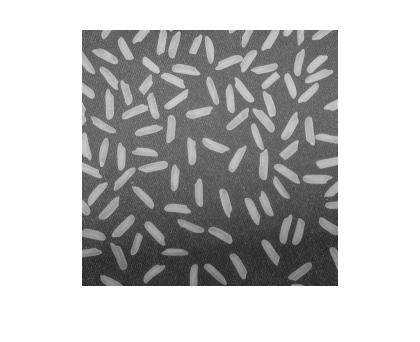
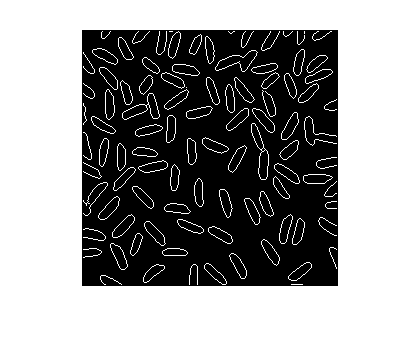
Here's an example using linkaxes to examine closely the output of the edge function.

I = imread('rice.png');
imshow(I)
bw = edge(I, 'canny');
imshow(bw)
Let's use subplot to create two axes in the same figure, and then we'll link them together.

% Call subplot with an output argument to capture the axes
% handles, because we'll need the handles in the call to
% linkaxes.
ax1 = subplot(1, 2, 1);
imshow(I)

ax2 = subplot(1, 2, 2);
imshow(bw)
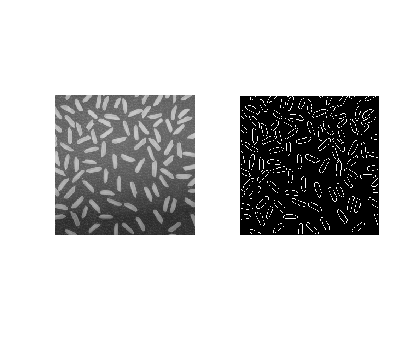
Now pass linkaxes a vector containing both axes handles.

linkaxes([ax1 ax2]);

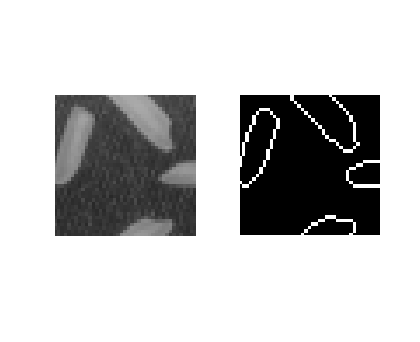
If you then pan and zoom using the mouse in one image, the other image follows along. The linking also works if you change the axes limits from the command line, like this:

axis([50 90 200 240])
There's your quick tip for the week. I hope to pick up the blogging pace again starting next week.


Get the MATLAB code

Published with MATLAB® 7.5

6 Responses to “linkaxes”

  1. Markus replied on :

    Hi Steve!

    Why don’t you prepare the image processing seminar as a video seminar for your blog? Then no one would claim about your posting frequency…

    Markus

  2. Steve replied on :

    Markus—Most of the new examples I prepared for the seminar will show up here in the next few months.

  3. Inyaki replied on :

    Hi Steve.
    I am using linkaxes for several graphs I need them to zoom together.
    If I use save as in the plot, the linkaxes motion is saved, whereas if I use the following statement it isnt
    saveas(gcf, filnam,’fig’);

    Is this I kind of limitation in matlab or I should be saving the figure in other way?
    Thanks.

  4. Steve replied on :

    Inyaki—I don’t know. You might try contacting technical support.

  5. Fikri replied on :

    Hi Steve,

    I’m trying to link 3 different subplots to another 3 different one (1:1), for both x and y axis. Then, two of the subplots suddenly didn’t have any graph in them…I’m guessing that one of the subplot size is enormously higher than the other, which causes the bigger graph has nothing in it.

    Can you help me, how to handle this…to make the matlab take the bigger x & y axis size as its limit?

    Thank you in advance

    -Fikri-

  6. Steve replied on :

    Fikri—I suggest that you contact technical support for assistance.

Leave a Reply


Steve Eddins manages the Image & Geospatial development team at The MathWorks and coauthored Digital Image Processing Using MATLAB. He writes here about image processing concepts, algorithm implementations, and MATLAB.

  • Mikr: I look for answers before asking people… “But we still can’t see the coordinates!...
  • Steve: Mikr—You might want to take a look at the Getting Started section of the MATLAB documentation in order...
  • Mikr: thanks but is it possible to see and write to file (Excel ?) that matrix of pixel coordinates ? instead of...
  • Steve: Mikr—An image in MATLAB is simply a matrix of pixel values. It can be saved (exported) to several common...
  • Mikr: thanks, Steve just started to learn matlab and to clarify matlab saves image files as a matrix of pixel...
  • Steve: Mikr—As far as I know, the commonly used image file formats such as TIFF, JPEG, PNG, etc., do not...
  • Mikr: how to write pixel coordinates in file ?
  • Steve: M.S.—Code for the bwtraceboundaries function ships with the Image Processing Toolbox.
  • M.S.Cheema: i need to know the detailed algorithm for bwtraceboundaries. i want how that function works. so please...
  • Steve: Wagas—It depends on how much memory you have on your computer. You should be able to load a 94 MB TIFF...

These postings are the author's and don't necessarily represent the opinions of The MathWorks.

Related Topics
