In a recent post I demonstrated the use of bwdist (binary image Euclidean distance transform) to perform isotropic dilation. This was inspired by something that Brett asked me about.
Last night Brett posted a comment explaining a little bit more about what he was doing. I'm going to coin a term for what Brett described: almost-connected-component labeling.
I'll illustrate with a simple synthetic image containing a number of circular blobs.
You can see that there are 23 distinct objects detected. The function label2rgb is useful for visualizing connected components. You use it by converting the output of bwconncomp to a label matrix using labelmatrix and then passing the result to label2rgb.
Brett's question was this: How can we label and measure the three clumps instead of the smaller circles? (The clumps were
cell clusters in Brett's problem.) The answer is to combine an isotropic dilation step with connected component labeling.
Let's say that two circles are "almost connected" if they are within 25 pixel units of distance from each other. So start
with an isotropic dilation step:
bw2 = bwdist(bw) <= 12.5;
imshow(bw2)
Now we can perform connected component labeling on bw2:
We have the three clumps now, but they are too "fat." That is, they have too many pixels in them because of the isotropic
dilation step. So if, for example, we measure the area of each clump using regionprops:
s = regionprops(L2, 'Area');
[s.Area]
ans =
14418 11023 6341
we get a distorted area measurement. What if we want to perform measurements only on the pixels in the original clumps?
A nice application of logical indexing will modify L2 to get rid of the added pixels. The following line sets to 0 all elements of L2 corresponding to background pixels in bw.
Thanks to Steve Lord I just learned that documentation for previous MathWorks releases is now available online. This is something I know many of you have asked about.
Just hop over to the Archived MathWorks Documentation page to find doc going all the way back to R13SP2 (2004). Please note that you'll need to register on the site in order to access the archives.
Brett recently asked me about an image processing problem. One step in the problem involved finding out which pixels are within
a certain distance of the foreground in a binary image. We experimented with a few methods, and I want to share the results
with you. In particular, I want to show you a useful technique called isotropic dilation that can be achieved using the distance transform.
Let's start with a small 400-by-400 test image that has only a single foreground pixel in the center.
Suppose we want to know which pixels are within 25 units of the foreground pixel? One common technique is to perform dilation
with a disk.
se = strel('disk', 25);
bw2 = imdilate(bw, se);
This has a problem, though. If you read the documentation for strel carefully, you'll see that by default it computes a structuring element that is an approximation of a disk. You can see the effect of the approximation by looking at the output of the dilation:
imshow(bw2)
You can avoid the approximation by passing in 0 as a third input argument to strel:
So why does strel use a disk approximation by default? Because it's usually a lot faster. Let's check it out on a larger test image (750-by-1500)
with a lot of pixels in the foreground.
An alternative to using imdilate is to use bwdist to compute the distance transform and then threshold the result. The distance transform computes, for each pixel, the distance
between that pixel and the nearest foreground pixel. Here's how it would work:
bw4 = bwdist(bw) <= 25;
imshow(bw4)
The function bwdist uses a fast algorithm, so this works a lot faster than imdilate with an exact disk.
h = @() bwdist(bw2) <= 25;
time_using_distance_transform = timeit(h)
time_using_distance_transform =
0.0687
This technique of thresholding the distance transform is sometimes called isotropic dilation.
Have you made creative use of the distance transform in your work? Then post a comment here.
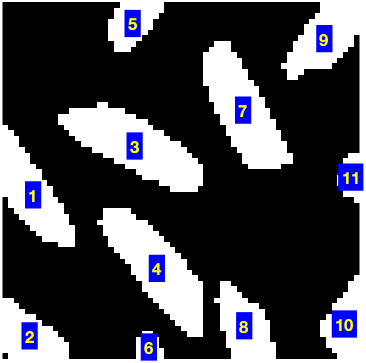
The Image Processing Toolbox function regionprops gives you measurements of shape-based measurements of image regions. It's pretty useful, and I have shown many examples of
it on this blog. Today I want to show you how to visualize the ellipse-based measurements produced by regionprops.
There are several supported measurements that are based on approximating regions by ellipses:
Call regionprops with the list of measurements you desire:
s = regionprops(bw, 'Orientation', 'MajorAxisLength', ...'MinorAxisLength', 'Eccentricity')
s =
99x1 struct array with fields:
MajorAxisLength
MinorAxisLength
Eccentricity
Orientation
From the output you can infer that regionprops found 99 objects in the binary image. It returned the desired measurements as a 99-element struct array. Here are the measurements
for the 10th object:
s(10)
ans =
MajorAxisLength: 28.7693
MinorAxisLength: 9.4320
Eccentricity: 0.9447
Orientation: -27.0162
How can you do a visual sanity check of the output? We should probably include some regionprops visualization utilities in the toolbox, but in the meantime I'll show you some code you can use to superimpose the fitted
ellipses over the original image.
First, we'll one additional measurement: the centroid.
s = regionprops(bw, 'Orientation', 'MajorAxisLength', ...'MinorAxisLength', 'Eccentricity', 'Centroid');
For each ellipse, we'll use a parametric form of the ellipse equation to plot the outline of the ellipse over the image.
imshow(bw)
hold on
phi = linspace(0,2*pi,50);
cosphi = cos(phi);
sinphi = sin(phi);
for k = 1:length(s)
xbar = s(k).Centroid(1);
ybar = s(k).Centroid(2);
a = s(k).MajorAxisLength/2;
b = s(k).MinorAxisLength/2;
theta = pi*s(k).Orientation/180;
R = [ cos(theta) sin(theta)
-sin(theta) cos(theta)];
xy = [a*cosphi; b*sinphi];
xy = R*xy;
x = xy(1,:) + xbar;
y = xy(2,:) + ybar;
plot(x,y,'r','LineWidth',2);
end
hold off
You can zoom in to see exactly why some of the ellipses don't seem to match objects in the image very well. Normally you'd
zoom interactively using the zoom controls in the figure toolbar, but of course I can't do that in this blog post, so I'll
use the axis function.
axis([140 225 85 170])
Now you can see that the two objects in the center of the display are actually touching at one point. That caused regionprops to consider them to be a single object and to fit an ellipse to both of them together.
One of the discrete-time Fourier transform properties that many people learn is that if a sequence is conjugate symmetric,
, then the Fourier transform is real.
Therefore it surprises people sometimes when the output of fft is unexpectedly complex. For example:
x = [1 2 3 2 1]
x =
1 2 3 2 1
The sequence above appears to be symmetric, but the output of fft(x) is complex:
So what's going on? Well, the fft function is computing the discrete Fourier transform of a sequence that is nonzero over the interval . Here's a plot:
You can see that in fact isn't actually symmetric about the origin: . is a shifted version of a symmetric sequence, and that shift causes the output of fft to be complex.
This is the symmetric sequence that has a real-valued Fourier transform:
So how do we compute the real-valued Fourier transform of that sequence using the fft function? If you'll allow me to be a bit hand-wavy here, I'll just say that the discrete Fourier transform has an implicit
periodicity in both the time domain and in the frequency domain. Related to this periodicity, many of the discrete Fourier
transform analogs to the more familiar Fourier transform properties involve circular shifts, or modulo indexing.
For example, the conjugate symmetry property for the discrete Fourier transform looks like this: if , then the DFT is real. What we want to do, then, is circularly shift x so that the center element moves to the left of the vector, like this:
xs = circshift(x,[0 -2])
xs =
3 2 1 1 2
Now take the DFT of xs:
fft(xs)
ans =
9.0000 2.6180 0.3820 0.3820 2.6180
Now the output is real, as expected.
If you're going to zero-pad, do that first and then apply the circular shift.
Whoops. Was I wrong about using this procedure to produce a real result? Not really, it's just our old friend floating-point
round-off error. Look how small the imaginary part is:
max(abs(imag(X128(:))))
ans =
4.4409e-016
You can get rid of the negligible imaginary part by using real. Let's plot the real-valued Fourier transform. I'll use the frequency axis labeling technique I showed in my June 25 blog post.
I've been bothered recently by a MATLAB terminology question: How should we describe the dim argument in functions such as sum? The documentation for sum says:
B = sum(A,dim) sums along the dimension of A specified by
scalar dim. The dim input is an integer value from 1 to N,
where N is the number of dimensions in A. Set dim to 1 to
compute the sum of each column, 2 to sum rows, etc.
For example:
a = [1 2 3; 4 5 6; 7 8 9]
a =
1 2 3
4 5 6
7 8 9
sum(a, 1)
ans =
12 15 18
sum(a, 2)
ans =
6
15
24
For some people this terminology seems to be quite confusing. I started thinking about this when I saw a user question about it recently. In that question, the mental model leading to confusion seems to be this: dimension 1 is the row
dimension, so sum(a,1) should sum each row, but MATLAB sums each column.
This a hard mental model to shake, apparently, and it makes me wonder if the phrase "along the dimension" isn't clear enough.
When you look at equations instead of ambiguous prose, it's easier to see the logic of the dim argument. Consider, for example, an M-by-N matrix A. sum(A,1) is doing this:
The variable of summation, i, is the first subscript of A.
sum(A,2) is doing this:
The variable of summation, j, is the second subscript of A.
This pattern extends nicely to higher dimensions.
So, dear readers, can you suggest a better way to document the meaning of the dim argument? Or should we just leave it be?
On June 16 I let you know about a new version of MATLAB xUnit that I posted on the MATLAB Central File Exchange. Since then I submitted another update that fixed a problem with running unit tests stored in a package. If you're interest in the new ability to run tests inside packages, be sure to grab the latest version.
In my Fourier transform series I've been trying to address some of the common points of confusion surrounding this topic. For today's espisode I want to
look at how to use the fft function to produce discrete-time Fourier transform (DTFT) magnitude plots in the form you might see in a textbook. Recall
that the fft computes the discrete Fourier transform (DFT). I described the relationship between the DFT and the DTFT in my March 15 post.
For my example I'll work with a sequence that equals 1 for and equals 0 elsewhere.
Here's a plot of the DTFT magnitude of this sequence:
Now let's see what get using fft.
x = ones(1, 5)
x =
1 1 1 1 1
X = fft(x);
plot(abs(X))
Wow, that's not anywhere close to the DTFT magnitude plot above. And why does it look like it's only got two points? Well,
take a look at the actual values of X:
X
X =
5 0 0 0 0
We have a 5 and four 0s. What's going on? I explained this back in my March 15 post when I discussed the relationship between the DFT and the DTFT. The outputs of the DFT are samples of the DTFT, and in this
case the sample locations just happen to align with the locations of four zeros in the DTFT.
You can get a finer sampling (and a much nicer-looking DTFT plot) by zero-padding. Here I'll use the zero-padding syntax
of fft.
N = 256;
X = fft(x, N);
plot(abs(X))
That's a smoother-looking curve, but it still looks quite a bit different than the DTFT magnitude plot above. To explain
the MATLAB output we're looking at, let me show a DTFT magnitude plot that shows three periods instead of just one.
You can see that the output from MATLAB is one period of the DTFT, but it's not the period normally plotted, which is from
to . Instead, it's the period from 0 to . To get a plot from to , use the fftshift function.
plot(abs(fftshift(X)))
That leaves us with the question of labeling the frequency axis. We want a plot in radians from to .
The way I always remember the frequency scaling between the DFT and the DTFT is this: the length of the DFT corresponds to
the frequency in the DTFT.
So the frequencies in radians corresponding to the output elements of fft are:
w = 2*pi * (0:(N-1)) / N;
But we're calling fftshift to plot the magnitude of the DTFT, so we have to perform a similar shift on our frequencies:
w2 = fftshift(w);
plot(w2)
Now our frequencies start at and have a discontinuity in the middle. Here's one way to fix that up:
w3 = unwrap(w2 - 2*pi);
plot(w3)
Now we can redo our magnitude DTFT plot with the x-axis labels.
plot(w3, abs(fftshift(X)))
xlabel('radians')
Often I like to see the multiples of more clearly along the x-axis. One way to accomplish this is to normalize the frequency variable by .
In February 2009 I posted MATLAB xUnit, a unit testing framework, to the MATLAB Central File Exchange. I blogged about it on Feb 3, 2009, and later I wrote an article about it for the IEEE Computing in Science and Engineering journal.
I just posted an update (version 3) to the File Exchange. The update contains some changes that several people have been asking me about, including:
Running tests stored in packages
A verbose option for runtests (displays name and running time for each individual test case)
Test-case files and functions can be named with "test" at the end in addition to the beginning
Larger default floor tolerance in "almost-equal" assertion functions (makes relative floating-point comparisons a bit more
forgiving for two values very close to zero)
Fixed handling of message strings in assert functions
If you use MATLAB xUnit you might want to grab the new version.
Here's a comparison of the default output and the new verbose output from runtests when running MATLAB xUnit's own test suite.
runtests c:\Work\matlab_xunit\tests
Starting test run with 147 test cases.
....................
....................
....................
....................
....................
....................
....................
.......
PASSED in 4.208 seconds.
runtests -verbosec:\Work\matlab_xunit\tests
tests
RuntestsTest
test_optionStringsIgnored ............................. passed in 0.179229 seconds
test_noTestCasesFound ................................. passed in 0.030545 seconds
test_packageName ...................................... passed in 0.069988 seconds
test_twoDirnames ...................................... passed in 0.086871 seconds
test_oneDirname ....................................... passed in 0.086698 seconds
test_oneInputArgWithFilter_failing .................... passed in 0.047178 seconds
test_oneInputArgWithFilter_passing .................... passed in 0.075055 seconds
test_testNameThenVerbose .............................. passed in 0.171836 seconds
test_verboseThenTestName .............................. passed in 0.172276 seconds
test_oneInputArg ...................................... passed in 0.066722 seconds
test_Verbose .......................................... passed in 0.098546 seconds
test_noInputArgs ...................................... passed in 0.119439 seconds
RuntestsTest ............................................. passed in 1.231721 seconds
TestCaseTest
testTestError ......................................... passed in 0.069214 seconds
testTestFailure ....................................... passed in 0.072357 seconds
testFixtureCalls ...................................... passed in 0.060515 seconds
testPassingTests ...................................... passed in 0.066578 seconds
testConstructor ....................................... passed in 0.049125 seconds
TestCaseTest ............................................. passed in 0.337303 seconds
TestCaseWithAddPathTest
testRunTestOnPath ..................................... passed in 0.054453 seconds
testPath .............................................. passed in 0.021226 seconds
TestCaseWithAddPathTest .................................. passed in 0.081960 seconds
TestFuncHandleTests
testTeardownFcnButNoSetupFcn .......................... passed in 0.045909 seconds
testFailingTest ....................................... passed in 0.039228 seconds
testFixtureNoTestData ................................. passed in 0.035223 seconds
testTestFixtureError .................................. passed in 0.045860 seconds
testTestFixture ....................................... passed in 0.036676 seconds
testPassingTests ...................................... passed in 0.033212 seconds
testCaseLocation ...................................... passed in 0.029351 seconds
testCaseNames ......................................... passed in 0.028664 seconds
testOutputs ........................................... passed in 0.030963 seconds
testSuiteNameAndLocation .............................. passed in 0.030237 seconds
TestFuncHandleTests ...................................... passed in 0.361527 seconds
TestRunLoggerTest
testFailingTestCase ................................... passed in 0.061540 seconds
testTwoPassingTests ................................... passed in 0.074688 seconds
TestRunLoggerTest ........................................ passed in 0.144972 seconds
TestSuiteTest
test_fromPwd .......................................... passed in 0.230802 seconds
test_fromName_with_dirname ............................ passed in 0.108591 seconds
test_fromName_with_nonmatching_filter_string .......... passed in 0.052603 seconds
test_fromName_with_filter_string ...................... passed in 0.035147 seconds
test_fromName_bogus_name .............................. passed in 0.026466 seconds
test_fromName_subfunctions ............................ passed in 0.032150 seconds
test_fromName_simpleTest .............................. passed in 0.032005 seconds
test_fromName_notTestCaseSubclass ..................... passed in 0.026601 seconds
test_fromName_TestCaseSubclass ........................ passed in 0.042280 seconds
test_fromTestCaseClassName_badclass ................... passed in 0.037137 seconds
test_fromTestCaseClassName ............................ passed in 0.077249 seconds
testNoTestMethods ..................................... passed in 0.060819 seconds
testCurrentDirectory .................................. passed in 0.037616 seconds
testClassNameIn ....................................... passed in 0.050326 seconds
TestSuiteTest ............................................ passed in 0.875839 seconds
ThrowsExceptionTest
testWrongExceptionTest ................................ passed in 0.071667 seconds
testNoExceptionTest ................................... passed in 0.072957 seconds
testPassingTest ....................................... passed in 0.069514 seconds
ThrowsExceptionTest ...................................... passed in 0.228000 seconds
testAssertEqual
testAssertEqualHappyCase .............................. passed in 0.001714 seconds
testAssertEqualWithThreeInputs ........................ passed in 0.001191 seconds
testAssertEqualHappyCaseString ........................ passed in 0.001191 seconds
testAssertEqualHappyCaseMatrix ........................ passed in 0.009695 seconds
testInfAndInf ......................................... passed in 0.000768 seconds
testMinusInfAndMinusInf ............................... passed in 0.000881 seconds
testOppositeSignInfs .................................. passed in 0.005263 seconds
testFiniteAndInf ...................................... passed in 0.002530 seconds
testFiniteAndNaN ...................................... passed in 0.002448 seconds
testInfiniteAndNaN .................................... passed in 0.002447 seconds
testAssertEqualNotEqual ............................... passed in 0.002487 seconds
testAssertEqualSparsity ............................... passed in 0.003061 seconds
testAssertEqualNans ................................... passed in 0.000814 seconds
testAssertEqualClass .................................. passed in 0.003871 seconds
testAssertEqual .......................................... passed in 0.046598 seconds
testAssertExceptionThrown
test_happyCase ........................................ passed in 0.001343 seconds
test_wrongException ................................... passed in 0.002399 seconds
test_noException ...................................... passed in 0.002300 seconds
testAssertExceptionThrown ................................ passed in 0.007276 seconds
testAssertFalse
testAssertFalseHappyCase .............................. passed in 0.001098 seconds
testAssertFalseHappyCaseWithTwoArgs ................... passed in 0.001255 seconds
testAssertFalseFailed ................................. passed in 0.001569 seconds
testAssertFalseNonscalar .............................. passed in 0.001777 seconds
testAssertFalseNonlogical ............................. passed in 0.001815 seconds
testAssertFalse .......................................... passed in 0.009098 seconds
testAssertTrue
testAssertTrueHappyCase ............................... passed in 0.001224 seconds
testAssertTrueHappyCaseWithTwoArgs .................... passed in 0.001010 seconds
testAssertTrueFailed .................................. passed in 0.001635 seconds
testAssertTrueNonscalar ............................... passed in 0.001855 seconds
testAssertTrueNonlogical .............................. passed in 0.001821 seconds
testAssertTrue ........................................... passed in 0.009276 seconds
testContainsRegexp
testOneStringContains ................................. passed in 0.000726 seconds
testOneStringDoesntContain ............................ passed in 0.000651 seconds
testCellArray ......................................... passed in 0.002125 seconds
testContainsRegexp ....................................... passed in 0.004720 seconds
testIsSetUpString
testOneStringIs ....................................... passed in 0.000966 seconds
testOneStringIsNot .................................... passed in 0.000711 seconds
testCellArray ......................................... passed in 0.000957 seconds
testIsSetUpString ........................................ passed in 0.003831 seconds
testIsTearDownString
testOneStringIs ....................................... passed in 0.000860 seconds
testOneStringIsNot .................................... passed in 0.000734 seconds
testCellArray ......................................... passed in 0.000971 seconds
testIsTearDownString ..................................... passed in 0.003920 seconds
testIsTestCaseSubclass
testTestCase .......................................... passed in 0.001117 seconds
testSubclass .......................................... passed in 0.001433 seconds
testNotASubclass ...................................... passed in 0.000704 seconds
testIsTestCaseSubclass ................................... passed in 0.004479 seconds
testIsTestString
testOneStringIs ....................................... passed in 0.001043 seconds
testOneStringIsNot .................................... passed in 0.000722 seconds
testCellArray ......................................... passed in 0.001105 seconds
testIsTestString ......................................... passed in 0.004039 seconds
testRuntestsWithDirectoryName
testDirName ........................................... passed in 0.186239 seconds
testRuntestsWithDirectoryName ............................ passed in 0.189451 seconds
test_TestSuiteInDir
test_constructor ...................................... passed in 0.021166 seconds
test_gatherTestCases .................................. passed in 0.078672 seconds
test_TestSuiteInDir ...................................... passed in 0.107688 seconds
test_arrayToString
test_smallInput ....................................... passed in 0.004122 seconds
test_largeInput ....................................... passed in 0.012194 seconds
test_emptyInput ....................................... passed in 0.002702 seconds
test_arrayToString ....................................... passed in 0.024989 seconds
test_assertElementsAlmostEqual
test_happyCase ........................................ passed in 0.012472 seconds
test_failedAssertion .................................. passed in 0.005771 seconds
test_nonFloatInputs ................................... passed in 0.004278 seconds
test_sizeMismatch ..................................... passed in 0.004909 seconds
test_finiteAndInfinite ................................ passed in 0.004088 seconds
test_infiniteAndInfinite .............................. passed in 0.002276 seconds
test_finiteAndNaN ..................................... passed in 0.004087 seconds
test_nanAndNaN ........................................ passed in 0.001614 seconds
test_plusMinusInfinity ................................ passed in 0.003298 seconds
test_infiniteAndNaN ................................... passed in 0.003342 seconds
test_assertElementsAlmostEqual ........................... passed in 0.048904 seconds
test_assertFilesEqual
test_equal ............................................ passed in 0.011540 seconds
test_differentSize .................................... passed in 0.004074 seconds
test_sameSizeButDifferent ............................. passed in 0.010435 seconds
test_oneFileEmpty ..................................... passed in 0.003349 seconds
test_bothFilesEmpty ................................... passed in 0.002264 seconds
test_cannotReadFirstFile .............................. passed in 0.001903 seconds
test_cannotReadSecondFile ............................. passed in 0.002844 seconds
test_assertFilesEqual .................................... passed in 0.038591 seconds
test_assertVectorsAlmostEqual
test_happyCase ........................................ passed in 0.011034 seconds
test_failedAssertion .................................. passed in 0.004597 seconds
test_failedAssertionWithCustomMessage ................. passed in 0.004030 seconds
test_nonFloatInputs ................................... passed in 0.002827 seconds
test_sizeMismatch ..................................... passed in 0.002661 seconds
test_finiteAndInfinite ................................ passed in 0.003378 seconds
test_infiniteAndInfinite .............................. passed in 0.003427 seconds
test_finiteAndNaN ..................................... passed in 0.003343 seconds
test_NanAndNan ........................................ passed in 0.003311 seconds
test_oppositeSignInfs ................................. passed in 0.003317 seconds
test_assertVectorsAlmostEqual ............................ passed in 0.044592 seconds
test_compareFloats
test_elementwiseRelativeTolerance ..................... passed in 0.004797 seconds
test_elementwiseAbsoluteTolerance ..................... passed in 0.005753 seconds
test_vectorRelativeTolerance .......................... passed in 0.002094 seconds
test_vectorAbsoluteTolerance .......................... passed in 0.001898 seconds
test_NaNs ............................................. passed in 0.004481 seconds
test_Infs ............................................. passed in 0.004494 seconds
test_complexInput ..................................... passed in 0.006239 seconds
test_comparisonTypeSpecified .......................... passed in 0.002089 seconds
test_compareFloats ....................................... passed in 0.034187 seconds
test_comparisonMessage
test_happyCase ........................................ passed in 0.003328 seconds
test_comparisonMessage ................................... passed in 0.004423 seconds
test_packageName
test_happyCase ........................................ passed in 0.038309 seconds
test_badPackageName ................................... passed in 0.001387 seconds
test_packageName ......................................... passed in 0.040861 seconds
test_parseFloatAssertInputs
test_tooFewInputs ..................................... passed in 0.001230 seconds
test_tooManyInputs .................................... passed in 0.001139 seconds
test_twoInputs ........................................ passed in 0.001647 seconds
test_threeInputs ...................................... passed in 0.002824 seconds
test_fourInputs ....................................... passed in 0.006563 seconds
test_fiveInputs ....................................... passed in 0.004510 seconds
test_sixInputs ........................................ passed in 0.003339 seconds
test_twoSingleInputs .................................. passed in 0.002287 seconds
test_twoSingleAndDoubleInputs ......................... passed in 0.002257 seconds
test_parseFloatAssertInputs .............................. passed in 0.028289 seconds
test_stringToCellArray
test_happyCase ........................................ passed in 0.000890 seconds
test_emptyInput ....................................... passed in 0.000639 seconds
test_spacesInFront .................................... passed in 0.000856 seconds
test_spacesAtEnd ...................................... passed in 0.000833 seconds
test_stringToCellArray ................................... passed in 0.004602 seconds
tests ....................................................... passed in 4.180996 seconds
Today offered more excitement than usual at MathWorks headquarters in Natick, Massachusetts. We got to destroy a building! Well, we got a good start on it anyway.
Let me back this story up a bit. In 1998 MathWorks had outgrown its office building in Natick. We wanted to stay in town, so we constructed a new building in a nearby office park called Apple Hill. (Even though it was the fourth building in the office park, the new building was called Apple Hill 3. Go figure.) We moved into the new building in 1999.
Over the next ten years, fueled by the global success of MATLAB, Simulink, and the whole product family, the company continued to grow. After eventually expanding into all four Apple Hill buildings, we finally ran out of space again. As before, we really wanted to stay in Natick. But with 1500 people working in the Natick headquarters, we had to get really creative about space.
After a couple of years of working out the details, and with a lot of help from the town of Natick and the Commonwealth of Massachusetts, we have finally started on the new plan—we are bringing down the smallest of the four buildings in order to replace it with a much larger structure. Our reconfigured headquarters campus will accommodate our anticipated company expansion and growth for years to come.
Today we held a ceremony and celebration to mark the destruction of Apple Hill 1 and to launch the new construction project.
Here's Apple Hill 1, apparently indifferent to its fate.
MATLAB Central bloggers Doug Hull and Loren Shure showed up early for the festivities, as did Ned Gulley, one of the driving forces behind all the community efforts on MATLAB Central.
(Ned was clearly trying to bring down Apple Hill 1 with the sheer force of his squinty, laser-eyed gaze. Or maybe he just didn't want me to take his picture.)
Here's the best view I could get of the MathWorks headquarters staff who turned out to watch.
Speakers at the ceremony included MathWorks President and Co-Founder Jack Little, Massachusetts Secretary of Housing & Economic Development Gregory Bialecki, State Senator Karen E. Spilka, and State Representative David Paul Linsky.
A ballista (catapult) was set up on the construction site to take shots at the building. I was very lucky to catch in one of my pictures the first ice block launched toward Apple Hill 1. As you can see on the right, however, the building seemed unfazed.
That was OK, though. We had a backup plan.
MathWorker Mike Labrecque got to "drive" the claw. Well done, Mike!
Finally, no true MathWorks event would be complete without food. Today it was ice cream:
As far as I'm concerned, any day that includes an ice cream cookie sandwich is a fine day indeed!
Steve Eddins is a software development manager in the MATLAB and image processing areas at MathWorks. Steve coauthored Digital Image Processing Using MATLAB. He writes here about image processing concepts, algorithm implementations, and MATLAB.
Recent Comments