MATLAB Spoken Here

July 9th, 2007

Printing hyperlinks to the Command Window

I quite often get asked how to print out hyperlinks to the Command Window. It’s really easy! The Command Window accepts <a href tags that contain valid links. Valid links contain http:// or matlab:. The Command Window treats any text after the matlab: syntax, inside the quote marks, as executable M-code.

Here are some examples of hyperlinks in the Command Window.

Hyperlink to a web page

disp('This is a link to <a href="http://www.google.com">Google</a>.')

Hyperlink to M-code

disp('You should <a href="matlab: plot(magic(10)), disp(''I plotted some stuff'')">my code</a>!')

I used the disp command, but you could also use the fprintf command to achieve the same effect.

To open an m-file from the Command Window, disp a matlab: link that uses the function opentoline:

disp('You should <a href="matlab: opentoline(which(''why.m''),27)">open my file</a>!')
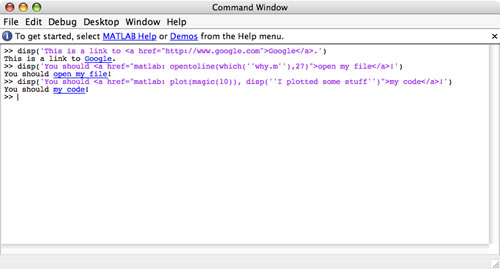
These lines of code can be placed in any M-file or in any shortcut on the Desktop toolbar.

The Command Window is not an HTML renderer, so it won’t interpret other types of html tags – just the <a href tag.

30 Responses to “Printing hyperlinks to the Command Window”

  1. Y Sylman replied on :

    Hi Kristin,
    Try “help matlabcolon” …

  2. Kelly replied on :

    Actually, I’ve more often wondered how to prevent printing hyperlinks to the command window. I was working on a project a few weeks ago that involved parsing a page of html commands. At one point I was printing some info to the command window for debugging purposes, and was being driven crazy by the automatic rendering of some of the html links. Is there a way to suppress this?

  3. Kristin replied on :

    Kelly – What would you like it to do instead? Are you accidentally clicking on them? Do you want to see the html or do you just not want to see the underlines?

  4. Kelly replied on :

    I wanted to see the plain text html. As I said, it was a minor inconvenience, since I could just open the files in a text editor instead. But I was surprised to discover there was no way to disable this behavior.

  5. Tim Davis replied on :

    This is cool! What I really want to do is to use color to highlight certain values that I print out, so I can now gleefully abuse this feature to do just that. For example:

    x = rand (10,1) ;
    for k = 1:10
    if (x (k) %8.5f\n’, x (k)) ;
    end
    end

    prints out x, but it underlines in blue the values that are greater than or equal to 0.5, with an otherwise-useless HTML link.

    Fun! … just don’t click on those funny blue numbers …

  6. Tim Davis replied on :

    Oh … I got caught again because the blog-comment post tries to interpret “less than …” as an html tag and it destroyed my code … Let me try again with “pre” tags …

    x = rand (10,1) ;
    for k = 1:10
    if (x (k) %8.5f\n’, x (k)) ;
    end
    end

  7. Tim Davis replied on :

    sigh … replace _LT_ and _GT_ below with the less than and greater than signs respectively…

    x = rand (10,1) ;
    for k = 1:10
    if (x (k) _LT_ .5)
    fprintf (‘%8.5f\n’, x (k)) ;
    else
    fprintf (‘_LT_ href=”"_GT_%8.5f_LT_/a_GT_\n’, x (k)) ;
    end
    end

  8. Tim Davis replied on :

    You can disable the highlighting of hypertext links by just replacing the href= string with HREF=. See hprintf.m, which I just posted in the File Exchange. Note that for “disp” you would need another solution:

    Instead of disp(string_with_url) you would use

    disp (strrep (string_with_url, ‘href=’, ‘HREF=’)) ;

    Failing that, you could always use matlab -nodesktop and turn off everything … :-}

  9. Tim Davis replied on :

    Note that HREF= is recognized by regular web browsers (Internet Explorer, Firefox, and even the MATLAB built-in “web”), so changing href= to HREF= disables only the hypertext link in the MATLAB Command Window, but leaves it as a valid link everywhere else.

  10. Kristin replied on :

    Hey Tim,

    In your example above, you could link the variables to disp the values, then if you click on them you are at least getting useful info.

    x = rand (10,1) ;
    for k = 1:10
      if (x (k) %lt; .5)
        fprintf (‘%8.5f\n’, x (k)) ;
      else
        fprintf (‘<a href=”matlab: disp %s”>%8.5f</a>\n’, x (k), x(k)) ;
      end
    end

    Obviously, this would work better if you were printing something other than the values.

  11. Tim Davis replied on :

    I was just printing values, and needed a do-nothing link, then “matlab:why” is the coolest do-nothing function out there :-)

  12. Yuri replied on :

    Tim, Kristin,

    Isn’t there another way to change the text color in the command window?

    Obviously, Tim’s solution is not powerful.

    Yuri

  13. Mike replied on :

    Yuri,

    It is not possible to change the text color in the Command Window. You can get errors or hyperlinks (whose color is settable in the preferences) but these have additional semantics that are not desirable for other uses.

  14. Rick Candell replied on :

    It is very desirable to be able to print colored text to the command window. Why has this feature not yet been implemented? It would also be nice in a matlab notebook, but I found the notebook to be very flakey. I would prefer to have color text in the command window.

  15. Mike replied on :

    Rick,

    Thank you for the suggestion. If you have a specific use case in mind, feel free to email us with the details.

    Mike

  16. Jimmy replied on :

    Is there any way to include hyperlinks in a comment, such as the standard help at the beginning of a function?

  17. Yair Altman replied on :

    Jimmy – if you mean that you wish to include hyperlinks in your function’s help comment, that will display asa hyperlink in the Command Window when you type “help myfunc”, then yes – simply include the hyperlink in your help comment, like so:

    function result = myfunc(varargin)
    % MYFUNC – this function does A B C …
    %
    % See also: <a href=”http://www.mathworks.com/matlabcentral/fileexchange/authors/27420″>MathWorks File Exchange</a>
    %

    Yair

  18. Mike replied on :

    Thanks for fielding that one, Yair.

  19. jeephenry replied on :

    Wonderful information. It is really useful to read your web.
    The information among your blog is strictly wonderful, and your blog structure is Simple kind. It is not dazzled. So great.replca tag heuer|

  20. Nic replied on :

    I’m using the hyperlink command to access windows explorer:

    disp('Go to data directory')
    

    This works nicely but Matlab is ‘busy’ until the explorer window is closed. Does anyone know a way around this?

  21. Nic replied on :

    Might be easier if you can see the code:

    disp(‘Go to data directory‘)

  22. Nic replied on :

    One more time…

    disp(‘<a href=”matlab:winExplorer(”c:\”)”>Go to directory</a>’)

  23. Nic replied on :

    Apologies for this – I have found a solution but the issue was with my own function.

    In case someone is interested – here is a piece of code that creates a hyperlink to open windows explorer to a particular folder, in this case the c drive:

    disp(‘<a href=”matlab:dos(”explorer.exe /e, c:\, &”)”>Go to data directory</a>’)

    note: including ‘&’ in the dos command input, returns to matlab immediately and the busy state is not an issue.

  24. jiro replied on :

    @Nic,

    You should be able to do this:

    disp('<a href="matlab:winopen(''C:\'')">Go to data directory</a>')

  25. Nic replied on :

    Thanks jiro – so many bits and pieces to learn!

  26. AdrianC replied on :

    Hi,
    After I create a hyperlink, I want to be able to click on the link automatically so I dont have to do it manually. The link will be to an image from an IP camera, and ideally I would like to save the resulting image. My aim is to write software that records jpegs from an IP camera at X frames per second. Has anyone done something like this?
    Thanks,
    Adrian

  27. Daniel Armyr replied on :

    Hi.
    I found this blog post a few months ago and started using this trick in several functions where one might want to quickly find the piece of code that printed the output.

    Now that I upgraded to Matlab 2011a, the code does not work any more.

    This code:

    disp('You should &lta href="matlab: opentoline(which(''why.m''),27)">open my file&lt/a>!')

    Gives me the following message:
    “File c:\…\which(‘why.m’) does not exist. [...]“

    Indicating that the contents of the first parentesis are taken as a literal string and are not evaluated as Matlab code. Does anyone have a workaround, because the hyperlink thing was really useful.

  28. Daniel Armyr replied on :

    Oh.
    Just found the answer in a much newer post: Replacing the above line with

    disp('You should <a href="matlab:matlab.desktop.editor.openAndGoToLine(which(''why.m''),27)">open my file</a>!')
  29. Chris replied on :

    I am trying to use the matlabcolon methodology described above to display hyperlinks to the command window, where my HYPERLINK_TEXT is not constant string, but rather changes dynamically in a FOR loop. This is because I want to print out hyperlinks for a number of data files dynamically. So far I have not been able to do this. Is this possible?

  30. Mike replied on :

    Chris,

    You just need to put the interesting text in the link, using (s/f)printf or using array concatenation in disp.

    E.g.

    for i=1:3
        fprintf('This is a link #%i <a href="http://www.google.com/#q=number%i" rel="nofollow">Google for %i</a>.\n',i,i,i)
    end
    

Leave a Reply

Wrap code fragments inside <pre> tags, like this:

<pre class="code">
a = magic(3);
sum(a)
</pre>

If you have a "<" character in your code, either follow it with a space or replace it with "&lt;" (including the semicolon).


MathWorks
News from the intersection of MATLAB, Community, and the web.

These postings are the author's and don't necessarily represent the opinions of MathWorks.