Inside the MATLAB Desktop
July 9th, 2007
Printing hyperlinks to the Command Window
I quite often get asked how to print out hyperlinks to the Command Window. It’s really easy! The Command Window accepts <a href tags that contain valid links. Valid links contain http:// or matlab:. The Command Window treats any text after the matlab: syntax, inside the quote marks, as executable M-code.
Here are some examples of hyperlinks in the Command Window.
Hyperlink to a web page
disp('This is a link to <a href="http://www.google.com">Google</a>.')
Hyperlink to M-code
disp('You should <a href="matlab: plot(magic(10)), disp(''I plotted some stuff'')">my code</a>!')
I used the disp command, but you could also use the fprintf command to achieve the same effect.
To open an m-file from the Command Window, disp a matlab: link that uses the function opentoline:
disp('You should <a href="matlab: opentoline(which(''why.m''),27)">open my file</a>!')
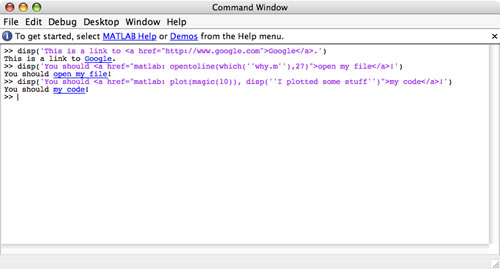
These lines of code can be placed in any M-file or in any shortcut on the Desktop toolbar.
The Command Window is not an HTML renderer, so it won’t interpret other types of html tags - just the <a href tag.
By
Kristin Thomas
Kristin is a developer on the MATLAB Desktop team. She works primarily on the Command Window when she is not throwing herself down a mountain on her snowboard.
7:28 am |
Posted in Command Window |
Permalink |
You can follow any responses to this entry through the RSS 2.0 feed.
You can skip to the end and leave a response. Pinging is currently not allowed.
Leave a Reply
|
Hi Kristin,
Try “help matlabcolon” …
Actually, I’ve more often wondered how to prevent printing hyperlinks to the command window. I was working on a project a few weeks ago that involved parsing a page of html commands. At one point I was printing some info to the command window for debugging purposes, and was being driven crazy by the automatic rendering of some of the html links. Is there a way to suppress this?
Kelly - What would you like it to do instead? Are you accidentally clicking on them? Do you want to see the html or do you just not want to see the underlines?
I wanted to see the plain text html. As I said, it was a minor inconvenience, since I could just open the files in a text editor instead. But I was surprised to discover there was no way to disable this behavior.
This is cool! What I really want to do is to use color to highlight certain values that I print out, so I can now gleefully abuse this feature to do just that. For example:
x = rand (10,1) ;
for k = 1:10
if (x (k) %8.5f\n’, x (k)) ;
end
end
prints out x, but it underlines in blue the values that are greater than or equal to 0.5, with an otherwise-useless HTML link.
Fun! … just don’t click on those funny blue numbers …
Oh … I got caught again because the blog-comment post tries to interpret “less than …” as an html tag and it destroyed my code … Let me try again with “pre” tags …
x = rand (10,1) ;
for k = 1:10
if (x (k) %8.5f\n’, x (k)) ;
end
end
sigh … replace _LT_ and _GT_ below with the less than and greater than signs respectively…
x = rand (10,1) ;
for k = 1:10
if (x (k) _LT_ .5)
fprintf (’%8.5f\n’, x (k)) ;
else
fprintf (’_LT_ href=”"_GT_%8.5f_LT_/a_GT_\n’, x (k)) ;
end
end
You can disable the highlighting of hypertext links by just replacing the href= string with HREF=. See hprintf.m, which I just posted in the File Exchange. Note that for “disp” you would need another solution:
Instead of disp(string_with_url) you would use
disp (strrep (string_with_url, ‘href=’, ‘HREF=’)) ;
Failing that, you could always use matlab -nodesktop and turn off everything … :-}
Note that HREF= is recognized by regular web browsers (Internet Explorer, Firefox, and even the MATLAB built-in “web”), so changing href= to HREF= disables only the hypertext link in the MATLAB Command Window, but leaves it as a valid link everywhere else.
Hey Tim,
In your example above, you could link the variables to disp the values, then if you click on them you are at least getting useful info.
x = rand (10,1) ;
for k = 1:10
if (x (k) %lt; .5)
fprintf (’%8.5f\n’, x (k)) ;
else
fprintf (’<a href=”matlab: disp %s”>%8.5f</a>\n’, x (k), x(k)) ;
end
end
Obviously, this would work better if you were printing something other than the values.
I was just printing values, and needed a do-nothing link, then “matlab:why” is the coolest do-nothing function out there :-)