
Searching the web while working in the MATLAB Desktop
Sometimes when I am working on a large project with many files and lot of figure windows open, things start to look like a mess. The last thing I want to do it open a web browser to search for something. I find I spend more time figuring out where my windows are than getting code written. One good way to manage this is to use the MATLAB Web browser while working on code (and also to dock those Editor windows and figures). Then when you search Google for code tidbits or search MATLAB Central for file downloads, all of your windows are contained.
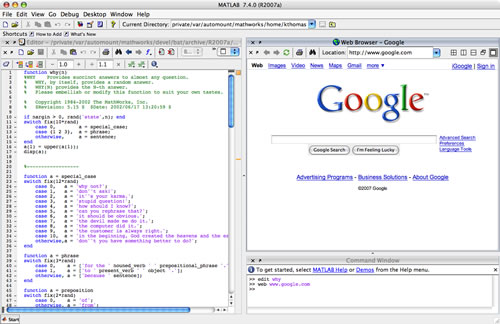
To open the web browser, you can just type the following command at the command line:
web www.google.comThen from the Web Browser Desktop menu, select “Dock Web browser”. Now you can rearrange your windows so that you can see all of your work at once and get all of those web browser windows out of your way.
- Category:
- Desktop




Comments
To leave a comment, please click here to sign in to your MathWorks Account or create a new one.