
Finding items in the Command Window or the Editor
In a recent post, Kristin described a lightweight way to search in the history and the file browser. The Command Window and the Editor also have a lightweight way to look for items. It’s called incremental search.
To do an incremental search you hit a couple keys and it brings up this nice little box at the bottom of the window. (Yes, I did just leave out the keys on purpose, I’ll explain in a minute.)

Now start typing. Each key you type refines the search. Hit Ctrl-s to go to the next match and Ctrl-r to go to the previous match. This feature is very similar to search in emacs.
Fun with keys
The one complicated part is what keys do you press? Unfortunately, the answer is that depends. Different platforms use different keys to mean the same things. We try to use the key on a platform that makes the most sense. Sometimes, however the key we want to use is already in use. Sometimes, people have different expectations of keys based on other programs they use.
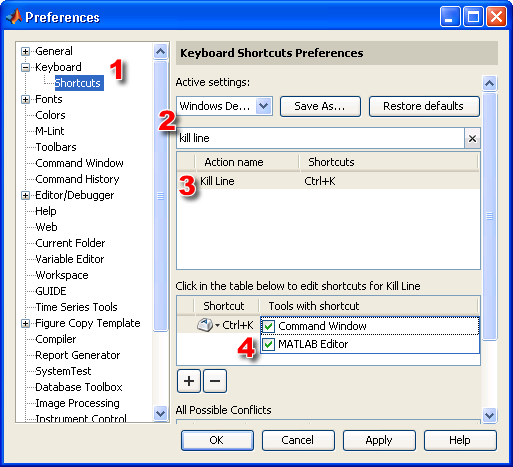
Because of this we have created preferences about which key bindings you use and we try to set the defaults in a way that will make most users happy. As mentioned in a previous post, the Command Window always uses the Emacs (MATLAB Classic) set of keybindings by default and the Editor uses a platform specific set. You can change these choosing “Preferences” from the “File” menu. From the Preferences dialog, select “Keyboard” and set the keybingings to the desired set.
By default on PC Ctrl-s will bring up incremental search in the Command Window and Ctrl-Shift-s will bring it up in the Editor for forward search. By default on UNIX and Mac Ctrl-s will bring up incremental search in both the Command Window and the Editor for forward search.
To do a reverse search use the above except use r instead of s.
Have Fun!
- Category:
- Command Window,
- Editor





Comments
To leave a comment, please click here to sign in to your MathWorks Account or create a new one.