
Marking up M with HTML
I’d like to welcome guest blogger Michael Katz, the newest member of the MATLAB Desktop team. Michael will occasionally be blogging here on the Inside the MATLAB Desktop blog.
For my first post as the newest developer on the desktop team, I want to wax philosophical about how great it is to use the PUBLISH function to turn your MATLAB code into web pages. I am a big believer in letting code speak for itself – that is by having the source generate its own reports or documentation. PUBLISH has useful formatting power by allowing you to add any HTML tag to your published web pages.
To demonstrate PUBLISH’s power, I hoped to pull a brilliant example of HTML usage in a randomly selected, published M-file already out there on the web. We have a report on MATLAB Central that searches the web looking for published M-files.
Unfortunately there is not an overwhelming amount of HTML markup usage in published M-file world.
Why not? It’s as easy as clicking the Cell -> Insert Text Markup -> HTML Markup menu item.
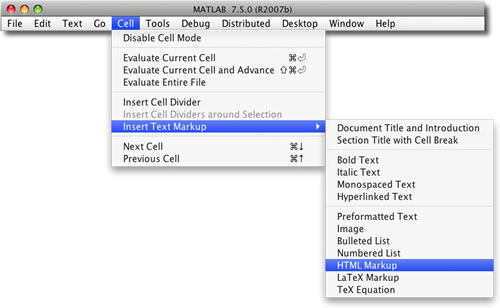
Selecting “HTML Markup” gives you a nice little two cell table, but you can put whatever HTML you want between the <html></html> tags.
But why would you want to do this?
You can already get bold and italic text, pre-formatting, and lists with the regular markup. Sure you can could have some nice red text with <font color=”red”>nice red text</font>, make paragraphs <p> and horizontal lines <hr>. But you can get even more power from iframes, Java Script, forms, and tables.
I’ve created the following example to show off some of those features, which I then published in MATLAB. The two buttons will only work inside MATLAB’s web browser; clicking on them will give you an error in a regular browser.
The following MATLAB code:
%% Publish to HTML Demo
% <html>
% This is a demonstration of PUBLISH's ability to use html markup inside a
% published m-file. For help about marking up m-files for publishing, see
% the following documentation:<br>
% <iframe
% src="https://www.mathworks.com/help/matlab/matlab_prog/marking-up-matlab-comments-for-publishing.html"
% width=600 height=300></iframe>
% <p>Or click on the following button if you have this page opened inside
% MATLAB</p>
% <button onclick="document.location='matlab:web([docroot \'/techdoc/matlab_env/f6-30186.html\'])'">Open the
% markup Documentation</button>
% </html>
%
Publishes into this document:
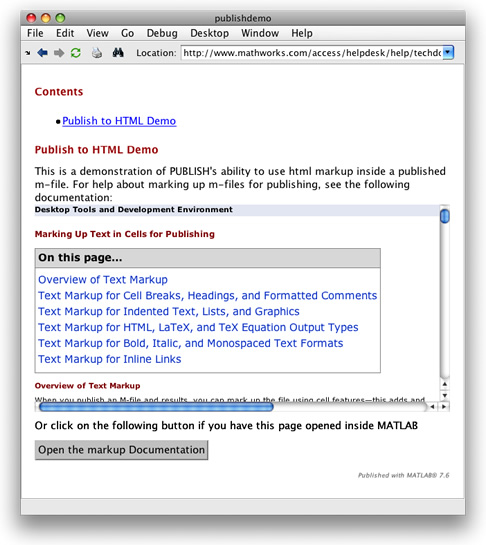
If you were to publish this on your machine, you’d be able to click the “Open the markup Documentation” button in the MATLAB web browser. This would take you right to the “Marking Up Text in Cells for Publishing” section in the MATLAB help browser.
All this is great for static text, but if you want to put some calculated data into table in your published document, I suggest you take a look at Ned’s makeHTMLTable on MATLAB Central.
In addition to using HTML formatting in your published M-files, you can have LaTeX equations, links, images, and easier to read markup for making lists, bold, italic and preformatted text. A full listing of the types of markup that one can have in a published M-file is in our documentation
Note that you cannot mix HTML formatting with other publish formatting in the same comment block. If you do it will treat any HTML tags as regular PUBLISH-formatted links.
So, go crazy. Add some flair to your published files: create mash-ups, add tables and JavaScript; make your published files come alive!
Happy formatting.
-by Michael Katz, The MathWorks
- Category:
- Editor


See Also
-

Publishing
Blogs
-

Mastering MATLAB Markup
Blogs




Comments
To leave a comment, please click here to sign in to your MathWorks Account or create a new one.