
Stop in the name of error
Recently I was performing some maintenance on the Dependency Report tool. The report has logic to display something reasonable in the web browser even if the scanned directory contains invalid MATLAB files. To make that work, there are several try/catch blocks that the process various errors that may be encountered.
When I tested my new changes in a directory with some “bad” MATLAB files…let’s just say that the code was not handling the errors properly! Normally in these situations I type:
dbstop if caught error
and inspect the state of program in the editor. However due to the recursive, iterative, and nested nature of this code, there were too many caught errors in different files to make this an efficient process. That’s when I remembered that we can stop on a particular type of error, but I could not remember the syntax to do so.
Debug menu to the rescue!
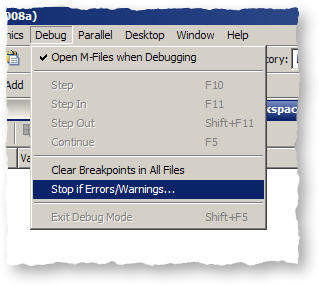
I clicked Debug -> Stop if Errors/Warnings… to open the Stop if Errors/Warnings for All Files dialog.
Next, I needed a unique error identifier, so MATLAB would know where to halt execution. This is easy to do from the command prompt using the lasterror command:
>> lasterror

ans =

       message: 'Index exceeds matrix dimensions.'
    identifier: 'MATLAB:badsubscript'
         stack: [1x1 struct]
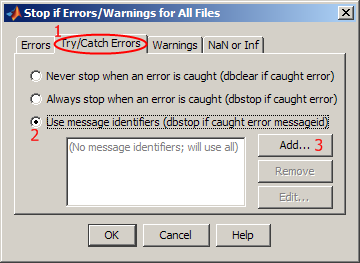
Then, I cut and pasted the identifier into the Stop if Errors/Warnings for All Files dialog. To follow along, Click the “Try/Catch Errors” tab (1), select “Use Message Identifiers” (2), and click “Add” (3):
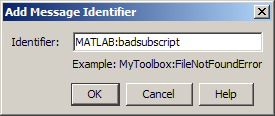
Finally, I pasted in the message I was interested in and clicked “OK”:
After this, I re-ran my code. Execution stopped only when this error was caught, which allowed me to debug just this issue.
Incidentally, the command-line syntax is shown in the dialog; hopefully I will remember that for next time!
- Category:
- Editor




Comments
To leave a comment, please click here to sign in to your MathWorks Account or create a new one.