Ken & Mike on the MATLAB Desktop

July 21st, 2008

Graphical user interfaces are just plain better

Graphical user interfaces are just plain better—better than pure command-line interfaces, that is. It should come as no surprise that a user interface designer and developer, such as myself, would make such a bold statement. But time and time again, it’s been shown that good graphical user interfaces outperform command-line interfaces (see Alan Cooper’s work for examples of this).

Some of you may be saying, “Wait a minute, I know I can move around a command-line much faster than I can move the mouse and click on windows and buttons”. The truth of the matter is, though, the more complex a command-line system gets, the more excise (waste) is generated. That excise includes things like memorizing commands and remembering exactly how to use them and when they can be applied.

When developing MATLAB’s first graphical user interfaces (many years ago) we came up with a couple guiding principles, the first of which was aimed at reducing the aforementioned excise:

Increase transparency to the user (i.e. don’t hide state)
Increase user productivity

Over the years, MATLAB has gone from this:

to this:
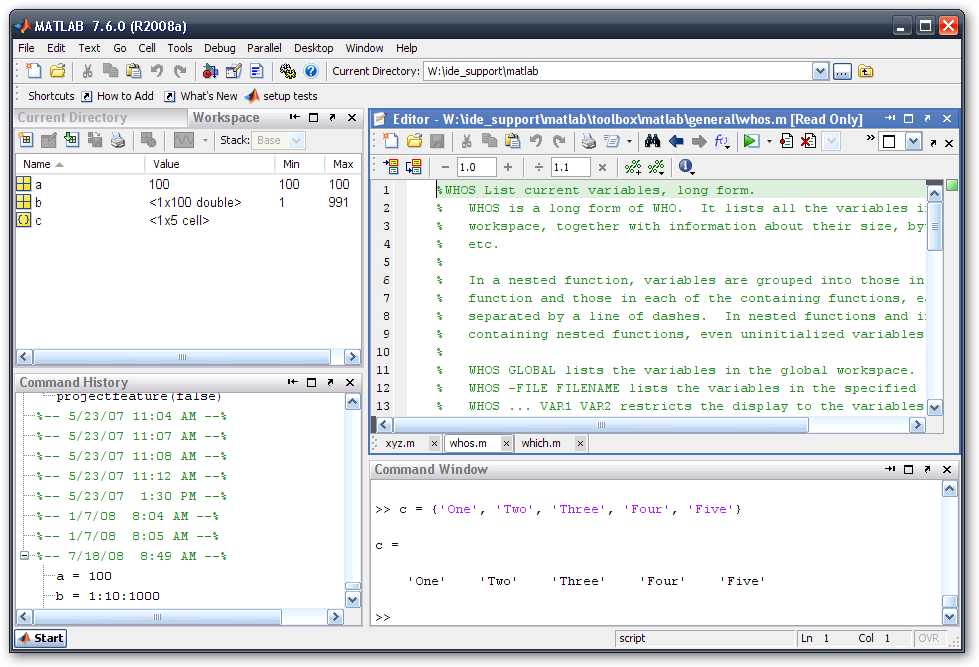
 
Quite a stark contrast between MATLAB version 4.2 and version 7.6!
 
I think we’ve adhered to those original principles pretty well. Since that command-line interface in version 4.2, we’ve exposed a number of major workflow items:

  • The current directory as well as its contents via the Current Directory Browser
  • The commands you’ve previously run via the Command History
  • Syntax, syntax errors and debugging status via the built-in Editor
  • The contents of the workspace via the Workspace Browser

This certainly isn’t an exhaustive list of the information and state that’s been made more transparent, but it certainly encompasses some of the core aspects of MATLAB that have been exposed.

Exposing this information helps make the second guiding principle, Increase user productivity, possible. Having a clearer more readily apparent overall picture (a.k.a. mental model) means you can spend more time thinking about what you want to do rather than how you want to do it.

What are some areas you think the MATLAB Desktop could better expose information to the user?

5 Responses to “Graphical user interfaces are just plain better”

  1. Daniel Armyr replied on :

    Hi.
    I am one of those old-school people who feels that the command-line has definate merit. However, having things clearly displayed on the screen is never a bad thing.

    However, using a mouse in an environment like Matlab where most work is done from the keyboard is something I find to be quite a nusance. I also find that the keyboard shortcuts in matlab are poorly documented. I had for example used matlab daily for 3 years before I found out abut Ctrl+pgUp/PgDown to change windows within the editor.

    So that is my beef. Feel free to improve the GUI (and you really have) but make sure those shortcuts are kept up-to-date and documented.

    –DA

  2. Ken replied on :

    Hi Daniel,

    Your absolutely right - keyboard shortcuts in MATLAB is an area that could use some improvement. Good news, though - we are working on this! For now, check out the following MATLAB references for a listing of keyboard shortcuts:

    General shortcuts
    Command window shortcuts
    Editor shortcuts

  3. John Haitas replied on :

    7 years on… still no native graphics for the Mac. When will Mathworks take time to code a GUI using the most advanced graphics libraries available(Aqua)?

    you are neglecting your users

  4. Ken replied on :

    Hi John,

    I can appreciate your desire for a true Mac user interface. As a Mac user myself, I am constantly striving to help improve the fidelity of our product on the Mac platform.

    As you can imagine, this won’t happen over night. Slowly but surely, your going to see more of what you expect from a user interface experience on the Mac.

    If you’re doubting Java’s ability to provide a true Mac experience, I encourage you to check out my personal blog, where I explore this very subject.

    I’m glad we have users that are passionate about the Mac.

    -Ken

  5. Mike replied on :

    @Daniel,

    What are the keyboard shortcuts you use most often? What operations do wish there were shortcuts for?

Leave a Reply

Wrap code fragments inside <pre> tags, like this:

<pre class="code">
a = magic(3);
sum(a)
</pre>

If you have a "<" character in your code, either follow it with a space or replace it with "&lt;" (including the semicolon).


Ken & Mike work on the MATLAB Desktop team.
  • DP: Hi i have a problem with ezplot3, i want to plot more than i curve in the same graph but hold on command...
  • Ken: Hi Arsalan, Unfortunately there is no way to get the new Editor API in older versions of MATLAB. -Ken
  • Arsalan: Hi, I am very excited about the MATLAB API for editor because right now i am working on a project and i need...
  • Johannes: Since I started using matlab-emacs some days ago I never experienced Emacslink. But I experienced some...
  • Francisco J. Beron-Vera: Hi all, I have recently learned about ViEmu (http://www.vimemu.c om) which, for Vi/Vim...
  • OysterEngineer: When I first learned of the Publish feature in MatLab, I thought it might be useful to help to...
  • Ken: Hi Herve, I’m not quite sure what you mean by “stand-alone&# 8221; mode? -Ken
  • Herve: I wonder when the publish fonction will be supported in standalone mode.
  • Mike: Ravi, What you described should work as far I understand it. Please follow up with technical support. With a...
  • Mike: @Daniel, Thanks for that note.

These postings are the author's and don't necessarily represent the opinions of The MathWorks.