Ken & Mike on the MATLAB Desktop

July 28th, 2008

Seeing also

Quan recently commented that he uses the “see also” part of M-file help as a way of finding related functions.

This made me think back to my early days writing MATLAB code, where my TA would take off points for not including help comments at the top of every M-file. Including a See Also is a nice way to build a graph of related functions, and it helps your users understand the relationship between files. I use it most when trying to find an exact function in a related family of functions, usually from one of the string or matrix manipulation functions.

We started out just by adding the See Also for related functions in the M-file help, as you can see in the following MATLAB 5.0 help for findstr.

FINDSTR HELP: v5

By the time we got to MATLAB R2008a, the findstr doc was expanded a bit, and the functions in the see also were hyperlinks to their respective functions.
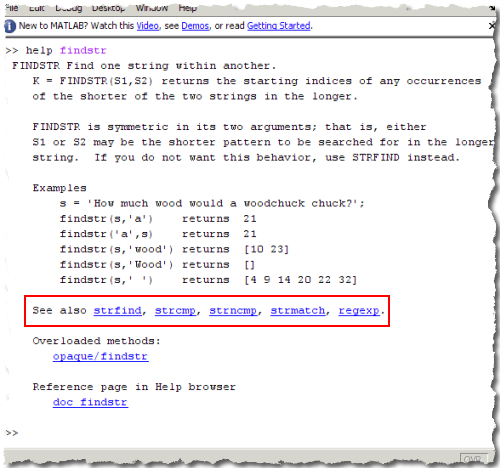
FINDSTR HELP: R2008a

When you write your own M-files, you too can get the hyperlinks for free. Just add a %see also function1, function2, etc… line to the help section of your script or function, and MATLAB takes care of the rest.

We also provide a Help Report that scans the M-files in a directory and will let you know if you missed any “see also” lines in your M-files.

6 Responses to “Seeing also”

  1. Harsha replied on :

    I would like to know how you got this kind of border for screenshots?

  2. Mike replied on :

    Harsha,

    On Windows, I use SnagIt to do the screen caps and annotations.

    Unfortunately its do not look so nice, so for that I use Adobe Fireworks. I do a torn edge and then a drop shadow.

  3. Quan replied on :

    That’s a cool feature for the see also command. I just got the chance to check my google reader today, and I always check out the MATLAB blogs first. Some great stuff you guys are presenting these days!

  4. Mike replied on :

    Thanks Quan!

  5. Ed Ross replied on :

    The hyperlinks are a great feature of the help documentation that have helped me quickly find a particular function. When writing help documentation, however, it sometimes would be useful to embed hyperlinks anywhere within the text instead of only in the “See also” section. Is this possible?

  6. Mike replied on :

    Ed,

    Yes. Take a look at this example:

    function help
    %This is the help for the file. For more information check out <a
    %href="matlab:web('http://blogs.mathworks.com/desktop/2008/07/28/seeing-also')">the blog</a>.
    %
    %see also help
    

Leave a Reply

Wrap code fragments inside <pre> tags, like this:

<pre class="code">
a = magic(3);
sum(a)
</pre>

If you have a "<" character in your code, either follow it with a space or replace it with "&lt;" (including the semicolon).


Ken & Mike work on the MATLAB Desktop team.
  • DP: Hi i have a problem with ezplot3, i want to plot more than i curve in the same graph but hold on command...
  • Ken: Hi Arsalan, Unfortunately there is no way to get the new Editor API in older versions of MATLAB. -Ken
  • Arsalan: Hi, I am very excited about the MATLAB API for editor because right now i am working on a project and i need...
  • Johannes: Since I started using matlab-emacs some days ago I never experienced Emacslink. But I experienced some...
  • Francisco J. Beron-Vera: Hi all, I have recently learned about ViEmu (http://www.vimemu.c om) which, for Vi/Vim...
  • OysterEngineer: When I first learned of the Publish feature in MatLab, I thought it might be useful to help to...
  • Ken: Hi Herve, I’m not quite sure what you mean by “stand-alone&# 8221; mode? -Ken
  • Herve: I wonder when the publish fonction will be supported in standalone mode.
  • Mike: Ravi, What you described should work as far I understand it. Please follow up with technical support. With a...
  • Mike: @Daniel, Thanks for that note.

These postings are the author's and don't necessarily represent the opinions of The MathWorks.