
Colorizing text output
There have been a number of requests recently asking that we support colorized output in the Command Window (here, here and here). I won’t be offering a way to colorize the Command Window content, but I will be offering an alternative way to generate colorized output for viewing in a web browser.
Some of the users I’ve talked with want to color their output in the Command Window so that they can easily pick out print-outs that indicate a problem. Imagine you had a long running program that printed various “good” diagnostics, but also occasionally printed out a message indicating that something wasn’t quite right and needed to be looked at. It would be nice to color that text in red, or some other attention grabbing color. This is the case we’ll address below.
We’ll start by writing a simple function that takes a string and wraps it in an HTML font tag. This function will also take a color, which will be used for the font tags color attribute. Because the result will be HTML , the color value can be anything supported by font‘s color attribute (e.g. red, #cccccc etc.). Here’s what that function looks like:
function colorizedstring = colorizestring(color, stringtocolorize)
%colorizestring wraps the given string in html that colors that text.
    colorizedstring = ['<font color="', color, '">', stringtocolorize, '</font>'];
end
Now all we need to do is use the function. Start by creating an HTML file in which to put your output text. Then, run your function and write to the output file as necessary using the colorizestring function. Finally, close the file for writing and open it using the web command.
Here’s what a sample usage might look like:
%% Open an HTML file to write the output into.
filename = 'colorizedoutput.html';
fid = fopen(filename, 'wt');

%% Do the long running calculation that generates lots of output.
for i=1:100
    outputswitch = rand;
    if rand < 0.80
    fprintf(fid, colorizestring('black', 'Everything is fine.<br/>'));
    elseif rand < 0.90
        fprintf(fid, colorizestring('orange', 'There may be a problem.<br/>'));
    else
        fprintf(fid, colorizestring('red', 'There is a problem.<br/>'));
    end

    fprintf(fid, 'some string<br/>');
end

%% Close the HTML output file.
fclose(fid);

%% Open the HTML output file in MATLAB's web browser.
web(filename);
and the resulting output:
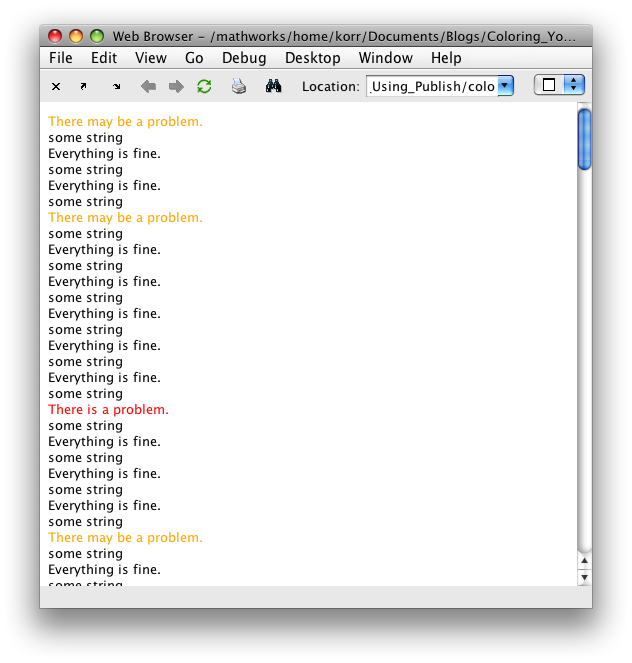
This won’t solve everyone’s problems, but it should help to fill the gap until we can fully support colorized output in the Command Window.
- Category:
- Command Window,
- Editor






Comments
To leave a comment, please click here to sign in to your MathWorks Account or create a new one.