
What’s New in R2026a?

MATLAB R2026a is available, let's see what's new in the Simulink world.
New Context Menu
This one cannot be missed! We decided to modernize our right-click menu.
Here is what it looks like when you right-click on a Constant block:
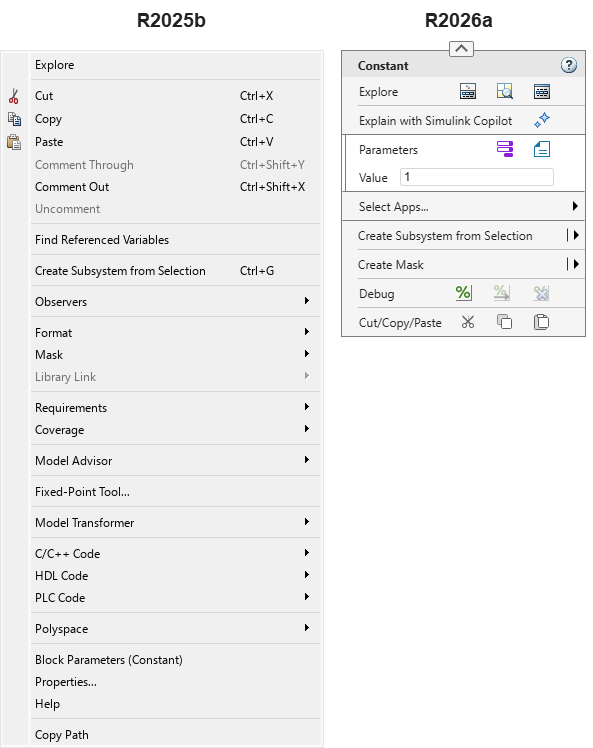
I have been using this new menu for many months now and it works well for me. It takes a little bit of getting used to, but overall, I think this is a good evolution.
Move In/Move Out
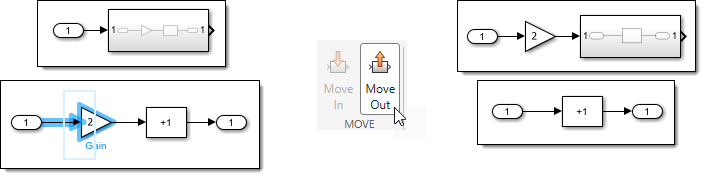
This one will save me so many clicks!
Select blocks connected to a Subsystem and move them in, in one click.

Select blocks connected to an Inport or Outport inside a subsystem and move them out, in one click.
Time Tolerance to input Data
Throughout the years, one blog post that I had to refer to more often than I would like is this one: Using Discrete Data as an input to your Simulink model » Guy on Simulink - MATLAB & Simulink.
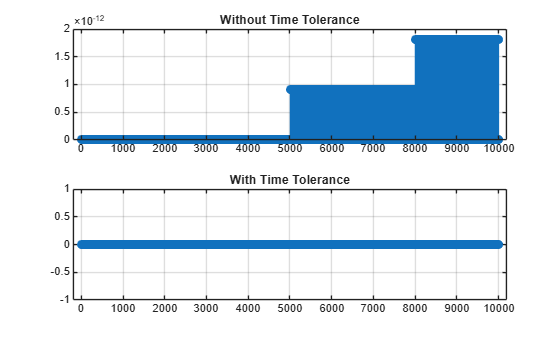
To summarize: If you specify time points for input signals that are slightly different from the time steps that Simulink takes, you will end up with skipped or duplicated points.
This new feature finally solves this issue. Let's revisit the example from this old post with and without the feature activated.
ts = 0.001;
t = (0:ts:10)';
u = (1:length(t))';
mdl = 'testInputTol';
in = repmat(Simulink.SimulationInput(mdl),2,1);
in(1) = in(1).setModelParameter('InputTimeTolerance','off');
in(2) = in(2).setModelParameter('InputTimeTolerance','on');
out = sim(in,'ShowProgress','off');
figure;
subplot(2,1,1);
stem(abs(u-out(1).logsout.get('u').Values.Data));
title("Without Time Tolerance");
subplot(2,1,2);
stem(abs(u-out(2).logsout.get('u').Values.Data));
title("With Time Tolerance");
Rapid Accelerator is Rapider
I hope you know that Simulink has a Rapid Accelerator mode. The way it works is it compiles the model into an executable, and that executable usually runs faster than the interpreted model.
One problem is that launching this executable takes 1-2 seconds. For very short simulations, this can be significant. If you need to run a million of those, it's 1-2 million seconds lost. In R2026a, this initial launch time has been significantly decreased, speeding up short simulations.
Here is an example:
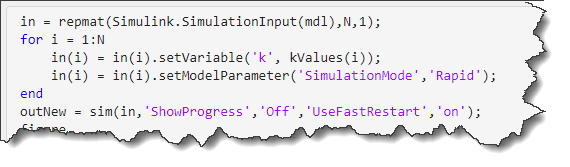
mdl = 'vdp';
Simulink.BlockDiagram.buildRapidAcceleratorTarget(mdl);
kv = 1:0.1:1.9;
in = repmat(Simulink.SimulationInput(mdl),length(kv),1);
for i = 1:length(kv)
in(i) = in(i).setVariable('k',kv(i));
in(i) = in(i).setModelParameter('SimulationMode','Rapid');
in(i) = in(i).setModelParameter('RapidAcceleratorUpToDateCheck','off');
end
out = sim(in,'ShowProgress','off','UseFastRestart','on');
t = arrayfun(@(i) out(i).SimulationMetadata.TimingInfo.TotalElapsedWallTime,1:length(kv));
mean(t(2:end))
In older releases, the same code gives me an average execution time of 2.3 seconds.
On a somewhat related topic, in R2026a, it also becomes possible to simulate models with algebraic loops in Rapid Accelerator mode.
Initialization Timing in Simulink Profiler
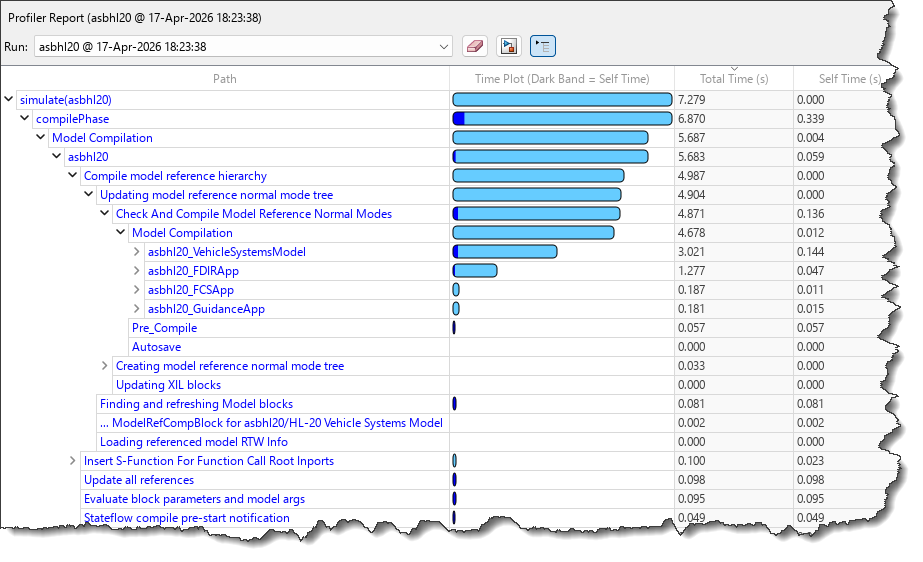
The Simulink Profiler now provides information about how compilation time is distributed among compilation phases and among referenced model.
It's an enhanced version of the CompileStats captured by sldiagnostics. If you call technical support about problems with initialization performance, this is the first thing we will ask you to look at.
Self-Paced Training
A new set of self-paced training to get you started with many basic aspects of Simulink:
- The Simulink Environment | Self-Paced Online Courses - MATLAB & Simulink
- Model Dynamic Systems | Self-Paced Online Courses - MATLAB & Simulink
- Run Multiple Simulations in Parallel | Self-Paced Online Courses - MATLAB & Simulink
- Configure Simulink Solvers to Improve Performance | Self-Paced Online Courses - MATLAB & Simulink
- Componentization Techniques for Simulink Models | Self-Paced Online Courses - MATLAB & Simulink
- Create Model Hierarchy with Subsystems | Self-Paced Online Courses - MATLAB & Simulink
- Model System Components | Self-Paced Online Courses - MATLAB & Simulink
- Analyzing Results in Simulink | Self-Paced Online Courses - MATLAB & Simulink
Now it's your turn
Check the Simulink release notes and let us know what's your favorite addition in R2026a, and if there is any topics you would like to be covered on this blog.
- Category:
- What's new?



Comments
To leave a comment, please click here to sign in to your MathWorks Account or create a new one.