Ken & Mike on the MATLAB Desktop

June 15th, 2009

Fold whatever you want using cells

Juliette recently suggested that users should be able to fold whatever code they like. While this is a great feature idea, the MATLAB Editor doesn’t currently support folding arbitrary sections of code. You can, however, simulate the feature using cells.

Start by turing on Cell folding in Preferences -> Editor/Debugger -> Code Folding (folding cells is off by default). Now, take your raw code, which we’ll say looks like this:
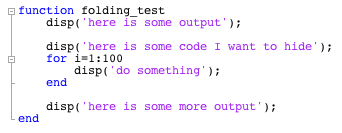

and insert cell markers before and after the code you want to fold, like this:
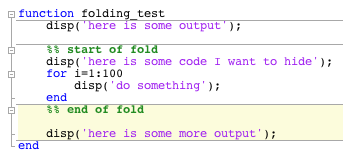

Finally, collapse the cell and voila! You’ve folded an arbitrary chunk of code!
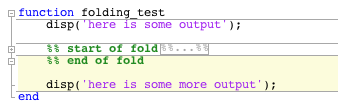

I realize this isn’t the ideal solution for folding a random chunk of code, but it’s a reasonable workaround in the meantime.

8 Responses to “Fold whatever you want using cells”

  1. steven replied on :

    I’ve always used folding in vim with the markers
    %%FOLDUP
    and
    %%UNFOLD

    I think code sharing would be much easier if there were a single standard, such as this one, which could be used in one’s editor of choice (including the matlab editor) and which persisted with the ascii file…

  2. Ken replied on :

    Hi Steven,

    Do you typically want your folds to be shared with other users? It seems that I’d want to remove folds before submitting or sharing code.

    -Ken

  3. Suresh replied on :

    Hi,

    I am sorry if this is off topic.

    But I find something very annoying in Matlab. The way matlab command history window displays, always “expanded”. Is there any way to set that it is always “collapsed”. It’s very tedious to scroll through it to a specific command in specific date. If it were always “collapsed” then I could go to specific date and expand it to see the list of command on that date.

  4. Ken replied on :

    Hi Suresh,

    Thanks for the feedback. Note that you can start typing a command in the Command Window and up arrow, which will then cycle through only the commands starting with what you’ve typed. I use this technique all the time to find previously typed commands.

    -Ken

  5. Alexander replied on :

    Hi,
    I’d love to do code folding! BUT, even after using cells in the code and enabling code folding in the preferences menu, there are no +/- signs to click on anywhere in my code to enable code folding.
    I’m writing a script .m file(not a function) and running:
    MATLAB Version 7.5.0.342 (R2007b)

    Also, I have cell highlighting on and it highlights correctly so I know that my cells are correct and the editor recognizes when my cursor is in one.

    Is this a version issue?

    thanks!

  6. Alexander replied on :

    Hi, Alexander here again,

    After a little research I found that when I try to code-fold manually by right-clicking and going to the code-folding option, all 4 options are grayed out and cannot be clicked on. Also, enabling/disabling code folding I noticed that when it is enabled my code is shifted over ~5pixels to, ostensibly, make room for the +/- graphics to be clicked on. However, as I mentioned before, there are no such signs.

    Also,I should probably mention that I am running this on a Windows XP 64bit architecture.

    doubly thanks,
    -alex

  7. Mike replied on :

    Alexander,

    Only functions were foldable in R2007b. Code folding for cells was added in R2008a.

  8. Alexander replied on :

    Thanks Mike, I’m downloading R2009b as we speak!

Leave a Reply

Wrap code fragments inside <pre> tags, like this:

<pre class="code">
a = magic(3);
sum(a)
</pre>

If you have a "<" character in your code, either follow it with a space or replace it with "&lt;" (including the semicolon).


Ken & Mike work on the MATLAB Desktop team.
  • Ori: The current folder shortcut used to be alt-y. Now it is alt-o. However, while in the editor window, alt-o opens...
  • Jose Miguel: Hi First of all, thanks for the post, it is really useful. I am trying to develop a Java GUI within...
  • Ken: Hi Siddharth, There isn’t currently any way to move the docking controls. Feel free to submit an...
  • Phil: I have the same problem as described above with UITable working fine in the Matlab environment but showing no...
  • Siddharth: Is there any way to move the position of the docking controls (or eliminate them through some...
  • Chris: Yes, it is a challenge to organize functions into categories, especially with so many functions. Ken and I...
  • Mike: Thanks for fielding that one, Yair.
  • Yair Altman: Jimmy - if you mean that you wish to include hyperlinks in your function’s help comment, that will...
  • OysterEngineer: Thanks for explaining the Function Browser. I fired it up and gave it a try. It appears that it has...
  • Jimmy: Is there any way to include hyperlinks in a comment, such as the standard help at the beginning of a function?

These postings are the author's and don't necessarily represent the opinions of The MathWorks.