
Archiving files in the Current Folder Browser
MATLAB projects are usually a series of self-contained folders of related code files and data. To facilitate sharing, we've found that many people create Zip archives of those folders so there is just one file to transfer. In previous versions of MATLAB you had to do this outside the MATLAB environment, but in MATLAB R2010a you can create Zip files, add additional files to existing Zips, and unpack them all from within the Current Folder Browser.
In previous editions, to zip up some files you could use an external tool, like WinZip, or the zip command, like so:
zip(fullfile(destdir,'output.zip'), '*.m')
Now it's simply a matter of selecting the files you want to include in the current folder, and with the right-click context menu, select "Create Zip File". You'll then get a chance to enter the name of the file. Since the folder browser shows directory trees, you can even select subfolders or parts of subfolders and include them in the Zip, preserving their folder structure.
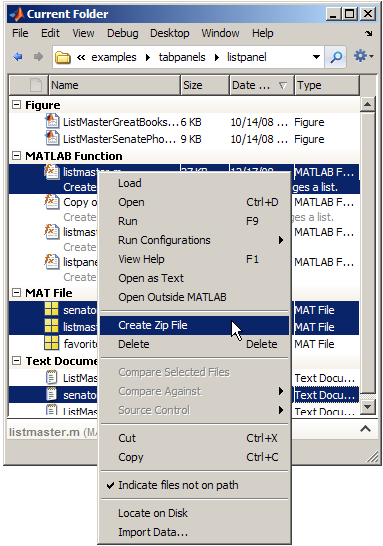
To add additional files to a Zip file, just drag them onto the Zip file entry in the tree (you can also copy+paste them onto the zip). Double-clicking the entry will unpack the archive in a subfolder with the same name as the zip file.
That's pretty much all there is to the new feature. We expect that this will make it easier to share files between users, and make it easier to maintain backups of directories for those not using source control.
- Category:
- Current Directory





Comments
To leave a comment, please click here to sign in to your MathWorks Account or create a new one.