Mike on the MATLAB Desktop

January 17th, 2011

MAT-File Comparisons

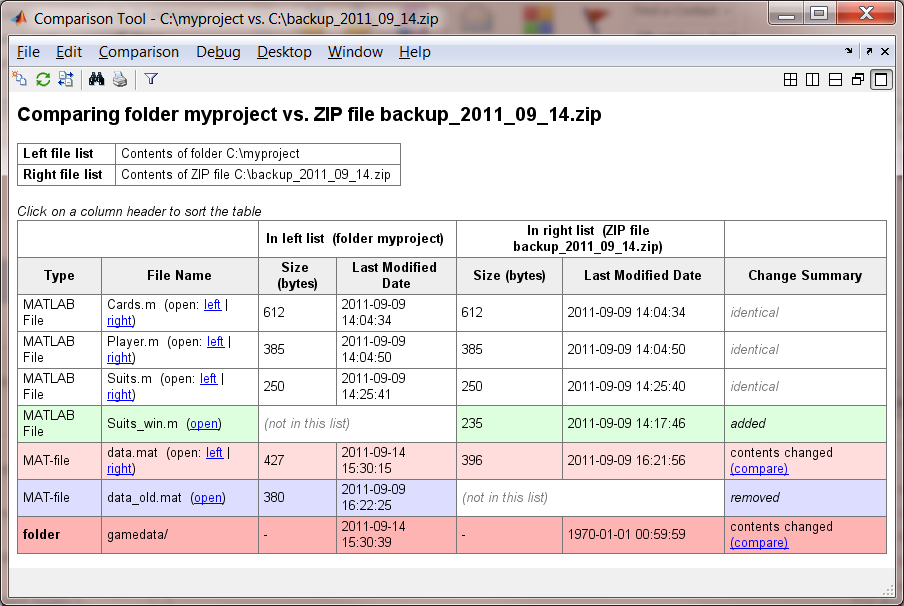
In MATLAB R2008a, we introduced the ability to compare MAT-files with the File and Folder Comparison Tool. In MATLAB R2010b, the team has added additional detail to the MAT-file comparisons. This includes the size and type of the variables in the MAT-file. While pretty simple, having this summary in the comparison reports saves you from having to open both files in the variable editor to see these changes.

This is what the MAT-file comparisons looked like before:

R2008a MAT-file Comparison
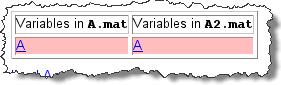
MAT-file comparisons in R2008a

And now they have this additional detail. Pretty sweet.

R2010b MAT-file Comparison
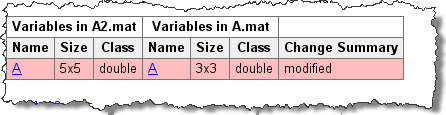
MAT-file comparisons in R2010b

6 Responses to “MAT-File Comparisons”

  1. Jim replied on :

    Very interesting! Unfortunately I am only on 2007b. However I would be interested in knowing what sort of homebrewing you do… !

  2. Aurelien Queffurust replied on :

    with R2011a Pre-release you can even merge the MAT-files … again a good reason to upgrade ;)

    Aurélien

  3. Mike replied on :

    @Aurelien,

    Hey! No stealing the good stuff from the Big Unveil.

    @Jim,
    Wow 7b, that feels like ancient software these days. It’s amazing how each of these little 6-month features add up over a few years. As for the homebrewing, we just finished the last of a holiday porter. A friend gave me about a pound of fresh hops from his garden, so I’m thinking of some kind of IPA for the spring-time.

  4. per isakson replied on :

    @Jim

    WHOS -FILE FILENAME provides all information needed on the file contents.

    There are several options to compare the outputs of WHOS.
    1. Search the FEX
    2. Use the half-documented function VISDFF

    e.g.
    diary(‘f1.txt’)
    whos …
    diary off

    diary(‘f2.txt’)
    whos …
    diary off

    visdiff( ‘f1.txt’, ‘f2.txt’ )

    or

    s1 = whos( …
    diary(‘f1′)
    disp(s1)
    diary off

    / per

  5. per isakson replied on :

    @Jim
    In addition see STRUCTCOMPVIS by Scott Hirsch in the FEX. The outline above is based on that contribution. (I missed it in my previous search.)
    / per

  6. Yair Altman replied on :

    You can also use my ObjDiff utility in FEX: http://www.mathworks.com/matlabcentral/fileexchange/14395-objdiff-generic-object-comparator

    objDiff Compares objects of many different types including Java, Matlab, HG handles, structs, cells & arrays

    - Yair

Leave a Reply

Wrap code fragments inside <pre> tags, like this:

<pre class="code">
a = magic(3);
sum(a)
</pre>

If you have a "<" character in your code, either follow it with a space or replace it with "&lt;" (including the semicolon).


MathWorks
Mike works on the MATLAB Desktop team.

These postings are the author's and don't necessarily represent the opinions of The MathWorks.