Steve on Image Processing

February 17th, 2006

All about pixel colors: Window-level and CLim

In a comp.soft-sys.matlab newsgroup post on January 17, Kevin wanted to know how the brightness/contrast control in imtool worked. Image Processing Toolbox function imtool is an image viewing/navigation GUI.

In medical imaging the brightness/contrast control is called the "window/level" control, and there is a reasonably standard set of mouse motions for changing the window and level. These mouse motions are supported by imtool.

This diagram shows how the terms "window" and "level" are related to brightness and contrast adjustment. Making the window wider or narrower decreases or increases the display contrast; moving the level left or right changes the display brightness.
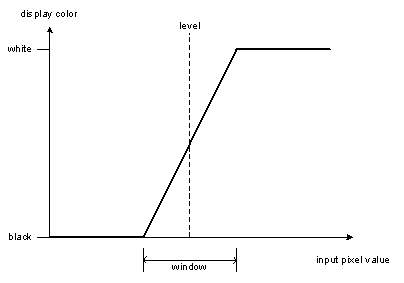
This window-level scaling function is just like the CLim scaling function I described previously. I replied to Kevin that the brightness/contrast control in imtool worked by adjusting the axes CLim property.

Here's an non-medical example of how adjusting the CLim can make previously unseen image details visible.

I = imread('cameraman.tif');
imshow(I)
text(256, 265, 'Image courtesy of Massachusetts Institute of Technology', ...
   'HorizontalAlignment', 'right', 'FontWeight', 'light', 'FontSize', 7, ...
   'Color', [.7 .7 .7])
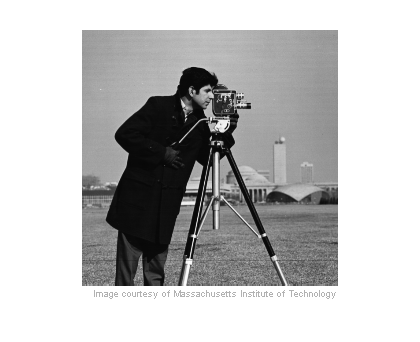
Not much detail is visible in the coat or glove. But you can make out much more detail if you change the CLim property of the axes:

imshow(I)
set(gca, 'CLim', [6 21])  % caxis([6 21]) does the same thing.
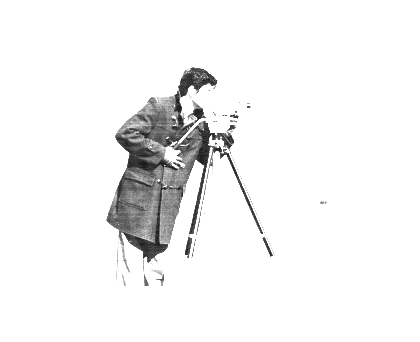
If you want to see how to make this adjustment interactively, look here in the Image Processing Toolbox Users Guide.


Get the MATLAB code

Published with MATLAB® 7.1

5 Responses to “All about pixel colors: Window-level and CLim”

  1. Greg Johnson replied on :

    The link on this page doesn’t work! (to the IPT user guide)

  2. Steve replied on :

    Greg - I fixed the link.

  3. gary replied on :

    it’s helpful to me.thank u!

  4. ali replied on :

    I want to form a cube consisted of pixels and place this to a coordinate frame. if you help me ı will be very glad

  5. Steve replied on :

    Ali - I’m sorry, but I don’t understand your question. Can you be a lot more specific about what you want to do? What are your inputs, and what output do you want?

Leave a Reply

Wrap code fragments inside <pre> tags, like this:

<pre class="code">
a = magic(3);
sum(a)
</pre>

If you have a "<" character in your code, either follow it with a space or replace it with "&lt;" (including the semicolon).


Steve Eddins manages the Image & Geospatial development team at The MathWorks and coauthored Digital Image Processing Using MATLAB. He writes here about image processing concepts, algorithm implementations, and MATLAB.

  • Sana: hi steve, could you explain to me how i would be able to use the dir function, to do a loop through a directory...
  • Nishtha: Sir, I have preprocessed the image in following steps: [1] adaptive histogram equalization [2] thresholding...
  • Kristof: I also strongly support the idea. I have just recently bumped into the problem that im2single was not...
  • Steve: David—I’ m glad you found it useful!
  • David Lalejini: I found your example very useful for finding connected nodes in a large set of input pairs. I start...
  • tommy: Dear Steve, I have a question,please if you are kind to help me regarding the accumulator array dimensions of...
  • Steve: Abc—I don’t know how to distinguish the faces. You might try posting your question in the MATLAB...
  • Manju: well if we have a few ovals within each other like in a cell how do we measure the distance from the center...
  • Steve: Manju—What do you mean? How is each region defined?
  • Manju: if we have 2-3 regions within each other how do we measure the regions of each one?

These postings are the author's and don't necessarily represent the opinions of The MathWorks.