Steve on Image Processing

April 28th, 2006

Spatial transformations: Forward mapping

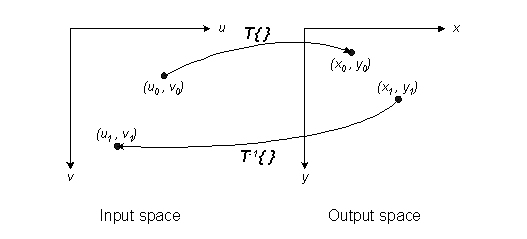
I've written previously about defining a spatial transform as a function, (x,y) = T{(u,v)}, that maps points from one space (input space) to another (output space). Given such a function, how do you go about spatially transforming an image?

The most obvious procedure is called forward mapping. It works like this:

Consider each input image pixel in turn. For each input image pixel:

  • Determine its location in input space, (uk,vk).
  • Map that location to output space using (xk,yk) = T{(uk,vk)}.
  • Figure out which output pixel contains the location (xk,yk).
  • Copy the input pixel value to that output pixel.
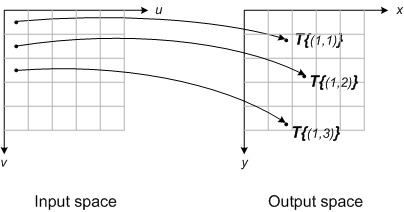
This diagram illustrates the procedure:

Forward mapping has two main disadvantages as a computational procedure: gaps and overlaps. Depending on specific spatial transform function, you may have some output pixels that did not receive any input image pixels; these are the gaps. You may also have some output pixels that received more than one input image pixel; these are the overlaps. In both cases, it is challenging to figure out a reasonable way to set those output pixels.

One way to overcome these problems is to map pixel rectangles in input space to output space quadrilaterals, as shown here:
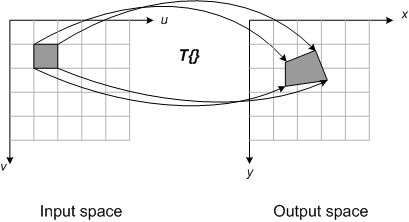
With this procedure, the input pixel value is allocated to different output pixels depending on the relative fractional coverage of the quadrilateral. Although this procedure can produce good results, it is complicated to implement and it takes a long time to compute.

Because of the problems with forward mapping, many (most?) image spatial transform implementations use a different technique, called inverse mapping. I'll describe that in a future post.

6 Responses to “Spatial transformations: Forward mapping”

  1. Leonardo replied on :

    Dear Steve,
    I have an input image from which I digitized grid points.
    I know the real distance between the grid points, so I can create an output array. I would like to specify a transformation using these points, so I can assign the real location to each point from the input.
    Is it possible?
    Best
    Leonardo

  2. Steve replied on :

    Leonardo—Sounds like you could use cp2tform to estimate a spatial transform fitting your points.

  3. Rudolph replied on :

    Hi Steve,

    I need to perform lense calibration on an image taken with specific camera. The lense coefficients are available.

    The distortions on the lense are radial distortion, decentering of the principal point and some affinity. According to me I’ll have to calculate the (subpixel units) distance which I have to move each pixel in the x and y direction. So each pixel will have it’s own resulting transformation. I went through most of your blogs and I want to create a custom tform struct which I can implement on bulk images.

    Now I can’t see how I will be able to do this with inverse mapping, true? Will imtransform deal with the overlapping and gaps for me automatically with chosen interpolation? How do I deal with a pixel that moves 0.166 pixels up for instance? How will matlab save the info on output space?

    Any guidence would be appreciated.

  4. Rudolph replied on :

    I managed to overcome the idea of linear indexing which imtransform use to determine the custom spatial transform. Thanks

  5. douglas replied on :

    Could you tell how to apply the grid points (data points from the transformation grid) in the transformation ?

    [Points edited out for space.]

  6. Steve replied on :

    Douglas—Use cp2tform to infer a spatial transformation from your point set. One of the spatially varying ones might be best. Then use imtransform to warp your image.

Leave a Reply

Wrap code fragments inside <pre> tags, like this:

<pre class="code">
a = magic(3);
sum(a)
</pre>

If you have a "<" character in your code, either follow it with a space or replace it with "&lt;" (including the semicolon).


Steve Eddins manages the Image & Geospatial development team at The MathWorks and coauthored Digital Image Processing Using MATLAB. He writes here about image processing concepts, algorithm implementations, and MATLAB.

  • Sana: hi steve, could you explain to me how i would be able to use the dir function, to do a loop through a directory...
  • Nishtha: Sir, I have preprocessed the image in following steps: [1] adaptive histogram equalization [2] thresholding...
  • Kristof: I also strongly support the idea. I have just recently bumped into the problem that im2single was not...
  • Steve: David—I’ m glad you found it useful!
  • David Lalejini: I found your example very useful for finding connected nodes in a large set of input pairs. I start...
  • tommy: Dear Steve, I have a question,please if you are kind to help me regarding the accumulator array dimensions of...
  • Steve: Abc—I don’t know how to distinguish the faces. You might try posting your question in the MATLAB...
  • Manju: well if we have a few ovals within each other like in a cell how do we measure the distance from the center...
  • Steve: Manju—What do you mean? How is each region defined?
  • Manju: if we have 2-3 regions within each other how do we measure the regions of each one?

These postings are the author's and don't necessarily represent the opinions of The MathWorks.