Steve on Image Processing

August 4th, 2006

Spatial transformations: Defining and applying custom transforms

Blog reader David A. asked me a while back about how to transform an image based on some mathematical function. For example, the online paper "Visualizing complex analytic functions using domain coloring," by Hans Lundmark, has an example of defining a spatial transformation by assuming that the input and output spaces are complex planes, and that the inverse mapping is given by:

Check out Figure 3 in the paper to see what this does to an image.

You can use maketform to create a custom spatial transformation by supplying your own function handle to perform the inverse mapping. Your function handle has to take two input arguments. The first input argument is a P-by-ndims matrix of points, one per row. (imtransform applies two-dimensional spatial transformations, so I'll be using P-by-2 matrices here.) The second argument, called tdata, can be used to pass auxiliary information to your function handle. My examples will just ignore this second argument.

Let's start with a very simple example just to illustrate the mechanics. Make an inverse mapping that just swaps the horizontal and vertical coordinates:

% inverse mapping function
f = @(x, unused) fliplr(x);

% maketform arguments
ndims_in = 2;
ndims_out = 2;
forward_mapping = [];
inverse_mapping = f;
tdata = [];
tform = maketform('custom', ndims_in, ndims_out, ...
    forward_mapping, inverse_mapping, tdata);

body = imread('liftingbody.png');
body2 = imtransform(body, tform);

subplot(1,2,1)
imshow(body)
subplot(1,2,2)
imshow(body2)
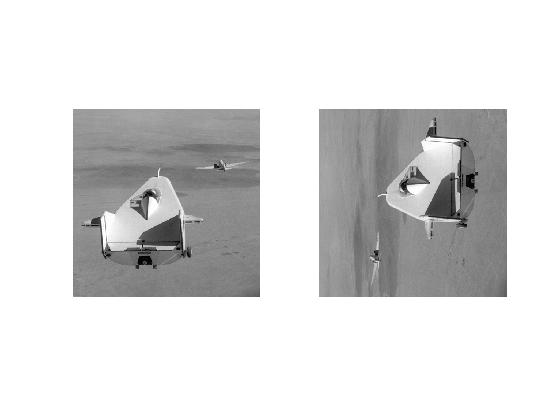
As we might have guessed, this custom transform just transposes the image.

For my other examples I'll use a picture of someone I know well:

face = imread('http://blogs.mathworks.com/images/steve/74/face.jpg');
clf
imshow(face)
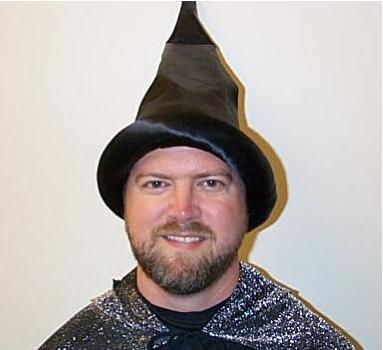
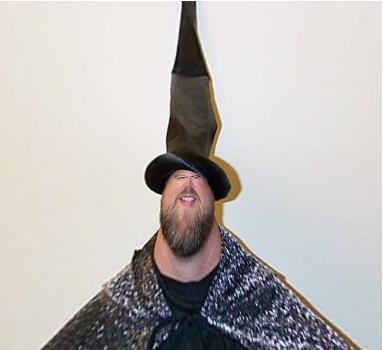
There is a fun little book called Beyond Photography: The Digital Darkroom, by Gerard Holzmann. This book has lots examples of spatial transformations based on simple mathematical expressions. Here's one that uses the square root of the polar radial component.

Note that the call to imtransform below sets up the input image to be located in the square from -1 to 1 in both directions. The output image grid is set up to be the same square.

r = @(x) sqrt(x(:,1).^2 + x(:,2).^2);
w = @(x) atan2(x(:,2), x(:,1));
f = @(x) [sqrt(r(x)) .* cos(w(x)), sqrt(r(x)) .* sin(w(x))];
g = @(x, unused) f(x);

tform2 = maketform('custom', 2, 2, [], g, []);
face2 = imtransform(face, tform2, 'UData', [-1 1], 'VData', [-1 1], ...
    'XData', [-1 1], 'YData', [-1 1]);
imshow(face2)
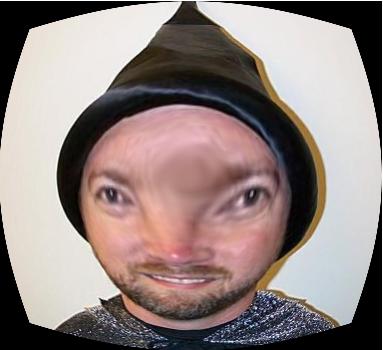
This example uses the square of polar radial component.

f = @(x) [r(x).^2 .* cos(w(x)), r(x).^2 .* sin(w(x))];
g = @(x, unused) f(x);

tform3 = maketform('custom', 2, 2, [], g, []);
face3 = imtransform(face, tform3, 'UData', [-1 1], 'VData', [-1 1], ...
    'XData', [-1 1], 'YData', [-1 1]);
imshow(face3)
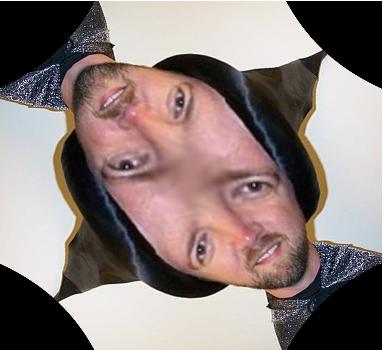
Finally, let's try the complex-plane function used in Lundmark's article. I'll construct the inverse mapping function in several steps: First, convert output-space Cartesian coordinates to complex values; square the complex values; and then produce new input-space Cartesian coordinates from the squared complex values.

f = @(x) complex(x(:,1), x(:,2));
g = @(z) z.^2;
h = @(w) [real(w), imag(w)];
q = @(x, unused) h(g(f(x)));

tform4 = maketform('custom', 2, 2, [], q, []);
face4 = imtransform(face, tform4, 'UData', [-1 1], 'VData', [-1 1], ...
    'XData', [-1 1], 'YData', [-1 1]);
imshow(face4)
If you want see to more examples of this kind of mathematical image fun, take a look at "Exploring a Conformal Mapping" in the Image Processing Toolbox product demos area.


Get the MATLAB code

Published with MATLAB® 7.2

11 Responses to “Spatial transformations: Defining and applying custom transforms”

  1. Matthew Simoneau replied on :

    Is it responsible science for you to be running these experiments on yourself? Or will your wizard powers protect you?

  2. Steve replied on :

    Matthew - Well, wizarding powers aside, I’m really more of an engineer than a scientist. So far, no ill effects are apparent.

  3. Faisal replied on :

    Awsome stufff ! This is really interesting ! Thanks :)

  4. Tim replied on :

    These are most helpful in implementing in MATLAB the algorithms specified in “Beyond Photography”. Probably due to my beginner status in using the Image Processing Toolbox, I was unable to get the the transformation where
    r -> r but
    theta -> theta + r/3
    This is on page 44 in “Beyond Photography”.

  5. Steve replied on :

    Tim—You could try something like this:

    r = @(x) hypot(x(:,1), x(:,2))
    theta = @(x) atan2(x(:,2), x(:,1))
    f = @(x) [r(x) .* cos(theta(x) + r(x)/3), ...
        r(x) .* sin(theta(x) + r(x)/3)];
    g = @(x, unused) f(x);
    

    and then form a custom tform as shown in this post.

  6. Shiva replied on :

    Hello Steve,

    I am working on a project where I need to simulate non-linear deformations in the images. Since these are MR images, the deformations can’t be as severe as the examples given above. Currently, I am using the following code to create the deformations.

    a = 0.95; b = 1.05;
    Tform_values = a + ((b-a) * rand(1,30));
    for i = 1:30
    f = @(x) ((x(:,:).^Tform_values(i)));
    g = @(x, unused) f(x);
    tform3 = maketform(’custom’, 2, 2, [], g, []);
    img_stack_Tformed(:,:,i) = imtransform(img_stack_org(:,:,i),tform3,’size’,size(img_stack_org(:,:,i)));
    end

    What I am not able to understand is how it the spatial transformation created using the function f given below. I am not sure whether the created transform is non-linear. Any information regarding this will be really helpful.

    Thanks,

    Shiva

  7. Steve replied on :

    Shiva—If you look at the various blogs posts in the spatial transforms category, you’ll find some descriptions of how they work. The Image Processing Toolbox functions imtransform and maketform use inverse mapping, which is described in the posts.

    Whether it is linear depends on whether you are talking about the warping function, or the process of warping an image. Image warping is linear, meaning that warping the image (aF + bG) is the same as a*warp_of_F + b*warp_of_G.

  8. douglas replied on :
    
    Can we apply the deformation grid to an image?
    
  9. Steve replied on :

    Douglas—Yes. This post shows how to do that using imtransform. Or did I misunderstand your question?

  10. douglas replied on :

    Dear Steve,
    thx for your answer. I can use the imtransform now. However, I have no idea on how to extract the data point from the deformation grid. Could you help?

  11. Steve replied on :

    Douglas—I don’t know what you mean by “extract the data point from the deformation grid.” Can you be more specific?

Leave a Reply

Wrap code fragments inside <pre> tags, like this:

<pre class="code">
a = magic(3);
sum(a)
</pre>

If you have a "<" character in your code, either follow it with a space or replace it with "&lt;" (including the semicolon).


Steve Eddins manages the Image & Geospatial development team at The MathWorks and coauthored Digital Image Processing Using MATLAB. He writes here about image processing concepts, algorithm implementations, and MATLAB.

  • Sana: hi steve, could you explain to me how i would be able to use the dir function, to do a loop through a directory...
  • Nishtha: Sir, I have preprocessed the image in following steps: [1] adaptive histogram equalization [2] thresholding...
  • Kristof: I also strongly support the idea. I have just recently bumped into the problem that im2single was not...
  • Steve: David—I’ m glad you found it useful!
  • David Lalejini: I found your example very useful for finding connected nodes in a large set of input pairs. I start...
  • tommy: Dear Steve, I have a question,please if you are kind to help me regarding the accumulator array dimensions of...
  • Steve: Abc—I don’t know how to distinguish the faces. You might try posting your question in the MATLAB...
  • Manju: well if we have a few ovals within each other like in a cell how do we measure the distance from the center...
  • Steve: Manju—What do you mean? How is each region defined?
  • Manju: if we have 2-3 regions within each other how do we measure the regions of each one?

These postings are the author's and don't necessarily represent the opinions of The MathWorks.