Steve on Image Processing

January 1st, 2007

Superimposing line plots on images

Several people have asked me recently how to plot some kind of shape on top of an image, so I thought I'd show the basic technique here. Essentially, you display the image, then call hold on, and then use plot or some other graphics command to superimpose the desired shape.

For my first example, I'll superimpose the boundaries found by the bwboundaries function on top of the original binary image.
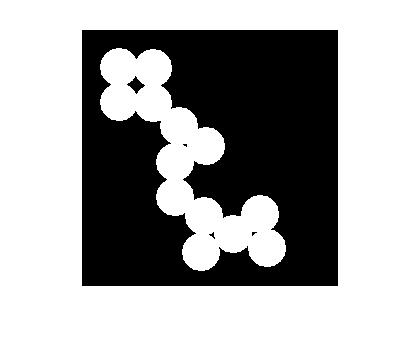
bw = imread('circles.png');
b = bwboundaries(bw);
imshow(bw)

Now call hold on. This causes subsequent plotting commands to add to what's already in the figure, instead of replacing it.
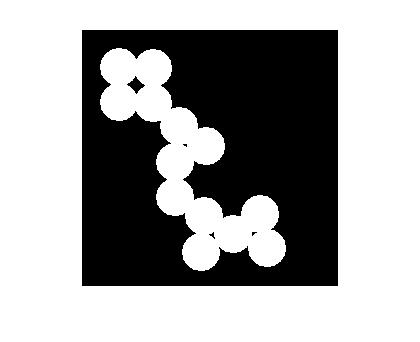
hold on

Finally, call plot to superimpose the boundary locations.
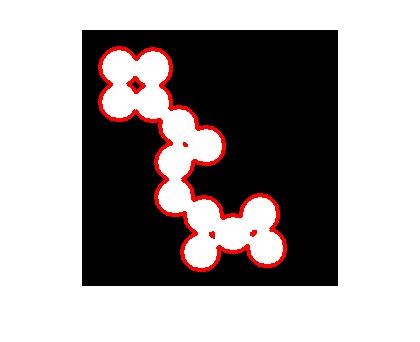
for k = 1:numel(b)
    plot(b{k}(:,2), b{k}(:,1), 'r', 'Linewidth', 3)
end

It's good to get in the habit of calling hold off when you're done adding plot elements. That way, the next high-level plotting command will start over, which is usually what is expected.

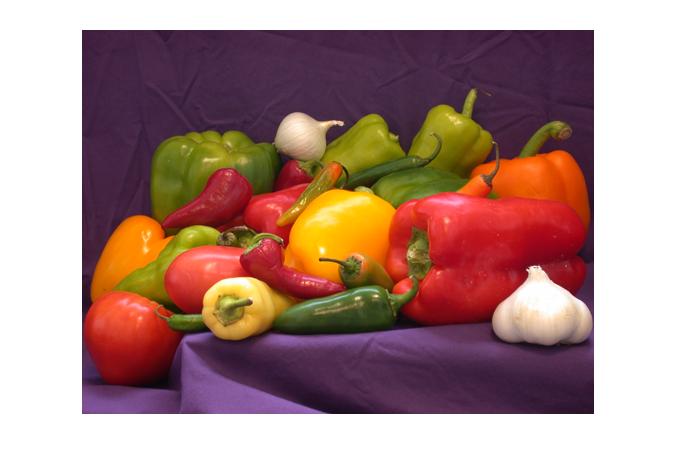
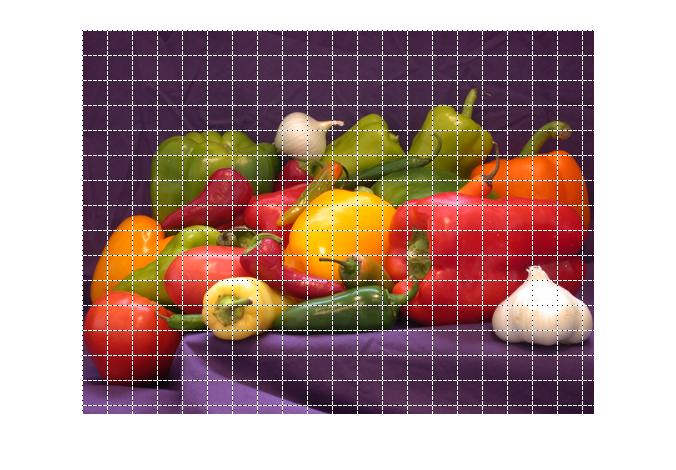
My second example shows how to superimpose a 25-pixel-by-25-pixel grid on an image. (See Natasha's blog comment.) Display the image first, and then call hold on.
clf
rgb = imread('peppers.png');
imshow(rgb)
hold on

Now superimpose the grid. To make sure the grid is visible over all pixel colors, I'll use the trick of superimposing two line objects with contrasting colors and line styles. The Pixel Region Tool in the Image Processing Toolbox uses this same trick.
M = size(rgb,1);
N = size(rgb,2);

for k = 1:25:M
    x = [1 N];
    y = [k k];
    plot(x,y,'Color','w','LineStyle','-');
    plot(x,y,'Color','k','LineStyle',':');
end

for k = 1:25:N
    x = [k k];
    y = [1 M];
    plot(x,y,'Color','w','LineStyle','-');
    plot(x,y,'Color','k','LineStyle',':');
end

hold off


Get the MATLAB code

Published with MATLAB® 7.3

152 Responses to “Superimposing line plots on images”

  1. Steffen B. Petersen replied on :

    Dear Steve,

    I ran into the following peculiar aspect of overlays – if you decide to fill the BW image in your example with single pixel dots using the plot command, you do not obtain a smooth even coverage – it becomes patterned, as if the plot command is interfering with something else. In include a code example below

    Your comments are appreciated

    mybw = imread(‘circles.png’);
    b = bwboundaries(bw);
    figure(1);
    imshow(bw);
    [sx sy]=size(mybw)
    myhighim=zeros(sx,sy);
    Ihigh=find(mybw>0.5);
    myhighim(Ihigh)=1;
    hold on;

    [mycol myrow]=find(myhighim>0);

    plot(myrow,mycol, ‘.’,'color’,'red’,'MarkerSize’,1);

  2. TomAtVandy replied on :

    Besides the typos, if you use
    plot(myrow,mycol, ‘.’,’color’,’red’,’MarkerSize’,10);
    instead of
    plot(myrow,mycol, ‘.’,’color’,’red’,’MarkerSize’,1);
    the circles will be filled in completely when you enlarge the plot. There may be other issues but this worked for me with my video card and screen resolution.
    Tom

  3. Steve replied on :

    Steffen – I observed no pattern when I ran your code. If you resized the figure, then I would expect you to see a pattern.

  4. Tracy replied on :

    Hello Steve,

    I have a question about one function in the image toolbox, that is, canny in ‘edge’. Applying canny edge detector requires two thresholds, low threshold and high threshold. They are derived from PercentOfPixelsNotEdges and ThresholdRatio which is set as 0.7 and 0.4. How do these two values come from? The file is in \MATLAB701\toolbox\images\images\edge.m, and these two values are at 221st and 222nd line. Thank you so much.

    Regards,
    Tracy

  5. Steve replied on :

    Tracy – I believe those default threshold values were determined heuristically, which is a fancy way of saying that we experimented and picked values that seemed to work well most of the time.

  6. Matt Whitaker replied on :

    Hi Steve,
    When I have to superimpose lines on images I usually use the line function directly. This way the hold command is not required (and remembering to turn it off!!)
    So for your first example I would do:
    bw = imread(‘circles.png’);
    b = bwboundaries(bw);
    imshow(bw)
    for k = 1:numel(b)
    line(‘Parent’,gca,…
    ‘XData’,b{k}(:,2),…
    ‘YData’,b{k}(:,1),…
    ‘Color’,'r’,…
    ‘Linewidth’, 3)
    end

    Keep up the the great , must read, blog
    Matt

  7. Steve replied on :

    Good point, Matt – and thanks for the encouragement!

  8. Karl replied on :

    Hi Steve,

    one – probably simple – question: how can I plot shapes (e.g., lines) _into_ an image, so it will remain in the img matrix and I can go on working with it? So, to make this clear, I don’t want to superimpose the plot.

    Can you help me on this? Thanks alot!
    Karl

  9. Steve replied on :

    Karl – You’ll need to superimpose the plot and then use getframe to get a new image containing the superimposed graphics.

  10. Jaakko replied on :

    Hi Steve!

    Thank you for the great article! I’ve been looking all over the internet for a simple way to plot on an image. Keep the great blog entries coming :)

    - Jaakko

  11. Steve replied on :

    Jaakko—Happy to help!

  12. Sridharan Kamalakannan replied on :

    Hi Steve,

    I have plotted a polygon (say Polygon-A) on an image. Now, I need to plot another polygon (say Polygon-B), on the image such that Polygon-A is not visible. I need to do this without using either imshow or image or imagesc command again. In other words, how can i simply erase Polygon-A and plot Polygon-B without calling either imshow or image or imagesc command again.

  13. Steve replied on :

    Sridharan—Delete the line object created when you plotted Polygon A. For example, you could get the handle returned by plot and then later delete it when you no longer want it visible:

    h = plot(ax, ay);
    ...
    delete(h)  % make Polygon A plot go away
    
  14. Sridharan Kamalakannan replied on :

    Thanks a lot Steve

  15. Barbara replied on :

    Hello,
    I have got a problem with the matlab function bwboundaries, correctly with the using of its results.
    Perhaps somebody has already a solution.

    I have a black-white picture as data and the boundaries are found by the function.
    I can correctly display the boundaries included in the original image.
    My problem starts, if I want to display only the boundaries. The bwboundaries seems not “take” every information of the picture, so the boundaries are misscaled and rotated but I can’t find a possiblity to get the original size back.

    Thank you for the help.

  16. Steve replied on :

    Barbara—I assume you are plotting the x-y locations of boundary vertices using plot. The plot function by default autoscales the plot so that it encompasses just the data being plotted. Set the XLim and YLim properties so that the plotted range is the same as the image, and set the YDir property so that the y-axis increases downward instead of upward. The xlim and ylim functions are convenient for this purpose. If your image has 100 rows and 200 columns, for example, then do this:

    plot(x,y)
    xlim([0.5 200.5])
    ylim([0.5 100.5])
    set(gca,'YDir','reverse')
    
  17. Julius replied on :

    Dear Steve,

    I would like to seek your help on the following:

    I have a JPEG, which I have divided into 30 rows by 60 columns using your method above.

    Now, if I would want to highlight a particular rectangle, say (29, 59), how should I do it?

    Thanks a lot!

  18. Steve replied on :

    Julius—You could use the techniques in this blog post to plot that rectangle on top of the image. Or you could superimpose a semitransparent patch covering the desired rectangle. See the MATLAB Graphics documentation covering patches and transparency.

  19. Julius replied on :

    Dear Steven,

    Thanks a lot for your help!

  20. Martin replied on :

    Dear Steven,
    Maybe this is a little bit offtopic, but I have tried to save an image with the grid like you blogged it with saveas.

    saveas(fig, savefile, ‘jpg’ );

    But if I save the figure, only the image is saved, the grid isn’t saved with. Why? I tried a few other endings but no one was working.

    Thanks for your help,

    Martin

  21. Steve replied on :

    Martin—I don’t know. I suggest that you contact technical support.

  22. Martin replied on :

    Oh okey,
    Thank you for your fast answer,
    Have a nice day,
    Martin

  23. Steve replied on :

    Martin—I have a two-minute threshold on blog comments. If I can answer in less than two minutes, I do so immediately. Otherwise I move it onto my list to do “later.” :-)

  24. Varun replied on :

    Great work Steve. I just started image processing and matlab and this has been really helpful. Thanks a lot.

  25. Andrew Defries replied on :

    Hello Steve,

    Could you tell me a little bit more about your grid overlay function? I’m new to matlab so I wouldn’t know how to tweak your commands off hand.

    Ideally I’d like display a 1536 box grid (rectangle) overlay of a set of images.

    See this link for an image example:

    http://bp3.blogger.com/_vyO1vHnACOc/R0qrYUU2uCI/AAAAAAAAADI/g9lzb5HFEV4/s1600-h/halo.jpg

    The grid would serve two purposes.

    1. To visually correlate a hit (white spot) with the corresponding treatment (which is already mapped out in alphanumeric coordinates A1, B2, etc)

    2. To use the quadrant as a way of keeping track or bounding elements that are identified using the “numObjects” and “regionprops” functions.

    Thanks for your help,

    Andrew

  26. Andrew Defries replied on :

    Also see my superimposed grid:

    http://bp3.blogger.com/_vyO1vHnACOc/R0quDUU2uEI/AAAAAAAAADY/-uOxQUy_CLc/s1600-h/halo_w_grid.jpg

    How can I align the grid such that the dots are in the center of each box? Thanks so much!

  27. Steve replied on :

    Andrew—It looks to me like you face an image analysis problem before you can even know where to draw the grid. You need to detect the dot spacing and possibly the dot grid rotation. You might want to look at the DNA microarray case study on the MATLAB Central File Exchange.

    There’s not much going on in the code in this post. There are basically three steps:

    1. Display the image with imshow
    2. Call hold on so subsequent plotting commands don’t start by clearing the figure
    3. Call plot with the x-y coordinates that form the grid.
  28. pallavi replied on :

    hi,,
    my project is face recognition using dct.
    i have to extract features like eyes, nose, mouth and take dct of those coefficients. using impixel i can get the pixel value for eye centre and i have constucted a matrix which cover eye region.
    now my problm is i have to show the traced eye(which is a matrix) region on the face image in the form of rectangle .
    how do i do that??

  29. Steve replied on :

    Pallavi—Have you tried the techniques shown in this post for superimposing a line plot on an image?

  30. Tommy replied on :

    Can you educate me how to do template matching for two image?
    I just want to know which template is the most match to an image. Please help.
    Thank you very much.

  31. Steve replied on :

    Tommy—Take a look at the normxcorr2 function.

  32. Tommy replied on :

    Yes, i have tried over this function. Actually, I want to get the highest correlation score within the templates to determine the person of the full face image. I use it on face recognition. However, I am not quite sure how to write it in Matlab. In C, I used affine transform to patch the template on the image and calculate the correlation score. Do you mind to write me or show me where to get such references on template matching algorithm in programming?

    Thank you very much.

  33. Steve replied on :

    Tommy—I still don’t see how what you’re describing is different from normalized cross correlation. If you want to see how to program that, look inside normxcorr2.m.

  34. Azmi Mohd replied on :

    Dear Steve
    I’m working with an image of a shaft and the purpose is to measure its diameter. I have problem with the image because it is shining on the top . I tried many ways but no one was working.Hope you can help me.

  35. Localhorst replied on :

    Hi Steve,

    grid works fine, thx. Is it possible to make eache square a button, so i can extract the accordant tile image from the complete image? Would be very nice, if you have some ideas about that.

    Thx
    Localhorst

  36. Steve replied on :

    Localhorst—You can give the image object a ButtonDownFcn and then program the callback to do whatever you want, including extracting tiles.

  37. Jonathan Schmitt replied on :

    Hey Steve,

    Is it possible to superimpose a 3D contour onto a real time image?

    Thanks

    Jon

  38. Aditya replied on :

    Hi Steve,

    I’m doing motion estimation using block matching and need to create a grid of arrows to represent the motion vectors.
    Can you tell me how to plot arrows with using only the start and end co-ordinates?
    I tried using the line ‘Marker’ property, but it marks both the ends of the line!

    Thanks a lot.
    Aditya

  39. Steve replied on :

    Aditya—Use an ‘arrow’ annotation.

  40. Steve replied on :

    Jonathan—I don’t understand your question. What do you mean by “3D contour” – an isosurface? And what do you mean by “real time image”?

  41. Dan B replied on :

    Is it possible to superimpose a image onto the XY plane in a 3d plot?

    I would like to draw “bars” over certain parts of an image, to show values at those given locations. i was planning on drawing the bars manually, ie, plotting points from z = 0 to the height, for a given x and y.

    What about if i would like to create an animation? Ie, the bars change height with time.

  42. Steve replied on :

    Dan—Handle Graphics image objects are rendered only in 2-D views. However, you can texture map on image onto a flat surface object to get a 3-D graphic. Take a look at the documentation for surface.

  43. Erik replied on :

    I am ploting trajectories, an in every timestep I would like to plot the background image corresponding to the most recent point in time.

    When I use imshow, all lines ploted in the past are cleared, although I have “hold on”. How can I keep them and only update the background image? Thanks!

  44. Jon Schmitt replied on :

    Steve,

    Sorry for the confusion. I want to overlay a Matlab plot onto a real time video feed. So basically I want to acquire video and then onto these real-time images I want to place a MATLAB plot. I hope this helps.

  45. Steve replied on :

    Jon—You can use the Image Acquisition Toolbox to acquire video. Then you can use standard Handle Graphics functionality to display the video images with superimposed plots. I suggest that you update the CData property of the HG image object directly, instead of calling image (or imshow) for each video frame.

  46. Lori replied on :

    Is there a way to superimpose a small image onto a larger plot? I’m doing some geographical maps and would like to use small icons/gifs to represent some features.

  47. Steve replied on :

    Lori—Sure, multiple Handle Graphics objects can be combined in one plot. If you want to use imshow to display the image, use the 'Parent', 'XData', and 'YData' input parameters to set which axes object the image goes into, and where it gets displayed in x-y data space of the axes.

  48. Shashank replied on :

    Hello Steve,
    I wish to plot a regular plot on an image. The problem is that once an image is displayed, Matlab reads the current figure in terms of pixels rather than x and y values which i need.
    For instance:
    imshow(’1.jpg’);
    hold on;
    t = 1:100;
    plot(t,sin(t));

    Kindly help,
    Shashank.

  49. Steve replied on :

    Shashank—Images are displayed by default with each pixel taking up one unit along the x- and y-axes. You can control this spacing by setting the XData and YData properties of the image object. Take a look at the coordinate systems section of the Image Processing Toolbox Users Guide. Also look at the doc for imshow to see how to use the XData and YData syntax.

  50. Peter replied on :

    Is there any way to do the plot overlay on an image without using the imshow function? Or, more specifically I would like to run this in the background without it the image popping up popping up a zillion times. Anyway we can just interact with the objects? Thanks so much! Great advice so far!

  51. Steve replied on :

    Peter—imshow will display in the current figure if there is one. That figure doesn’t need to be on top or even visible. Or you can use the 'Parent' syntax of imshow to direct it to display in whatever axes you wish.

  52. Conni replied on :

    Dear Steve, i have a gray scale image and a second image of the same size with ‘colormap’ patches on a zeros background (and can also extract the point coordinates and values of the patch pixels). After adding the patch pixels with the ‘hold on’ -> ‘plot’ command to the gray scale image, how can I make these patch pixels appear in ‘colormap’ style? Thanks a lot for you help, Conni

  53. Steve replied on :

    Conni—I don’t understand what you mean by an “image with ‘colormap’ patches” and “patch pixels with ‘colormap’ style.”

  54. Conni replied on :

    Dear Steve, with ‘colormap’ patches I mean round objects in the image displayed via colormap(jet) and I would like to have only these in colour on top of the grayscale image. Thanks, Conni

  55. Steve replied on :

    Conni—A figure can have only one colormap at a time. So you can’t display one image with a grayscale colormap and another image with the jet colormap in the same figure. You’ll need to convert the images to truecolor form.

  56. Ryan replied on :

    Dear Steve,

    I have programmed an animation that shows the affect of gravity on an object. I want to lay my animation over a background image. Due to the way that the image matrix sets the axes, my object is “falling up”. How can I change the way that the image matrix counts itself so that that the bottom left corner is the (0,0) index of the image and it counts up vertically and to the right?

    Cheers,
    Ryan

  57. Ryan replied on :

    Wait I just figured it out! Ignore my last post.

  58. Steve replied on :

    Ryan—Glad I could help. :-)

  59. Juri Minxha replied on :

    Hello,

    I am trying to do an oval profile of an image. It sums up the pixel intensities in a particular radius starting from the center. How can I do this?

    Thanks

  60. Steve replied on :

    Juri—You can use interp2 to extract pixel values along your oval path.

  61. Andrew replied on :

    Dear Steve,

    I would like to know how can I plot extracted edges (via canny filter) of the image on the original image (which is a grey scale image)without making it boundary?

    Thank you,

    Andrew

  62. Steve replied on :

    Andrew—Take a look at my image overlays post.

  63. Fernando Marques replied on :

    Dear Steve.
    I was wondering if you could help me out. I’d like to superimpose two line plots with difference axis range. I created this sample script to illustrate my problem:
    %
    clear all;
    k=0.0:0.05:1;
    %
    figure(‘position’,[25 25 1260 945],’color’,'white’)
    plot(k.*exp(k));
    F=getframe(gcf);
    X0=F.cdata;
    imwrite(X0,’fig1.tif’,'tif’);
    %
    clear all;
    k=0.0:0.05:1;
    bg = imread(‘fig1.tif’);
    imagesc(bg);
    axis off;
    hold on;
    plot(k.*log(k+10))
    %
    As you can see, I first create a TIF file with the first line plot. I then read in this figure and try to superimpose a second line plot over it.
    My problem is that the second plot shows up very small on the upper left-hand corner of the figure. I’d like both line plots occupying the same space, and only the first plot’s axes properties showing. How can I do that? Thank you in advance for your help. Fernando

  64. Steve replied on :

    Fernando—You can control the spatial extent of image pixels by setting the XData and YData properties of the Handle Graphics image object. You might need to do this in order to establish consistent coordinate system for the different things you are trying to plot together. See the Image Processing Toolbox document for the section on image coordinate systems.

  65. sharmin replied on :

    Dear Steve

    I have a question that might be related to the subject you posted on this site. I need to graph a 2-D velocity model using a gray scale. Could you please guide me how can I do it in MATLAB?

    Thank you
    Sharmin

  66. Steve replied on :

    Sharmin—Try looking at MATLAB functions such as imagesc, colormap, gray, and colorbar. Also take a look at the “Graphics” section of the MATLAB documentation.

  67. Berkan replied on :

    Dear Steve,

    I am trying to detect moving objects in a video. I use optical flow to get the coordinates (stats.BoundingBox = [r c w h] ) for each frame. My aim is to draw a rectangle on each frame and save the frames with the rectangle that helps track the object. i.e. without superimposing and without ever calling imshow().
    Example code:

    %n = number of frames in the video sequence
    %vid(h*w*n)= intensity video,consisting of n frames 
    %B(n*4)= the coordinates matrice (for each frame)that gives the location of the object for each frame. e.g. B(1,:) = [1 50 100 100] 
    %M(h*w*n) = The matrice to store my results
    
    M = zeros([size(vid,1) size(vid,2) n]);
    for k=1 : n
    imagek = vid(:,:,k);
    rectangle('Position', B(k,:), 'EdgeColor', 'r');
    Xk = function that places the rectangle on imagek (my current frame).
    M(:,:,k)=Xk
    end
    implay(M); 
    

    I believe it should be simple but couldnt figure it out :(.

    Thank you in advance for your time,
    Berkan

  68. Steve replied on :

    Berkan—It sounds like you want to modify each frame so that it contains a white rectangle, but without displaying any graphics. But your sample code contains graphics calls like implay and rectangle.

    You need to modify imagek yourself. Use indexing to assign the desired values to the desired set of pixels that define a rectangular box.

    imagek(top, left:right, 1) = 255;
    imagek(top, left:right, 2) = 0;
    imagek(top, left:right, 3) = 0;
    ...
    
  69. Maxi84 replied on :

    Hi Mr. Steve,

    Thank you for your previous post regarding on how to create a grid on a picture.

    Now I need your help to determine coordinate for each rectangular, is it possible because of the superimpose techniques.

    Another thing is, can I manipulate the coordinate to do ray-tracing on the same picture.

    Thank You,

    Sincerely Yours,

    Maxi84

  70. Steve replied on :

    Maxi84—Since you are drawing the grid on the picture, you must know the coordinates. Or am I misunderstanding your question? I can’t help you with ray tracing because I don’t know anything about that.

  71. Maxi84 replied on :

    Hello Mr. Steve,

    Regarding to my last comment, yes i can have the coordinate for certain rectangular (I can’t have the coordinate for every rectangular that I pointed by using the data cursor)when i’m used the data cursor. Here I need your help to resize my picture because I got 501x430x3 uint8 when i run the ‘imread’ command for my bit.map picture.

    Thank You,

    Sincerely Yours,

    Maxi84

  72. Steve replied on :

    Maxi84—Use imresize.

  73. Francesco replied on :

    I plot a surface (viewed in the XY plane), then I try to superimpose a 2-D scatter plot: the latter seems to be placed under the surface.
    I would put the scatter plot over the surface.
    How to deal with display order of such a two graphic objects (and for any graphic objects)?
    Thanks in advance
    Francesco

  74. Steve replied on :

    Francesco—Your question is getting pretty far off topic for an image processing blog. But when you plot objects in 2-D, the objects have an implicit z value of 0. So therefore your 2-D objects are “underneath” the surface. You could adjust this by adding the appropriate z values so your 2-D objects appear just above the surface.

  75. Francesco replied on :

    Thank you for your hint. Sorry for my off-topic question.
    I still have the problem with a rectangle superimposing other objects (e.g. labels), but I will continue to browse the web for it (until now, very hard task), unless … you would be so kind to help me privately ;-)
    Bye

  76. Steve replied on :

    Francesco—Try modifying the stacking order (order of children) of the axes. See uistack.

  77. Francesco replied on :

    Wonderful! It works!
    You have taught me a very useful thing.
    Thank you very much, Steve.
    Best regards

  78. Maxi84 replied on :

    Hello Steve,

    Is it possible to label each boxes with my own co-ordinate.

    Thank You,

    Sincerely Yours,

    Maxi84

  79. Steve replied on :

    Maxi84—Sure, there are a lot of different things you could do. What exactly did you have in mind? You could use axes labels, or plot text strings in different locations yourself.

  80. Maxi84 replied on :

    Hello Steve,

    When I’m load a picture by using imshow command,
    I got a picture range for x=1:215 & y=1:250. Then I tried to make smaller the picture by using imresize command and it become smaller according to the resize value factor such as 0.5 & I got half range from the previous picture.

    Below is my resize command:

    B = imread (‘F:\SPACE DIVISION METHOD\FKEKK OUTDOORBMP.bmp’)
    imshow (B)
    B2 = imresize (RGB, 0.5)
    imshow (B2)

    So what I meant from my last post is, if I want to have a picture with my own co-ordinate such as for x axis range from 1:65 and y axis range from 1:40 with the co-ordinate (1,1) until (65,40). Is it possible Sir?

    Then I want to superimpose grids according to the coordinates. Can you please guide me regarding to this topic Sir…

    My grid to grid distance command:

    for k = 1:1:M
    x = [1 N];

    when I changed the step to 1, the distance between rectangular grid become so small. So is there any other way for me to create the rectangular grid according to my own coordinate value such as from (1,1) until (65,40) with reasonable step.

    Thank You,
    Sincerely yours

    Maxi84

  81. Steve replied on :

    Maxi84—Yes, you need to set your values for the XData and YData properties of the Handle Graphics image object. These properties control where the image pixels lie in the data space of the axes. See the image properties documentation and the imshow documentation.

  82. Walther replied on :

    Great thread, learned a lot.

    If I am concerned with speed, and I want to display a particle swarm (thousands of moving dots) on top of a 2D image, what do you think would be the fastest way of doing this ?

    Deleting handles after each iteration, textures and 3D rendering, direct openGL rendering, or another option ?

    Thank you for your time,

  83. Steve replied on :

    Walther—If the number of dots does not change (only their position), then I suggest that you create a single line object and reset its XData and YData properties with each iteration. Direct OpenGL rendering (bypassing MATLAB rendering) is not an option within MATLAB.

  84. amina replied on :

    Hello!
    I am making a software for gps navigation system. I want to place a small icon at the current position of the client.
    Can you kindly guide me how to place a small icon given the latitude and longitude.

    Thanks a lot!

  85. Steve replied on :

    Amina—By setting the XData and YData properties of an image object, you can precisely control its displayed position.

  86. searching replied on :

    Hey, I found this place extremely useful. I have a question though.

    Although I manage to plot my points on an image. The two axes did not appear. How do I make them visible?

    Here is my script

    I = imread(‘processor.jpg’);

    figure;

    imshow(I);
    hold on;
    plot(B(:,2), B(:,4),’r.’);
    ylim([0,B(2,5)]);
    xlim([0,B(2,3)]);
    set(gca,’YDir’,'reverse’);

    xlabel(‘horizontal side’);
    ylabel(‘vertical side’);
    title(‘Locus of Hot Spot using Idle’);

    hold off;

  87. Steve replied on :

    Searching—

    axis on
    
  88. Sanket replied on :

    Hey Steve,
    I will like to ask you 1 question.
    I am using Matlab R2007B for my project i.e. motion detection and tracking.
    In that I was trying to draw a line on an image which will is going to represent motion and that image is part of video film(as video film comprises of 30 images per scond).
    I got co-ordinates to draw a 4 lines so that at the end it will become rectangle.
    but i am not able to draw it on image…

  89. Steve replied on :

    Sanket—If you know the position of the rectangle and the rectangle is aligned with the horizontal and vertical axes, then you can just change the pixel values of the image yourself using ordinary subscripted assignment. If the rectangle isn’t aligned, then that’s harder. Try making your own copy of toolbox/images/images/private/intline.m; it will help you calculate the pixel locations from one rectangle vertex to the next.

  90. Priscilla replied on :

    Hello,
    How do i use this grid to perform stereology(surface&length density). i have binary image(480×640), i superimpose the grid using your idea. but i need to find the number of intersection of the grid with the BW per unit lenth.
    Please help
    Priscilla

  91. Steve replied on :

    Priscilla—This example is about plotting; I don’t think it will help with your stereology problem. I’m sorry, but I know very little about stereology.

  92. Sirisha replied on :

    Hi Steve,

    I have developed a GUI that displays 4 images on 4 axes (using imshow). I used ‘line’ to create a line object on one of the axes. But the line is not visible on the image when I run the code. I find that the code is executing correctly in debug mode. Repeating these steps outside the GUI in a new figure window displays the line perfectly.

    I have also tried the plot command without any success. Am I missing something?

    Please help

    -Sirisha

  93. Steve replied on :

    Sirisha—I’m sorry, but I can’t help you with debugging your GUI code.

  94. Fabian Ojeda replied on :

    Alternative grid (without loops)

    Great blog Steve! Have found/learnt lots!

    This is my alternative (not sure whether still of use to anyone) to the superimpossed grid. It doesn’t require loops!

    clf
    rgb = imread('peppers.png');
    M = size(rgb,1);
    N = size(rgb,2);
    x = 1:25:N;
    y = 1:25:M;
    imshow(rgb)
    hold on
    plot([x' x'],[1 M],'Color','w','LineStyle','-')  
    plot([x' x'],[1 M],'Color','k','LineStyle',':')  
    plot([1 N],[y' y'],'Color','w','LineStyle','-')
    plot([1 N],[y' y'],'Color','k','LineStyle',':')
    hold off;
    

    - Fabian

  95. Dabhi replied on :

    How do I adapt this for a circle of radius (r) instead of a grid.

    I have a circularly symmetric image and I want to superimpose a circle of radius (r) on top. I was given this code

     
    function plotround
    
    x0=390;
    y0=423;
    O=x0+i*y0;
    
    d=20;
    Z0=O+d;
    
    thitar=0:10:360;  %degree
    rthitar=thitar*pi/180;  %rad
    
    lr=length(rthitar);
    for di=1:lr
        Z(di)=O+(Z0-O)*exp(i*rthitar(di));
    end
    
    pZ=[Z,Z(1)];
    
    hold on;plot(pZ,'ko-');
    
    %figure;plot(pZ,'ko-');
    %keyboard;
    

    But it is only visible over half the range i.e. this page is the solution but I ma useless at coding so I have gotten all confused.

    Any help appriciated.

    Dave

  96. Steve replied on :

    Dabhi—Try something like this:

    theta = linspace(0, 2*pi, 200);
    x = radius*cos(theta) + x_center;
    y = radius*sin(theta) + y_center;
    

    and then use plot(x,y).

  97. Till replied on :

    Hi Steve,
    thanks for sharing your advice in this forum. I know that this issue has been touched in previous postings, but I’d like to know whether there is more elegant way to superimpose a colored contourplot on a grayscale image other than using getframe to capture the contourplot. In another blog I found the recommendation to adjust the colormap of the grayscale image and the contour, so that both appear in the same figure in a useful way. I tried to modify the colormaps, but the results are not satisfying due to the color intensity in the original image.

  98. Steve replied on :

    Till—Convert the grayscale image to truecolor form by replicating it in the 3rd dimension:

    rgb = cat(3, I, I, I);
    

    Then you can use whatever colormap you want for the contours without affecting the colors in the image.

  99. Till replied on :

    Hi Steve,
    thanks for the hint. It works fine. However, there is still a small visible difference in intensity between the gray scale image and the gray scale image which has been converted to rgb. I noted this also, when doing it the other way, i.e. I reduced a “false” rgb to one channel. I assume the “false” rgb image was created by some other image processing program in the same way from gray scale, since it is a transmission electron (TEM) image and TEM images are gray scale in general. Anyway, thanks again. The blog and the MATLAB community helped me quite a bit.

  100. Steve replied on :

    Till—There should be no difference in display. It’s hard to say what you might be seeing because you didn’t explain how you’re doing the different conversions. For example, how are you “reducing” your RGB image to one channel?

  101. Miguel replied on :

    Hello Steve,
    Thanks for the PDF on image superimposed, it was very helpful. I’ve managed to superimpose an RGB image using(imshow)to a Pcolor plot using the values on the’Cdata’

    My problem is that, in the superimposed figure i would like to display the values for the Cdata matrix(i.e.0-60)on a colorbar and scale them to their own colormap,i.e colormap(jet(60)).

    What happens now is that the ‘Cdata’ values of pcolor are scaled to the colormap of the RGB image,so instead of the Cdata and a colorbar scaled from 0-60 i get a colorbar and Cdata scaled to a 0-255 colormap.

    Is there anyway to separate the two, having a background picture and a pcolor plot on top scaled differently?

    Hope i made some sense

    Some of the code i have :

    <Xlessthan30 = X

  102. Miguel replied on :

    Hello Steve,
    Thanks for the PDF on image superimposed, it was very helpful. I’ve managed to superimpose an RGB image using(imshow)to a Pcolor plot using the values on the’Cdata’
    My problem is that, in the superimposed figure i would like to display the values for the Cdata matrix(i.e.0-60)on a colorbar and scale them to their own colormap,i.e colormap(jet(60)).
    What happens now is that the ‘Cdata’ values of pcolor are scaled to the colormap of the RGB image,so instead of the Cdata and a colorbar scaled from 0-60 i get a colorbar and Cdata scaled to a 0-255 colormap.
    Is there anyway to separate the two, having a background picture and a pcolor plot on top scaled differently?
    Hope i made some sense
    Some of the code i have :

    <Xlessthan30 = X

  103. Miguel replied on :

    Hello, I just sorted the problem, i managed to do it by only setting the clim property of the axis to the limits i wanted. thanks!

  104. Priscilla replied on :

    i have biary image and i also have aseparate grid. i was thinking of using the operation AND to obtain numbers of points interection of the grid and image

  105. Priscilla replied on :

    Steve, the image is a blood vessel that i have reduced to a line(sketetonized) by using bwmorph but also its a binary image. i want to find/marked the intersections. so i created a grid same as the image size and separated by 25. then i want to get the interection by ANDing. the problem is i can not asign the grid to be 0/1.my idea can be expressed as;

    numberOf Intersection=find(image&grid=1);%if the grid=1 amd Image is binary

  106. Steve replied on :

    Priscilla—Can you be more specific? What code did you actually try, and why exactly were the results not satisfactory?

  107. Priscilla replied on :

    Hello Steve,
    i used your codes above to overlay the grid over the image(binary). but i need to mark and count those points where the grid cuts7intesect the image features and not the background.

  108. Priscilla replied on :

    using your codes as;
    M = size(rgb,1);
    N = size(rgb,2);

    for k = 1:25:M
    x = [1 N];
    y = [k k];
    plot(x,y,’Color’,'w’,'LineStyle’,'-’);
    plot(x,y,’Color’,'k’,'LineStyle’,':’);
    end

    for k = 1:25:N
    x = [k k];
    y = [1 M];
    plot(x,y,’Color’,'w’,'LineStyle’,'-’);
    plot(x,y,’Color’,'k’,'LineStyle’,':’);
    end

    hold off

    a grid is overlay on the image.
    What i mean by intersection points, is that points were the onions,tomatoes and green papper cuts the gray grid. if the onions etc are binary image they will have a value [1 1 1]. the background(purple) is [o o o]. with infro, how can i mark the intersction og line point with image.

  109. Hongying replied on :

    Hello Steve,

    I would like to know how can I plot a line with different colors associated to each points/step(like using colormap)?

    data are like this:
    line.xyz % the x y z coordinates, assuming the length is 50
    line.color % in total 50, between 0 and 1, a variant used to character the color of each point/step, or use the multiplication of line.color(:) to character the color of the line in one color.

    I also want to show this line(fiber) on some images(some slices of heart), I have no idea for this, can you give me some advice ?

    Thanks.

  110. megha bhatt replied on :

    Hello,
    I have plotted a line on an image and now I want to know this line’s pixel positions. How can I extract pixel positions?
    Thanks.
    Megha

  111. Vivek Kaul replied on :

    I am not able to increase the line-width for the plot using the commands you have suggested above. Even if I change linewidth from 2 to 100 the width stays the same. Why is that? I am facing difficulty in getting a printout with the color. Is it because the points are too closely spaced.

    figure,
    imshow(Image_ground)
    hold on
    
    [Y,X]=ind2sub(size(Image_ground'),detectedCurve);
    
        for i=1:count
            
            plot(Y(i),X(i),'c', 'Linewidth',10)
        end  
    
  112. Steve replied on :

    Vivek—It’s because you are calling plot many times with a single point each time. The LineWidth parameter doesn’t have much affect on a single point. :-)

    There’s no need for your loop. Just call plot once:

    plot(Y,X,'c','LineWidth',10)
    
  113. Vivek Kaul replied on :

    When you superimpose the plot over an image and you want to rotate the image along with the plot by 90 degrees what is the best way to do that?
    Regards
    Vivek

  114. Steve replied on :

    Vivek—Consider using hgtransform, although you’ll have to pay attention to the limitations of hgtransform with respect to image objects.

  115. Jeremy replied on :

    Steve,
    I’ve got 2 different (1000,1000) 2D arrays, defined over the same locations according to meshgrid. I want to plot contours of one of these arrays on top of a scaled image of the other, but it doesn’t seem to work. Simply put, the code looks something like:

    figure
    imagesc(x1,x2,arr1)
    hold on
    contour(x1,x2,arr1)

    After doing this, all I can see is the image without the overplotted contours. Any ideas?

  116. Jeremy replied on :

    oops – last line should read “contour(x1,x2,arr2)”. Thanks.

  117. Steve replied on :

    Jeremy—The X and Y inputs to the image function are not the same as the X and Y inputs to the contour function. You’ll need to read the doc for both functions carefully to determine how they should be called for your application.

  118. Maximilien replied on :

    Dear Steve,

    Thanks a lot for the “image plot” explanation!
    Thanks to it, i could plot my image (2048*1536 pixels), add some countours and lines on it (curves functions were defined based on the image matrix)….

    but i would like now to export the resulting image with the pixel size and resolution (for further analyses in another software).
    However the “export plot” tools either resized the picture to be “screen” sized or when i succeeded to get the size i want exported only a snapshot of the screen…
    How could i get a new “processesd” picture which is the exact reproduction of the original with the curves i want to draw?

    Many thanks in advance,
    Maximilien

  119. Steve replied on :

    Maximilien—Use the print function with the “-r” option to control the desired output resolution. You might also want to look at the PaperPositionMode property of the figure.

  120. Ramesh replied on :

    Hi Steve,

    Is there a function to draw a 2d grid for a user defined (irregular) region of interest with the gridlines lying only within the region?

    I searched the documentation and ran into meshgrid. Is there some sort of a meshgrid for 2d?

    Thanks

  121. Steve replied on :

    Ramesh;No. Also, I think meshgrid is unrelated to your question.

  122. Kaushik replied on :

    Hi, is it possible to turn the grids on (with a pre-set grid spacing) while using implay? I have a sequence of 45×45 matrices (each element in each matrix has R,G,B components) that I can scroll through, using implay. But what I also need, are grids seperating each cell of the matrix.

    With a single image, I can do the following:
    grid on;
    set(gca,’xtick’,[0.5:1:45.5]);
    set(gca,’ytick’,[0.5:1:45.5]);
    set(gca,’XTickLabel’,[]);
    set(gca,’YTickLabel’,[]);

    The above commands work well on image() but not on implay().

  123. Diogo Costa replied on :

    I Steve,

    First of all, congratulations for the blog, I found it very interesting and helpful.

    I have a problem. I want to create a plot on top of an image. But my plot is a set of coordinates exported from another software, and I need to match the coordinates with the image. Is it possible to define the limits for the axis xy?

    Best regards,
    Diogo Costa

  124. Steve replied on :

    Diogo—Sure. Look in the graphics documentation for information about the XData and YData properties of an image object. Note that the Image Processing Toolbox function imshow supports setting these properties via the ‘XData’ and ‘YData’ name/value pairs.

  125. Diogo Costa replied on :

    Dear Steve,

    Thank you very much for the help. I searched the documentation and I think that I have found the solution for my problem.

    Many thanks,
    Diogo

  126. Hongying replied on :

    Dear Steve,

    I notice that you use the following to plot.
    “plot(b{k}(:,2), b{k}(:,1), ‘r’, ‘Linewidth’, 3)”

    -Why b{k}(:,2) comes first ?
    -We should change “x” “y” components to align 2D curves with a figure or 3D curves with a volum data ?
    -Or maybe we should change the image/3d volum data ?

    Thanks.

  127. Steve replied on :

    Hongying—Because the second column contains the horizontal (X) coordinates, which should be supplied as the first input to plot.

    I don’t understand your other two questions.

  128. Hongying replied on :

    Dear Steve,

    Here is some details of my problem:

    –Global description: I have some 3D curves. They are calculated from a 4D medical data set. (the 4D data is a matrix like 256*256*52*20, here we name it as “data4d”. So I have a object of size 256*256*52. And at each voxel of this object I have some data of size 20*1.

    –Details: A curve is constructed step by step using a sequence of vectors. Each vector is calculated using the 20*1 data at each voxel.

    Typically, say that, we are at voxel V1, whose index is [idx, idy, idz]. A vector [x, y, z] is obtained using data4d(idx, idy, idz, :)(that’s the 20*1 data at this voxel). Then we prolong the curve by adding this vector to the end of the curve. (If the end of the curve is [locX, locY, locZ], then the new curve end is [locX+x, locY+y, locZ+z], After that we find the new voxel(it’s index) where the new curve end falls, and calculate the vector for another time. )

    –Problem: Sometimes I need to align the curve with the data, But I find there is some difference between showing a image and plotting a curve in the aspect of coordinate system. I have not found a good way to do this properly.

    Thanks very much!

  129. Steve replied on :

    Hongying—Sounds like you might need some debugging assistance? This is not a good forum for it. You might try the MATLAB newsgroup or MATLAB Answers.

  130. Hongying replied on :

    http://www.peteryu.ca/tutorials/matlab/plot_over_image_background

  131. Steve replied on :

    Hongying—I hope that means you solved your problem?

  132. Khoa replied on :

    Steve, how do I transform/pan a plot that is plotted over an image? When I call pan it transforms the axes as a whole, how do I do it separately just for the plot itself and not the image?

  133. Steve replied on :

    Khoa—This seems like a more general MATLAB interactive graphics programming question that I almost never try to answer. ;-)

    All children of a single axes object share the same data-space coordinates. If you want to move a plot independently of an image that’s living in the same axes object, you’ll need to change the XData and YData of the plot. Or you’ll need to use separate, overlaid axes objects. Check out the File Exchange for code to implement draggable graphics objects.

  134. Taylor replied on :

    This is so stupid! This site doesn’t even help you!

  135. Hasnain replied on :

    Hi Steve,

    After plotting certain points on my image, I save the new image in some variable using getframe.

    The issue is that getframe resizes the new image. I need the exact same image size.

    Please suggest some way to do it.
    Regards

  136. Steve replied on :

    Hasnain—There is not a straightforward way to do this using just MATLAB and Image Processing Toolbox. The Computer Vision System Toolbox has tools for “burning” lines into image pixel arrays. I’ll put this question on my someday/maybe list of blog topics.

  137. Kyaw replied on :

    Dear Steve,

    I am looking for the actual X and Y coordinates in terms of pixels and axis using bwboundaries.
    What I saw some of the boundary points
    e.g
    [B,L,N,A] = bwboundaries(bw5,8,’noholes’);
    B{1}(:,2) has repititive values and is it because of closed loop?
    My case is try to digitize the wave of image as an open wave signal and please advise me.

    Thanks and best regards
    Kyaw

  138. Steve replied on :

    Kyaw—Your expression B{1}(:,2) picks out the y-coordinates of the boundary. Why wouldn’t you expect repeated y-coordinate values?

  139. Kyaw replied on :

    Dear Steve,

    Thank you for your prompt reply and I got the y and x coordinates from my detected boundary objects of image below
    10 33
    11 33
    12 33
    13 32
    14 31
    15 31
    16 31
    17 32
    18 33
    19 33
    20 33
    21 33
    22 33
    23 33
    24 33
    25 33
    26 33
    27 32
    28 32
    29 32
    30 32
    30 31
    30 30
    30 29
    30 28
    31 27
    32 27
    33 26
    33 25
    33 24
    34 23
    35 23
    36 23
    37 23
    38 23
    39 23
    40 22
    41 22
    42 22
    43 22
    44 22
    45 22
    46 22
    47 22
    47 21
    47 20
    47 19
    47 18
    47 17
    46 17
    45 17
    44 17
    43 17
    42 17
    41 17
    40 17
    39 18
    38 18
    37 18
    36 17
    35 16
    35 15
    35 14
    35 13
    34 13
    33 13
    32 13
    31 13
    30 13
    29 13
    28 13
    27 13
    26 13
    25 12
    25 11
    24 10
    24 9
    23 8
    22 8
    21 7
    20 6
    19 6
    18 6
    17 5
    16 5
    15 5
    14 4
    13 4
    12 4
    11 4
    10 4

    but I wish to rearrange depend on the actual x axis then I got it after sorting shown below

    14 4
    13 4
    12 4
    11 4
    10 4
    17 5
    16 5
    15 5
    20 6
    19 6
    18 6
    21 7
    23 8
    22 8
    24 9
    24 10
    25 11
    25 12
    35 13
    34 13
    33 13
    32 13
    31 13
    30 13
    29 13
    28 13
    27 13
    26 13
    35 14
    35 15
    35 16
    47 17
    46 17
    45 17
    44 17
    43 17
    42 17
    41 17
    40 17
    36 17
    47 18
    39 18
    38 18
    37 18
    47 19
    47 20
    47 21
    40 22
    41 22
    42 22
    43 22
    44 22
    45 22
    46 22
    47 22
    34 23
    35 23
    36 23
    37 23
    38 23
    39 23
    33 24
    33 25
    33 26
    31 27
    32 27
    30 28
    30 29
    30 30
    14 31
    15 31
    16 31
    30 31
    13 32
    17 32
    27 32
    28 32
    29 32
    30 32
    10 33
    11 33
    12 33
    18 33
    19 33
    20 33
    21 33
    22 33
    23 33
    24 33
    25 33
    26 33

    However, some of the pixel points
    let say in the x axisof 4 has 5 repeated but different Y values.

    In my understanding of bwboundaries will give extra X and Y coordinates since it is connected operations.
    As for me,I would like to have only one X and Y coordinates since I want to get digitized information from boundary objects.

    Even, I am optimazing some image processing techniques with Matlab programming but still there the results above shown.

    Please advise me since I need to finish up by this week and I am looking forward to hearing from you good news.

    Best regards
    Kyaw

  140. Steve replied on :

    Kyaw—I plotted the output you showed from bwboundaries and it looks fine. Of course a contour around an object will have some points having the same x-coordinate and different y-coordinates. Consider a simple square: x = [0 1 1 0 0], y = [0 0 1 1 0]. I don’t understand why you would expect anything different.

  141. Kyaw replied on :

    Dear Steve,

    It is right for image perspective but our application is different like playing reverse martial arts and I wish to get the single points of x and y data from the boundary points not the contour display.

    My aim is to get digitized data utomatically from that coordinates of x and y(x is cm and y is cm/s scale). If I have one data point in x and y must be single coordinated pixels if not it will blur to the final output.
    e.g
    x1 = 4 not {4,4,4,4} mean location of cm = 4 pixels * 2.54 / dpi
    y1 = 10 not {10, 11, 12, 13,14} mean location of cm/s = 10 pixels * 2.54 / dpi
    In the last, I can save these particular-single data of x and y depend on the shape of object boundary as a text file.

    I am looking forward to hearing form you good news soon.

    Thanks and best regards
    Kyaw

  142. Steve replied on :

    Kyaw—I really do not understand your explanation. For some reason, you want to rearrange the points on a boundary, and then for some other reason you apparently want to discard some of those points. You’ll have to write your own code to do that. Best of luck with your project.

  143. Kyaw replied on :

    Dear Steve,

    Thank you for your encouragement and now I can manage to get the output I want from two dimensional arrays even the array manipulation is ticky and complex.

    Yours sincerely
    Kyaw

  144. Kyaw replied on :

    Dear Steve,

    I think this topics seem like what I would like to do for additional requirement that is to put the plotted data of x and y on the image.

    I tried to use the plot and imshow many ways and times but I couldn’t manage to solve the issue.

    Pls advise me and I am looking forward to hearing from you good news.

    Thanks and best regards
    Kyaw

  145. Steve replied on :

    Kyaw—Use the techniques described in this blog post to superimpose x-y plots on an image. If you need more help, then I suggest that you post your question to MATLAB Answers.

  146. Kyaw replied on :

    Dear Steve,

    Thank you for your prompt reply and I managed to have the x-y plot in the image except the scaling issue.

    Yours sincerely
    Kyaw

  147. Mandeep Kaur replied on :

    Hello Sir,

    I want to superimpose a binary image on Grayscale image and to find corresponding regions in grayscale image where value in binary is 1.

  148. Steve replied on :

    Mandeep—See my imoverlay contribution on the MATLAB Central File Exchange, and see my post on logical indexing.

  149. Kyaw replied on :

    Dear Steve,

    I still had the scaling issue and I am here linked for your review
    http://imageshack.us/photo/my-images/687/superimposingplotteddat.png/

    I used under mentioned below and
    min_x = 1,max_x = 172, min_y 10 and max-y = 157
    grayImg = 236 x 172;
    tmp1 and tmp2 is open loop data of red color on this link using bwboundaries(periImg,8,’noholes’);

    % Draft Code
    figure;
    hImg = imagesc([min_x max_x], [min_y max_y], (grayImg));
    colormap(gray);
    hold on;
    hPlot = plot(tmp1,tmp2, ‘r’, ‘linewidth’,2);

    Please advise me since I was stuck this issue one week plus and I am looking forward to hearing from you good news.

    Thanks and best regards
    Kyaw

  150. Steve replied on :

    Kyaw—I approved your comment #149 because it is relevant to the topic of this post, but I would like for you to know that this blog is not a forum for obtaining technical support or personalized tutorials on the use of MATLAB. I would like to suggest that you use MATLAB Answers or the MATLAB newsgroup comp.soft-sys.matlab. When you use these forums, it will be helpful if you can formulate your questions more precisely. For example, I took a quick look at the image link you posted, but without a more specific explanation from you it isn’t at all obvious to me what you think is wrong with your result. I don’t have any idea what you mean by “scaling issue,” and you haven’t said why the image is wrong or what you expected to see instead.

  151. joseph replied on :

    i would like to know how to plot a point over an image….I found the max intensity pixel using [r,c]=max(max(I1)…from a image in freq domain i need to plot that point in the original image I( Spatial)….and how to draw a marker over it

  152. Steve Eddins replied on :

    Joseph—The techniques described in this post can be used to plot a single point. Just call plot with scalar instead of vector inputs. However, a single point in the frequency domain does not directly correspond to a single point in the spatial domain. A single point in the frequency domain derives from all points in the spatial domain, just as a single point in the spatial domain derives from all points in the frequency domain.


MathWorks
Steve Eddins is a software development manager in the MATLAB and image processing areas at MathWorks. Steve coauthored Digital Image Processing Using MATLAB. He writes here about image processing concepts, algorithm implementations, and MATLAB.

These postings are the author's and don't necessarily represent the opinions of MathWorks.