Skip to Main Content Skip to Search
File Exchange
MATLAB Newsgroup
Link Exchange
  Blogs  
 Contest 
MathWorks.com

Steve on Image Processing

February 6th, 2007

Antialiased polygon scan conversion: Are you interested?

In December I wrote several blogs about the algorithm underlying the poly2mask function. Basically, the algorithm uses a 5-by-5 subpixel grid and lays out the polygon along the edges of the grid, like this:
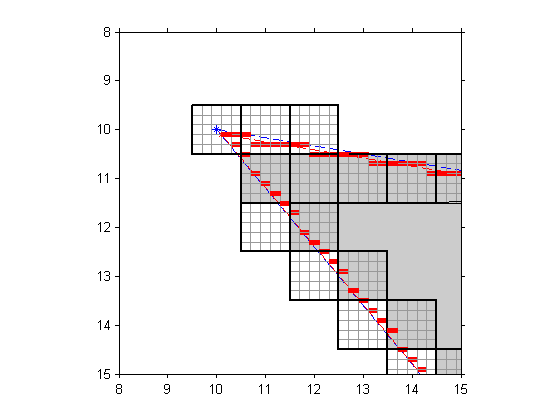
The algorithm then makes a binary decision (inside or outside) for each pixel. A given pixel is inside the polygon if and only if the center subpixel square is inside the polygon.

A very similar procedure could be used to compute an approximate fractional coverage for each pixel. In other words, approximately what fraction of each pixel is inside the polygon? It might look like this:
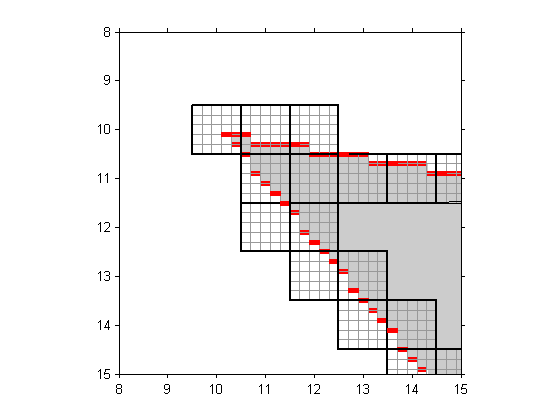
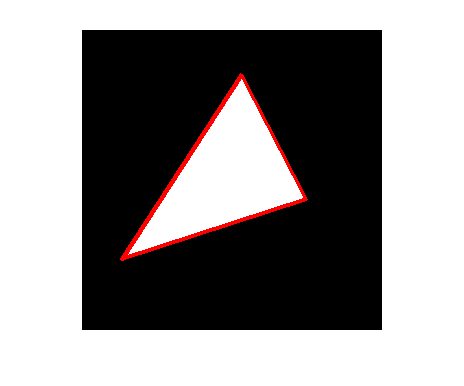
For each pixel, you just divide the number of gray squares by 25 to get the approximate fractional coverage. This computation could be used to do antialiased polygon scan conversion. For example, compare the left and right images below. The left image is a binary image containing the output of poly2mask. You can see the "jaggies" along the edges. The right image is a grayscale image containing the fractional coverage of each pixel. The edges in this image appear smoother.

Readers: Would you like to see this functionality in the Image Processing Toolbox? If so, what do you think you might use it for?

Published with MATLAB® 7.3

10 Responses to “Antialiased polygon scan conversion: Are you interested?”

  1. AliReza KashaniPour replied on :

    Hi, it’s funny & tasty …
    I was implemented some algorithm like this (2 years ago)…
    I faced some problem in some polygon that have obtuse angles ((like more than 140 … i think ))
    I couldn’t solve this problem and developed algorithm until now!!
    those days i thought((spiked in my mind!!)) to other algorithm that :
    we find or estimated Center of object for example center in circle or circumcenter or incircle in triangle …
    now we have 2 thing 1)1 dot in shape 2)other dot((edge of shape))
    now we make function that coordination of edge’s dot are independent variable and DISTANCE from enter of shape to edge’s shape is dependent variable …
    if we plot this function, peak of this function ((local maximum)) are cornet of polygon ..
    it’s raw but beauty i think …
    what’s your idea?

  2. Matt K. replied on :

    Steve,

    Thanks for the info on the poly2mask/roipoly functions. Now I understand why pixels at integer (x,y) locations along horizontal and vertical lines are often clipped out.

    To solve this problem, I found the “inpoly.m” subroutine in the file exchange. It not only calculates which points are in a polygon, but also identifies points on the borders of a polygon.

  3. Anthony Davis replied on :

    I could use a function like this for some interesting image resorting algorithms (CT reconstruction and the like.) Also, I’ve wanted a function like this in past for better ROI selection.

  4. Steve replied on :

    AliReza - I don’t really understand what you mean.

  5. Steve replied on :

    Anthony - What do you mean by “better ROI selection”?

  6. Steve replied on :

    Matt - The MATLAB function inpolygon can also identify points on the polygon borders.

  7. AliReza KashaniPour replied on :

    http://www.sharemation.com/naarkhoo/max.jpg?uniq=yut6jo
    Steve … i draw my think …
    NOW YOU SEE WHAT i MEANT tanx

  8. Steve replied on :

    AliReza - you can use the bwboundaries function (or bwtraceboundary) to generated an ordered list of vertices. Then you can compute the distance between the centroid and each vertex.

  9. David Lee replied on :

    Hi Steve,

    I stumbled across your blog today and have found the posts about the poly2mask function really helpful.
    I too, like Anthony, would benefit from this anti-aliased poly2mask function in constructing “better ROIs” for use in image reconstruction, as some algorithms benefit from being able to assign fractional coverage of pixels.

  10. Steve replied on :

    David - Thanks for your input.

Leave a Reply


Steve Eddins manages the Image & Geospatial development team at The MathWorks and coauthored Digital Image Processing Using MATLAB. He writes here about image processing concepts, algorithm implementations, and MATLAB.

  • Mikr: I look for answers before asking people… “But we still can’t see the coordinates!...
  • Steve: Mikr—You might want to take a look at the Getting Started section of the MATLAB documentation in order...
  • Mikr: thanks but is it possible to see and write to file (Excel ?) that matrix of pixel coordinates ? instead of...
  • Steve: Mikr—An image in MATLAB is simply a matrix of pixel values. It can be saved (exported) to several common...
  • Mikr: thanks, Steve just started to learn matlab and to clarify matlab saves image files as a matrix of pixel...
  • Steve: Mikr—As far as I know, the commonly used image file formats such as TIFF, JPEG, PNG, etc., do not...
  • Mikr: how to write pixel coordinates in file ?
  • Steve: M.S.—Code for the bwtraceboundaries function ships with the Image Processing Toolbox.
  • M.S.Cheema: i need to know the detailed algorithm for bwtraceboundaries. i want how that function works. so please...
  • Steve: Wagas—It depends on how much memory you have on your computer. You should be able to load a 94 MB TIFF...

These postings are the author's and don't necessarily represent the opinions of The MathWorks.

Related Topics