OK, I've learned an important lesson about this blog: I really shouldn't start up two topics series at the same time. It's too hard to find the time to compose posts on both topics each week, and so the frequency of my posts drops off.
Anyway, let's get into the third algorithm for labeling connected components in a binary image. It involves two passes over the image, with an in-between step called equivalence class resolution. I first learned about this idea from Haralick and Shapiro, Computer and Robot Vision, vol. I, Addison-Wesley, 1992.
The first pass assigns temporary labels to each foreground pixel. Here's a graphical illustration of that procedure, using this small sample image:
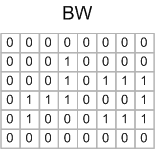
Now scan the image, processing one pixel at a time. Because of the way MATLAB stores matrix elements in memory, we'll scan along columns. When the scan encounters a foreground pixel, look at that pixel's neighbors that have already been encountered in the scan. Here's the first foregound pixel encountered, shown with its already-scanned neighbors highlighted in color:
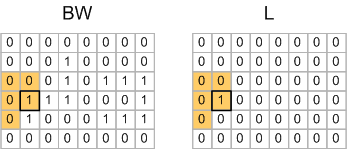
For the pixel shown above, none of the highlighted neighbors have been assigned a temporary label yet, so a new label value (1) is assigned to the corresponding pixel in the output.
Here's the second foregound pixel encountered:
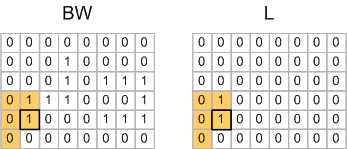
Note that one of this pixel's neighbors has already received a label (1), so this pixel is also assigned a temporary label of 1 in the output image.
When the scan gets to row 2, column 4 pixel, none of that pixel's scanned neighbors have been labeled, so that pixel gets assigned a new temporary label of 2.
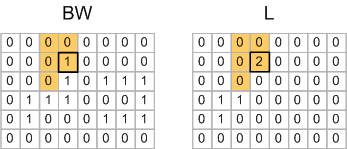
The very next pixel, on row 3, column 4, is where things start to get more interesting:
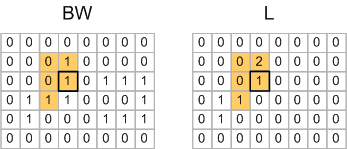
One of this pixel's scanned neighbors has already been assigned a label of 1, but another of the neighbors has been assigned a label of 2. So the algorithm picks one of the labels arbitrarily, and then records the fact that temporary label 1 and temporary label 2 actually refer to the same object.
This situation happens again on row 4, column 8:
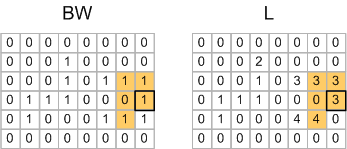
So the pair of labels 3 and 4 is an equivalence and goes into the equivalence table.
When the first pass is done, you have this matrix of labels:
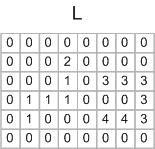
And you have an equivalence table containing these pairs:
1 <--> 2 3 <--> 4
Equivalence class resolution is the process of determining which subsets of the temporary labels really refer to the same object. You can do that in MATLAB using the technique I showed previously that was based adjacency matrix and dmperm. From this you would compute that temporary labels 1 and 2 map to final label 1, and temporary labels 3 and 4 map to final label 2. Then you make a second pass over the output matrix to relabel the pixels according to this mapping:
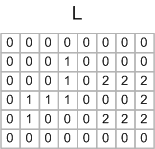
The Image Processing Toolbox function bwlabeln uses a variation of this technique, where the equivalence class resolution is actually performed during the first pass, using an algorithm called union find. I'll explain that next time.
Get
the MATLAB code
Published with MATLAB® 7.4


very nice
tanks
Hi, please can you give me the Connected component labeling algorithime, in preference written in matlab, i extremely need it. thank’s
Vanessa—Use the function bwlabel or bwlabeln in the Image Processing Toolbox.
i have used these instructions and more, but it don’t give the result i wish, because the indexed image that i have is composed with labels {0,1,2,3,…} not {O,1} only. i have tried to transform it to an {0,1} image, but I did’nt succeed.
Vanessa—Try im2bw to convert your indexed image to binary.
I have already used it, but with the intial image which is color one, in this case that instruction im2bw merge the regions which have a near color, and that’s wrong. so i have give a label to each color, and i got an indexed image with these labels {0,1,2,..}. now i will try to apply im2bw to my indexed image, i’ll tell you. thank’s
this have given a result indexed with {0} only because the indexed image is taken as an intensity one in matlab, what can i do?
Vanessa—I think it might help you to review the introductory information in the Image Processing Toolbox Users Guide about the different image types and how to convert between them.
I have already learnt this guide, and i know all the instructions given, i have tried all of them and also combined them, but in vain. my problem is to convert a classified indexed image to a labeled indexed image, for example i’ve to give to two regions which belong to the same classe and are not connected two diffrents labels , using -why not- Connected Component Labeling. thank’s for your help.
hi, your help gave me a new idea, 1000 thanks. i’ll communicate u the result.
i’ve solved my problem. thank’s for your help.
Hi, please can you give me the Connected component labeling algorithim but my image is grayscale and not in bw, in preference written in matlab.
I have read yours informations, and I think my problem is very same with the previus.
Thanks
Juliana—If you can define very clearly what you mean by “connected components” in a grayscale image, I might be able to make a suggestion. I do not send people custom code, however.
Hi Steve, is it possible to label/find connected components in a matrix composed of integer from 0 to 10 (not a binary matrix). I want to find continuous areas of the matrix that have the value 1, 2, etc. I could create a loop (for i=1:10) and replace every value in the matrix other than i by zero, but is there a easier solution?
I really enjoyed your series on connected component labeling
Thanks
Peter—Connected-component algorithms can be adapted to compute what I believe is called “flat-zones labeling.” It would take some work, though, to program such a thing. Possibly the simplest implementation in MATLAB would be along the lines of what you suggest: Label f==1, then label f==2, etc.
hi steve,
can you discuss gray scale connected component labelling algorithm?
thanks
Shailesh—I’ll put it on my list of possible blog topics. Thanks for the suggestion.
Hi Steve,
I am trying to find some blob detection algorithm/function already implemented in matlab. Is there something as such? I tried segmenting the image and then filling it and have some sort of bw image. Then I use bwlabel to find ‘blobs’. However, it is not as good as I would like and I am wondering whether exists something already to do this.
Thanks a lot.
Edgar—The function bwlabel computes the connected the components of your binary image. That’s a well-defined operation - it’s either being computed correctly or it isn’t. So can you elaborate on what you mean by saying the result is not “good”?
Thanks Steve, in fact, I have done it using bwlabel but tweaking the parameters of the edge function a bit.
Hi Steve, i have a problem in using dmperm function, as my adjacency pairs are not incremental. ie. example in below case i dont have label 4, as it forms a individual un-connected cluster.
pairs = [ 2 3; 3 2; 1 2; 2 1; 5 6; 6 5];
here i have 5 nodes in total (ie. 1,2,3,5,6)
A = sparse(pairs(:,1), pairs(:,2), 1);
A(1:5+1:end) = 1;
[p, q, r, s] = dmperm(A);
this does not give correct result. how to solve this problem?
Karthik—You didn’t check your A matrix. This line:
doesn’t do what you thought it would.
See this comment from Tim Davis about efficiently putting 1s on the diagonal of a sparse matrix.
hi steve.
How we can detect an overlaping between connected cmponent.
can you help me.
Thanks in advance
Nawal
Nawal—You can’t have two connected components that are overlapping. “Overlapping” indicates that you really only have one connected component.
Thank you Steve.
Sorry, in my case there is an overlap between bounding box of connected component not in connected component it self. I read today in some research paper the follwing idea we can use convex hull of connected component. where if there are an overlaping between two convex hull there are an overlap between bounding box of component.
Nawal—You can the convex hull of each connected component via regionprops. Then you need a routine to determine if two polygons overlap. You don’t a routine that works for general polygons, because the convex hull polygons will be, well, convex. :-) You might try searching the MATLAB Central File Exchange in addition to Google.
Hi Steve:
i am happy to saw that your update on “Image visualization using transparency” to label the two connected objects as a single object.
However, i am having a problem with seperating two overlap object to seperate. in binary image i am trying to seperate two/three overlap rectangular object to seperate them and calculate the centroids of each seperated object. could you please show me one example?
Thank you.
Sincerely,
DP
DP—There are one or two Image Processing Toolbox product demos that might be helpful.