Steve on Image Processing

October 19th, 2007

Finding bright objects

In a blog comment earlier this summer, someone asked how to find "which labeled regions have a bright spot greater than some threshold?" That's a good question. It can be done efficiently and compactly using the Image Processing Toolbox, but the techniques may not be widely known. (Have you ever used the ismember function to do image processing before?) Also, the techniques apply to other questions of the form "which regions satisfy some criterion?"

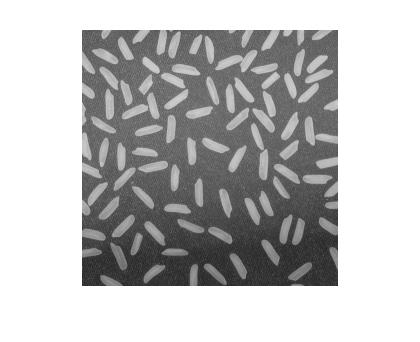
Let's work with the rice image.

I = imread('rice.png');
imshow(I)
Threshold it.

bw = im2bw(I, graythresh(I));
imshow(bw)
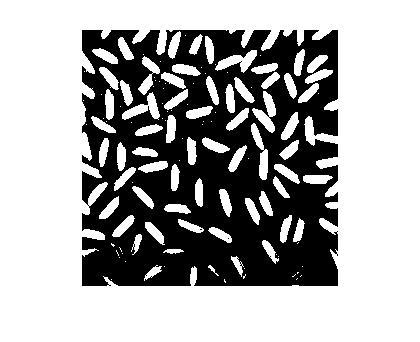
Clean it up a bit.

bw = bwareaopen(bw, 50);
imshow(bw)
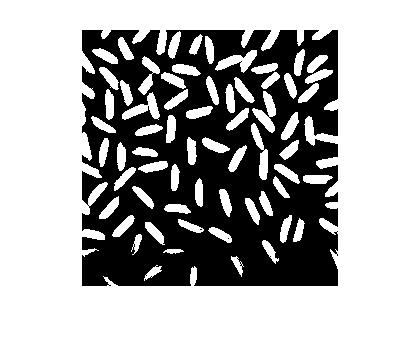
Now label connected components and compute the PixelIdxList property for each labeled region. The PixelIdxList is useful for the extracting pixels from a grayscale image that correspond to each labeled region in the binary image. (See my post "Grayscale pixel values in labeled regions.")

L = bwlabel(bw);
s = regionprops(L,'PixelIdxList');

Compute the maximum pixel value for each labeled region.

% Initialize vector containing max values.
max_value = zeros(numel(s), 1);

% Loop over each labeled object, grabbing the gray scale pixel values using
% PixelIdxList and computing their maximum.
for k = 1:numel(s)
    max_value(k) = max(I(s(k).PixelIdxList));
end

% Show all the maximum values as a bar chart.
bar(max_value)
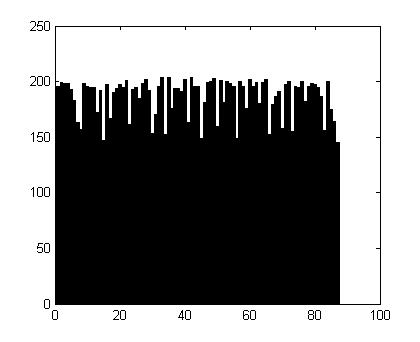
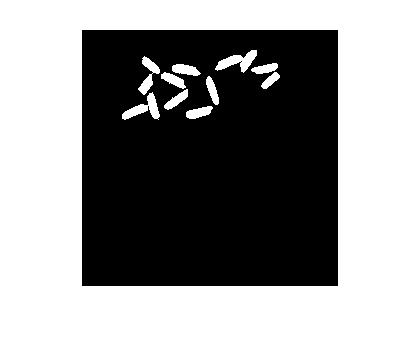
And we'll finish by using find to determine which objects have a maximum value greater than 200. Then we'll display those objects using ismember.

bright_objects = find(max_value > 200)
bright_objects =

    22
    28
    33
    35
    40
    42
    49
    51
    60
    65

imshow(ismember(L, bright_objects))

Get the MATLAB code

Published with MATLAB® 7.5

7 Responses to “Finding bright objects”

  1. Rob replied on :

    Hey Steve,

    Great post. In addition to the geospatial posts, which involve seemingly deeper technicals, I like and appreciate these “fundamentals” type posts. It’s the variety of applications you cover that keep me coming back. We use an algorythm similar to this for crude machine vision prototypes, so its usefulness goes well beyond rice!

    Keep up the good work,
    Rob

  2. Steve replied on :

    Thanks, Rob. I thought maybe I went off the deep end with the upslope area series. It took a lot more posts than I thought it would to work everything out. There were some useful image processing techniques in there, though. In the future I’ll try to shift the balance a bit and include more posts like this one.

  3. becky replied on :

    Hi steve I read your several paper about image restoration.I have a question about edgetaper in MATLAB,It really acted well in reducing ringing effect .But what is theory about edgetaper? thank you.

  4. Steve replied on :

    Becky—Contact Professor Stanley J. Reeves at Auburn University and ask him for a copy of his paper, “Fast Image Restoration Without Boundary Artifacts, IEEE Transactions on Image Processing, October 2005. The paper has descriptions of several methods, including the one used by edgetaper.

  5. Damodar Pokhrel replied on :

    Hi Steve,

    i have a binary image,back ground is white and high contrast object is black, how can i flip to get background is black and high contrast object is white?

    Thank you.
    Damodar

  6. Steve replied on :

    Damodar—Use the ~ operator for a binary image, or use imcomplement for a grayscale image.

  7. Damodar Pokhrel replied on :

    Thankx Steve, it works.

Leave a Reply

Wrap code fragments inside <pre> tags, like this:

<pre class="code">
a = magic(3);
sum(a)
</pre>

If you have a "<" character in your code, either follow it with a space or replace it with "&lt;" (including the semicolon).


Steve Eddins manages the Image & Geospatial development team at The MathWorks and coauthored Digital Image Processing Using MATLAB. He writes here about image processing concepts, algorithm implementations, and MATLAB.

  • Steve: Kezia—Try imrotate.
  • kezia: steve, how to perform rotation of structuring element by 15 degrees. kindly answer my question. thank u kezia...
  • Steve: Tasha—I only accept comments that are relevant to the particular blog post or are questions or comments...
  • Tasha: Steve,I send you a comment here but still didn’t get any reply yet.I did not see my comment posted here...
  • Steve: Carsten—Thanks for your input.
  • Carsten: Another vote for either imtranslate.m, or at least a blurb in the imtransform help why pure translation...
  • Loren Shure: If you look towards the end of the fftfilt program, you will see that there’s a check to see if...
  • Steve: Sonja—My imwritesize submission on the MATLAB Central File Exchange might be helpful. It was posted...
  • Steve: Grant—Sorry, but it won’t be for R2010a. That development deadline has already passed.
  • Sonja: My publisher is wanting images for a new book to be 300 dpi. Only 5 of the 19 images are 300, the rest are...

These postings are the author's and don't necessarily represent the opinions of The MathWorks.