Steve on Image Processing

February 8th, 2008

Linear indexing

Last week I posted an introduction to logical indexing. This week I want to continue with a brief discussion of linear indexing and its connection to image processing in MATLAB.

Lets start with a small matrix. Breaking with tradition, I'll use a Hilbert matrix instead of a magic square:

A = hilb(5)
A =

    1.0000    0.5000    0.3333    0.2500    0.2000
    0.5000    0.3333    0.2500    0.2000    0.1667
    0.3333    0.2500    0.2000    0.1667    0.1429
    0.2500    0.2000    0.1667    0.1429    0.1250
    0.2000    0.1667    0.1429    0.1250    0.1111

POP QUIZ: What does the MATLAB expression A(17) mean?

A(17)
ans =

    0.2000

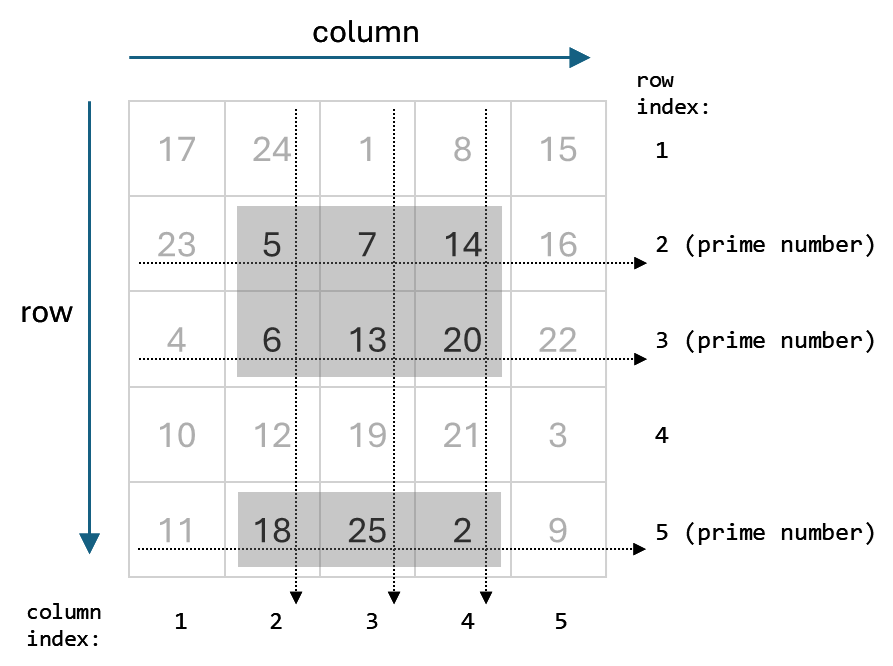
MATLAB interprets a single subscript as an index into a vector containing all the values of A in column order. So A(17) is the same as A(2, 4).

A(2, 4)
ans =

    0.2000

This is called linear indexing.

So what's the connection to image processing? Suppose A is our image, and some previous computation has told us that we are interested in the pixel values at these row and column coordinates:

row = [2 1 5];
col = [1 3 4];

Can we extract the desired pixel values in a single expression? Let's try:

A(row, col)
ans =

    0.5000    0.2500    0.2000
    1.0000    0.3333    0.2500
    0.2000    0.1429    0.1250

Well, we got nine values out, not three, so that certainly isn't what we are looking for. MATLAB computes A(row, col) as the submatrix of A formed by the intersections of the specified rows and columns.

Instead of indexing into A using row and column subscripts, we need to index using a single subscript.

Here's how to convert from row-column subscripts into linear indices:

M = size(A, 1);
idx = M * (col - 1) + row
idx =

     2    11    20

The expression A(idx) pulls out just the three values we want:

A(idx)
ans =

    0.5000    0.3333    0.1250

Or we can assign to just those elements:

A(idx) = Inf
A =

    1.0000    0.5000       Inf    0.2500    0.2000
       Inf    0.3333    0.2500    0.2000    0.1667
    0.3333    0.2500    0.2000    0.1667    0.1429
    0.2500    0.2000    0.1667    0.1429    0.1250
    0.2000    0.1667    0.1429       Inf    0.1111

The functions sub2ind ("subscript" to "index") and ind2sub convert back and forth between row-column subscripts and linear indices.

idx = sub2ind(size(A), row, col)
idx =

     2    11    20

[r, c] = ind2sub(size(A), idx)
r =

     2     1     5


c =

     1     3     4

For a couple of detailed image processing examples illustrating linear indexing, see these previous posts:


Get the MATLAB code

Published with MATLAB® 7.5

11 Responses to “Linear indexing”

  1. Daisuke Aoyagi replied on :

    The “subplot” command seems to use a sort of linear indexing, but in Row order. Why?

  2. Steve replied on :

    Daisuke—I have no idea. That behavior was established probably 20 years ago. I’ve been at MathWorks at long time but not that long. Why does it matter to you?

  3. Daisuke Aoyagi replied on :

    I get confused between col-order (matrix) and row-order (subplot) sometimes. I thought it’d be cleaner (less confusing) if they are consistent, plus it’d be nice to be able to use something built-in like sub2ind to specify col & row of subplots, instead of N*(row-1)+col (and mess up). Not a big deal, though.

  4. Tim Davis replied on :

    Linear indexing is great for dense matrices, but use it with caution for sparse matrices. It’s very slow (the problem is intrinsically difficult), and it breaks down if prod(size(A)) is greater than 2^31. It’s quite easy to work with sparse matrices that large, but not with linear indexing.

    It would be really easy to implement a kind of indexing where you could refer to the kth nonzero element in the matrix (in column order). That is, the kth nonzero would be the kth entry in i, j, and x where [i j x] = find (A), not the A(row,col) index where k=M*(col-1)+row. That would be extremely fast, as compared with linear indexing based on row/column indices, but M doesn’t support that kind of indexing.

  5. Steve replied on :

    Tim—Thanks for the clarification. Almost all of my image processing work is with dense matrices.

  6. Kevin Lan replied on :

    Hello Steve,
    I am trying to analyze a scanning electron microscope image which has many layers bounded very closely which makes the edges/boundaries of the layers very unclear (but can still tell by naked eyes). It also has some obvious cracks as well. I tried a couple of edge functions and they didn’t give me satisfactory results, either too much distaction on surrounding or no edges except for cracks. If you have hard time imagining the image, it just looks a page of lined notepad with the lines very much blended to the background color and with a few obvious crack spreaded on it. Is there a way that I can detect the edges accurately and clearly?
    Thank you!

  7. Steve replied on :

    From your description, especially the “lines very much blended to the background color” part, it sounds challenging. If the lines are parallel, however, you might try computing a projection along the direction parallel to the lines. The line locations would show up as peaks in the projection.

  8. Kevin Lan replied on :

    They are not quite parallel but I will try that, thank you. And I just bought your book “Digital Image Processing using Matlab” to try to solve one of my recent projects. Which part of the book should I read to solve pattern tracking/detection/recognition problems? I basically have a light microscope image that has some fingerprint-like patterns that I would like to detect and mark. Or what methods would you recommend? Thank you!

  9. Steve replied on :

    Kevin—The later chapters are about image analysis and object recognition. There’s nothing in the book about tracking.

  10. JanKees replied on :

    Hi, Steve:

    As you are dealing with indexing, maybe my question fits in this topic: is there a fast way to do template matching in Matlab? I am thinking in something related to xcorr/xcorr2 or something related to it (as in the case of the summation of the absolute/squared difference).

    Best regards from,

    JanKees

  11. Steve replied on :

    JanKees—See normxcorr2.

Leave a Reply

Wrap code fragments inside <pre> tags, like this:

<pre class="code">
a = magic(3);
sum(a)
</pre>

If you have a "<" character in your code, either follow it with a space or replace it with "&lt;" (including the semicolon).


Steve Eddins manages the Image & Geospatial development team at The MathWorks and coauthored Digital Image Processing Using MATLAB. He writes here about image processing concepts, algorithm implementations, and MATLAB.

  • Sana: hi steve, could you explain to me how i would be able to use the dir function, to do a loop through a directory...
  • Nishtha: Sir, I have preprocessed the image in following steps: [1] adaptive histogram equalization [2] thresholding...
  • Kristof: I also strongly support the idea. I have just recently bumped into the problem that im2single was not...
  • Steve: David—I’ m glad you found it useful!
  • David Lalejini: I found your example very useful for finding connected nodes in a large set of input pairs. I start...
  • tommy: Dear Steve, I have a question,please if you are kind to help me regarding the accumulator array dimensions of...
  • Steve: Abc—I don’t know how to distinguish the faces. You might try posting your question in the MATLAB...
  • Manju: well if we have a few ovals within each other like in a cell how do we measure the distance from the center...
  • Steve: Manju—What do you mean? How is each region defined?
  • Manju: if we have 2-3 regions within each other how do we measure the regions of each one?

These postings are the author's and don't necessarily represent the opinions of The MathWorks.