Steve on Image Processing

October 7th, 2009

Release notes for old versions

Last week Oliver asked for the release in which CMYK TIFF support was added to imwrite. Oliver then followed up asking for MathWorks to make release notes available for old versions.

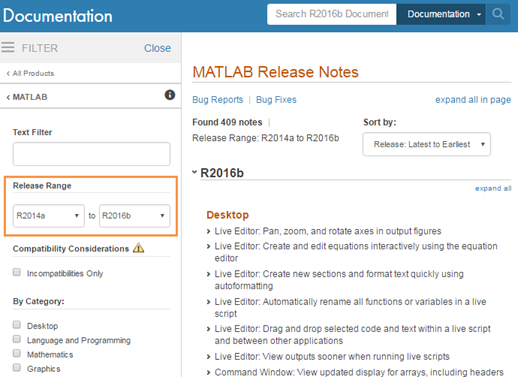
In case anyone else is interested, here's one way to navigate to release notes for older versions of MATLAB.

  1. Start at The MathWorks home page.
  2. Click on Support.
  3. Click on Product Documentation.
  4. Click on MATLAB.
  5. Click on MATLAB Release Notes.

Note that release notes are available there for releases back to R14 in 2004. The release notes summarize new features, compatibility considerations, and fixed and known bugs.

Similarly, you can find release notes for the Image Processing Toolbox going back to version 2.2.2 in 2000.

We aren't always perfect about remembering to include everything in the release notes, but this is something we're trying to get better at.

To answer Oliver's original question: Since MATLAB 6.5.1 (R13 SP1 in 2003), imwrite has written a CMYK TIFF when passed an M-by-N-by-4 input array.

13 Responses to “Release notes for old versions”

  1. Frederic Moisy replied on :

    By the way, it would be nice if the documentation of each Matlab function could include a “birth date”, i.e. the Matlab version number at which a given function has been introduced.

  2. Steve replied on :

    Frederic—Thanks for the suggestion. I’ll pass it along.

  3. Matt Fig replied on :

    I made the same request for enhancement Frederic suggested, at least a year or more ago. I hope more people make the same suggestion because I often need to know how far back a function I write will be compatible. Just a little note at the end of the help, i.e.,

    >> help bsxfun
    BSXFUN.....
    ...
    ...
    ...
       Available since version 2006b 
    
    See also .....
    
  4. Steve replied on :

    Matt (and Frederic)—Y’all are not alone, and I really will pass this along to the right people.

  5. Kelly replied on :

    If I look at any function in my current version of Matlab, I can see the revision number for that function. However, it would be much more helpful if I could go somewhere, either in the help or on the Mathworks website, and see a list of functions and the revision number included in each release of Matlab. Release notes rarely include minor bug fixes and updates to functions, only the major changes. A table of release numbers would allow me to look at any function and see both when it was introduced and when both minor and major changes occurred to it, even if it didn’t give me any details of what those changes were.

    I requested this once as a followup to a troubleshooting request, and was simply told that the Mathworks policy was to document major changes in release notes, and that they didn’t have a history available for minor changes. However, I assume the Mathworks keeps copies of all previous releases, and it would be pretty simple to parse the revision number out of all functions (I’ve done it for the two versions I have available to me, R2007a and b). Any chance of this happening?

  6. Steve replied on :

    Kelly—I believe it is very unlikely.

  7. Kelly replied on :

    Steve,

    Can you elaborate? I’m not asking for a list of all the actual changes made to functions, just a list of which version shipped with each release. Not a difficult, time-consuming, or costly suggestion… why is it so unlikely?

  8. Steve replied on :

    Kelly—Because I believe that it would difficult, time-consuming, and costly. And, in many cases, the data would be misleading for users, resulting in confusion and higher support costs.

  9. Steve L replied on :

    Kelly,

    If we told you that version 1.2.3.4 of function foo.m shipped with R2011c and version 1.4.3.2 of that function shipped with R2011d, how would you use that information? What types of changes would you expect to have been done to that function between R2011c and R2011d?

  10. Loren Shure replied on :

    Kelly-

    Sometimes the only change is a date or version information or information for the See Also line. But the revision number would still change. This can add to the noise rather than the signal.

    I am still very sympathetic for wanting to know when functions were introduced or significant changes made.

    –loren

  11. Oliver Woodford replied on :

    Thanks, Steve. My google search didn’t turn up the old release notes, so it’s good to know where to look now. Fingers crossed for an “available since” on functions at some point. Of course, there are ever increasing levels of detail you could go to (e.g. when a particular feature of a function was introduced), but I appreciate it’s a case of diminishing returns for TMW.

    Thanks for the tip on cmyk support, too. I was able to add cmyk tiff output to export_fig without any version checking as a result.

  12. Steve replied on :

    Oliver—I’m glad I could help. I’m not completely certain, but I think the “missing” doc about CMYK output was one of those cases where we documented the change in one place (M-file help) but not the other (reference page), or vice versa. Duplication is a generic evil in software, and we’re looking at ways to improve our handling of the doc.

  13. Kristof replied on :

    I also strongly support the idea.
    I have just recently bumped into the problem that im2single was not included in an older release of the image processing toolbox. I have spent about an hour trying to locate it at the release notes page, with no luck. Does anyone have a clue when it was introduced? I would really appreciate any help.

Leave a Reply

Wrap code fragments inside <pre> tags, like this:

<pre class="code">
a = magic(3);
sum(a)
</pre>

If you have a "<" character in your code, either follow it with a space or replace it with "&lt;" (including the semicolon).


Steve Eddins manages the Image & Geospatial development team at The MathWorks and coauthored Digital Image Processing Using MATLAB. He writes here about image processing concepts, algorithm implementations, and MATLAB.

  • Sana: hi steve, could you explain to me how i would be able to use the dir function, to do a loop through a directory...
  • Nishtha: Sir, I have preprocessed the image in following steps: [1] adaptive histogram equalization [2] thresholding...
  • Kristof: I also strongly support the idea. I have just recently bumped into the problem that im2single was not...
  • Steve: David—I’ m glad you found it useful!
  • David Lalejini: I found your example very useful for finding connected nodes in a large set of input pairs. I start...
  • tommy: Dear Steve, I have a question,please if you are kind to help me regarding the accumulator array dimensions of...
  • Steve: Abc—I don’t know how to distinguish the faces. You might try posting your question in the MATLAB...
  • Manju: well if we have a few ovals within each other like in a cell how do we measure the distance from the center...
  • Steve: Manju—What do you mean? How is each region defined?
  • Manju: if we have 2-3 regions within each other how do we measure the regions of each one?

These postings are the author's and don't necessarily represent the opinions of The MathWorks.