Ken & Mike on the MATLAB Desktop

April 27th, 2007

Tab Completion will save your fingers

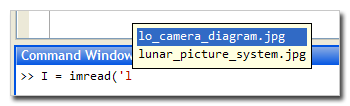
Tab Completion is a popup that can be found in both the Command Window and the Editor. After you type a key (or a few) you can hit the tab key and a popup will appear and show you all of the possible completions, including variable names and figure properties. If you are a horrible typist like I am, this can save you from having to type the whole string and hit backspace over the typos. It is also useful when you just can’t remember the functionname. I find myself sometimes thinking, “I know that the function I want to call here starts with ’str’…”. Hitting tab in this case shows me all of the functions that start with that string.

tabcompletion.jpg

Once the popup has appeared, you can continue to type to narrow your choices or you can arrow to the correct item and then hit tab or enter to insert that completion into the window.

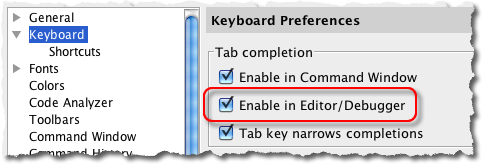
Some long-time users of MATLAB will fondly recall the old days when the completions printed to the window. Hitting tab 2x would display any completions in the output area. If your fingers still try to do this, there is a preference in the “Keyboard” section of Preferences called “Tab key narrows completions”. This preference changes the behavoir of tab completion to work more like the old tab completion. When the popup is showing, you can type a few keys and hit tab again to narrow the completions. Hit enter to select a completion.

tabpref.jpg

Do you use the tab completion popup in the default mode or in the “tab narrows” mode?

28 Responses to “Tab Completion will save your fingers”

  1. Markus replied on :

    Hi!

    I am using Matlab classes and objects. Let say I have a function myfunction.m in some class directory @myclass. If I type “edit myfu” and then hit tab, I see “No completions found”. However, if I enter “edit myfunction” and hit return, the function is opened.

    I think checking the whole path for the tab completion might take too long, but the subdirectories of the current directory should be included.

    Regards
    Markus

  2. Kristin replied on :

    Thanks Markus. I’ll look into this. Which release are you using?

  3. Markus replied on :

    I am using Matlab version 7.3.0.267 (R2006b)

  4. Tehn Yit Chin replied on :

    Tab completion is a fabulous feature. I do most of my work in Stateflow. Are there any plans to add a similar feature to the Stateflow editor? It could be context driven and suggest items that would fit in. eg, hitting a tab while initially entering a transition brings up a list of all defined events.

    Cheers,
    Tehn Yit Chin
    Australian Arrow P/L.

  5. Kristin replied on :

    Not that I am aware of. That doesn’t mean that someone isn’t working on it, or thinking about it… just that I haven’t heard anything about that. I’ll put in an enhancement request to the Stateflow team. Thanks for the suggestion.

  6. Ralf J. replied on :

    I strongly support the request about tab completion in Stateflow. Especially since busses were introduced to Stateflow, that would be a very helpful feature.

  7. Daniel Armyr replied on :

    Tab completion is what differentiates good environments from bad environments. However, why doesn’t the matlab editor allow, as an option, tab-completion of variables and function declared in the file but not in the current workspace? All serious coding environemts provide that feature these days, even the ones that cost less than a full months salary.

    Sincerely
    Daniel Armyr

  8. Elad replied on :

    What release of matlab supports Tab Completion in the Editor window?

    I’m using R14sp3 and I can’t seem to find how to configure it.

  9. Ken replied on :

    Hi Elad,

    Tab completion was introduced into the MATLAB Editor in version 7.2 (R2006a) (one release after yours), though it had been around longer in the Command Window.

    Check out the release notes for more detailed information on the evolution of this feature.

    -Ken

  10. Michal Kutil replied on :

    I am using Matlab classes. Let say I have a function fcea.m and fceb.m in some class directory @myclass. In workspace there is instance C of myclass.

    I implemented method ‘methods.m’ and place it into directory @myclass too. This method returns only {’fcea’ ‘methods’}’ cell.

    If I call:
    >> methods(C)
    I obtain a cell above mentioned, which is a different result then if I call
    >> methods(’myclass’)
    where I obtain a list of all methods fcea, fceb, methods.

    If I use Tab completion in the form >> C.’tab’ I obtain ‘myclass’ methods from methods called in this form “methods(’myclass’)”. Is any way how to change it to call methods in this form: “methods(C)”?

    Or how can I modify list of methods available in tab completion for a class?

    My Matlab version 7.4.0.287 (R2007a)
    Operating System: Microsoft Windows XP Version 5.1 (Build 2600: Service Pack 2)

    Thx
    Michal

  11. Ken replied on :

    Hi Michal,

    I had to consult the MATLAB OOPS experts for this one! Unfortunately, the short answer to your question is no - there is no way to have tab completion call your version of methods. The good news is that there will soon be a much more robust class system in MATLAB.

    Here’s the detailed reason of why this won’t work for you. Let me first restate your problem:

    You have a class with three methods, like this:

                        myClass
                       /   |   \
                   fcea  fceb methods
    

    Your intention by overriding methods (a built-in MATLAB function) is to hide fceb (i.e. to make it private).

    There are two ways MATLAB can determine what methods your class contains. One is by calling the methods function with the string name of your class. This technique results in a listing of ALL methods in your class, so in your case:

    {’fcea’ ‘fceb’ ‘methods’}

    You can also use the methods(yourObject). This technique dispatches directly to your overloaded implementation of methods.

    In the case of tab completion, the first technique described above is used to determine what methods are available.

    -Ken

  12. Michal Kutil replied on :

    Than you Ken,
    I summarize it in in this post:
    http://www.tim.cz/en/nfaq/matlab-simulink/tab-completion.php

    I’m expected to new class system in Matlab.
    Best
    Michal

  13. Ken replied on :

    Hi Michal,

    Thats a great article on tab completion for MATLAB classes. I like your clever workaround to the problem you mentioned above!

    -Ken

  14. Joachim Vandekerckhove replied on :

    Hey guys,

    Thanks for this blog :)

    Quick question (though suspect I know the answer): Can I somehow tell MATLAB that the input argument to my function is going to be a filename so that it’ll allow me to use tab completion in the Command Window?

    Cheers,

    Joachim

  15. Mike replied on :

    Joachim,

    MATLAB does not currently have support for users to add tab completion to their files. I suggest you request an enhancement from our web form (requires login):
    http://www.mathworks.com/support/service_requests/contact_support.do

    If you want to specify a file as an argument, there is a dirty trick you can use in the Command Window. The “!” (bang) operator is shorthand for issuing the system command. You can use this to trick the command window into thinking you are typing a shell command, use the file completion and then go back to the beginning of the line and delete the “!”.

    So if you wanted

    >>myfun c:\myfiles\file.txt
    

    just use:

    >>!myfun c:\<TAB>....
    

    and so on.

    But please, enter the enhancement request, and be specific as possible about your particular use case.

    Thanks,
    Mike

  16. Joachim Vandekerckhove replied on :

    Hah, clever trick with the bang. I’ll be using that occasionally, thanks.

    But I will also submit an enhancement request. Thanks for the reply!

    Joachim

  17. Peter replied on :

    Hi, I have to agree with Daniel. What’s up with no v7.2+ Editor support for tab completion for variables in the file being edited, but not in the workspace?

    Does anyone know of an Eclipse plugin for Matlab, or does Matlab not play well with open source? It would be such a relief to use a real editor.

    Sincerely,
    Peter

  18. Mike replied on :

    Peter,

    Since M-files are just text files you can edit them anywhere. There may even be someone who has approximated syntax highlighting and if/end completion, etc for eclipse, but the big advantage of the MATLAB editor is cell-mode, publishing, debugging, and execution, which would be difficult to do outside of MATLAB.

    I am interested in hearing why you think our editor is not a “real editor,” and what its limitations are within your workflow. You can email me at michael.katz@mathworks.com.

  19. Ken replied on :

    Hi Peter,

    I can assure you we are working hard on making tab-completion work in the Editor.

    We’d love to hear what you think is missing from the MATLAB Editor, as we’re constantly striving to improve it.

    Feel free to email Mike or myself (ken.orr@mathworks.com).

    -Ken

  20. Scott Hirsch replied on :

    To Daniel and Peter, regarding tab completion on variables defined in files in the editor. This is one of those places where MATLAB’s loose interactivity makes it much harder for MATLAB to figure out your intentions through static analysis. Other languages require that you declare variables before they are used, so it’s fairly trivial to know what’s what.

    That said, we’ve got some awfully clever people working on MATLAB. Perhaps if I tell them it can’t be done, we’ll see something soon :)

  21. Saugata guha replied on :

    In reference to Item 17
    I have the same question, is Eclipse plugin available?
    It was not answered.
    Lot of pogrammers now use Eclipse framework, so support for it will be appreciated.

    Thanks
    Saugata

  22. Ken replied on :

    Hi Saugata,

    There isn’t an Eclipse plugin that I’m aware of.

    -Ken

  23. Michael Kopinsky replied on :

    Is there any progress on being able to specify that an input parameter for a function is a file path for the sake of tab completion? I.e. I want to be able to type myfunc(’my and it will fill in myfile.txt if that exists in the current directory.

    Thanks!

  24. Mike replied on :

    Michael,

    That is something we are interested in providing, but that functionality is not available in R2009b.

  25. Leonidas Georgopoulos replied on :

    I am doing some heavy coding using MATLAB editor. The truth is that after some time it is completely impossible to do your work in an efficient manner.

    Here are just a few problems:

    1. Code completetion is basic. Variables/functions defined in the m-file are never found using tab completition.
    (a) When using OOP properties, methods, and classes are defined. This should help have a better prediction for variables or at least properties. I really hate having to write each time obj.ThisIsMyReallyLongProp instead of obj.This–TAB–Lo–TAB …

    2. One cannot guide through the structure of his code.
    (a) when one is using the classes this is extremely necessary and the code is there to build the structure plan (i.e. eclipse style)
    (b) if one is not using classes still structure could be available per function as a dependency graph.
    (c) Using packages and the rest should also be a piece of cake to provide a structure graph.

    3. Filesystem handling.

    Everytime one has to create a new class he has to mentle with the filesystem, not to mention the path handling mechanism. Something more is required.

    4. git/cvs/svn incorporation

    This would be excellent since in matlab the development is regularly nonlinear.

    These are just a few from the problems matlab editor has when one is using it to do some heavy work. ECLIPSE provides solutions and it should not be too difficult for Mathworks to endorse this and write a plugin for eclipse.

    I would have to have to go to C/C++ and mexing everything since I code staff that runs in Linux/Windows servers.

    Cheers
    Leonidas

  26. Thomas Ibbotson replied on :

    Michael said:
    >Is there any progress on being able to specify that an input
    >parameter for a function is a file path for the sake of tab
    >completion? I.e. I want to be able to type myfunc(’my and it
    >will fill in myfile.txt if that exists in the current >directory.

    This is yet another reason why I prefer to use a fully-featured editor such as Vim or Emacs to edit my code. In Vim tells Vim that you want to complete a filename, so it looks on your path and completes it for you.
    Without this feature I could not go back to using the MATLAB editor.

    Peter said:
    >Does anyone know of an Eclipse plugin for Matlab, or does >Matlab not play well with open source? It would be such a >relief to use a real editor.

    There used to be something called EmacsLink which provided hooks for external editors to interact with MATLAB, this was removed in 2009a, which now makes it more difficult to work with an external editor. However, I still manage to happily edit in Vim. The only thing I need the MATLAB editor for is using the interactive debugger.

    For those interested in using Vim I can recommend two scripts to make editing MATLAB code more pleasant. A script I wrote which runs mlint and highlights the errors:
    http://www.vim.org/scripts/script.php?script_id=2378
    and another which adds good syntax highlighting and clever indentation amongst other things by Fabrice Guy:
    http://www.vim.org/scripts/script.php?script_id=2407

  27. Ken replied on :

    Thomas,

    While EmacsLink may be dead, Emacs integration is not. This will be the subject of next weeks blog.

  28. Thomas Ibbotson replied on :

    Well I’ll look forward to reading that, thanks!

Leave a Reply

Wrap code fragments inside <pre> tags, like this:

<pre class="code">
a = magic(3);
sum(a)
</pre>

If you have a "<" character in your code, either follow it with a space or replace it with "&lt;" (including the semicolon).


Ken & Mike work on the MATLAB Desktop team.
  • DP: Hi i have a problem with ezplot3, i want to plot more than i curve in the same graph but hold on command...
  • Ken: Hi Arsalan, Unfortunately there is no way to get the new Editor API in older versions of MATLAB. -Ken
  • Arsalan: Hi, I am very excited about the MATLAB API for editor because right now i am working on a project and i need...
  • Johannes: Since I started using matlab-emacs some days ago I never experienced Emacslink. But I experienced some...
  • Francisco J. Beron-Vera: Hi all, I have recently learned about ViEmu (http://www.vimemu.c om) which, for Vi/Vim...
  • OysterEngineer: When I first learned of the Publish feature in MatLab, I thought it might be useful to help to...
  • Ken: Hi Herve, I’m not quite sure what you mean by “stand-alone&# 8221; mode? -Ken
  • Herve: I wonder when the publish fonction will be supported in standalone mode.
  • Mike: Ravi, What you described should work as far I understand it. Please follow up with technical support. With a...
  • Mike: @Daniel, Thanks for that note.

These postings are the author's and don't necessarily represent the opinions of The MathWorks.