Mike on the MATLAB Desktop

June 15th, 2007

Scroll less with Editor Bookmarks

When I am working on code, I find that I often need to move back and forth between two places in the code – sometimes several places in the code. The best way to do this in MATLAB is with Bookmarks in the Editor. To add a bookmark in a file, place your caret on the line that you wish to mark, and then select the Go menu, Set/Clear Bookmark menuitem:
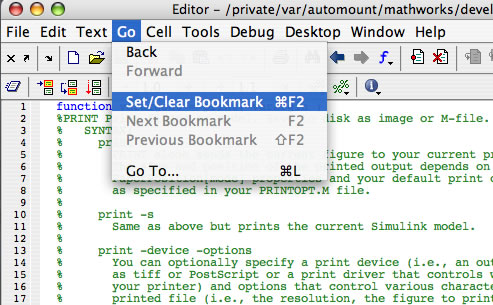
set bookmark

You can also use the Ctrl-F2 (On the Mac, Command-F2) keybinding to set a bookmark instead of using the menuitem.

A blue bookmark will be added to the gutter next to the line numbers:

set bookmark

Now you can easily move between bookmarks using the F2 key to move to the next bookmark and the Shift-F2 to go back to the previous bookmark, no matter where you are in the file.

8 Responses to “Scroll less with Editor Bookmarks”

  1. junziyang replied on :

    Great! I’ll have a try! Thanks!

  2. Markus replied on :

    I have tried the bookmarks, but when I close and re-open a file, they are gone. Like this, the bookmarks are only of very limited use for me.

  3. Ruben Faibish replied on :

    Is there a possibilty to save the bookmarks? I am talking about something similar to the breakpoints that you can get by using dbstatus and then save them. I looked at the java classes that control the MATLAB editor, but I couldn’t find anything related to the bookmarks.

  4. Kristin replied on :

    Not at this time, but we are looking into it.

  5. Hugh Thompson replied on :

    I absolutely agree – the ability to save bookmarks would be a tremendous feature, and I am very surprised it does not already exist. When working with very long, complex files, bookmarks can greatly simplify navigation – but they are of little use if they disappear every time you close the file!

  6. Yury replied on :

    Matlab 2010 is released, but we still can’t save bookmarks. It’s a pity.

  7. mnasr14 replied on :

    there is a trick to have permanent bookmarks:
    you can write an additional line without ; where you want to refer frequently.
    this make an output in command window and an orange dash (messages you to add a ;) will appear in the right side. you can easily click on orange dashes as bookmarks! ;-)

  8. mnasr14 replied on :

    I offer another way to have quick links like bookmarks.
    If you use cells in your code, the title of each cell appears in Ctrl+G list.
    You can easily add two % (%%) before a comment. MATLAB treats that line until the next %% as a cell. You can run each cell repeatedly and access to the first line of it using Ctrl+G.

Leave a Reply

Wrap code fragments inside <pre> tags, like this:

<pre class="code">
a = magic(3);
sum(a)
</pre>

If you have a "<" character in your code, either follow it with a space or replace it with "&lt;" (including the semicolon).


MathWorks
Mike works on the MATLAB Desktop team.

These postings are the author's and don't necessarily represent the opinions of The MathWorks.